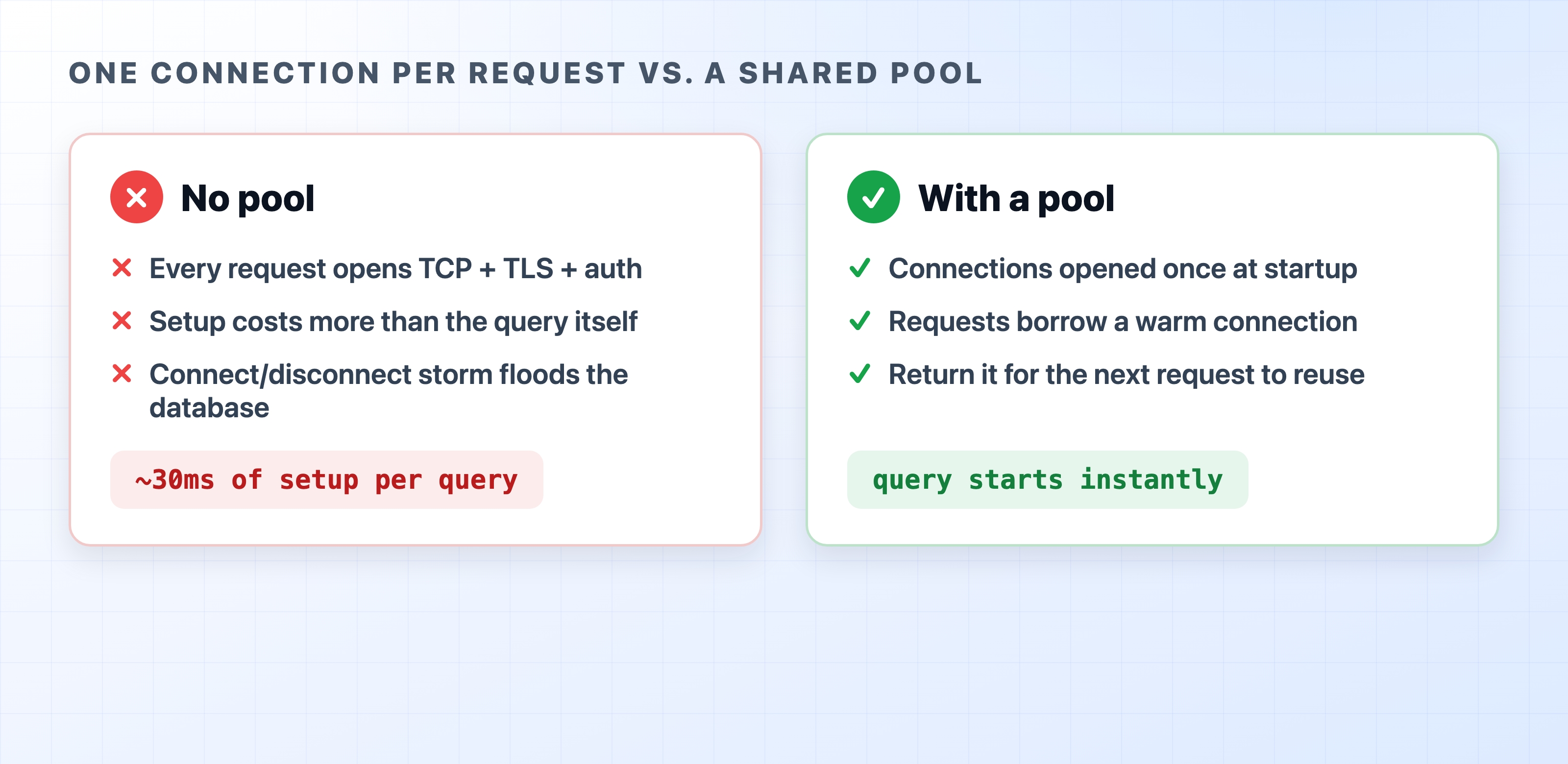
Every query your app runs needs a live connection to the database, and opening a fresh one for each query is one of the slowest things a web server can do. Database connection pooling fixes this by keeping a small set of connections open and handing them out as needed, so your queries start working immediately instead of waiting on a handshake every single time.
Opening a connection per request versus reusing a warm pool
Most frameworks give you a pool by default, so you can go a long way without thinking about it. But the moment your app gets busy, the pool becomes the thing that decides whether requests fly through or pile up waiting. This post explains what the pool is doing under the hood and how to use it without shooting yourself in the foot.
Why Opening a Connection Is So Expensive
When you connect to a database like PostgreSQL, a lot happens before you can send a single query:
Your app opens a TCP socket to the database server (a network round trip).
If the connection is encrypted (it should be), a TLS handshake runs on top of that (more round trips).
The database checks your credentials and sets up a session for you.
On a typical cloud setup where the database sits a few milliseconds away, this can easily add up to tens of milliseconds before your query even starts. Now imagine an API endpoint that runs one quick SELECT. The query itself might take 2ms, but if you open a brand-new connection for it, the user waits 30ms or more—almost all of it spent on setup you're about to throw away.
Do that on every request, under real traffic, and two bad things happen. Your response times get dragged down by handshakes, and your database gets buried under a storm of connect-and-disconnect churn. Databases have a hard limit on how many connections they'll accept, and each one costs the server memory, so this pattern falls over fast.
A pool solves both problems at once: pay the connection cost a handful of times at startup, then reuse those connections for thousands of queries.
What a Connection Pool Actually Does
Think of the pool as a small desk of pre-opened phone lines to the database. When a request needs to run a query, it doesn't dial a new number—it grabs a free line, talks, and hangs the line back on the hook for the next request.
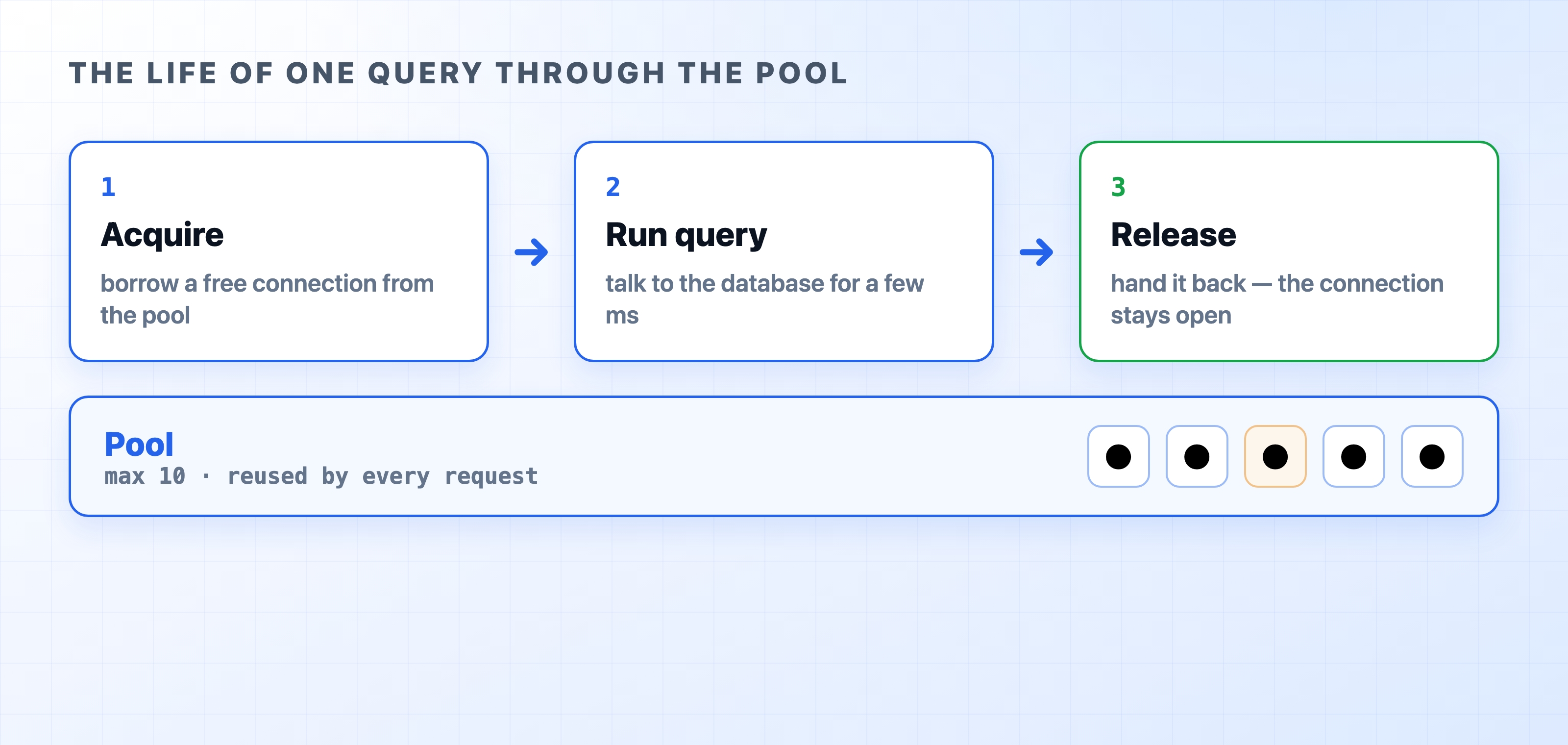
Here's the full lifecycle of a single query through the pool:
Acquire: The request asks the pool for a connection. If a free one is sitting idle, it gets handed over instantly.
Run the query: The request uses that connection to talk to the database.
Release: The request hands the connection back to the pool. The connection stays open and ready for whoever asks next.
Requests acquire a connection use it and release it back
The pool keeps a few dials to control its size:
Max: the most connections it will ever open. This is the important one—it caps how much load you put on the database.
Min (or idle): connections it keeps open even when things are quiet, so a sudden burst of traffic doesn't have to pay the handshake cost.
Idle timeout: how long an unused connection sits around before the pool closes it to free up resources.
The key idea: your app might handle hundreds of requests per second, but they take turns sharing maybe ten connections. Since each query only holds a connection for a few milliseconds, a small pool serves a lot of traffic.
What Happens When the Pool Runs Out
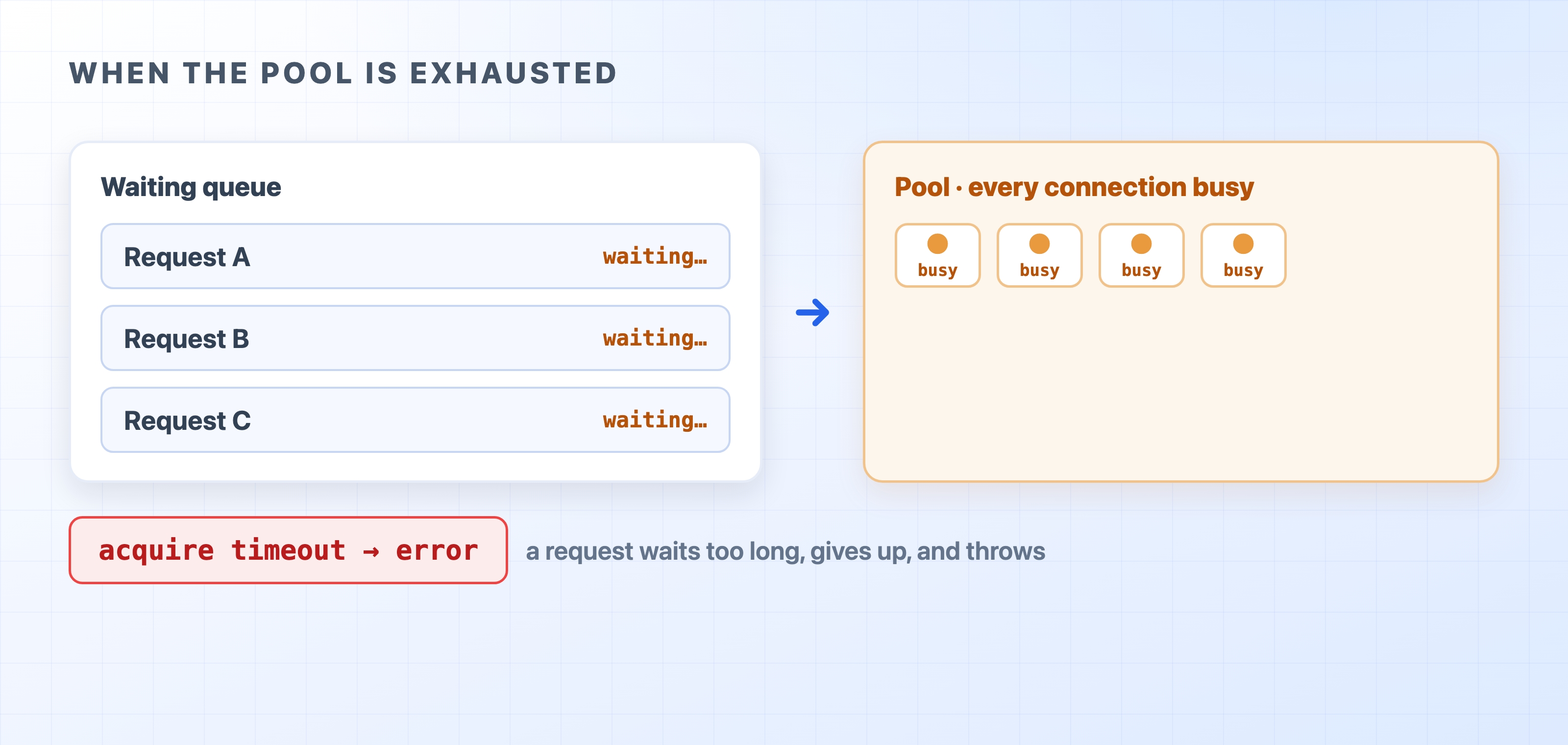
So what if every connection is busy and another request comes in? The pool doesn't crash and it doesn't open an unlimited number of new connections. Instead, the request waits in a queue for one to free up.
Requests queue and then time out when every connection is busy
Usually this is invisible—a connection frees up in a millisecond or two and the waiting request grabs it. But if something is holding connections too long, the queue backs up. Each waiting request has an acquire timeout: if it waits too long without getting a connection, it gives up and throws an error instead of hanging forever.
When you see errors like timeout exceeded when trying to connect or Connection pool timeout, this is almost always what happened. Your pool is exhausted—every connection is checked out and nobody is giving them back fast enough. The usual causes are:
A slow query holding a connection for seconds instead of milliseconds.
Code that acquires a connection but forgets to release it (a connection leak).
A pool that's simply too small for your traffic.
The important thing to understand is that the timeout is a symptom. Making the pool bigger often just hides a leak or a slow query for a little longer before it comes back.
How to Use a Pool in Node.js
Let's make this concrete with pg (node-postgres), the most common PostgreSQL client. The rules are the same for MySQL, knex, Prisma, or any other library—the pool is doing the same job underneath.
Rule 1: Create one pool for your whole app. The pool is meant to live for the entire lifetime of the process. Create it once when your app starts and reuse it everywhere.
// db.js — created once, imported everywhere
import{Pool}from"pg";
exportconst pool =newPool({
connectionString: process.env.DATABASE_URL,
max:10,
idleTimeoutMillis:30_000,
connectionTimeoutMillis:5_000,
});
javascript
Those three options are the ones you'll actually reach for. max caps how many connections the pool will ever open (here, 10). idleTimeoutMillis closes a connection after it's sat unused for 30 seconds. And connectionTimeoutMillis is the acquire timeout—how long a request waits for a free connection before giving up with an error.
The most common beginner mistake is creating a new Pool() inside a request handler. That defeats the entire purpose—you're back to opening connections per request, except now you're also leaking pools. Make it a module-level singleton and import it.
Rule 2: For simple queries, let the pool manage the connection for you. Calling pool.query() acquires a connection, runs the query, and releases it automatically. You never touch the connection directly:
import{ pool }from"./db.js";
exportasyncfunctiongetUser(id){
const result =await pool.query("SELECT * FROM users WHERE id = $1",[id]);
return result.rows[0];
}
javascript
This is what you want 90% of the time. Acquire, run, release—all handled for you.
Rule 3: When you check out a connection yourself, always release it. You only need a dedicated connection for a transaction, where several queries must run on the same connection. For that, use pool.connect()—but now you're responsible for handing the connection back, and the safe place to do that is a finally block:
await client.query("UPDATE accounts SET balance = balance - $1 WHERE id = $2",[amount, fromId]);
await client.query("UPDATE accounts SET balance = balance + $1 WHERE id = $2",[amount, toId]);
await client.query("COMMIT");
}catch(err){
await client.query("ROLLBACK");
throw err;
}finally{
client.release();
}
}
javascript
That finally block is not optional. If you release the connection only on the happy path, then any query that throws will leak a connection—it never goes back to the pool. Do that a few times under load and the pool is exhausted, every request starts timing out, and the culprit is nowhere near the error message. finally guarantees the connection goes home no matter what.
Rule 4: Close the pool on shutdown. When your app is shutting down, drain the pool so it closes its connections cleanly instead of leaving them dangling on the database:
process.on("SIGTERM",async()=>{
await pool.end();
process.exit(0);
});
javascript
pool.end() waits for any active queries to finish, then closes every connection in the pool. This pairs naturally with a proper graceful shutdown, where you stop taking new requests, finish the in-flight ones, and then close resources like the pool before exiting.
How Big Should the Pool Be?
The instinct is "bigger is faster," and it's wrong. A bigger pool is not free—every connection uses memory and CPU on the database side, and past a point more connections make the database slower, not faster, because it's juggling too many at once.
A few things to keep in mind when picking max:
Your database has a ceiling. PostgreSQL has a max_connections setting (often around 100 by default). Every connection from every app instance counts against it.
Count your instances. If you run several copies of your app—say multiple worker processes with the cluster module, or a few containers behind a load balancer—and each has a pool of 20, that's easily 80+ connections, before you add background workers, migrations, or your own psql session. It's easy to blow past the database limit without realizing it.
Small is usually enough. Because each query holds a connection for only a few milliseconds, a pool of 10–20 per instance handles a surprising amount of traffic. Start small and raise it only if you have evidence the pool is the bottleneck.
Serverless is a special case. In serverless (like Lambda), every function instance wants its own pool, and they multiply fast. There you typically put an external pooler like PgBouncer in front of the database and point your app at that instead.
The honest answer is that the right size depends on your database, your query speed, and how many instances you run—so measure. Watch how many connections are actually in use under real traffic, and tune from there. But the default starting point of a small pool per instance is right far more often than a big one.
Common Mistakes to Avoid
If you remember nothing else, remember these:
Creating a pool per request. The pool must be a long-lived singleton. Build it once at startup.
Forgetting to release. Any pool.connect() needs a matching client.release() in a finally block. This is the number one cause of pool exhaustion.
Sizing the pool by vibes. Add up connections across all your instances and make sure the total stays under the database's max_connections.
Blaming the timeout. An acquire timeout is a symptom. Look for the slow query or the leak behind it before you reach for a bigger pool.
Get those four right and the pool does its job quietly in the background, which is all you ever want from it.