Now that we know how HTTP carries and labels its payloads, we can move into running HTTP in production. The first question is usually a money question: a small website does not need a whole server to itself. How does one machine host hundreds of different sites at once? We have already met both halves of the answer earlier in the course: the Host header and SNI. This chapter puts them together.
Here is the puzzle. You have one server with one public IP address. Pointed at that single address are shop.example.com, blog.example.com, and a hundred other domains. Each is a different website with different content. A request arrives. The server can see the IP the request came in on, but that IP is the same for every site it hosts. How does it know which site you actually wanted?
What virtual hosting means
Running more than one website on a single server is called virtual hosting. From the outside, each site looks like it has its own server. In reality, they all share one machine and usually one IP address.
There are historically two ways to do this. The difference explains why the modern web looks the way it does.
The old way was IP-based virtual hosting. You gave the server several IP addresses, one per site. The server told the sites apart by checking which IP the request landed on. It works, but IPv4 addresses are scarce and expensive. Handing one to every small blog does not scale.
Today, the web runs on name-based virtual hosting. One IP hosts many sites. The server tells them apart by the name the client asked for. That name travels in the request, and the server reads it to decide which site should answer.
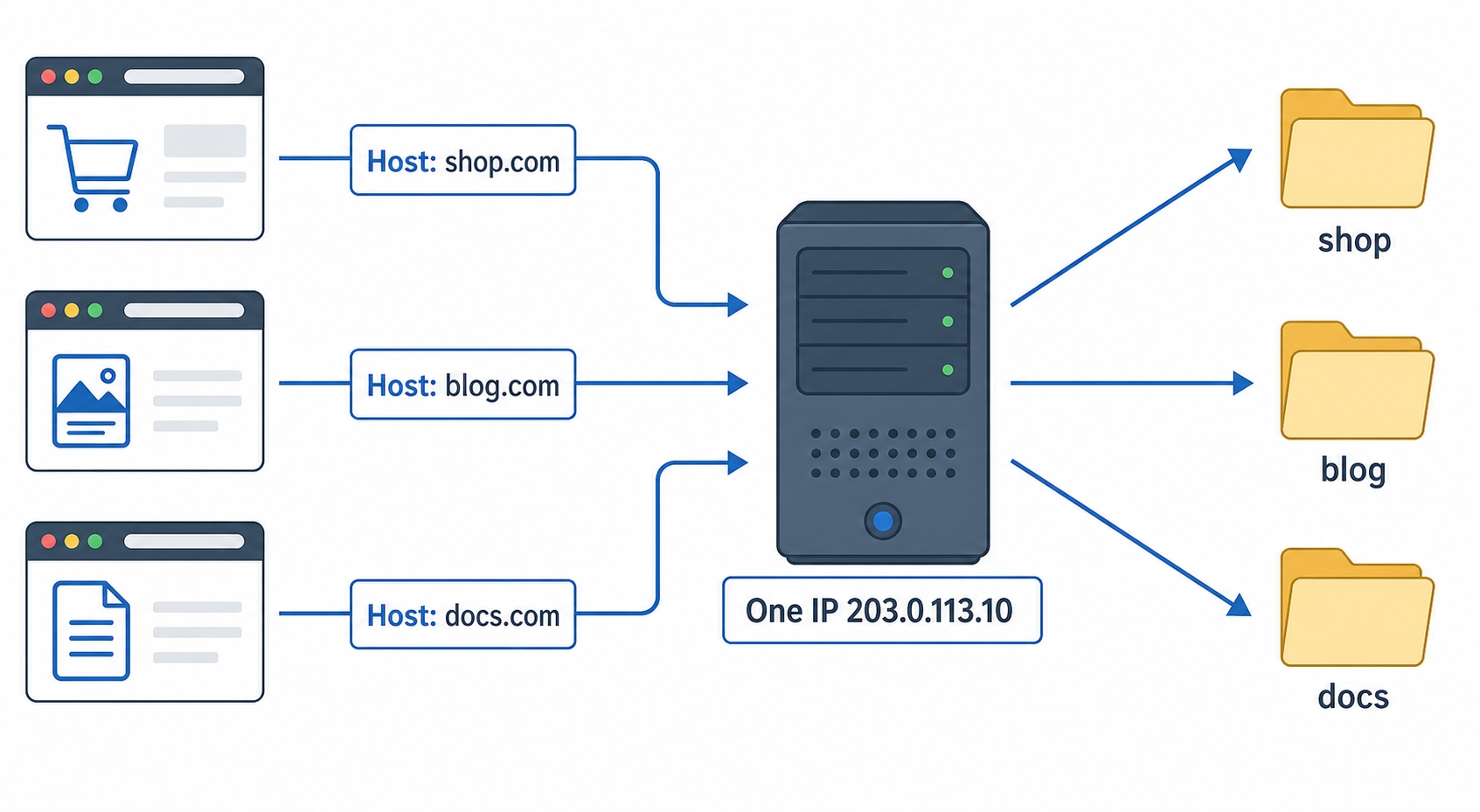
One IP routes requests to different sites by their Host header
That picture is the entire idea. Three different requests reach one server at one IP. Each one carries a different site name. The server reads the name, finds the matching site, and serves it. Same machine, same address, three completely different websites.
Virtual Hosts and the Host Header Explained | dalabs.academy
Where does the name live? In plain HTTP, it lives in a request header you have already seen: Host.
Think back to the URL. When you type https://blog.example.com/posts, the browser splits that apart. The hostname blog.example.com is used to find an IP and open a connection, and the path /posts becomes the request target. Since the connection is just to an IP, the hostname could be lost at that point. The browser solves this by writing the hostname into a header so it rides along inside the request itself:
GET /posts HTTP/1.1
Host: blog.example.com
http
That Host: blog.example.com line is the answer to the server's question. The request came in on a shared IP, but the Host header names the exact site the client wanted. The server matches that name against its list of sites, picks blog.example.com, and serves its content instead of shop.example.com's.
This is why Host is the one header HTTP/1.1 makes mandatory. Every other header is optional. Without Host, a shared server literally cannot tell which site you mean. A request with no Host to a virtual-hosting server is ambiguous by definition.
A quick clarification: The Host header is not the same thing as the IP address, and it does not have to match it. The IP gets your bytes to the right machine. The Host header tells that machine which of its sites you want. You will see this split clearly in the "Try it now" section, where we send the same machine three different Host values and get three different answers.
What about HTTPS? This is where SNI comes in
There is a catch, and it is the one we flagged back in the TLS chapter. Over HTTPS, the Host header is encrypted. It sits inside the HTTP request, and the HTTP request only goes out after the secure connection is already built.
To build that secure connection, the server has to present a certificate first. On a shared server, each site has its own certificate. The server hits a chicken-and-egg problem: it needs to know which site you want in order to pick a certificate, but the header that tells it lives inside the encryption it has not set up yet.
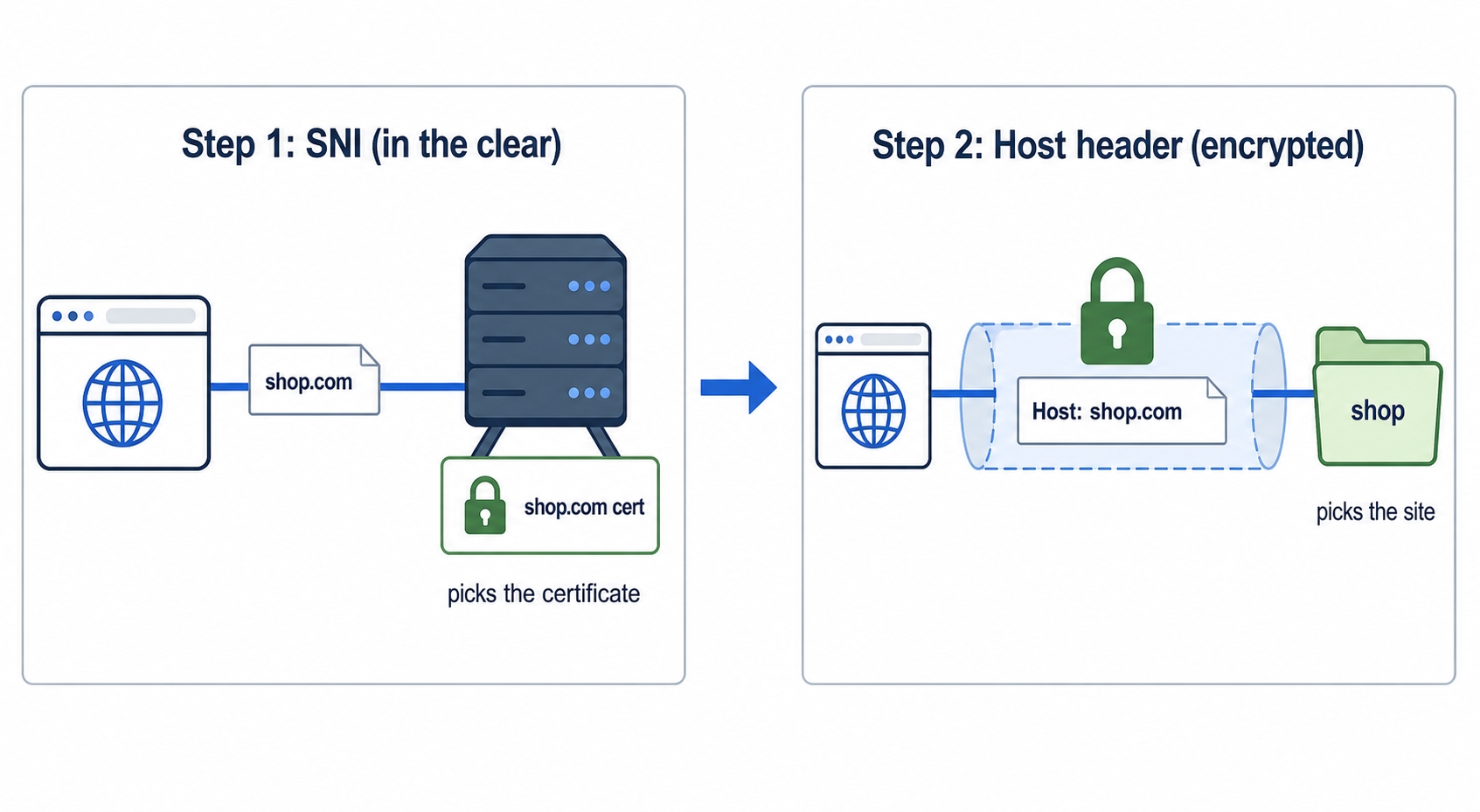
The fix is SNI, Server Name Indication. Right at the start of the TLS handshake, before any encryption, the browser names the hostname it is trying to reach in the clear. That early hint lets the server choose the correct certificate for that exact site and finish the handshake. Once the connection is encrypted, the Host header arrives inside it and the server uses it to route the request, just like plain HTTP.
SNI picks the certificate then the Host header picks the site
So an HTTPS request to a shared server names its destination twice, and the order matters:
SNI, in the clear, during the handshake, so the server can pick the right certificate.
The Host header, encrypted, inside the request, so the server can pick the right site to serve.
They usually carry the same hostname and do the same job at two different moments. SNI is the early, unencrypted version sent at handshake time. Host is the later, encrypted version sent once the tunnel is open. Both exist because the handshake happens before the server can read anything encrypted.
A virtual-host config you can read
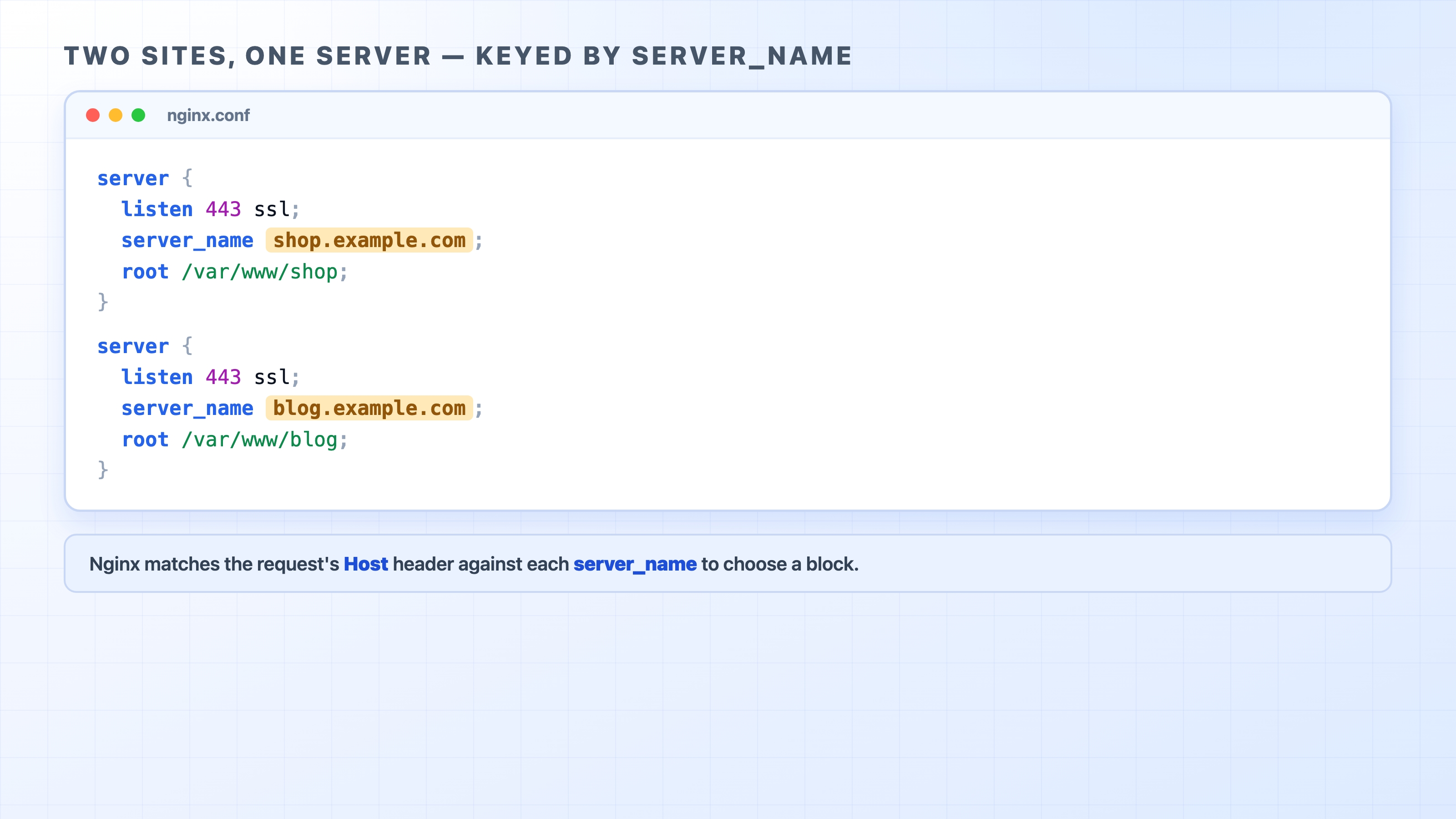
Concretely, how does a server keep its sites apart? On Nginx, each site is a server block, and the routing key is server_name. When a request arrives, Nginx compares the Host header against the server_name of each block and serves the one that matches.
Two Nginx server blocks keyed by server_name on one machine
Two blocks, both listening on the same port on the same machine. The only thing that separates them is server_name. A request whose Host is shop.example.com matches the first block and gets served from /var/www/shop. A request whose Host is blog.example.com matches the second and gets served from /var/www/blog. One Nginx process, one IP, two sites, and the Host header is the switch between them.
For HTTPS, each block also points to that site's specific certificate. This is the certificate SNI told the server to present during the handshake. The server_name that matches the Host header and the certificate SNI selects belong to the same site. That is how the two mechanisms line up.
When the Host matches nothing
What happens when a request arrives with a Host that matches no server_name, or with no Host at all? The server cannot just guess. It needs a rule.
That rule is the default server, sometimes called the fallback or catch-all. It is one site marked as the one to use when nothing else matches. On Nginx, you mark a block as default_server and it absorbs every unmatched request. Without an explicit default, Nginx falls back to the first block defined. There is always some answer, just not necessarily the one a misdirected request hoped for.
What that fallback actually returns is a deployment choice. Common options:
Serve a real default site (one of the hosted sites is simply the "first" one).
Return an error like 404 Not Found or 421 Misdirected Request, the honest "I don't host that here."
Redirect somewhere, for example bouncing a bare-IP visitor to a real domain.
This matters more than it sounds. When you point a brand-new domain at a shared server but have not configured its server_name yet, you do not automatically get an error. You get whatever the default server happens to be. Sometimes, that is a completely different customer's site. The mismatch between "the IP answered" and "the wrong site answered" is a classic virtual-hosting confusion. The fix is always the same: add a server block whose server_name matches the domain.
Try it now
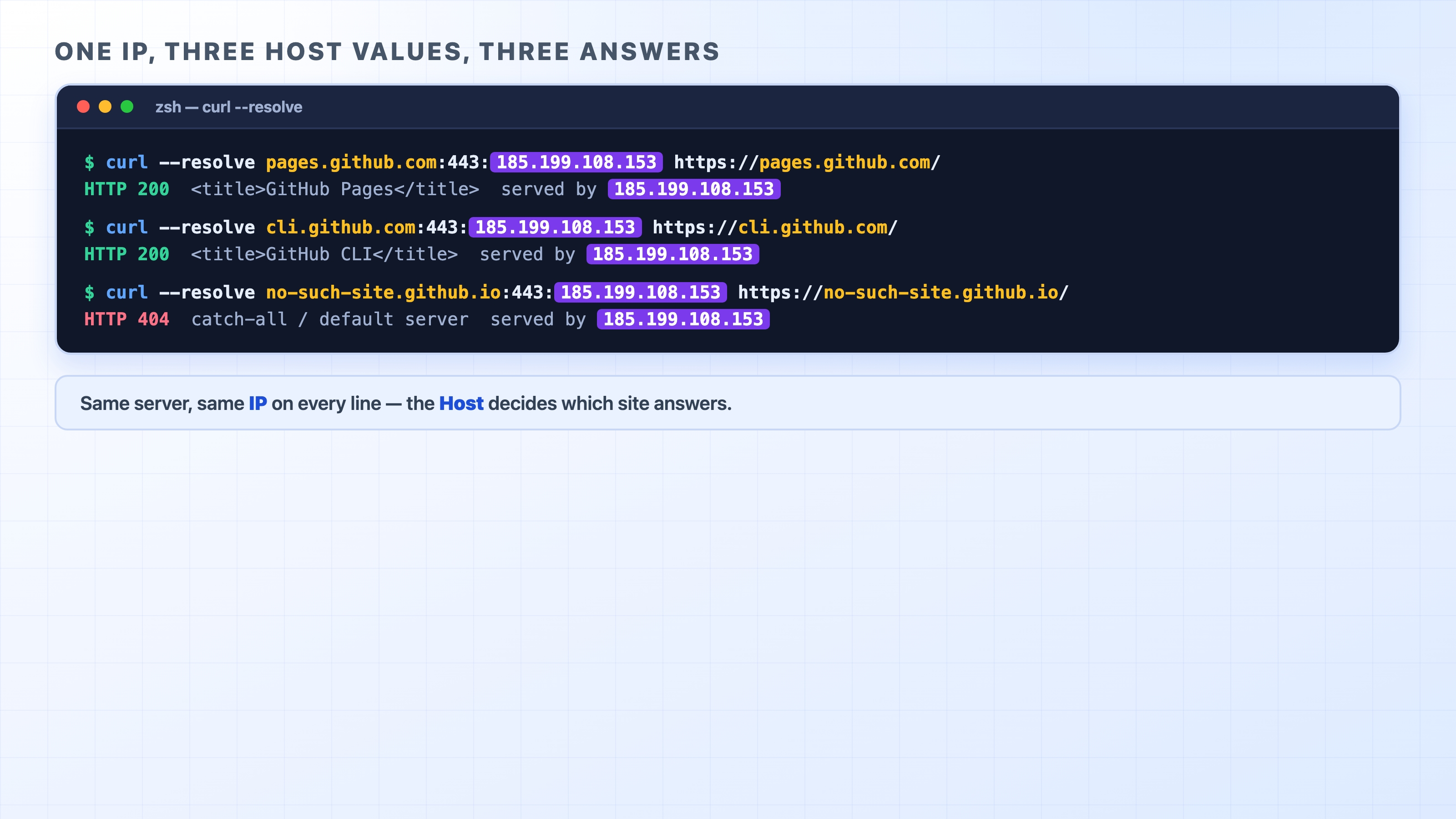
You do not need to run your own server to watch this happen. GitHub Pages hosts a huge number of sites behind a small set of shared IP addresses. Which site answers depends entirely on the Host you send. We will aim every request at the same IP, 185.199.108.153, and change only the hostname.
curl --resolve lets us do exactly that. It says "for this hostname on this port, skip DNS and use this IP." The connection always lands on the same machine while the hostname (and therefore the Host header and SNI) changes:
<title>GitHub Pages | Websites for you and your projects...</title>
<title>GitHub CLI | Take GitHub to the command line</title>
text
Same server, same IP, two different websites, separated only by the name you asked for. Finally, ask the same machine for a site it does not host and watch the fallback answer:
One IP returns two different sites depending on the Host you send
The IP answered every time, but the unknown name got a 404 from GitHub's catch-all rather than a real site. That is name-based virtual hosting, SNI, the Host header, and the default server all visible in four commands.
What's Next
Sometimes the server's answer is not "here is the content" but "the content lives elsewhere." Next, we look at redirects: the status codes and the Location header that tell a client to go ask somewhere else.