In the last chapter, we saw the HTTP body shrink: Accept-Encoding switches on gzip or brotli, and the same content crosses the wire in a fraction of the bytes. Before that, we saw the body get labeled so the receiver knows whether it is reading HTML, JSON, or a PNG. This chapter steps back to look at the body itself. What forms does it actually take, and how does the receiver know where it ends?
The HTTP body is just bytes. The protocol does not care whether those bytes spell out a JSON object, a photograph, or a 4 GB video file. The body is an opaque stretch of bytes, and the headers above it explain what they mean. Once you see the body this way, JSON, images, and file uploads stop being three separate features. They are just three uses of the same mechanism.
Where does the body stop?
The receiver reads bytes off a connection. How does it know when the body has ended and the next response (or the end of the message) has begun?
There are two common answers. A real client handles both.
Two ways the receiver knows where the body ends
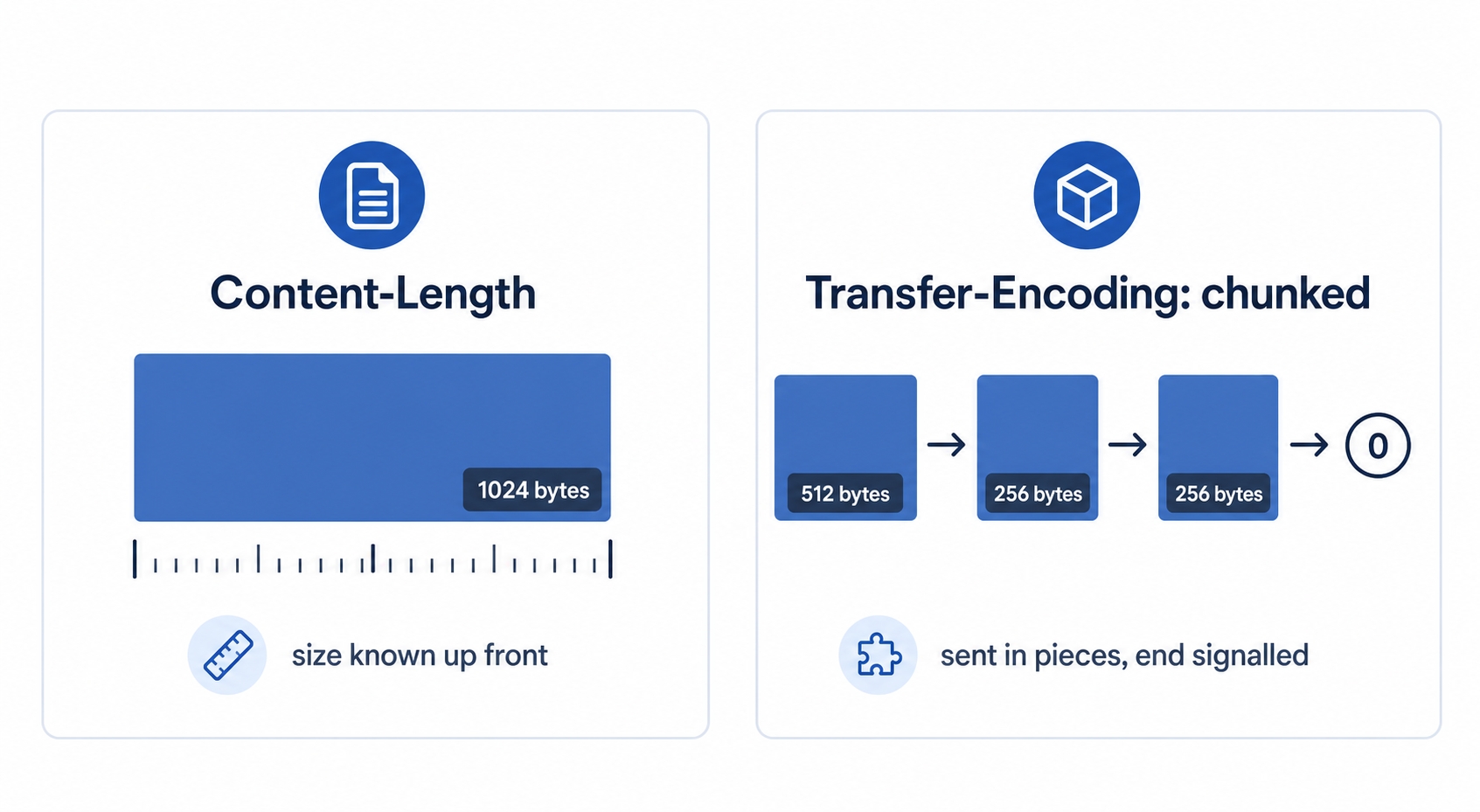
The first answer uses a header you have already seen. The sender counts the body, declares the count, and the receiver reads exactly that many bytes.
Content-Type: application/json
Content-Length: 1024
http
Content-Length: 1024 is a promise. It means the body is exactly 1024 bytes. The receiver reads 1024 bytes and stops. This works whenever the sender knows the full size before it starts sending, which is usually the case. A JSON response built in memory, a file read from disk, or an uploaded photo of a known size can all be measured up front.
Sometimes the sender does not know the size up front. A response might be generated on the fly, streamed row by row from a database, or proxied from another service. You cannot write a Content-Length for bytes you have not created yet. This is where the second answer comes in.
Chunked transfer encoding lets the sender ship the body in pieces. Each piece is prefixed by its own size. The sender signals the end with a zero-size piece. It turns this behavior on with a header instead of :
HTTP Bodies: JSON, Binary, and File Uploads | dalabs.academy
Content-Length
Transfer-Encoding: chunked
http
Now the receiver reads a chunk size, then that many bytes, then the next size. It repeats this until it hits a chunk of size zero, which means the body is finished. The total length was never declared because it was never known in advance. This is HTTP/1.1's way of streaming a body of unknown length over a connection it wants to keep alive.
A note on HTTP/2 and HTTP/3. Chunked transfer encoding is an HTTP/1.1 mechanism. HTTP/2 and HTTP/3 frame the body differently at the protocol level, so they do not use the Transfer-Encoding: chunked header. The idea of streaming a body of unknown length still exists, but it is handled by the protocol's own framing. The mental model still holds across all versions: the receiver needs a way to know where the body ends. Only the exact mechanism changes.
For everyday work, the rule is simple. A body either announces its length with Content-Length, or it is streamed and the framing marks the end. Either way, the receiver has an unambiguous way to know when to stop reading.
The same channel, text or binary
Now that we can find the start and end of a body, what lives inside it? Anything. The body is bytes, and bytes can encode text just as easily as a JPEG.
Sending a JSON document and sending an image use the exact same request and response structure. The only thing that changes is the Content-Type label and the bytes themselves.
A JSON request body is text. It is made of human-readable characters that follow JSON syntax.
POST /comments HTTP/1.1
Content-Type: application/json
Content-Length: 41
{"author":"tung","body":"great chapter"}
http
A response that returns an image has the same shape, but the body is raw binary. These are the actual bytes of the PNG file, which would look like noise if you printed them as text.
HTTP/1.1 200 OK
Content-Type: image/png
Content-Length: 48213
‹PNG…raw image bytes…›
http
The transport did not change. The server read a file off a disk and copied its bytes into the body, exactly as it copied JSON characters into the body above. The Content-Type tells the browser how to handle what arrives: parse it as JSON, render it as an image, or offer it as a download. The body is just the cargo.
This explains why you should avoid pasting raw binary into a terminal or a log. The data is not corrupted. It is simply a set of bytes that were never meant to be displayed as characters. Tools like curl save data to a file with -o so those bytes land intact instead of being mangled by your terminal.
Asking for part of a file
Serving a large video or a big download raises a practical problem. What if the connection drops at 90%? What if a media player only needs the middle of a file so the user can seek to a specific timestamp? Re-downloading the whole file every time is wasteful. HTTP solves this by letting the client ask for a byte range instead of the whole body.
A server signals it supports this feature with a header on its normal responses:
Accept-Ranges: bytes
http
That line means the client may ask for byte ranges of this resource. A client that wants only part of the file then sends a Range header naming the bytes it wants:
GET /big-video.mp4 HTTP/1.1
Range: bytes=0-1023
http
The server answers with status 206 Partial Content instead of the usual 200. It returns only those bytes and adds a Content-Range header describing which slice it sent and how big the whole file is:
HTTP/1.1 206 Partial Content
Accept-Ranges: bytes
Content-Range: bytes 0-1023/1048576
Content-Length: 1024
http
Read that Content-Range carefully: bytes 0 through 1023 of a total 1048576. The Content-Length here describes the slice (1024 bytes), not the whole file. This exchange powers two everyday features. A download manager that lost its connection at 90% asks for Range: bytes=<where it stopped>- and resumes from there instead of starting over. A video player asks for ranges around the point you scrubbed to, so seeking is instant without downloading the parts in between.
A common point of confusion. A 206 is not an error, even though it is not the plain 200 you usually see. It is a success code. It means the server is returning exactly the part you asked for.
This is the simplest version of a bigger idea: streaming responses, where the server sends the body progressively rather than all at once. Range requests let the client pull specific slices. Chunked or progressively flushed responses let the server push the body as it becomes available. Both exist so that a large or slow-to-produce body does not have to be fully ready, or fully transferred, before anything useful happens.
Three shapes of a request body
Bodies do not just come back from servers. Clients send them too, mostly on POST and PUT. When you submit a form or upload a file, the body's shape depends on what you are sending. Three shapes cover almost everything you will encounter, and they are distinguished by their Content-Type.
The first is a plain form post. This is the original HTML form encoding, sent as application/x-www-form-urlencoded. The body is one line of key=value pairs joined by &, which is the same format as a URL's query string:
Content-Type: application/x-www-form-urlencoded
comment=looks+good&rating=5
http
It is compact and works for simple text fields. It falls apart for anything else. There is nowhere to attach a file, and binary data has to be awkwardly escaped. It is a flat list of strings.
The second is a raw JSON body, the default for modern APIs. The whole body is a single JSON document, and the Content-Type reflects that:
Content-Type: application/json
{"comment":"looks good","rating":5}
http
JSON keeps structure—nested objects, arrays, numbers, and booleans—that the flat urlencoded format cannot express. It is the natural choice when a JavaScript front end or another service talks to an API. But like urlencoded, it is text, making it a poor fit for sending an actual file.
The third shape is built for files: multipart/form-data. Instead of one flat body, it packs several independent parts into a single body. Each part has its own headers. This makes it possible to send a text field and a file in the same request.
Inside a multipart body
Browsers use multipart/form-data when a form contains a file input. It is worth understanding in detail because it looks intimidating until you see how it works.
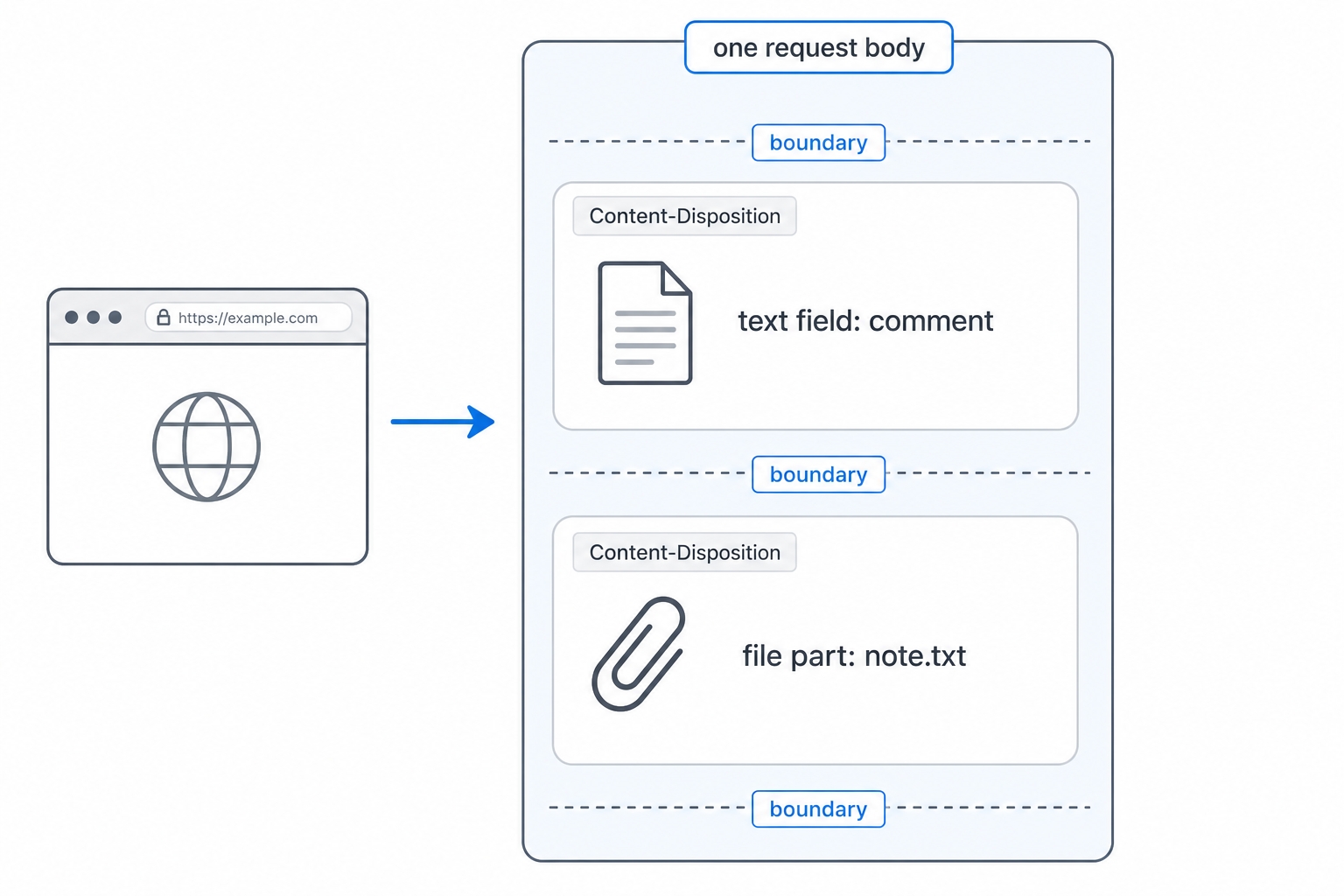
One request body holding a text field and a file part
The mechanism relies on a boundary. This is a random string the sender invents and declares in the Content-Type. The sender then repeats this string between each part to fence them off from one another.
Inside the body, that boundary appears before every part. Each part carries its own Content-Disposition header naming the field. A file part adds a Content-Type of its own for the file's format. Here is one body holding a text field named comment and a file named note.txt:
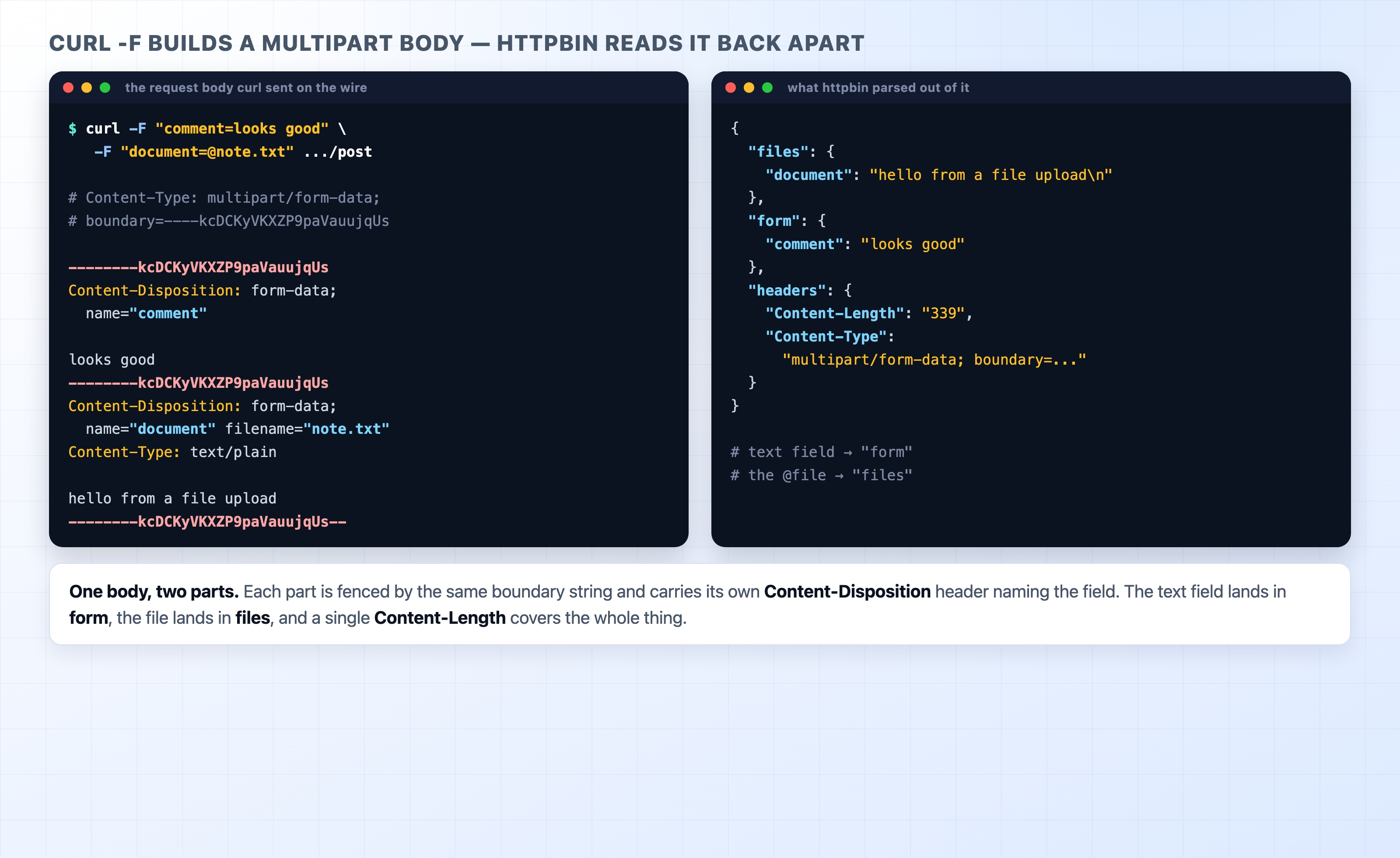
Read it from top to bottom. The boundary opens the first part. Its Content-Disposition says this is the comment field. A blank line follows, and then the field's value, looks good. The boundary appears again to start the second part, the file. Its Content-Disposition carries both a name and a filename. Because it is a file, it gets its own Content-Type: text/plain. A blank line follows, and then the file's actual contents. The final boundary, with two trailing dashes, marks the end of the whole body.
This structure is why multipart can do what the other two shapes cannot. Each part is self-describing. One part can be text while the next is a binary image with its own type, all inside a single request with a single Content-Length. The boundary is just a fence the parser splits on. The sender's only job is to pick a boundary string that does not appear in any of the data. This is why boundaries look like random characters.
A helpful distinction. The boundary is not a security feature or a secret. It is purely a separator, chosen at random to make sure it will not collide with the file's contents. The server reads the boundary out of the Content-Type header, then uses it to chop the body back into parts.
Large uploads, briefly
Sending a small file is the easy case. Sending a large one—like a video or a database export—brings real-world limits into play. It is worth knowing the shape of the problem even before you need the solutions.
Every server sets a maximum body size. A request that exceeds it is rejected, often with a 413 Payload Too Large status. This is deliberate. Without a cap, a single client could exhaust the server's memory or disk by uploading something enormous. When an upload fails unexpectedly, a low body-size limit on the server or a proxy is a common culprit.
A server that reads the entire body into memory before doing anything will struggle with large files. The better pattern is to stream the body to a disk or to storage as the bytes arrive. This keeps memory use flat no matter how big the file is. Conceptually, this is the same streaming idea from earlier in the chapter, applied to the request side.
The hardest case is an upload that must survive a dropped connection. This is the upload equivalent of resuming a download. The common pattern is a resumable or chunked upload. The client splits the file into pieces and sends them as separate requests. If one fails, it retries just that piece instead of restarting the whole upload. Several upload services and protocols are built around this idea. The details vary, but the motivation remains the same: large bodies should not have to succeed or fail all at once.
Try it now
You can send the two most common request bodies to a public endpoint and watch how the server reads each one back. The httpbin.org/post endpoint echoes whatever you send so you can see exactly how it was parsed.
First, create a small file to upload:
printf 'hello from a file upload\n' > note.txt
bash
Now send a multipart upload with curl -F. Each -F adds one part. A value starting with @ tells curl to read a file:
In the JSON that comes back, look at three things. The headers object shows Content-Type: multipart/form-data; boundary=..., which is the boundary curl invented. The text field landed under form, and the file landed under files with its contents. One request carried both, fenced by that boundary.
curl -F builds a multipart body that httpbin reads back apart
Now send the same fields as a JSON body instead. Notice how different the body is even though the destination is identical:
curl -H 'Content-Type: application/json' \
-d '{"comment":"looks good","rating":5}' \
https://httpbin.org/post
bash
This time the response shows your document parsed under the json key. The Content-Type is application/json. There is no boundary and no files section because nothing was a file. It is the same endpoint and the same method, but a completely different body shape, all signaled by one header.
For a last look at the body's edges, ask for a byte range from an endpoint that serves a fixed-size body and supports ranges:
The status line comes back as 206 Partial Content, with Content-Range: bytes 0-19/1024 and Content-Length: 20. You asked for the first twenty bytes of a 1024-byte resource, and that is precisely what you received. This is the resumable-download mechanism in one line.
What's Next
This closes out how HTTP carries and labels its payloads. Next, we move into Production HTTP. We will start with virtual hosting, where one server uses the Host header to decide which of many sites should answer a request.