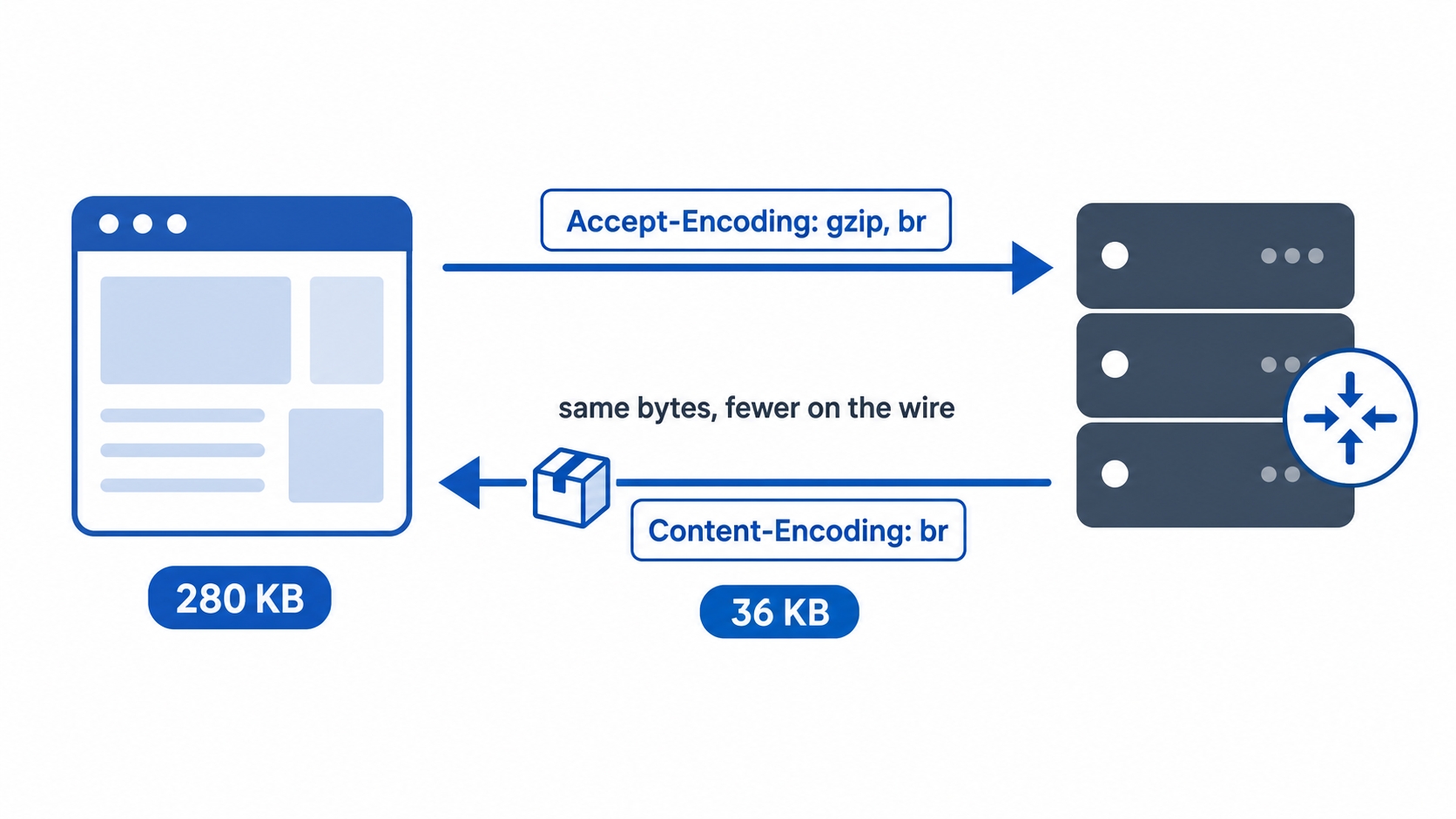
In the last chapter, we met three Accept headers the browser sends on every request. Two of them, Accept and Accept-Language, choose which version of a file comes back. The third, Accept-Encoding, is different. It does not change the content at all. Instead, it changes how many bytes it takes to send that content.
The payoff is large and almost free. A 281 KB stylesheet can cross the network as just 33 KB. The browser then unpacks it back to the exact same 281 KB before any code ever sees it. You get the same content for a fraction of the transfer size. Here is how the client and server agree to do that, which compression methods they use, and where the compression should actually happen.
What compression does here
Compression in HTTP means the server runs the response body through an algorithm to rewrite it using fewer bytes. It sends this smaller version across the network, and the client reverses the process to recover the original. The file the browser ends up with is byte-for-byte identical to the uncompressed one. Nothing about the meaning changes. Only the size on the wire shrinks.
This works because text is full of repetition. An HTML page repeats <div, class=, and the same CSS class names hundreds of times. A JSON response repeats the same keys on every object. Compression algorithms are excellent at spotting that repetition and storing it once instead of a thousand times. This is also why the same trick that shrinks a stylesheet by eight times does almost nothing to a photo. We will come back to that point later.
This process is called content encoding. It is worth separating from the Content-Type header you learned about in the last chapter. The type says what the bytes are, like HTML, JSON, or an image. The encoding says how those bytes were packed for transport. A response can be Content-Type: text/html and Content-Encoding: gzip at the same time. It is an HTML document wearing a gzip wrapper for the trip.
HTTP Compression: gzip and Brotli Explained | dalabs.academy
Walking the negotiation
Compression is negotiated exactly like the formats from the previous chapter. The client offers a list of methods it can decode, and the server picks one from that list.
How Accept-Encoding and Content-Encoding shrink a response
It is a two-header handshake:
The client sends Accept-Encoding listing the methods it understands.
The server compresses the body with one of them and sends Content-Encoding naming the method it chose.
A real browser request carries something like this:
Accept-Encoding: gzip, deflate, br
http
This line tells the server it can decode gzip, deflate, or brotli. The server compresses the body with one of those methods and reports its choice on the way back:
Content-Type: text/css; charset=utf-8
Content-Encoding: br
Vary: Accept-Encoding
http
Content-Encoding: br tells the browser that the body was compressed using brotli. The browser automatically runs it back through brotli to get the original file. This happens before any JavaScript runs or any rendering starts. Your code always sees the full, decompressed body. The compression is completely invisible above the network layer.
A common confusion: The request header is Accept-Encoding (what the client accepts). The response header is Content-Encoding (what the server actually did). They are a matched pair, just like Accept and Content-Type. Mixing them up is a frequent mistake when reading network tabs in DevTools.
The Vary: Accept-Encoding line matters when a cache sits between the client and the server. It tells the cache that the response depends on the request's Accept-Encoding header. This ensures the cache treats a brotli copy and a gzip copy as two different entries. Without it, a cache might hand a brotli-compressed body to an older client that only asked for gzip, causing the client to fail. Caches store and serve compressed responses directly, and Vary is how they keep the different formats organized.
gzip, brotli, and a word on deflate
You will see three main names in the Accept-Encoding header. In practice, two of them handle almost all web traffic.
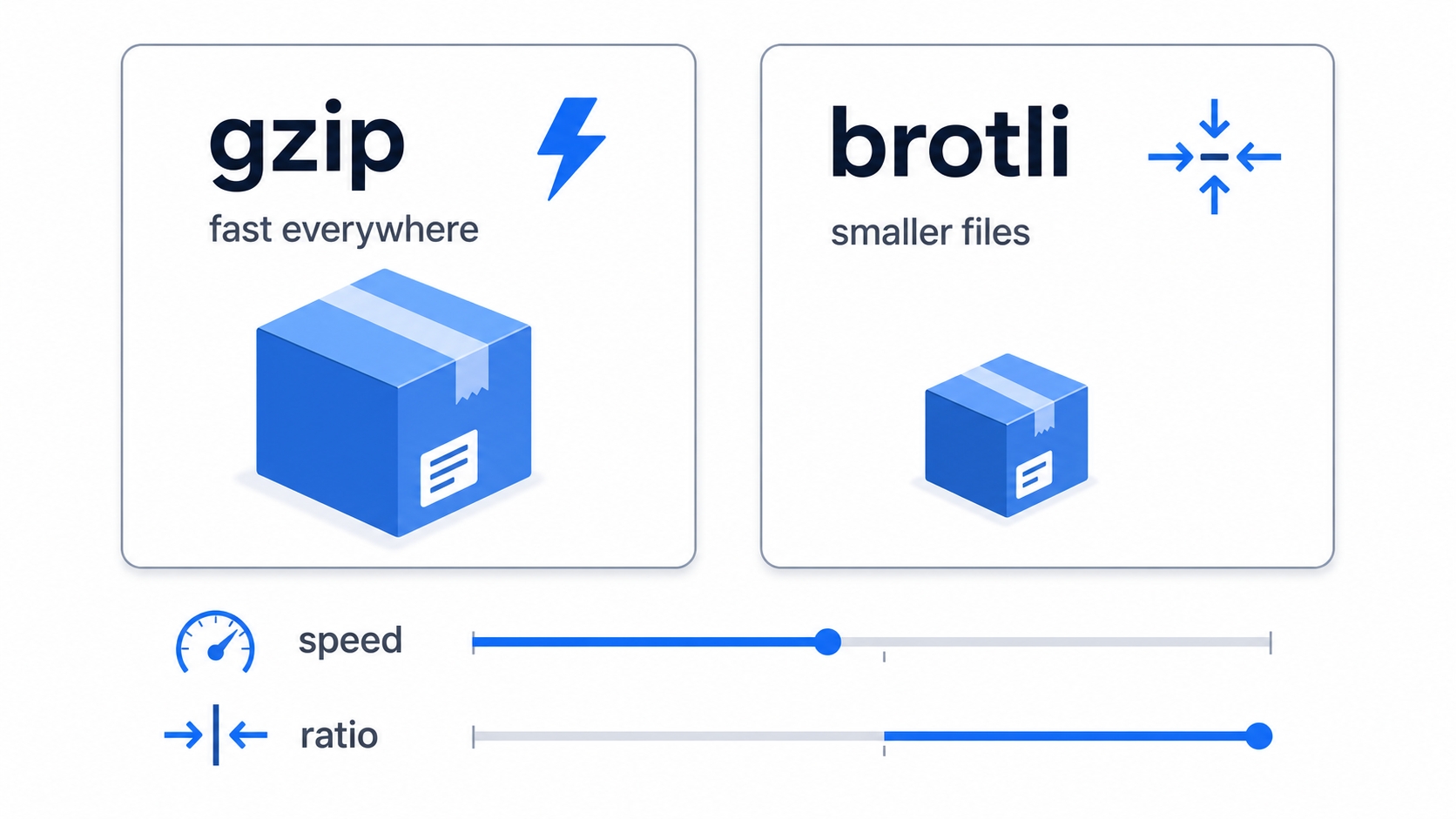
gzip is the old reliable standard. It has been in HTTP since the 1990s. Every client and server supports it, and it is fast to compress and decompress. If you do nothing else, turning on gzip is the single biggest and safest performance win you can give your users.
brotli (sent as br) is newer. It was developed at Google and is now supported by every major browser. At its higher settings, it produces noticeably smaller files than gzip on text, often 15 to 25 percent smaller. The catch is that heavier compression costs more CPU time. Because of this, brotli is usually configured to compress aggressively for static assets that are served many times. For one-off dynamic responses, it is used more gently or skipped entirely.
deflate is the third name you might see. It uses the same underlying algorithm as gzip but with a thinner wrapper. It exists mostly for historical reasons and is rarely the best choice today, partly because some older servers implemented it inconsistently. You can safely focus on gzip and brotli.
The trade-off between gzip and brotli usually comes down to file size versus CPU time.
gzip versus brotli trading speed against ratio
gzip
brotli (br)
Support
Everywhere, for decades
All modern browsers
Compression ratio on text
Good
Better, especially at high settings
CPU to compress
Low
Higher at top settings
CPU to decompress
Low
Low
Best fit
Anything, the safe default
Static assets compressed ahead of time
Notice that decompression is cheap for both methods. The client side is rarely the bottleneck. The cost that varies is on the server, which has to spend CPU cycles compressing the response. This is why deciding where and when to compress matters just as much as which method you pick.
Why compressing a JPEG is wasted work
Compression only helps when there is repetition to remove. Some file formats have already removed all of it. Formats like JPEG, PNG, GIF, MP4 video, MP3 audio, and .zip archives are already compressed. They squeeze the data as part of the saving process. By the time you have a .jpg file, the easy repetition is long gone.
If you run gzip over a JPEG, one of two things happens. Usually, the file shrinks by almost nothing because there is no leftover repetition to find. Sometimes it actually grows. This happens because gzip adds its own small header and bookkeeping data while finding nothing to remove. Either way, you spend CPU time on both the client and server for no benefit.
The practical rule is simple: compress text, but skip media. Stylesheets, HTML, JavaScript, JSON, SVG, and plain text compress beautifully and should usually be compressed. Images, video, audio, modern font formats like woff2, and archives should be served exactly as they are. Good web servers already know this and ship with a default list of text types to compress. If you ever need to configure a server by hand, this single rule covers almost every case.
Think of it this way: Compression is about finding patterns and storing them once. A page of text is mostly patterns, so it shrinks a lot. A photo, after the JPEG format has done its own work, looks like near-random bytes with no patterns left. There is nothing left for gzip to grab.
Where compression should happen
A response body can be compressed at several different points along the network path. Choosing the right spot saves both CPU time and latency. Recall the architecture from earlier in the course: a request often passes through a CDN, then a reverse proxy, and finally reaches your application server.
When setting up compression, you have two main questions to answer: who compresses the file, and when do they do it?
For the who, you usually want compression to happen as close to the user as possible. You do not want it buried in your application code. A reverse proxy like Nginx or a CDN is built for this task and handles it efficiently. Your application server can compress responses, but it is rarely the best place to do so. It is already busy running business logic. Compressing at the application level often means every response is recompressed on the fly, even if the content is identical to the last request. The standard pattern is to let your application send plain, uncompressed responses and let the proxy or CDN handle the encoding.
For the when, there are two common approaches:
On-the-fly compression happens at request time. The server compresses each response right before sending it. This is the only option for dynamic responses, like a personalized dashboard or an API result. It costs a little CPU time for every request. Usually, you use gzip or a fast brotli setting here so the compression time does not add noticeable latency.
Static precompression happens ahead of time. During your build process, you compress your static files once. This produces files like app.css.br and app.css.gz right next to your original app.css. At request time, the server simply picks the matching pre-made file and sends it. This costs zero CPU time per request. Because you only compress the file once, you can afford to use brotli's slowest and most aggressive setting. This is the standard treatment for CSS, JavaScript, and other static assets.
These two approaches combine cleanly in practice. Static assets get precompressed with brotli at maximum effort, while dynamic responses get gzipped on the fly. Either way, the client cannot tell the difference. It simply reads the Content-Encoding header and decompresses the body.
Try it now
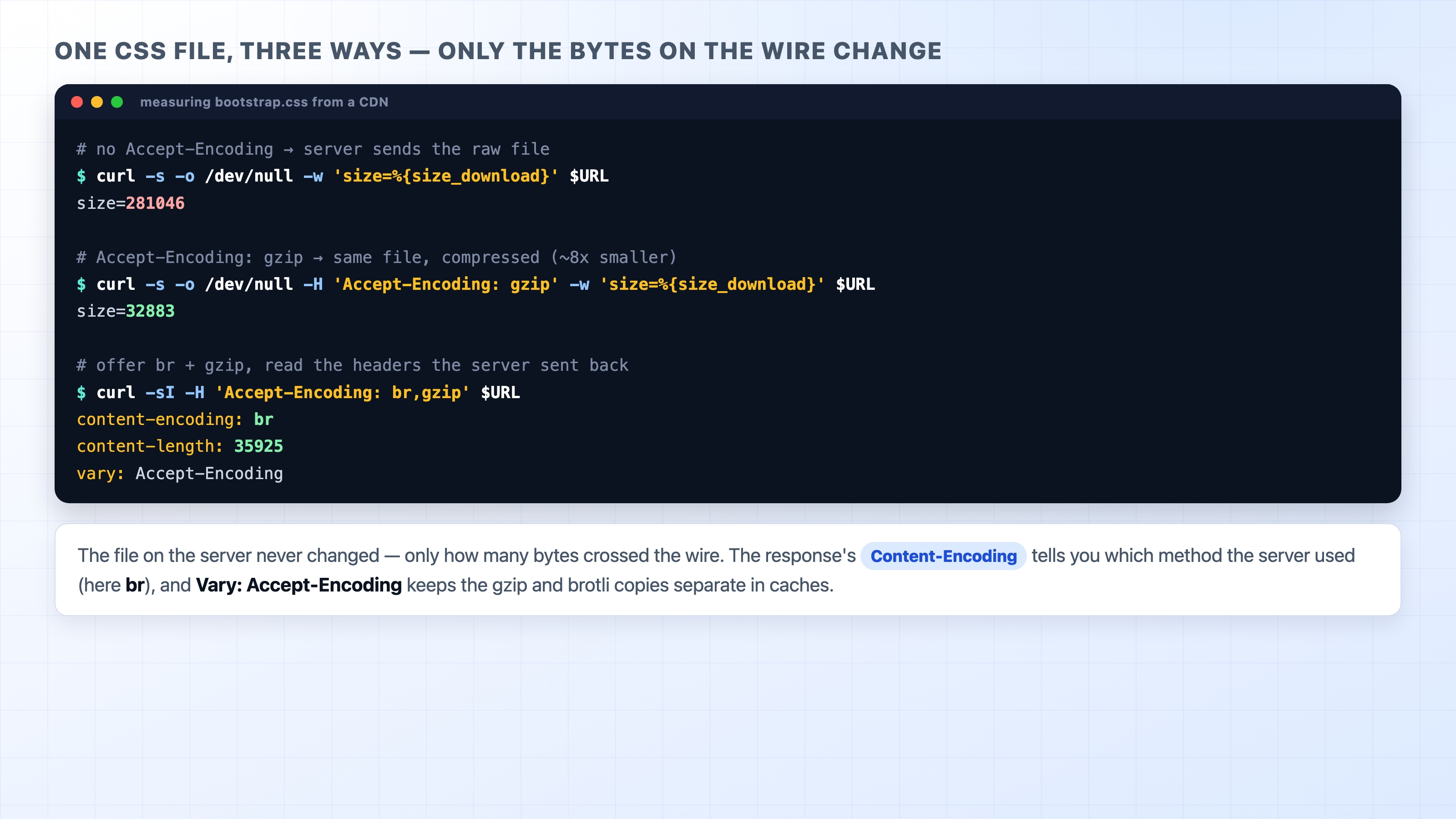
We can measure this performance win on a real file. The jsDelivr CDN serves the Bootstrap stylesheet, which is a large text file. The CDN supports both gzip and brotli. We will ask curl for the same URL three different ways and watch the transferred size change.
The -w '%{size_download}' option prints exactly how many bytes came down the wire. The -o /dev/null option throws the actual file body away so we only see the final byte count.
Measuring one CSS file with and without compression using curl
First, ask for the file with no compression at all. By default, curl does not send an Accept-Encoding header, so the server sends the raw file:
This time it reports about 32883 bytes. The file on the server did not change. We just told the server we could accept gzip, and it sent the compressed version instead. This is roughly an eight-fold reduction in size. Finally, ask for the response headers and let the server pick between brotli and gzip:
You will see content-encoding: br, a small content-length, and vary: Accept-Encoding. This tells the whole story in three lines. The server chose brotli, the body is a fraction of the original size, and the server flagged the response as varying by encoding so caches keep the formats apart. As an experiment, try the same -w 'size' trick against an image URL. You will watch the number barely move, because there is nothing left to compress.
What's Next
You can now read the headers that shrink a response and reason about where that compression should happen. Next, we will look at the body from the other side. We will explore how HTTP carries JSON, raw binary data, and multi-part file uploads. Underneath every Content-Type and Content-Encoding, the body is ultimately just bytes.