For the last few chapters, the message body has mostly sat in the background. We learned how a request finds the right server, rides over an encrypted connection, and carries credentials. But none of that explains what is actually inside the body, or how the receiving side is supposed to read it. A response is ultimately just a pile of bytes. Those bytes could form a web page, a chunk of JSON, or a PNG image. Something has to tell the receiver what they are looking at.
That something is the Content-Type header. Once a body can take many forms, another question comes up: if a single URL can return HTML, JSON, or a PDF, how does the client ask for the one it wants? That process is called content negotiation. This chapter covers both.
The body is just bytes until a header says otherwise
Open any HTTP response and you will find a header that looks like this near the top:
Content-Type: text/html; charset=utf-8
http
Content-Type is the label on the package. It tells the receiver how to interpret the bytes that come after the blank line. Without this header, the body becomes a mystery. A browser would have to guess whether it is looking at a page to display, data to parse, or a file to save. The header removes the guesswork.
The value has two parts. The first is a MIME type (sometimes called a media type). This is a short, standard string that names the format, like text/html or application/json. The second part, after the semicolon, is an optional parameter that adds detail. The most common parameter is charset, which we will cover shortly. For now, focus on the MIME type, because it dictates how software behaves.
What a MIME type looks like
A MIME type consists of two words joined by a slash: a general type and a specific subtype.
Content-Type and Content Negotiation | dalabs.academy
MIME type
What it means
Where you see it
text/html
An HTML document
Web pages
text/plain
Plain text, no markup
.txt files, simple API errors
text/css
A stylesheet
.css files
application/json
JSON data
Most APIs
application/javascript
A JavaScript file
.js scripts
image/png
A PNG image
Images
image/jpeg
A JPEG image
Photos
application/pdf
A PDF document
Downloads, invoices
application/octet-stream
Arbitrary binary, "unknown bytes"
Generic file downloads
The pattern is easy to read once you see it. Types starting with text/ are human-readable text. Types starting with image/ are picture formats. Types starting with application/ represent data meant for a program. That last bucket is broad on purpose. This is why JSON, JavaScript, PDFs, and raw binary files all live under application.
The name "MIME" comes from email (Multipurpose Internet Mail Extensions). Early email needed a way to attach non-text files to a message. HTTP borrowed this labeling system, so the type names you see on the web are the same ones email has used for decades.
Why the type changes what the browser does
This is where Content-Type stops being trivia and starts having visible consequences. A browser does not decide what to do with a response by looking at the URL or the file extension. It looks at the Content-Type header, and it behaves differently depending on what it finds.
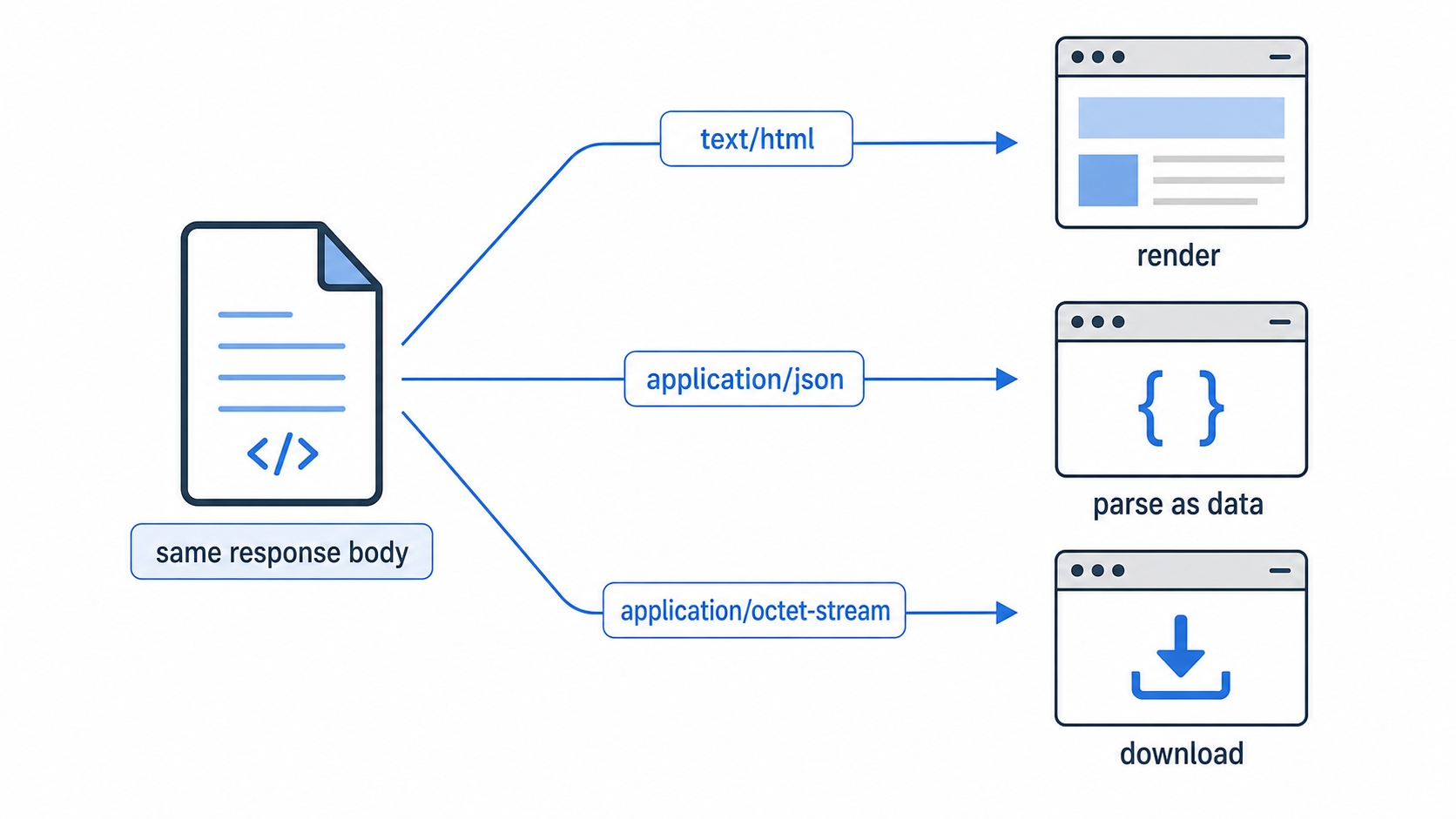
How the browser treats the same bytes based on Content-Type
Take the exact same body of text and send it three times with three different types:
Send it as text/html, and the browser renders it. It parses the bytes as HTML, builds a page, and shows it.
Send it as application/json, and the browser treats the bytes as data. Code that called fetch will parse it into an object. If you open the URL directly, you usually see the raw text or a built-in data viewer.
Send it as application/octet-stream, and the browser downloads it. It has no idea how to display unknown binary data, so it saves the file to disk instead.
The bytes never changed. Only the label did. This is why a misconfigured Content-Type causes confusing bugs. If a server sends your JavaScript file as text/plain instead of application/javascript, the browser refuses to run it as a script. If it sends an HTML page as text/plain, you see the raw <html> tags on screen instead of a rendered page. You told the browser not to parse it, so it just prints the text.
A common confusion: The file extension in the URL (.json, .png) is for humans, not the browser. The browser trusts the Content-Type header over the extension. A file named data.json served with Content-Type: text/html is treated as HTML. The header wins.
There is one wrinkle worth knowing. When a server sends a type that looks wrong, browsers historically tried to "sniff" the real type by peeking at the bytes. This created a security problem. An uploaded image that was secretly HTML could get rendered and run malicious scripts. Modern servers usually send X-Content-Type-Options: nosniff to switch that guessing off and force the browser to trust the declared type. The practical lesson remains the same: set the correct Content-Type and you avoid the problem entirely.
The charset parameter, and why UTF-8 is the safe default
Back to the second part of the header. For text formats, the bytes alone do not fully describe the content. A byte like 0xE9 could mean different characters depending on the character encoding in use. The charset parameter names that encoding so the receiver decodes the bytes into the correct characters.
UTF-8 is the encoding to reach for. In practice, it is the default across the modern web. It can represent every character in Unicode, which covers essentially every written language plus emoji, while staying compact for plain English text. Sending charset=utf-8 (and actually encoding your text as UTF-8) is the safe choice. It avoids garbled-character bugs almost entirely. If you are ever unsure what to set, UTF-8 is the answer.
A small note for completeness: JSON is defined to be UTF-8, so application/json does not carry a charset parameter. The charset mostly matters for text/ types and for HTML forms, where older encodings still lurk.
One URL, many representations
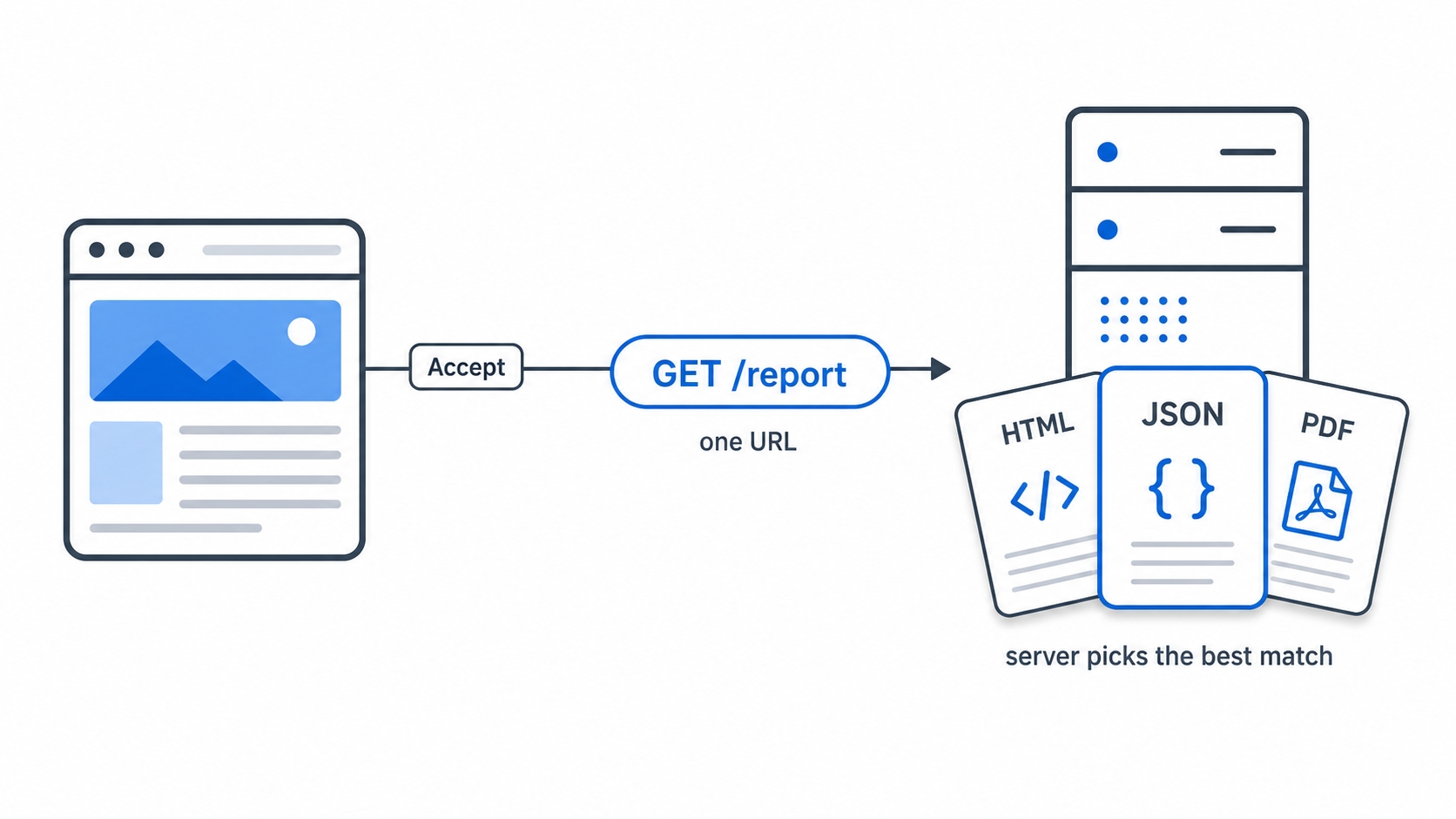
So far, the server has decided the format on its own. But the same resource can sensibly exist in more than one form. A report at /reports/q3 might be available as a web page for a person, as JSON for a script, and as a PDF for printing. They are all the Q3 report, just different representations of it.
Instead of inventing three URLs (/reports/q3.html, /reports/q3.json, /reports/q3.pdf), HTTP lets you keep one URL. The client and server then negotiate which representation comes back. This mechanism is called content negotiation.
One URL many representations chosen by the Accept header
The client states its preferences in a set of request headers, all beginning with Accept:
Accept says which MIME types the client can handle: "I would like JSON, but HTML is fine too."
Accept-Language says which human languages it prefers: "English first, then French."
Accept-Encoding says which compression formats it understands, like gzip or br. We give this header a full chapter of its own next.
The server reads these headers, picks the representation it thinks fits best, and sends it. It then sets Content-Type (and Content-Language, and Content-Encoding) on the response to report exactly which format it chose. The request says what the client would like. The response says what the client actually got. Negotiation is a request, not a command. The server makes the final call, and it might not have your first choice available.
Your browser already does this on every page load without you noticing. A typical browser request carries headers like this:
This is the browser quietly announcing the formats, languages, and compression it can handle on your behalf. The server takes it from there.
Reading quality values
Look again at the language header above and you will spot a piece of syntax we have not explained: en;q=0.9. That q stands for quality value. It is how a client expresses ranked preferences instead of a flat list.
A quality value is a number from 0 to 1 attached to an option with ;q=. A higher number means a stronger preference. Anything listed without an explicit q is treated as q=1.0, the top rank. So this header:
Accept-Language: en-US,en;q=0.9,fr;q=0.7
http
reads as a ranked wish list:
Option
Quality
Meaning
en-US
1.0 (implied)
US English, most preferred
en
0.9
Any English, almost as good
fr
0.7
French, acceptable if no English exists
The server checks its available representations, scores each against this list, and returns the highest-scoring one it can produce. If the report only exists in French and German, neither en-US nor en matches, so French wins at 0.7. A value of q=0 is special. It means the client does not want that option at all, which is a way to explicitly rule a format out.
The same q syntax works in the Accept header for MIME types. Accept: application/json;q=1.0, text/html;q=0.5 says to send JSON if available, and HTML only as a fallback. Conceptually, the server sorts your options by quality and hands back the best match it has on the shelf.
Worth keeping in perspective: Many real servers do not implement the full ranking algorithm. Some ignore these headers entirely and return one fixed format. Content negotiation is a mechanism HTTP offers, not a guarantee every server honors. The mental model still holds: the client ranks what it wants, and the server tries to oblige.
Try it now
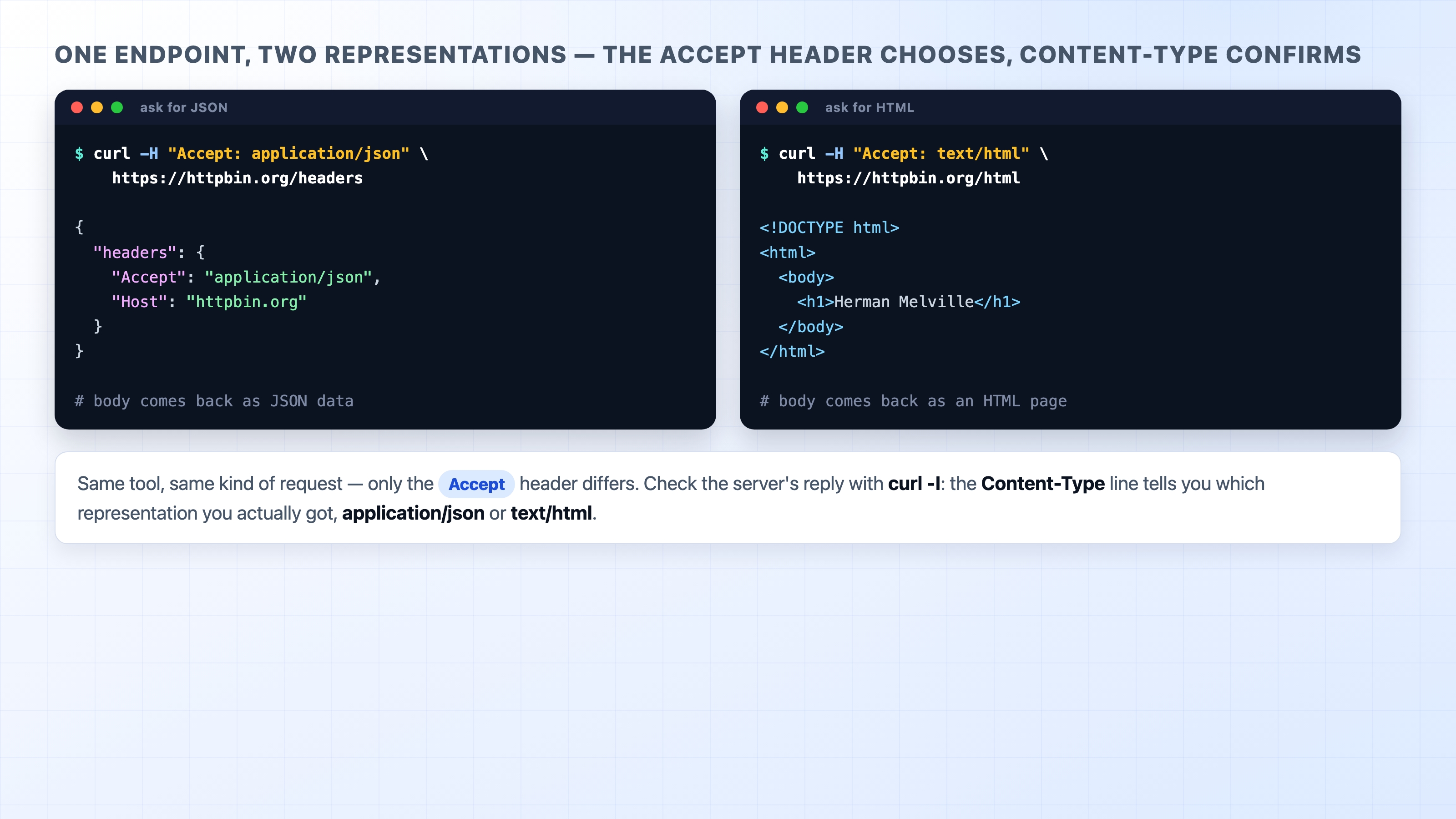
You can watch negotiation happen from the command line. The httpbin.org service has an endpoint that mirrors back details about your request. You can change a single header to change what comes back. Pass a header to curl with -H, and read the response.
Negotiating JSON vs HTML from one endpoint with curl
To see the type the server actually chose, ask for the response headers only with -I and look for the Content-Type line:
curl -I https://httpbin.org/image/png
bash
That last command reports Content-Type: image/png. This is the server telling you the bytes form a PNG image. Finally, you can prove the misconfigured-type bug to yourself. Open https://httpbin.org/html in a browser. It renders as a web page because it arrives as text/html. If that same content was described as text/plain, it would show up as raw HTML tags. One header creates completely different behavior.
What's Next
You now know how the body announces its format and how the client and server agree on which representation to exchange. Next, we zoom in on one of those Accept headers: Accept-Encoding. We will see how formats like gzip and brotli shrink a response on the wire without changing what it means.