For three chapters you have been collecting credentials: a session ID that lives in a cookie, a signed token the client carries. Each one answers "who is this?" but we glossed over a mechanical question every time: how does that credential actually attach itself to a request? Cookies you have seen, the browser clips them on for you. This chapter covers the other way, the Authorization header, and the API keys that identify the application doing the calling.
Overview
The Authorization header is the standard place to put credentials on an HTTP request. Unlike a cookie, the client attaches it deliberately, which makes it the natural fit for APIs, single-page apps, and mobile clients. It follows one fixed shape, names the scheme it is using, and carries the credentials for that scheme.
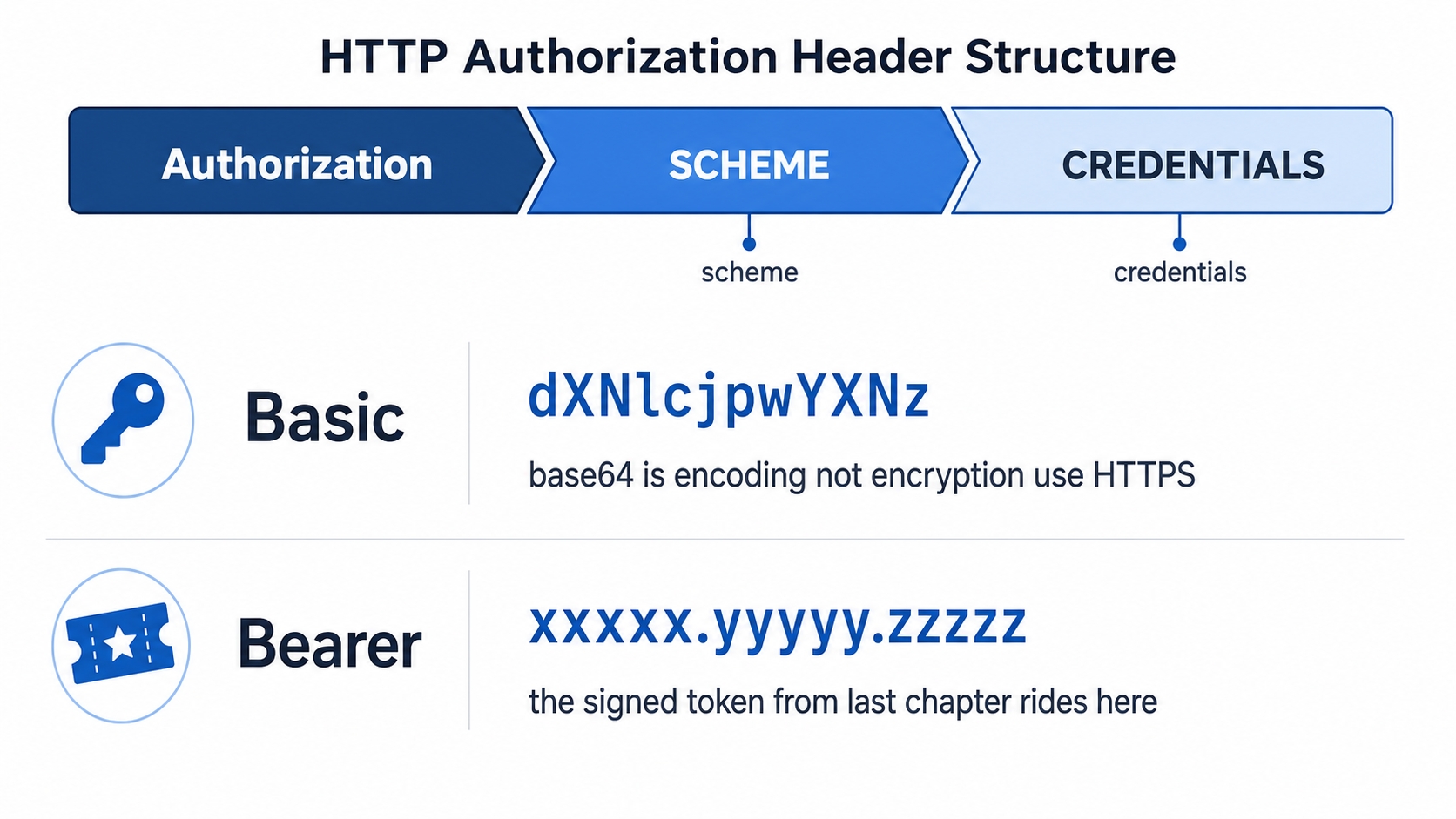
The Authorization header shape with Basic and Bearer examples
The rest of the chapter works through that shape and what travels in it:
The two schemes you meet most: Basic (a base64 blob, which is encoding and not encryption) and Bearer (the signed token from the last chapter).
API keys: what they identify, where they should ride, and the lifecycle of issuing, scoping, rotating, and revoking one.
The everyday mistakes that leak a credential, and how to avoid each.
The shape of the Authorization header
Every credential that travels in this header follows the same two-part form:
Authorization: <scheme> <credentials>
http
The scheme is a single word that tells the server how to read what follows. The credentials are the actual proof, formatted however that scheme expects. The server reads the scheme first, then knows what to do with the rest. That is the whole grammar. Once you can see those two slots, every variant below is just a different word in the first slot and a different blob in the second.
Authorization Headers and API Keys Explained | dalabs.academy
Two schemes cover the vast majority of what you will run into.
Basic: username and password, lightly wrapped
The Basic scheme carries a username and password. The client glues them together as username:password, encodes that with base64, and drops the result after the word Basic:
Authorization: Basic YWxpY2U6czNjcmV0
http
That blob is not as private as it looks, and this is the part beginners most often get wrong. Base64 is encoding, not encryption. It exists to pack arbitrary text into a small safe character set, not to hide anything. There is no key and no secret involved in reversing it. Anyone who sees that header can decode it back to alice:s3cret in one step.
So Basic auth has no protection of its own. The thing that makes it safe is the layer underneath: HTTPS. Over HTTPS the entire request, header and all, travels encrypted between the client and the server, so nobody on the network can read the base64 in the first place. Send Basic auth over plain HTTP and you have effectively published the password. The rule is short: Basic auth is fine, but only over HTTPS.
Bearer: present this token
The Bearer scheme is the one that carries the token from the previous chapter:
The word "bearer" is the whole idea. A bearer token works like cash: whoever bears it can spend it. The server does not ask "are you the person this was issued to?", it asks "is this token genuine?" If the signature checks out, access is granted. The credentials slot holds the token, often a JWT, but it can be any opaque string the server knows how to verify.
That convenience is also the risk. Because possession alone is enough, a stolen bearer token is usable by anyone who steals it, which is exactly why the expiry and short-lived-token advice from the last chapter matters, and why you never want one leaking into a log or a URL.
There are other schemes, like Digest and the AWS4-HMAC-SHA256 signature scheme AWS uses, but Basic and Bearer are the two you will write and read by hand most often.
Try it now
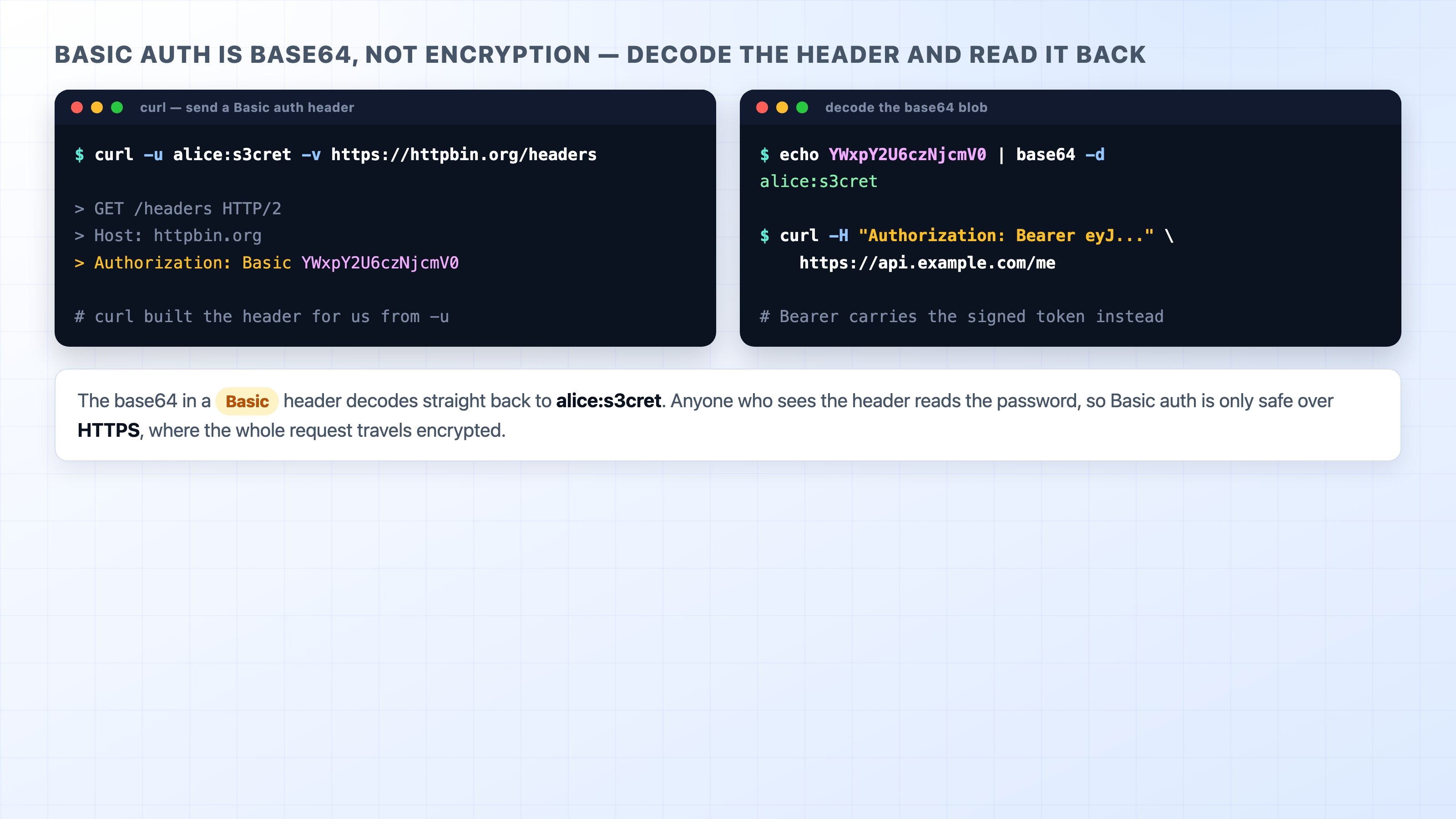
You can watch Basic auth get built and then take it apart. Pass curl a username and password with -u and it constructs the header for you; decode the blob and the secret falls right out.
Decoding a Basic auth header shows base64 is not encryption
The -u alice:s3cret flag turns into Authorization: Basic YWxpY2U6czNjcmV0. Piping that base64 to base64 -d gives back alice:s3cret immediately, with no key and no effort. That round trip is the whole lesson: the header is readable to anyone who sees it, so the encryption has to come from HTTPS around it, not from base64 inside it.
Header or cookie?
You now know two ways a credential reaches the server: in a cookie, or in the Authorization header. They are both valid, and the difference between them is about who attaches the credential.
A cookie is attached automatically. Once the browser has stored it, every matching request to that site carries it without anyone writing code to make that happen. That is wonderful for a classic server-rendered web app: the user logs in, the session cookie rides along on every page click for free. The catch is that "automatically, on every request" includes requests the user did not mean to make, which is the opening that CSRF attacks exploit, and the reason the SameSite attribute from Chapter 28 exists.
The Authorization header is attached explicitly. Nothing sends it unless the client deliberately sets it on the request. A single-page app reads its token from storage and adds the header to each fetch call; a mobile app does the same; a backend calling another service sets it by hand. That is more work, but the credential never travels on a request you did not write, which sidesteps the automatic-sending problem entirely.
A rough rule of thumb: cookies suit a browser talking to its own site, and the Authorization header suits an API talking to clients it does not control. Neither is the "correct" one; they fit different shapes of application.
What an API key is for
A bearer token answers "who is this user?" An API key usually answers a different question: "which application is calling?" It is a single secret string a service hands to a developer so the service can recognize that developer's app on every request.
That distinction matters more than it first looks. A weather API does not need to know that you personally requested today's forecast; it needs to know which registered application made the call, so it can count that app's usage, enforce its rate limit, and bill the right account. The key identifies the caller as an application, not a specific human behind it. Some keys do map to a single user, but identifying the application is the job they were built for.
That is also why a plain API key is often enough on its own. If all you need is to recognize an app and meter it, a key does the job with almost no machinery. The moment you need to know which user is acting, what they are allowed to do, and when their access should expire, you have outgrown a bare key and want a real token whose payload carries those claims. Keys identify and meter; tokens carry per-user authorization. Plenty of APIs use both: a key to identify the app, a token to identify the user.
Where the key should travel
An API key has to ride somewhere on the request, and the choice has real security weight. There are two common places.
The safe place is a header. Many APIs accept the key as a bearer credential, Authorization: Bearer <key>, and others use a custom header by convention:
X-API-Key: 8f14e45fceea167a5a36dedd4bea2543
http
The tempting but risky place is the query string, tacked onto the URL:
GET /v1/forecast?api_key=8f14e45fceea167a5a36dedd4bea2543
http
This works, and you will see it in the wild, but it leaks the key in ways a header does not. URLs end up in places request headers never reach: server access logs write the full path, browser history stores it, and the Referer header can forward it to a third-party site when a page links out. A key in the query string is a key copied into all of those places. Put it in a header instead, where it stays out of the URL and out of those logs.
The life of a key
A key is not a set-and-forget string. It has a lifecycle, and four moments in it are worth naming.
Issuing. The service generates a long random key and shows it to the developer once, usually in a dashboard. From then on the service stores only a hash of it, not the key itself, so even the provider cannot show it to you again. That is why every key page says "copy this now, you will not see it again."
Scoping. A good key is not all-powerful. Scoping limits what a key can do, so a key minted for read-only access cannot delete anything, and a key for one project cannot touch another. The point is blast radius: if a narrowly scoped key leaks, the damage is bounded to what that key was allowed to do, not your whole account.
Rotating.Rotation is replacing a key with a fresh one on a schedule, retiring the old one after a short overlap. You rotate so that a key which quietly leaked at some unknown point stops being useful, and so that the secret an attacker might have copied has a limited shelf life. Designing for rotation from the start, rather than hardcoding one key forever, is what makes it painless later.
Revoking.Revocation is killing a key immediately, the instant you know it is compromised. Unlike a stateless JWT, a key lives in the provider's store, so revoking it is one delete away: the next request carrying that key fails. This is the same easy-revocation property sessions had over tokens, and it is a real advantage of keys when a secret gets out.
Where credentials leak
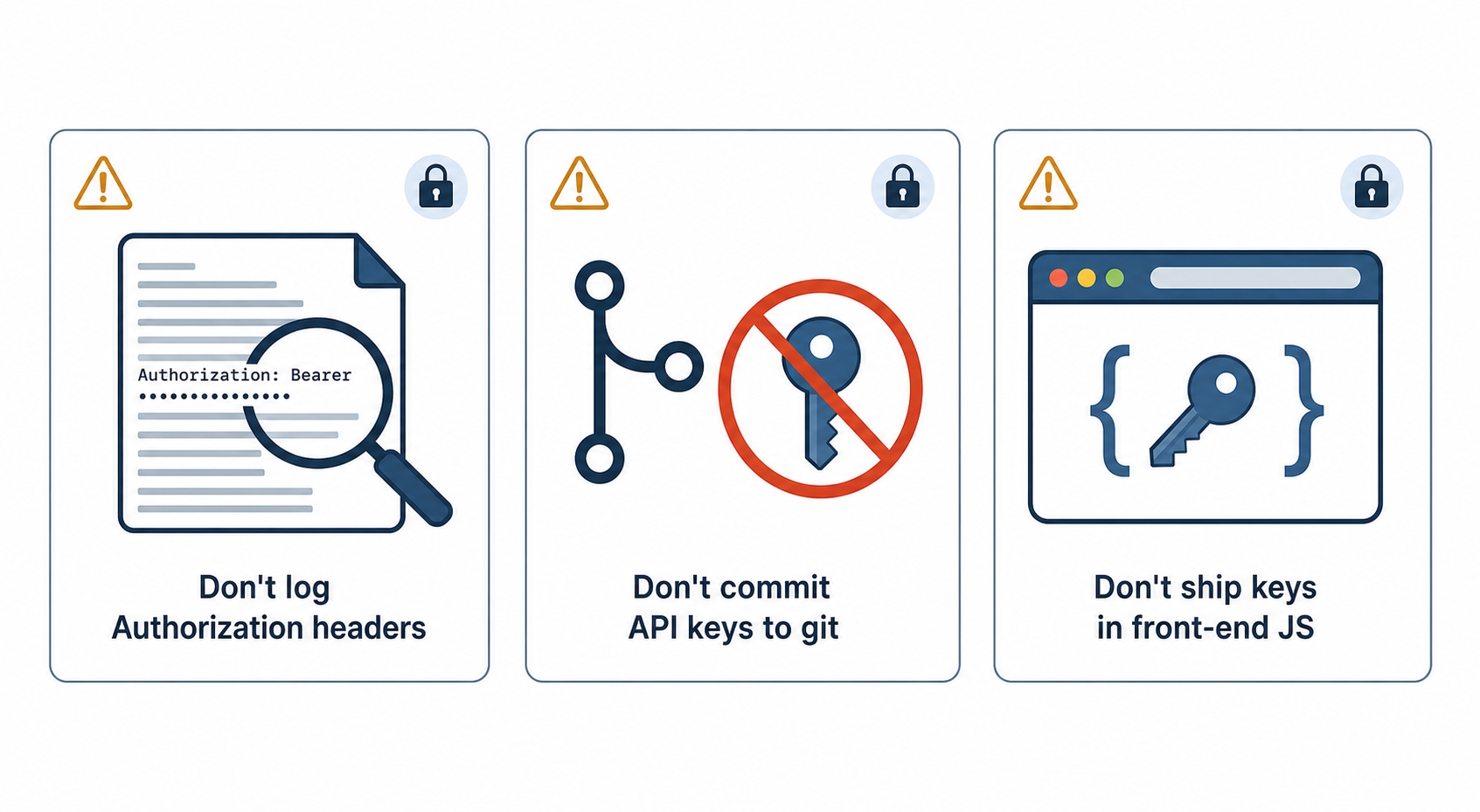
Most credential leaks are not clever attacks. They are an Authorization header or a key ending up somewhere it can be read, put there by ordinary mistakes. Three of them account for an enormous share of real incidents, so they are worth taking seriously.
Three ways credentials leak and how to avoid each
Logging the Authorization header. It is natural to log incoming requests for debugging, and just as natural to log all their headers. Do that without filtering and every bearer token and Basic credential that passes through lands in your logs in plain text, where anyone with log access can read and reuse it. The fix is to redact the Authorization header (and any Cookie header) before logging, replacing the value with something like [REDACTED]. This is exactly the rule the observability chapter later in the course returns to: tokens, passwords, and full Authorization headers must never reach a log.
Committing keys to git. Pasting a key directly into source code is fast and feels harmless, until that commit is pushed to a repository. Now the key is in the git history, and even deleting it in a later commit does not remove it, because the old commit still holds it. Public repositories get scraped for keys within minutes of a push. Keep secrets out of source entirely: load them from environment variables or a secrets manager, and add the files that hold them to .gitignore. If a key does get committed, treat it as compromised and revoke it, do not just delete the line.
Shipping keys in a front-end bundle. This is the one beginners trip over most. Anything your front-end JavaScript can read, the user can read too. The browser downloads that JavaScript in full, so a key baked into it is sitting in plain sight in the page's source, visible to anyone who opens DevTools. There is no such thing as a "hidden" secret in client-side code. Any credential that must stay secret belongs on a server the user cannot inspect; the browser should call your server, and your server holds the key and makes the real request. Keys that are safe to expose, like a publishable analytics key, are designed for it and scoped to almost nothing, which is the exception that proves the rule.
What's Next
That closes Section 9: you now know how a stateless web remembers and authenticates you, from cookies to sessions to tokens to the headers and keys that carry credentials. Section 10 turns from who you are to what you send, starting with Chapter 32, "Content-Type and Content Negotiation," and the header that tells the other side how to read the body.