In the last chapter we followed the cookie loop and ended on a question: a cookie is just a small piece of text the browser sends back, so where does the real user data live? You would not want to stuff someone's name, role, and cart into a cookie. It is small, it lives on the user's machine where they can read and tamper with it, and it rides along on every request. The answer is a session: the server keeps the actual state on its own side and hands the browser only an ID. Think of that ID as a coat-check ticket. The ticket is tiny and says nothing about your coat, but the cloakroom can find your coat with it.
Overview
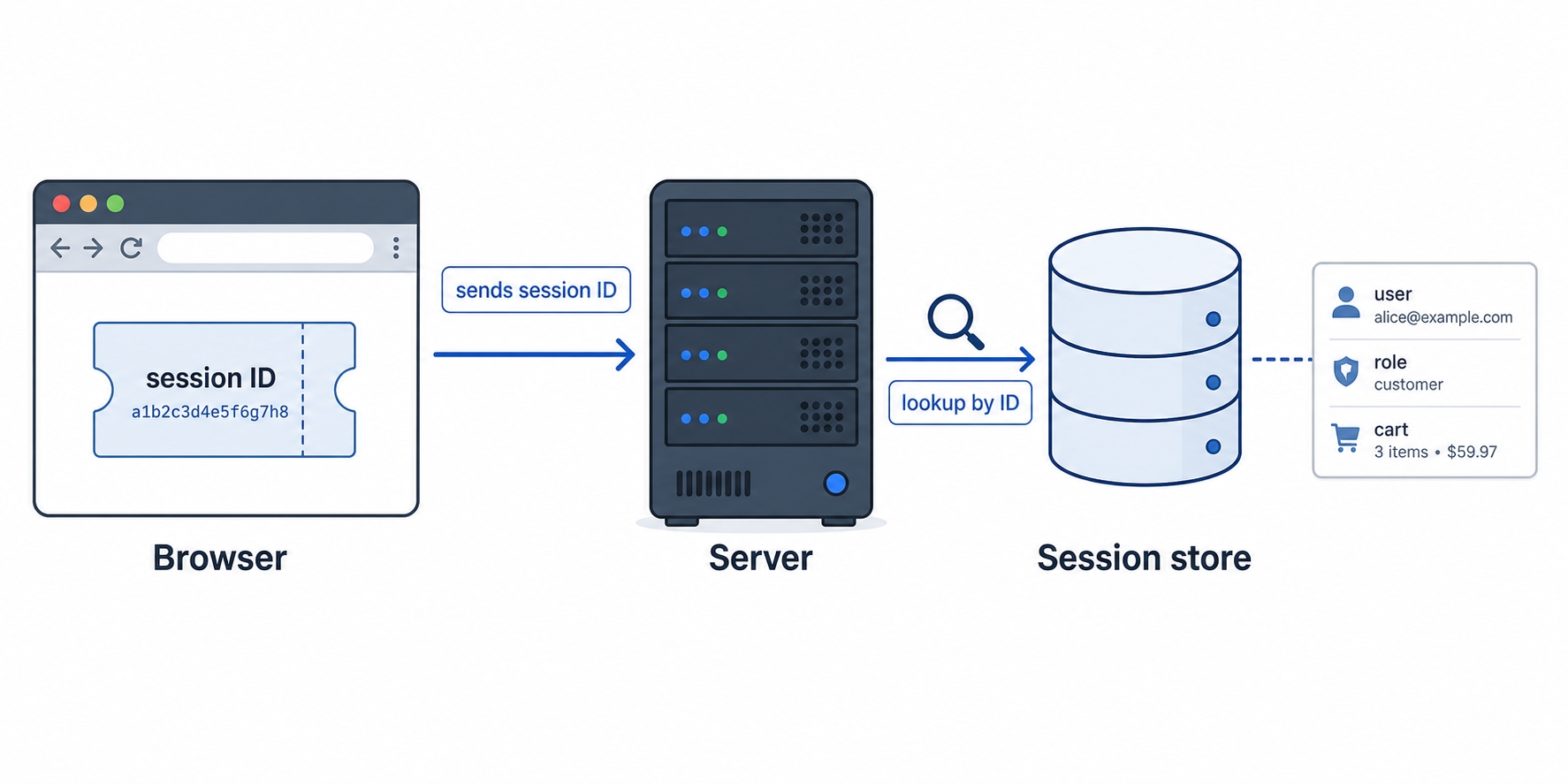
A session is a record of who you are that the server stores and keeps between requests. On login the server creates that record, gives it a random ID, and sends just the ID to the browser in a cookie. On every later request the browser returns the ID cookie, the server looks up the full session by that ID, and it knows who you are again, without the browser ever holding the real data.
Browser sends a session ID cookie and the server looks up the real data
The rest of the chapter fills in the parts the picture leaves out:
The session-ID-in-a-cookie pattern: the cookie carries only the ID; the real data sits server-side, keyed by that ID.
Where session data actually lives: in process memory, a database, or a shared store like Redis, each with a trade-off.
Why sessions make running more than one server harder, and the two standard fixes (sticky sessions and a shared store).
The session-ID-in-a-cookie pattern
Cookies from the last chapter are still doing the carrying. What changes is what we put in the cookie. Instead of any meaningful data, the cookie holds a single opaque value: the session ID, a long random string that means nothing on its own.
Here is the split. When you log in, the server does two things. First it creates a session: a record of who you are, stored on the server. Then it generates a random session ID to label that record and sends only the ID back in a header.
On the next request the browser attaches the cookie automatically, exactly as the last chapter showed:
GET /account HTTP/1.1
Host: shop.example.com
Cookie: session_id=k7Qx9fL2mZ8aD4pR
http
The server reads the session_id, looks it up in the store, gets the record back, and now knows you are user 4821 with the admin role. It builds your account page and replies. The request itself carried nothing but a meaningless string.
The cookie holds the ID, not the data. This is the part people new to sessions mix up. The cookie is the claim ticket; it is small and says nothing useful by itself. All the real information lives server-side, looked up by the ID. That is the whole point: the browser can read its own cookie, but k7Qx9fL2mZ8aD4pR tells an attacker nothing about you, and changing it to a different random string just fails the lookup. The data is somewhere they cannot reach.
This is why the security attributes from the last chapter matter so much here. The session ID is the key to your account for as long as the session lives. Whoever holds that ID can act as you, so a session cookie almost always carries Secure, HttpOnly, and a SameSite value, for the same reasons we covered with cookies.
Where the session data lives
We keep saying "the server stores it," but where exactly? The session store is just a place to keep id → data pairs, and you have three common choices. They differ in durability, speed, and whether more than one server can share them.
The simplest option is in process memory: a plain map or dictionary in the running server process. It is fast and needs no setup, which makes it fine for a tutorial or a single small app. It has two real problems, though. Restart the server, even just to deploy, and every session is gone, so everyone gets logged out. And the sessions live inside one process, so a second server cannot see them, which is the scaling problem we will hit in a moment.
The second option is a database. You store sessions in a table, keyed by ID. This makes them durable: a restart no longer logs everyone out, because the rows are still on disk, and every server querying that database sees the same sessions. The cost is speed. A session is read on essentially every authenticated request, and a full database round trip on every request is more work than a lookup of that frequency really wants.
The third option, and the common production choice, is an in-memory data store like Redis. Redis keeps data in memory, so lookups are fast like the in-process map, but it runs as its own service that every app server connects to, so all of them share one set of sessions. It also supports a time-to-live, so an expired session can clean itself up automatically. You get the speed of memory and the sharing of a database at the same time, which is exactly what session lookups want.
There is no single right answer; it depends on your scale. The progression is the useful thing to remember: in-memory is simplest but private and fragile, a database is durable and shared but slower per lookup, and Redis is the fast-and-shared option that most production setups land on.
Why sessions complicate scaling
Sessions interact badly with one of the most common ways to grow a web app: running more than one server. This is worth slowing down on, because it explains why so many real systems reach for Redis.
Back in the load balancing idea you will meet in full later, a busy site does not run on one server. It runs several identical app servers with a load balancer in front, spreading incoming requests across them so no single machine carries everything. That is horizontal scaling: handle more traffic by adding more servers, not a bigger one.
Now picture in-memory sessions in that setup. You log in, and the load balancer happens to send that request to Server A. Server A creates your session in its own memory and sends you the cookie. A moment later you click a link. The load balancer is free to send this next request to Server B, which is just as valid a choice. But Server B has never seen your session. It is sitting in Server A's memory, and Server B cannot read another process's memory. So Server B looks up your session ID, finds nothing, and treats you as logged out. You get bounced to the login page for no reason you can see.
This is the in-memory session trap, and it has two standard fixes.
The first is sticky sessions (also called session affinity). You configure the load balancer to pin each user to the server that first handled them. Once you land on Server A, every later request from you goes to Server A, where your session lives. It works, and it needs no shared store. The downside is that you have tied users to specific machines: if Server A goes down or gets taken out for a deploy, every session on it is lost, and the load balancer cannot freely rebalance traffic anymore because it has to keep honoring those pins.
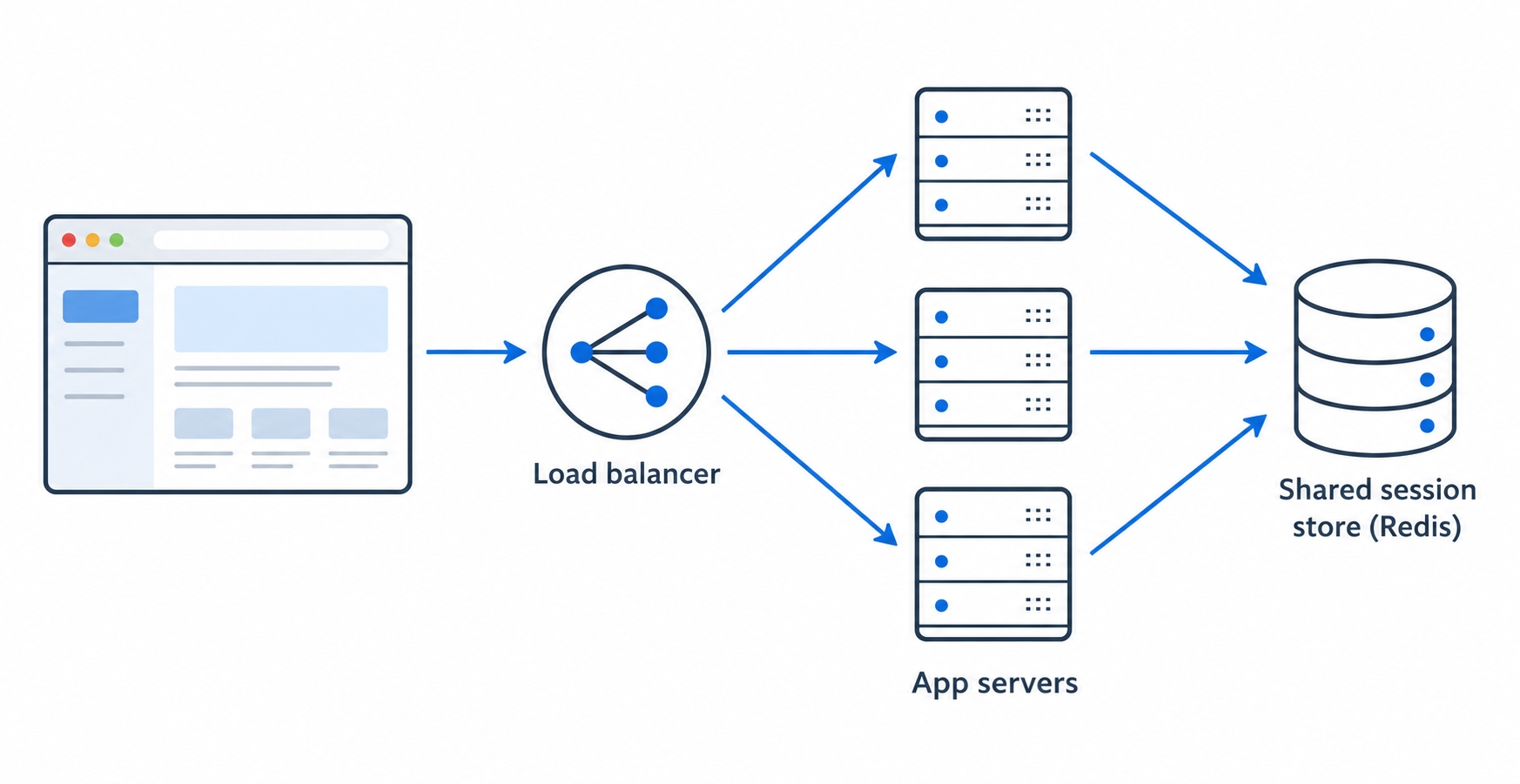
The second fix is a shared session store: move the sessions out of any single server's memory and into one store, like Redis, that all the app servers read from.
Many app servers share one session store behind a load balancer
Now it does not matter which server the load balancer picks. Server A wrote the session to Redis on login; Server B reads it from the same Redis on the next request and recognizes you immediately. The servers become interchangeable again, which is the whole point of running several of them. This is why "use Redis for sessions" is such common production advice: it is the move that lets sessions survive horizontal scaling cleanly.
A login to authenticated-request walkthrough
Let's put the pieces in order as one flow, from credentials to a recognized request.
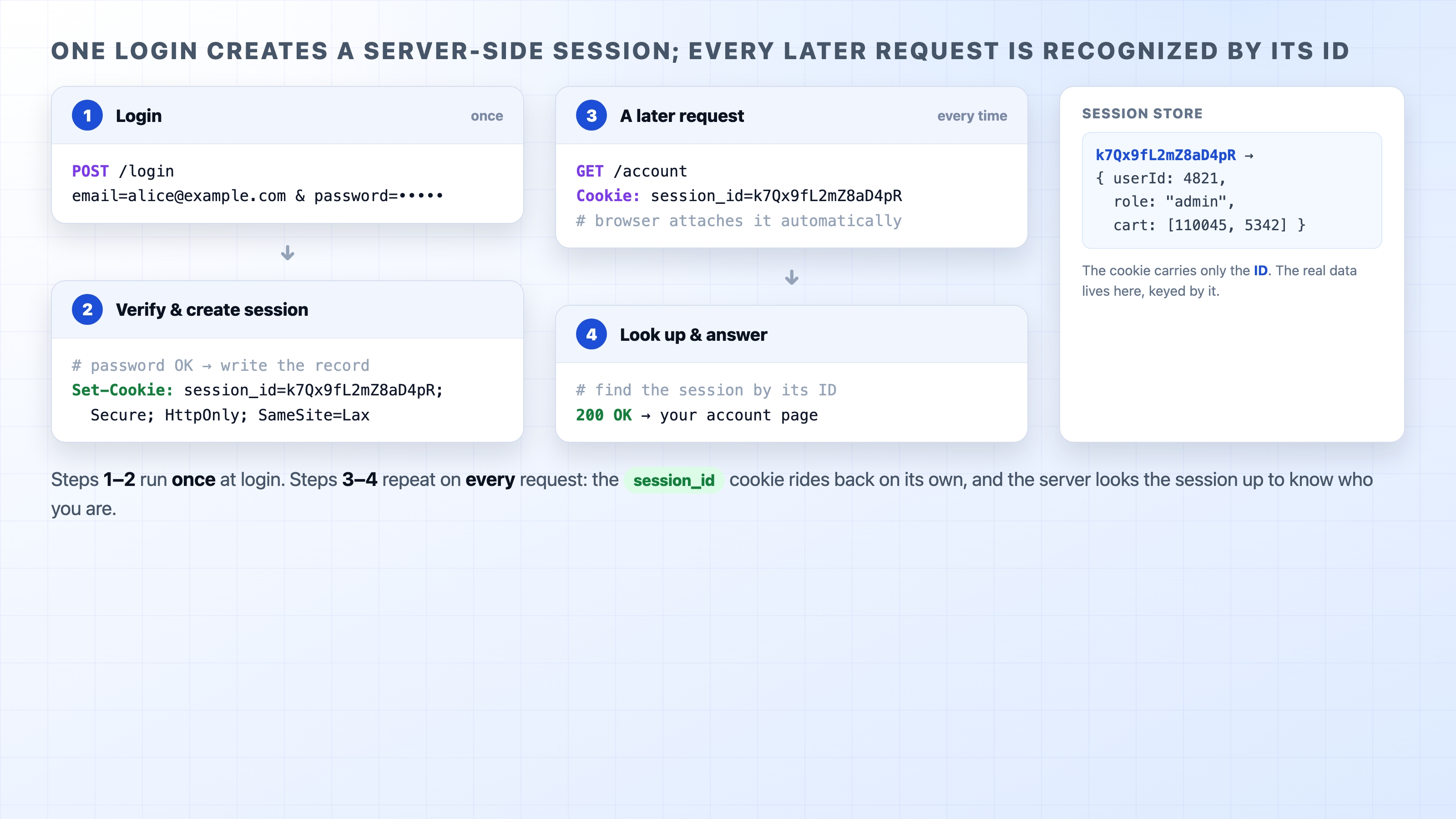
Login. You submit the form. The browser sends POST /login with your email and password in the body.
Verify. The server checks the password against what it has stored. If it is wrong, it stops here and returns an error. If it is right, you are authenticated.
Create the session. The server creates a session record (userId, role, and so on), generates a random session ID, and writes the pair into the session store.
Set the cookie. The response comes back with Set-Cookie: session_id=<random> plus Secure, HttpOnly, and SameSite. The browser files it under the site.
A later request. You navigate somewhere. The browser attaches Cookie: session_id=<random> automatically.
Look up and answer. The server reads the ID, looks the session up in the store, finds you, and serves a response that knows who you are.
Login creates a server-side session and later requests are recognized by its ID
Steps 1 to 4 happen once, at login. Steps 5 and 6 then repeat on every request for the life of the session. That repetition is the key trait of this design: every authenticated request costs a lookup in the session store. The server holds state, and it has to go consult that state each time.
This is exactly the property the next chapter pushes against. A session-based system is stateful on the server: the source of truth for "who is this?" lives in your store, and you pay a lookup for it on each request. That works well and is everywhere, but it is not the only way. There is an approach where the credential the client carries holds its own verifiable claims, so the server can trust it without a lookup.
What's Next
The next chapter, "Tokens and JWT," shows that other approach: instead of looking up a session on every request, the server verifies a self-contained token that carries its own claims. We will compare the two honestly and see what each one gives up.