Back in Chapter 7 you met the rule that makes the whole web scale: HTTP is stateless. Each request stands completely on its own, and the moment the server replies it forgets you ever asked. That is wonderful for running a hundred interchangeable servers, and useless the second you want to stay logged in, keep items in a cart, or remember that you prefer dark mode. This section is about how a forgetful protocol still remembers who you are, built up in four steps: cookies, then sessions, then tokens, then the headers and keys that carry credentials. We start with the oldest and most fundamental piece, the cookie.
Overview
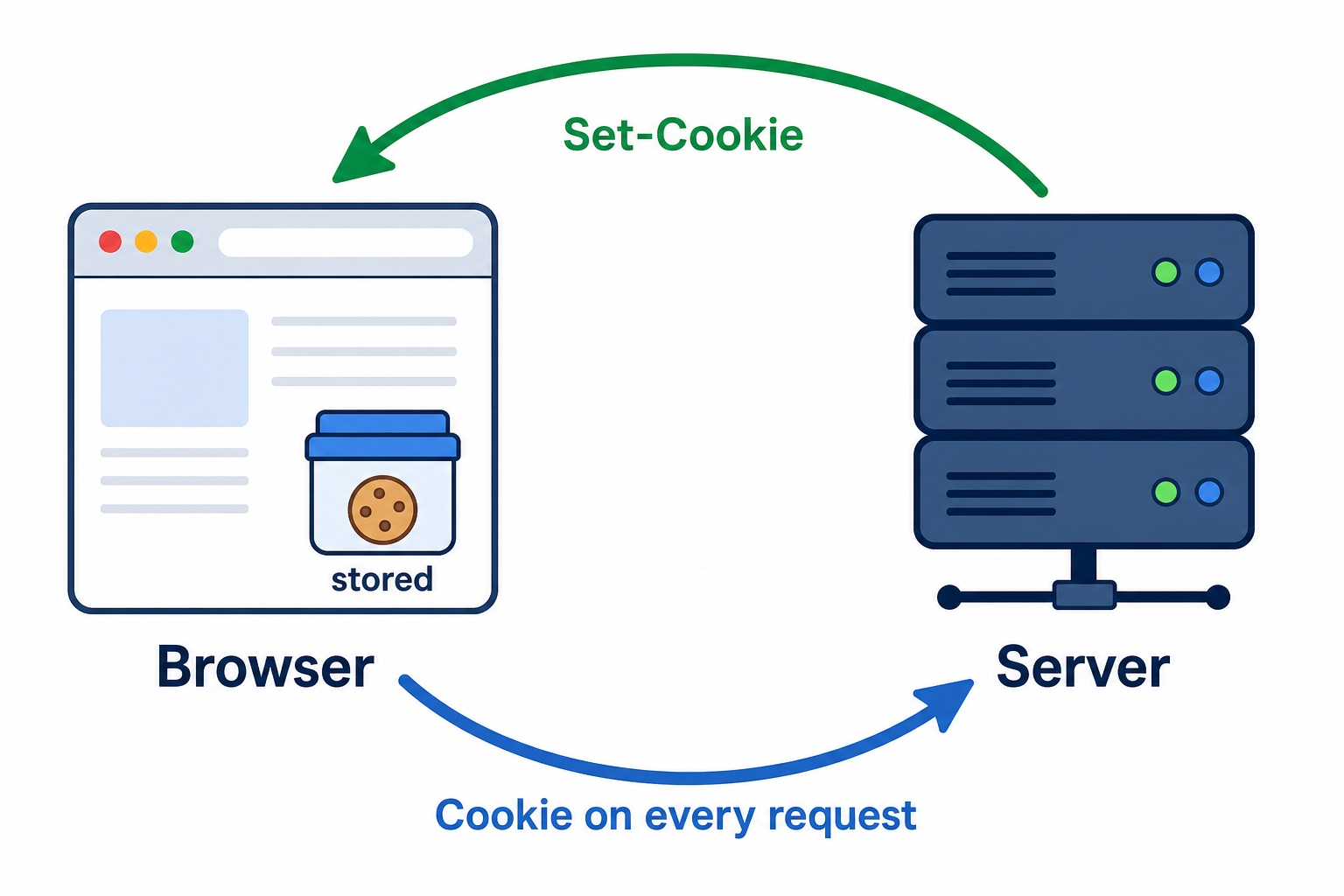
A cookie is a small piece of text a server asks the browser to store and hand back on later requests. The server sets it once, the browser keeps it, and from then on the browser quietly attaches it to every request to that site. That single round trip is how a stateless server recognizes a returning visitor without remembering anything itself.
The cookie loop between a browser and a server
The picture above is the entire mechanism. The rest of the chapter fills in the details:
The cookie loop: a Set-Cookie header goes out in a response, the browser stores the cookie, and a Cookie header comes back on every later request to that site.
The attributes that ride alongside a cookie and control its lifetime, which requests it travels on, and how hard it is to steal: Expires, Max-Age, Domain, Path, Secure, HttpOnly, and SameSite.
Cookies: How a Stateless Protocol Remembers You | dalabs.academy
How to watch all of this happen live in your browser's DevTools.
The cookie loop
Here is the trick that defeats statelessness, and it really is just three steps.
When the server wants the browser to remember something, it includes a Set-Cookie header in its response. Say you log in. The server's response comes back like this:
HTTP/1.1 200 OK
Content-Type: text/html
Set-Cookie: session_id=9f2a3b...d71
http
The browser sees that header and stores the cookie, filed under the site that sent it. It is just a name and a value, session_id=9f2a3b...d71, sitting in the browser's cookie storage.
From then on, every time the browser makes a request to that same site, it adds the cookie back on its own, in a Cookie header:
GET /account HTTP/1.1
Host: shop.example.com
Cookie: session_id=9f2a3b...d71
http
The server reads that header, recognizes the value it handed out earlier, and now knows this is the same visitor. It looks you up, builds your account page, and sends it back, still without holding any memory of you between requests. The memory lives in the cookie that travels back and forth, not in the server.
That is the whole loop: Set-Cookie going out, the cookie stored in the browser, the Cookie header coming back in. Everything else in this chapter is detail layered on top of those three steps.
The part beginners often miss: you don't attach the cookie, the browser does. There is no code in the page that reads the cookie and adds it to the next request. Once a cookie is stored, the browser sends it automatically on every matching request, including ones triggered by an image tag, a fetch() call, or a plain link click. This is convenient and it is also exactly why some of the security attributes below exist, because "sent automatically on every request" includes requests you didn't intend.
What the attributes control
A real Set-Cookie header is rarely just a name and value. It usually carries a list of semicolon-separated attributes that tell the browser how to treat the cookie:
These attributes fall into three jobs: how long the cookie lives, which requests it gets sent on, and how protected it is. Let's take them in that order.
Lifetime: Expires and Max-Age
Two attributes set how long a cookie should survive. Expires gives an absolute date and time (Expires=Wed, 01 Jul 2026 07:28:00 GMT); the browser deletes the cookie once that moment passes. Max-Age gives a number of seconds from now (Max-Age=1209600 is two weeks); it is less error-prone because it doesn't depend on the browser's clock agreeing with the server's, and when both are present Max-Age wins.
This single choice splits cookies into two kinds:
A session cookie has neither Expires nor Max-Age. The browser keeps it only for the current browsing session and drops it when the browser closes. Good for "you're logged in for now."
A persistent cookie has a lifetime set. It is written to disk and survives restarts until its expiry, which is how a site remembers you days later without making you log in again.
(One honest caveat: many browsers now restore tabs after a restart, so a "session" cookie can outlive a close in practice. The mental model still holds, no expiry means short-lived, a lifetime means it sticks around.)
Scope: Domain and Path
The next two attributes decide which requests a cookie rides along on. A cookie isn't sent everywhere; it is sent only where it belongs.
Domain controls which hosts get the cookie. By default a cookie is sent only to the exact host that set it. Set Domain=example.com and the browser will also send it to subdomains like shop.example.com and api.example.com. A server can only set this to its own domain or a parent of it, never to some unrelated site, so a cookie can widen its reach across your own subdomains but can't leak to someone else's.
Path narrows it further by URL path. Path=/account means the cookie is attached only to requests under /account, and left off requests to / or /blog. Worth knowing clearly: Path is for organizing which cookies go where, not for security. It does not stop other code on the same site from reading the cookie, so don't lean on it to hide anything sensitive.
Security: Secure, HttpOnly, and SameSite
The last three attributes are the ones that matter most, because a session cookie is effectively a key to your account. Whoever holds it can act as you. These three attributes each shut a different door an attacker might use.
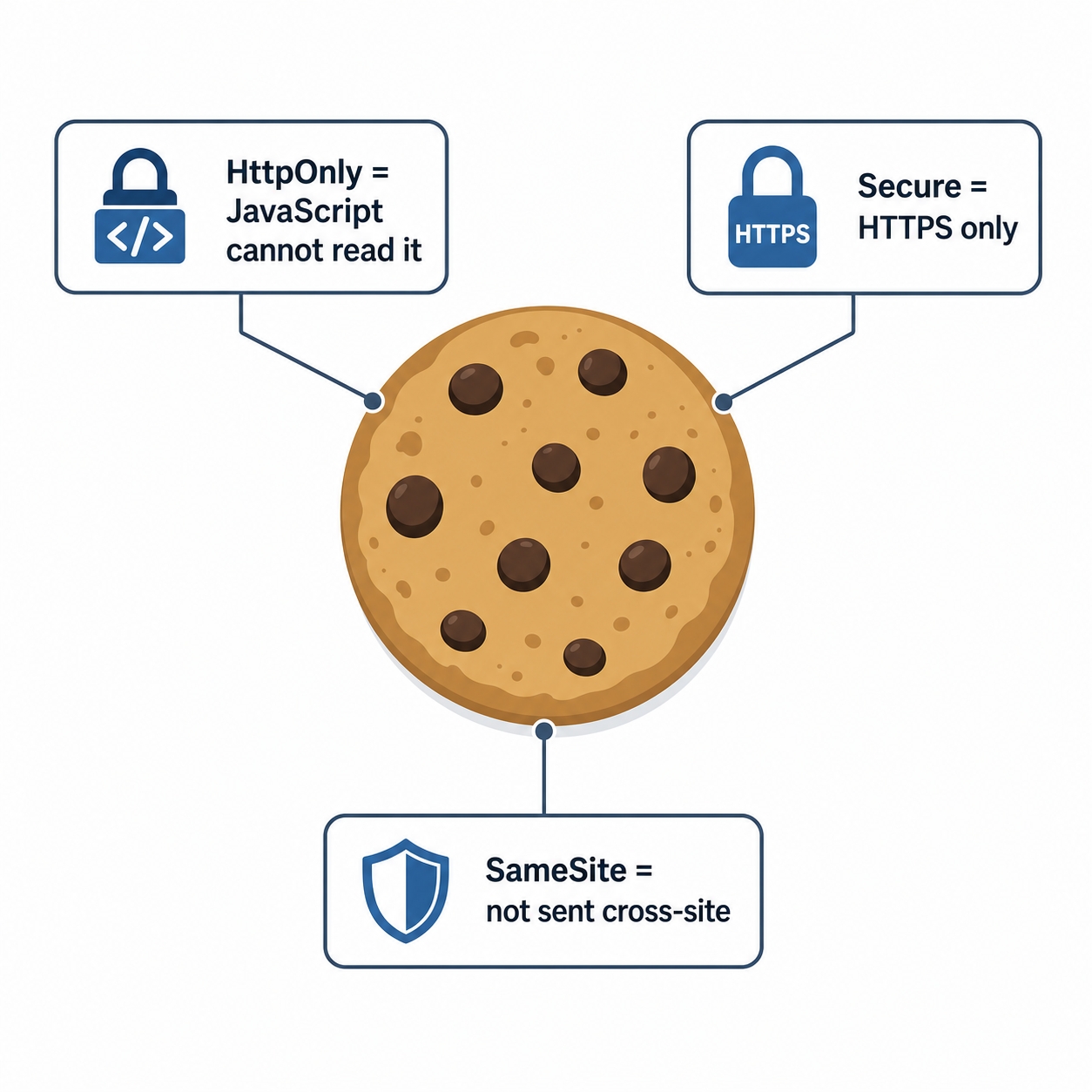
Three cookie attributes that defend against theft and forgery
Secure tells the browser to send the cookie only over HTTPS, never over plain http://. Without it, a cookie can be attached to an unencrypted request and read by anyone watching the network. With it, the cookie stays off the wire unless the connection is encrypted. For anything that authenticates a user, this should always be on.
HttpOnly makes the cookie invisible to JavaScript. Normally page scripts can read cookies through document.cookie; an HttpOnly cookie is hidden from that API and travels only in HTTP requests. This defends against XSS (cross-site scripting), an attack where someone manages to inject malicious JavaScript into your page. If that injected script can read document.cookie, it can copy your session cookie and send it to the attacker. HttpOnly removes the cookie from JavaScript's reach, so even a successful injection can't steal it that way.
SameSite controls whether the cookie is sent on requests that originate from other sites, which is the heart of defending against CSRF (cross-site request forgery). In a CSRF attack, a malicious page you visit quietly fires a request at a site you're logged into, say bank.example.com/transfer. Because the browser attaches cookies automatically, your session cookie would normally ride along and the bank would treat the forged request as genuinely yours. SameSite is how you stop that. It takes three values:
Strict sends the cookie only on requests that start from the cookie's own site. A request triggered by another site never carries it. Safest, but it also means following a link from elsewhere into your site arrives without the cookie.
Lax is the common default. It withholds the cookie on cross-site sub-requests (like a hidden form post or an embedded image) but still sends it when the user actually navigates to your site by clicking a top-level link. This blocks the typical CSRF request while keeping normal navigation smooth.
None sends the cookie on cross-site requests too, which you need for legitimate third-party embedding. Browsers require Secure alongside SameSite=None, so such a cookie at least never travels unencrypted.
HttpOnly and Secure do different jobs, don't confuse them.Secure is about where the cookie may travel: HTTPS only, so it can't be sniffed off an unencrypted connection. HttpOnly is about who can read it: not JavaScript, so a script injected into your page can't grab it. One closes the network door, the other closes the in-page-script door. A well-protected session cookie usually sets both, plus a SameSite value.
Try it now: watch cookies in DevTools
You can see this whole loop on any site you're logged into, without writing a line of code. Open your browser's developer tools (right-click anywhere and choose Inspect, or press F12).
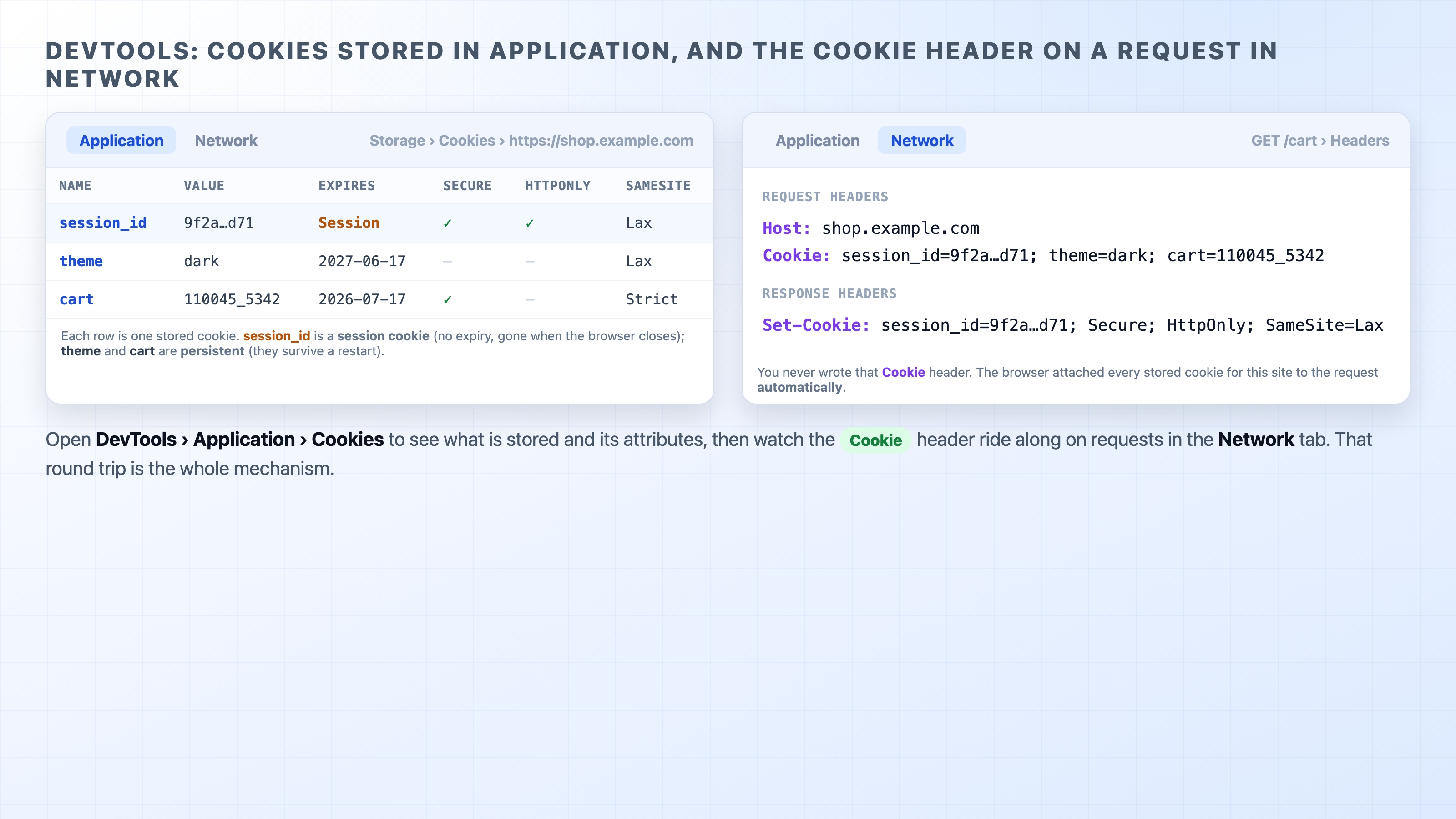
Go to the Application tab (in Firefox it's Storage), and in the left sidebar expand Cookies and pick the current site. You'll see a table of every cookie stored for it, one row each, with columns for the value and the attributes from this chapter: Expires, Secure, HttpOnly, SameSite. A cookie whose Expires reads "Session" is a session cookie; one with a real date is persistent.
Now switch to the Network tab and reload the page. Click any request and open its Headers. Under the request headers you'll find the Cookie header carrying the stored cookies up to the server, and on responses that set them, a Set-Cookie header coming back.
DevTools showing stored cookies and the Cookie header on a request
The thing to notice is that you never wrote that Cookie header. It appears on request after request on its own, because the browser attaches every cookie that matches the site automatically. Seeing the stored cookies on one tab and the same values riding the Cookie header on another is the cookie loop made visible.
What's Next
A cookie can hold a session value, but where does the real user data live, and why is it usually a bad idea to keep it all in the cookie itself? The next chapter, "Sessions," shows how servers store the actual state on their side and hand the browser only an ID.