So far in this section the cache has lived on one machine. The browser cache in Chapter 25 holds copies for a single user, on a single laptop, and the Cache-Control headers in Chapter 26 are the instructions a server attaches to steer it. A CDN (content delivery network) takes those same instructions and applies them in a very different place: a shared cache, spread across the world, sitting in the path between your users and your server. It reads the very headers you just learned, and it is the reason a page can feel instant from Tokyo even though your server is in Virginia.
Overview
A CDN is a fleet of cache servers placed in data centers around the world. When a user requests one of your files, they are routed to the nearest of those servers, which serves a cached copy if it has one and only reaches back to your server if it does not. Two new pieces of vocabulary carry this chapter. The cache servers spread around the world are called edge locations, and the single source-of-truth server they cache for is your origin.
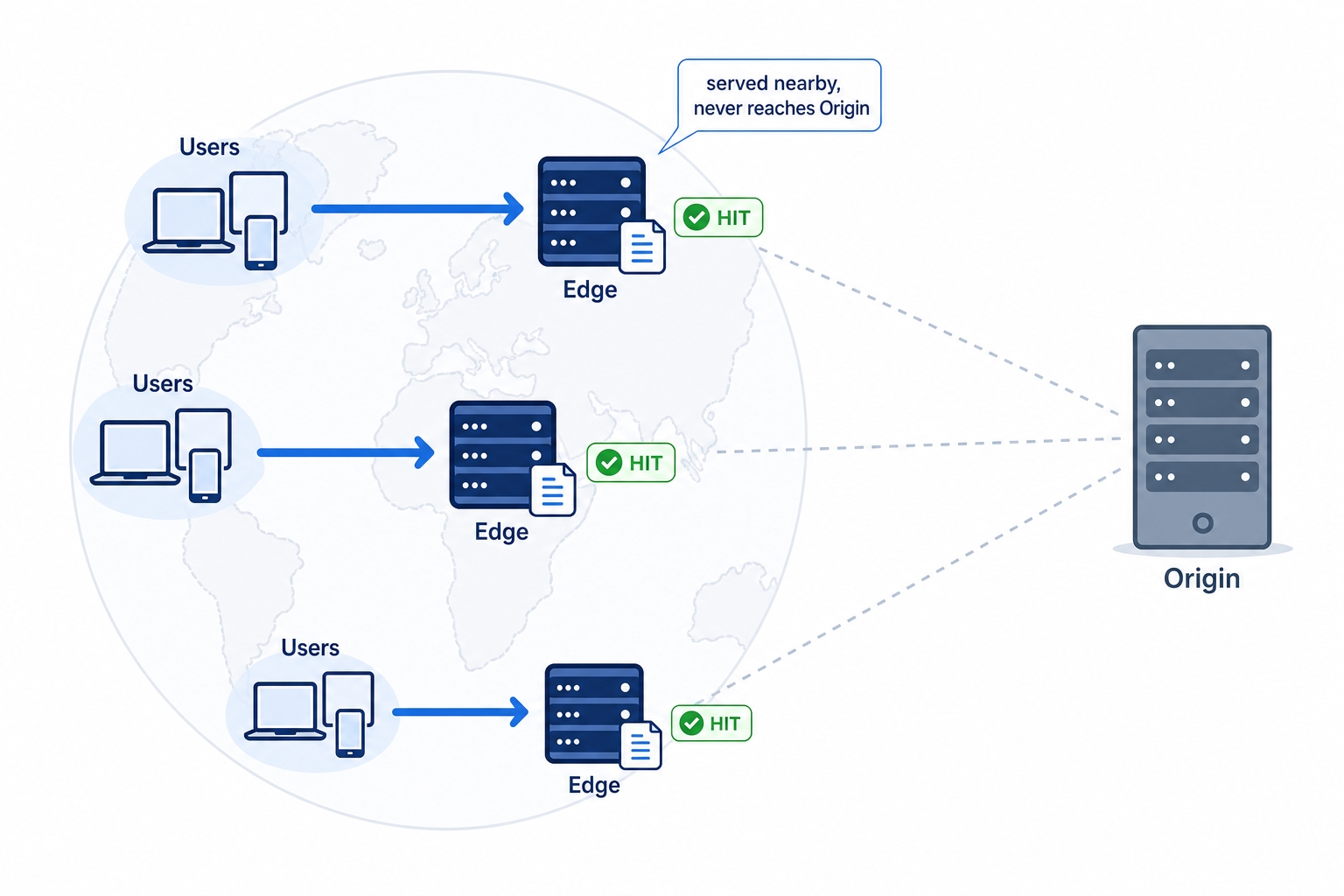
Users in each region are served by a nearby edge cache, never reaching the distant origin
The diagram above is the whole idea in one picture. Three groups of users in three regions each talk to a nearby edge, and a hit at that edge is answered locally. The distant origin, on the right, barely gets touched. The rest of this chapter fills in how that works and where it goes wrong:
Why serving from an edge close to the user is faster, and what a hit at the edge actually saves.
What is safe to cache at a CDN (shared static assets) versus what is not (personalized pages), and why mixing them up leaks data.
How a CDN decides two requests are "the same resource" with a cache key, why query strings can fragment your cache, and why getting a cached copy removed is its own hard problem.
The edge: caching close to the user
Start with the cost a CDN is trying to cut. Every request your browser makes has to physically travel to a server and back, and distance is not free. A round trip from a user in Sydney to a server in Virginia crosses most of the planet, and even at the speed of light through fiber that is well over a hundred milliseconds, before the server does any work at all. Repeat that for a connection setup, a TLS handshake, and a few requests, and the distance alone can add up to noticeable lag.
CDN Cache: How CDNs Cache at the Edge | dalabs.academy
An edge location (you will also hear point of presence, or PoP) is a CDN data center placed geographically close to users. The CDN runs many of them, so wherever your users are, there is usually one not far away. When a user requests a file, the CDN routes them to a nearby edge instead of all the way to your origin. The round trips are still happening, but they are short ones, to a server down the road rather than across an ocean.
Now the payoff. When the requested file is already stored at that edge, the edge answers from its own copy. This is a cache hit at the edge, and the important part is what does not happen: the request never travels to your origin. Your server does no work, the long-distance round trip is avoided, and the user gets the file from a machine near them. When the edge does not have a copy yet, that is a cache miss: the edge fetches the file from your origin once, stores it, and serves it. Every later user routed to that same edge gets the stored copy. The first visitor pays for the trip to the origin; everyone after them is served locally.
That is the speed-and-scale win in one sentence. Speed, because most requests are answered nearby. Scale, because your origin only sees the misses, a tiny fraction of total traffic, instead of every request from every user in the world.
What you can safely cache at a CDN
A CDN is a shared cache: one stored copy at an edge answers requests from many different users. That sharing is exactly what makes it powerful, and exactly what makes some content unsafe to put in it. The dividing line is the same public versus private idea from the last chapter, now with real consequences.
What caches beautifully is static, shared assets: images, CSS, JavaScript, fonts, videos, downloads. These have one defining property, the response is the same for everyone. Your logo is your logo whether you are logged in or not, whoever you are. Store it once at the edge and hand the identical bytes to every visitor, and nobody gets the wrong thing. This is the bulk of what a typical site serves by weight, and it is what CDNs were built for.
What usually does not belong in a shared CDN cache is personalized or authenticated content: the HTML of a logged-in dashboard, an account page, an API response shaped by who is asking. The trap is that these often live at the same URL for everyone. GET /account returns one person's name and email; GET /account from the next user should return theirs. To the CDN those are the same request for the same URL, so if the first response is cached, the second user is served the first user's page.
The leak worth fearing: never CDN-cache a personalized response as public. This is the same pitfall from Chapter 26, and it is at its most dangerous in a shared cache, because a shared cache serves strangers. If a personalized response goes out with Cache-Control: public, the edge stores one user's account page and hands it to the next person who asks for that URL. The fix is to mark personalized responses private (browser may cache, shared caches must not) or no-store (nobody caches), so the edge never keeps a copy meant for one person. The rule of thumb: only let a CDN cache responses that are byte-for-byte correct for anyone who might request them.
This is also the first place to correct a common belief: a CDN is not magic, and it is not automatically safe. It does exactly what your headers tell it to. Put it in front of your site and it will happily cache whatever your origin marks as cacheable, including things that shouldn't be cached. The intelligence is in the headers you set, which is the whole reason the previous chapter came first.
The cache key: what counts as "the same resource"
For a CDN to answer "I already have this," it needs a precise definition of what "this" is. That definition is the cache key: the set of request details the CDN uses to decide whether two requests are for the same cached resource. By default the key is roughly the host plus the path, for example cdn.example.com plus /assets/logo.png. Two requests with the same host and path are treated as the same resource, and the second one is a hit on the copy the first one stored.
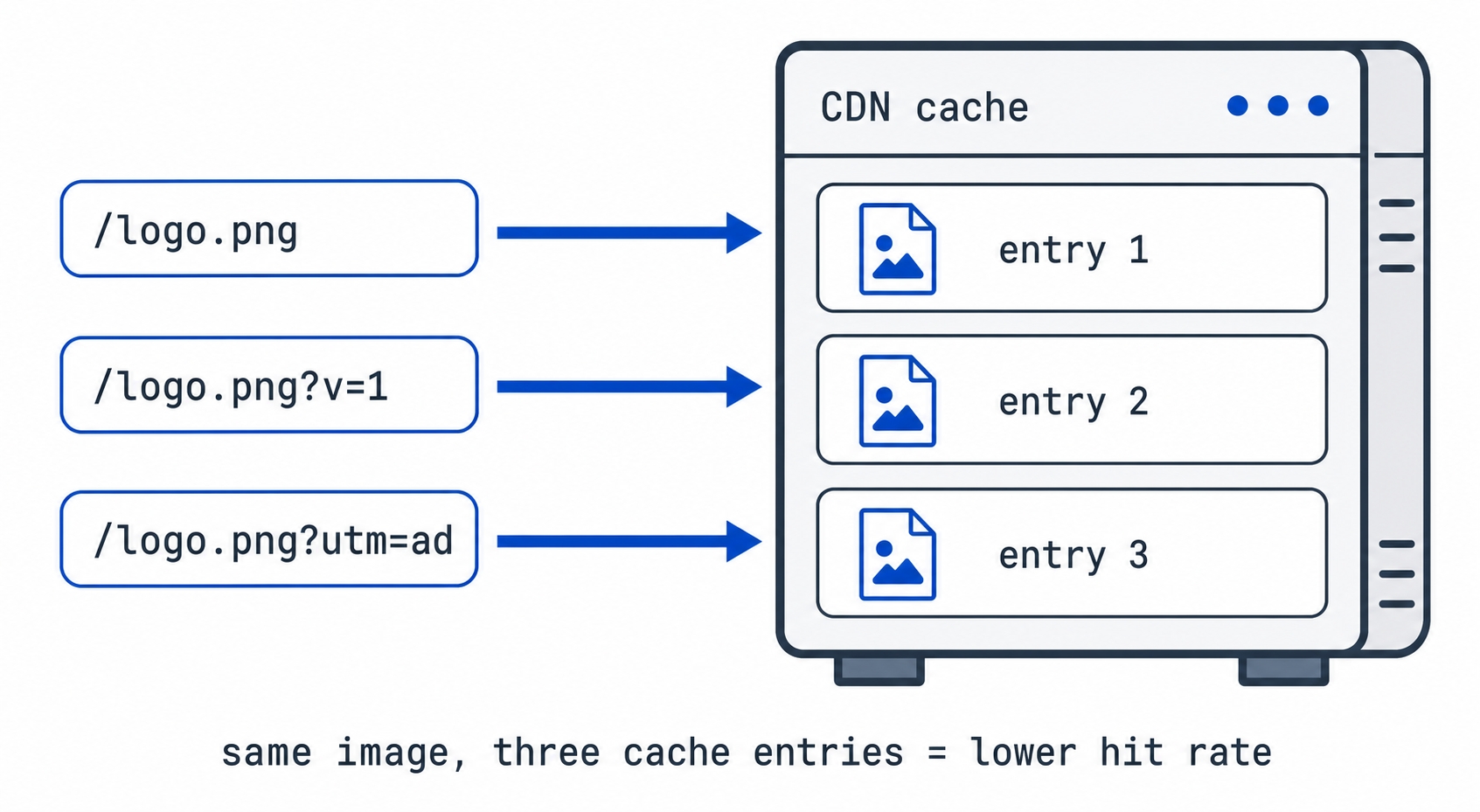
The complication is the query string, the ?something=value part of a URL. By default many CDNs include the query string in the cache key, which means these three URLs are three different keys, and therefore three separate cache entries:
/logo.png
/logo.png?v=1
/logo.png?utm_source=ad
The same image with different query strings becomes three separate CDN cache entries
It is the same image every time. But because the keys differ, the edge stores it three times, and a hit on one does nothing for the others. This is cache fragmentation: the same content split across many cache entries, each with its own slim chance of being reused. The hit rate drops, and your origin sees more misses than it should.
Where this bites in practice is tracking and versioning parameters. Marketing links append ?utm_source=..., ?fbclid=..., and friends; these change nothing about the file but generate a brand-new cache key per campaign, per click. A ?v=2 you add to bust a cache does the same on purpose. The defense is to tell the CDN which query parameters actually matter for a given resource and to ignore the rest. If /logo.png is the same picture regardless of utm_source, configure the CDN to drop that parameter from the cache key, and all those variants collapse back into one well-used entry.
Hashed filenames sidestep this entirely. Notice the contrast with the asset trick from Chapter 26. Instead of /app.js?v=2, you ship /app.4f3a9c.js, where the hash is part of the path, not a query string. New content means a new path, which means a clean new cache key with no fragmentation, while the old path keeps serving its cached copy to anyone still on the old page. Versioning in the path works with the cache key; versioning in the query string works against it.
Purging: getting a cached copy to go away
There is an old joke that there are only two hard problems in computer science: naming things, cache invalidation, and off-by-one errors. The middle one is the one this section keeps circling. Once a CDN has stored a copy at hundreds of edges around the world, getting it to drop that copy on demand is its own hard problem, and it has a name: purging (also called invalidation).
The reason it is hard is the same reason caching is fast. The whole point was to spread copies far and wide so users are served locally without anyone checking back to the origin. But "drop the copy you have" is a message that now has to reach every one of those edges, and until it does, some users are still being served the old file. Purges are usually fast in practice, but "fast" across a global fleet is not instant, and a purge that has to touch every edge is more work than serving a file ever was.
So in practice you avoid needing to purge. The hashed-filename trick is the clean way out, and it is worth seeing why one more time: if a changed file always gets a new URL, you never have to invalidate the old one. The old URL can keep its copy forever because nothing new will ever be served from it, and the new URL is a fresh cache key that no edge has seen, so it simply gets fetched and stored. You replace the hard problem (purge the world) with an easy one (publish a new name). Purging stays available for the cases you can't design away, like pulling a leaked file or fixing a bad HTML page, but for everyday assets the goal is to never reach for it.
It all runs on your Cache-Control headers
Everything in this chapter is driven by the headers from Chapter 26. The CDN is a cache, and it reads the same Cache-Control instructions your origin sends to decide what to store and for how long.
max-age sets how long the edge may serve a copy as fresh, just as it does for the browser. When it expires, the edge revalidates against your origin with the same ETag / If-None-Match conditional request, and a 304 Not Modified lets it keep its copy without re-downloading.
public lets shared caches, including the CDN, store the response. private and no-store keep it out of the edge, which is your guard against the leak above.
There is one directive aimed specifically at shared caches like a CDN, worth knowing by name: s-maxage. It is a freshness window, like max-age, but it applies only to shared caches and overrides max-age for them. That lets you split the two audiences cleanly, for example a short freshness window in the browser but a longer one at the edge:
Cache-Control: public, max-age=60, s-maxage=86400
Here a browser treats the copy as fresh for 60 seconds, while a CDN holds it for a day. You don't need it often, but when you want the edge and the browser to cache for different lengths of time, s-maxage is the lever, and its existence is a reminder of the theme of this whole section: the origin sets the policy in headers, and every cache down the line, browser and edge alike, obeys it.
Try it now: read a CDN's cache headers
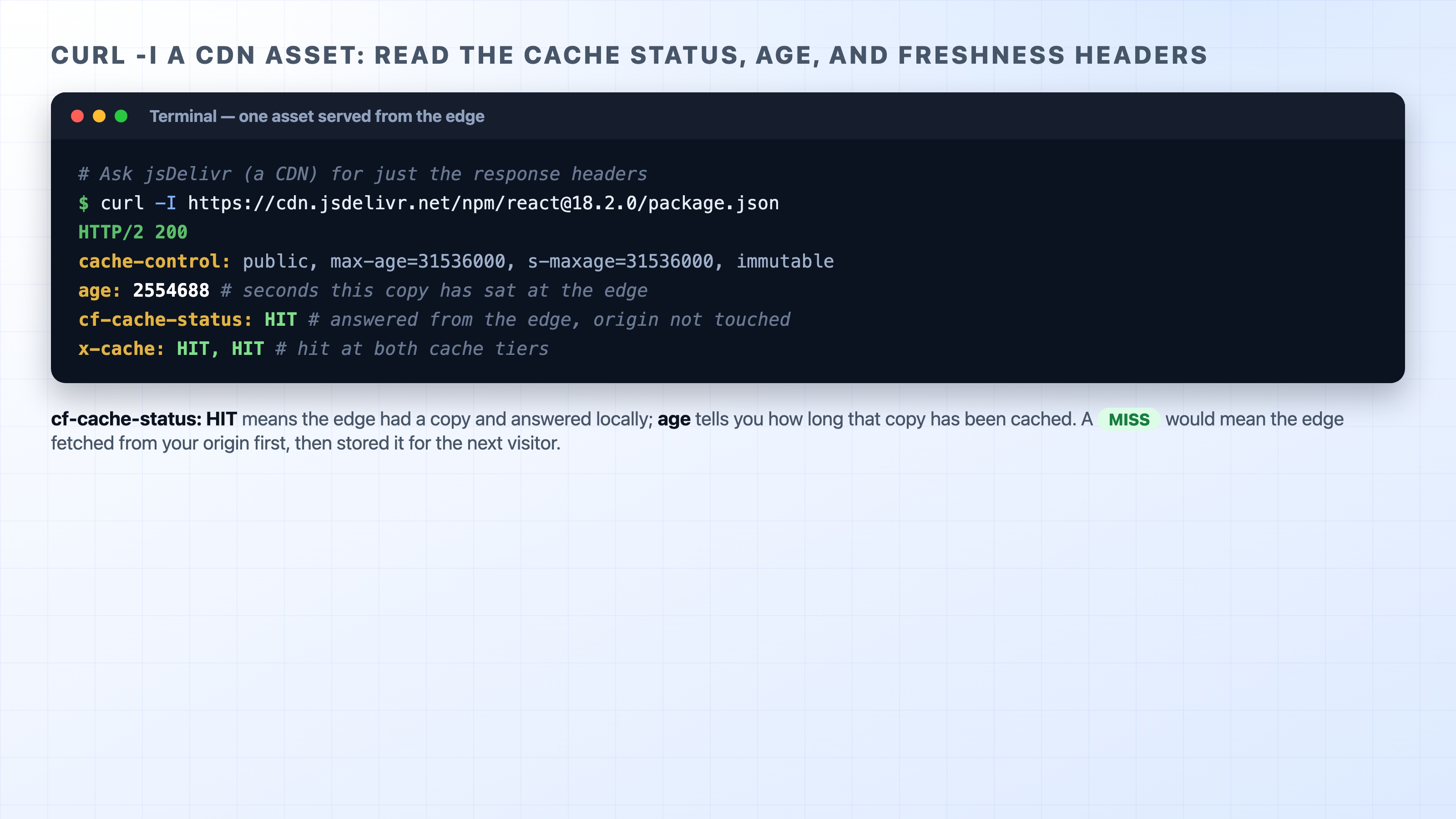
You can see an edge cache report on itself with a single command. Many CDNs add their own response headers describing what they did, and curl -I (headers only) will show them. jsDelivr is a public CDN anyone can reach, and because it sits behind Cloudflare it reports cf-cache-status:
curl -I a CDN asset showing cf-cache-status HIT and the age header
Two lines tell the story. cf-cache-status: HIT means the edge had a copy and answered from it, so your request never reached the origin; a MISS would mean the edge had to fetch from origin first, then store the file for the next visitor. A globally popular asset like this one is almost always a HIT already; on a less-trafficked file you can sometimes catch a MISS on the first request and a HIT on the second. The age header tells you how many seconds that copy has been sitting at the edge, and the cache-control here (max-age=31536000, s-maxage=31536000, immutable) is the origin telling every cache it is safe to keep this exact version for a year. Other CDNs use different header names for the same idea, such as x-cache: HIT or x-cache: MISS, but they are all answering the same question: did this come from the edge, or did it have to go home to the origin?
What's Next
That closes the caching section: you now understand caching from the browser at the user's machine, to the Cache-Control headers that drive it, out to the global edge of a CDN. Next we change subjects entirely to how a stateless protocol remembers who you are, starting with Chapter 28, "Cookies."