The last chapter gave you the vocabulary of caching: a copy is fresh while the cache may use it, stale once that window passes, and revalidate is the small check that asks the server "is my copy still good?" without re-downloading. What it didn't show is the actual HTTP behind those words. That is this chapter: the headers a server sends to set the freshness window, and the conditional request that does the revalidating.
Overview
When a server sends a response, it can attach instructions for how that response may be cached: how long it stays fresh, whether it may be stored at all, and whether shared caches are allowed to keep it. Those instructions live almost entirely in one response header, Cache-Control. Separately, the server can attach a fingerprint of the content so a cache can later ask "has this changed?" and get a one-line answer instead of the whole file.
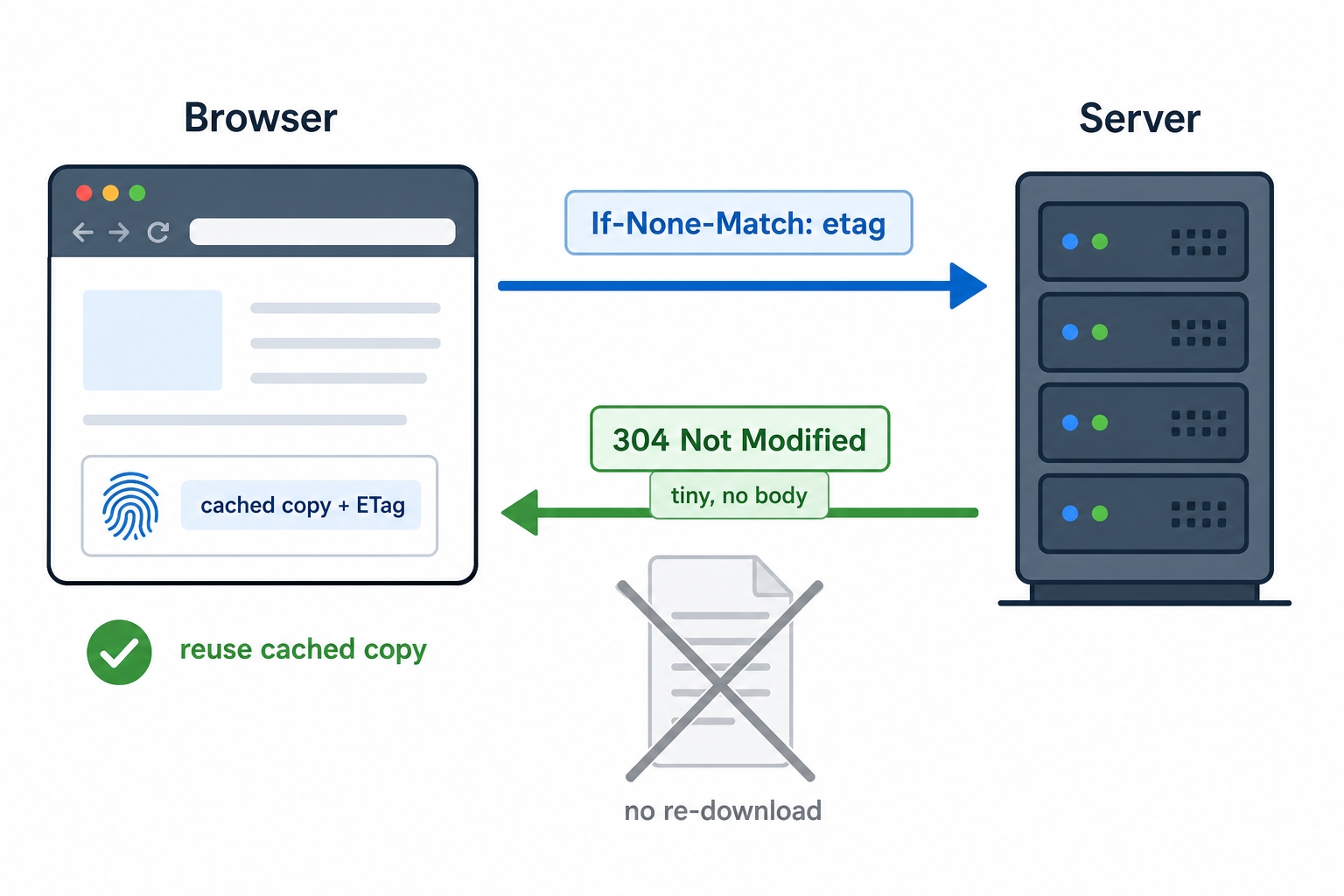
Browser sends If-None-Match and the server replies 304 Not Modified with no body
This chapter covers three things:
The Cache-Control directives that drive freshness: max-age, no-cache, no-store, and public versus private.
The conditional request that revalidates a stale copy: an ETag fingerprint, an If-None-Match request, and a 304 Not Modified reply that sends no body.
HTTP Cache Headers and Validation | dalabs.academy
The practical recipe most sites follow, cache static assets hard but keep HTML fresh, plus a pitfall that can leak one user's data into another user's cache.
Cache-Control: how the server sets the rules
Cache-Control is a response header, and it is the main lever a server has over every cache between itself and the user. Its value is a comma-separated list of directives, each one a small rule. A real one looks like this:
You read that left to right as a set of instructions. Here is each directive on its own, because each answers a different question.
max-age: how long is it fresh?
max-age is the freshness window from the previous chapter, made concrete. It is a number of seconds, counted from when the response was received, during which a cache may serve the copy without checking back.
Cache-Control: max-age=600
This says: for the next 600 seconds (ten minutes), treat this copy as fresh and serve it straight from cache, no questions asked. After ten minutes the copy is stale, and the cache should revalidate before using it again. A max-age=31536000 you will see on static files is just a very long window: 31,536,000 seconds is one year. The server is saying "this file is not going to change, hold onto it."
no-store: never keep a copy
no-store is the strict one. It tells every cache along the path not to store this response at all, not on disk, not in memory, nowhere. The next time the resource is needed, the client must fetch it fresh from the server.
Cache-Control: no-store
This is what you want for sensitive or strictly per-request data: a bank balance, a one-time checkout page, anything that should never sit in a cache where it could be served again or read later. Nothing is reused, so there is no speed benefit, and that is the point.
no-cache: keep a copy, but always check first
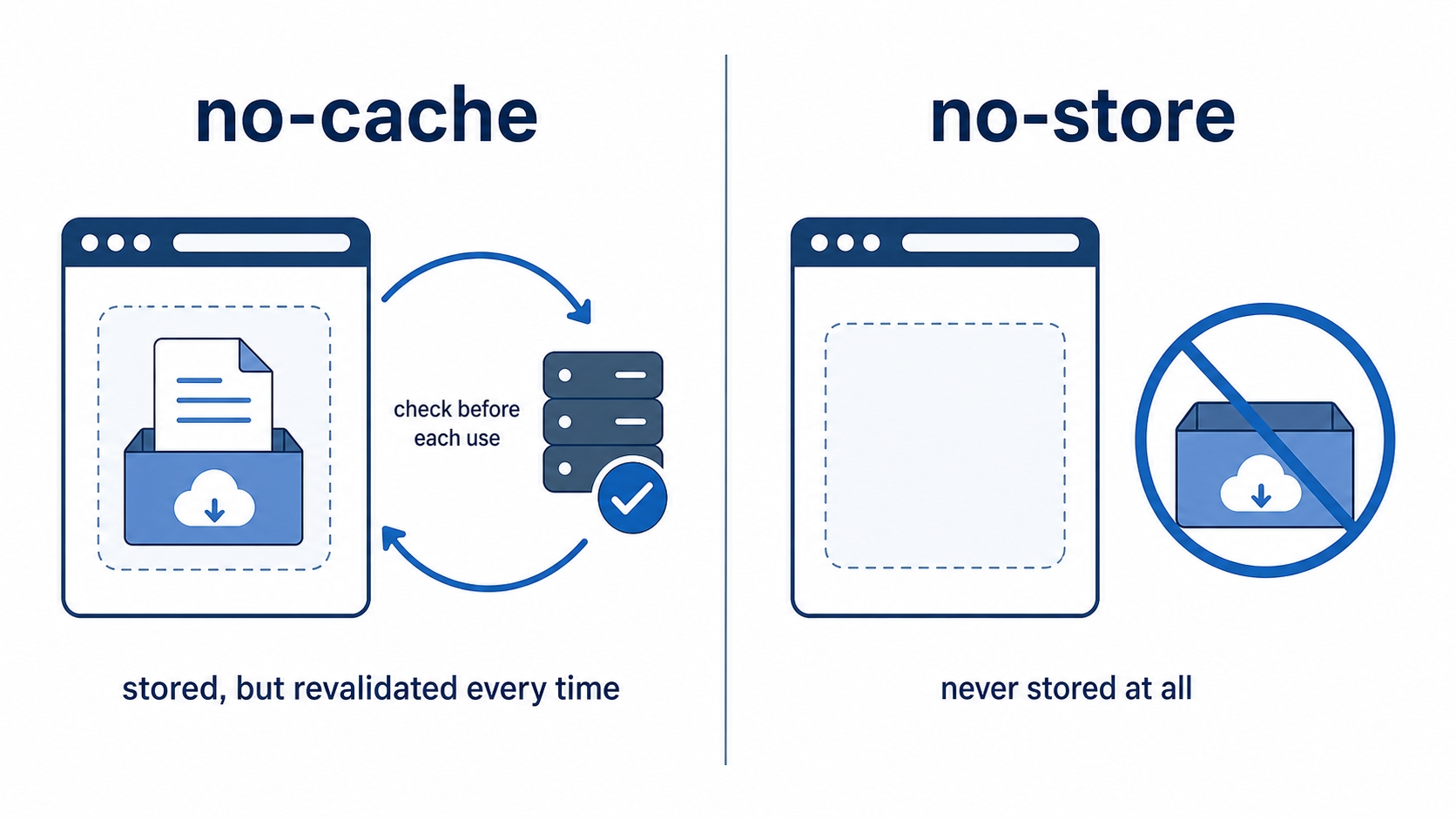
Here is the directive whose name fools almost everyone. Despite how it reads, no-cache does not mean "do not cache." It means the cache may store the response, but it must revalidate with the server before serving it, every single time.
Cache-Control: no-cache
So a copy is kept, but it is never served blindly. On each use the cache sends a conditional request (the one we get to in a moment) and only serves its stored copy if the server confirms it is still current. If you think of it in last chapter's terms, no-cache makes the copy stale immediately, so the very next request triggers a revalidation.
no-cache stores a copy but revalidates every time while no-store keeps nothing
The one to get right: no-cache versus no-store. This is the most misread pair of directives in HTTP, so it is worth saying plainly. no-store keeps nothing; every request goes all the way to the server for the full response. no-cache keeps a copy and checks it on every use, which means when nothing has changed it can still skip the download via revalidation. If your goal is "never let this touch a cache," you want no-store. If your goal is "cache it, but never show it without confirming it is current," you want no-cache. Reaching for no-store when you meant no-cache throws away a real speed win; reaching for no-cache when you meant no-store can leave sensitive data sitting in a cache.
public and private: who is allowed to store it
The last pair decides which caches may keep the response, and it matters the moment a shared cache is in the path.
public means any cache may store the response, including shared caches like a CDN or a reverse proxy that serves many users from one copy.
private means only a private cache may store it, meaning the user's own browser. Shared caches in the middle must not keep it.
Cache-Control: private, max-age=60
The word "private" is the signal "this response is meant for one user." A logged-in dashboard, a page with your name on it, an API response shaped by your account, all of these should be private so a shared cache never hands your copy to the next person who asks. We come back to exactly why that matters at the end of the chapter.
Expires: the older header Cache-Control replaced
Before Cache-Control existed, freshness was expressed with a single header called Expires, which carries an absolute date:
Expires: Wed, 17 Jun 2026 04:41:42 GMT
This says "this copy is fresh until that exact moment." It still works, and you will still see it in the wild, often sitting right next to a Cache-Control header on the same response. The reason Cache-Control: max-age took over is that a relative window is more robust. An absolute date depends on the client's clock being correct; if the user's machine has the wrong time, Expires can be off by hours. max-age counts seconds from receipt, so it does not care what the clock says. When both headers are present, Cache-Control wins, and Expires is the fallback for very old caches. For anything you write today, use Cache-Control.
ETag and the conditional request
Now to the second half of the chapter, and the more satisfying mechanic. A max-age window eventually runs out, and no-cache expires the copy on every use. In both cases the copy is stale and the cache has to revalidate. The question is how it does that without re-downloading the whole resource. The answer is the conditional request, and it starts with a fingerprint.
When the server first sends a response, it can attach an ETag (entity tag): a short, opaque string that identifies this exact version of the content. Think of it as a fingerprint. Change the file by one byte and the server generates a different ETag; leave it untouched and the ETag stays the same.
ETag: "3e7-8PToueED8kHiw6t8AJUibrxT1Dg"
The browser stores that ETag alongside the cached copy. Later, when the copy has gone stale and needs revalidating, the browser doesn't ask for the resource again. It sends a conditional request: the same request as before, plus one header carrying the ETag it has.
If-None-Match: "3e7-8PToueED8kHiw6t8AJUibrxT1Dg"
If-None-Match reads literally: "send me the body only if the current version does not match this fingerprint." The server compares the ETag it has now against the one the browser sent, and there are two outcomes:
They match. The content has not changed. The server replies with 304 Not Modified and no body at all: just a small set of headers. The browser takes that as "your copy is still good," refreshes the freshness window, and serves the copy it already had.
They differ. The content changed. The server replies with a normal 200 OK and the full new body, including a new ETag for next time.
This is the whole revalidation round trip from the last chapter, now with names on every part. If-None-Match is the question, the ETag is the fingerprint being compared, and 304 Not Modified is the "still good, reuse yours" answer.
304 is the win, even though it is a round trip. A common reaction is "but the browser still made a request, so what did caching save?" It saved the body. On a 304 the browser pays for one small round trip of headers and gets back a response with no payload, then serves a file it already has on disk. For a 2 KB icon that is a modest saving; for a 2 MB script or a large image, the request still costs a few hundred bytes while the download you skipped was megabytes. The round trip is the price; not re-downloading the body is the prize.
ETag versus Last-Modified
ETag is not the only way to revalidate. There is an older, time-based pair that does the same job. Instead of a fingerprint, the server sends the time the resource last changed:
Last-Modified: Tue, 22 Oct 2019 18:30:00 GMT
The browser stores that timestamp and, to revalidate, sends it back in an If-Modified-Since header. The server answers the same way: 304 Not Modified if the resource has not changed since that time, or 200 OK with the new body if it has.
The two approaches answer slightly different questions. Last-Modified asks "has this changed since this time?", which is cheap for the server to produce (it is just a file's modification date) but coarse: it only has one-second resolution, and a file can be rewritten with identical content yet a new timestamp. ETag asks "is this the same version?", which is exact, because the fingerprint is derived from the content itself. When a response carries both, ETag and If-None-Match take precedence. You will frequently see them together, with Last-Modified as a backup signal.
Try it now: read an ETag, then revalidate it
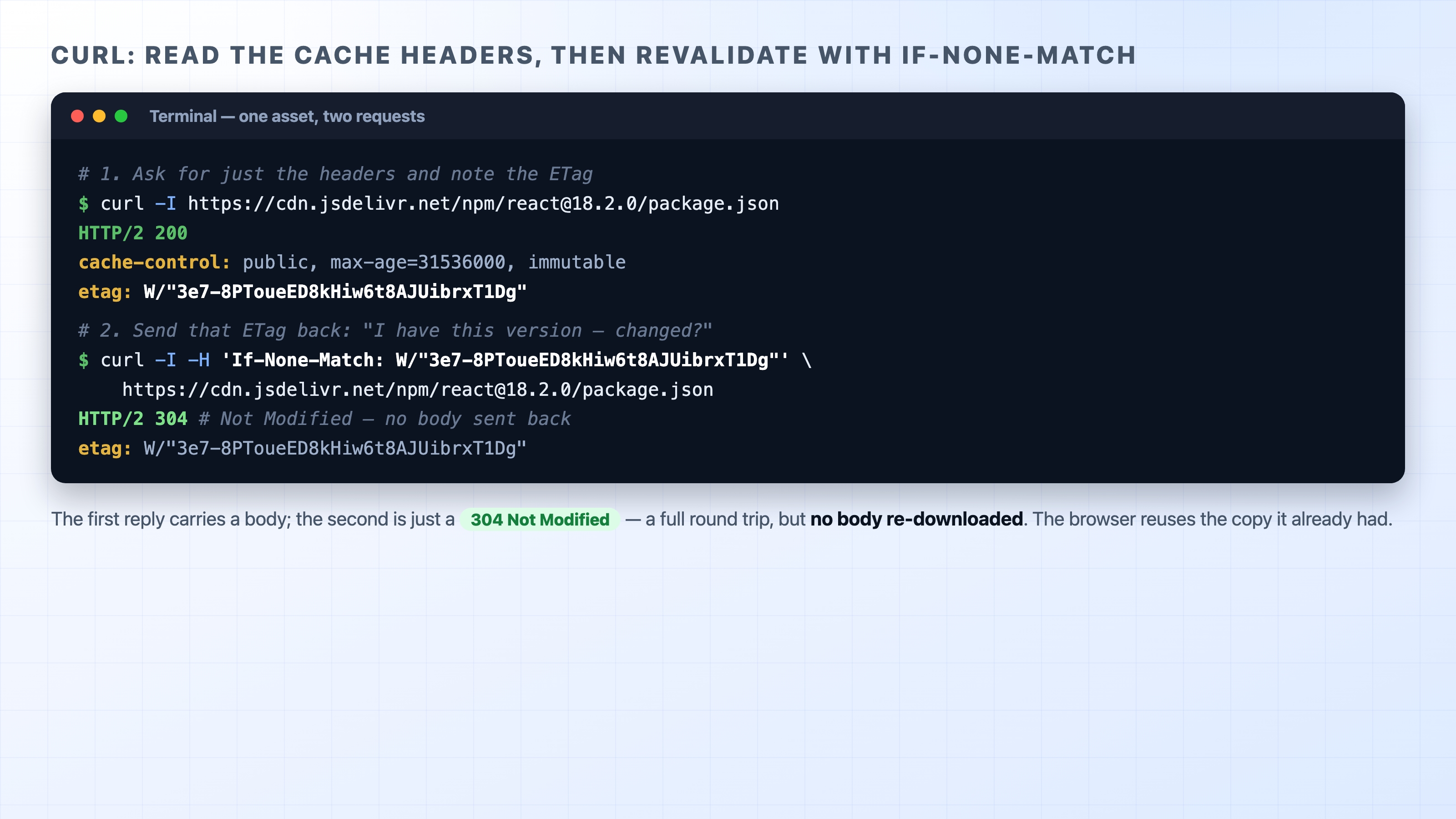
You can watch a full revalidation with two curl commands and no setup. Public CDN assets are perfect for this because they ship long max-age values and an ETag.
First, ask for just the response headers with -I and find the ETag:
You will get back a 200, a Cache-Control line with a long max-age, and an etag. Copy that ETag, then send it back in an If-None-Match header on a second request:
(Use whatever ETag your first request returned; servers can change them over time.) This time the status line comes back as 304 Not Modified. There is no body. The server compared your fingerprint to its own, they matched, and it told you to keep what you have.
curl reading an ETag then revalidating it and getting a 304 Not Modified back
That 304 is exactly what your browser does for you automatically every time a stale-but-unchanged file needs revalidating. The same thing works with time instead of a fingerprint: grab the Last-Modified value from the first response and send it back in If-Modified-Since, and you get the same 304.
The practical recipe: hard on assets, fresh on HTML
All of this collapses into a pattern most sites follow, and it is worth keeping because it resolves the fast-versus-stale tension cleanly for the two kinds of thing a site serves.
Static assets, cache them hard. Stylesheets, scripts, fonts, and images are given a very long max-age and often immutable:
immutable is an extra promise to the browser that this file will never change while it is fresh, so the browser shouldn't even bother revalidating on a normal reload. This is safe only because of one trick: the filename contains a hash of the contents, like app.4f3a9c.js. When the file's content changes, its hash changes, so it becomes a different URL. The old URL keeps its year-long cache, the new HTML points at the new URL, and there is never a stale-asset problem because changed content is never the same address.
HTML, keep it fresh. The HTML page is the thing that points at those hashed assets, so it must not be cached hard, or users would keep loading an old page that references files that no longer exist. HTML is typically served with no-cache (store it, but revalidate every time) or a short max-age:
Cache-Control: no-cache
Paired with an ETag, that gives you the best of both: the browser revalidates the HTML on each visit, and when nothing changed it gets a tiny 304 instead of re-downloading the page. The reader gets the current page every time, cheaply.
The pitfall: caching one user's response for everyone
The mistake that bites hardest in production is caching a personalized response in a shared cache. Picture an endpoint that returns the logged-in user's account page. If that response goes out with Cache-Control: public, max-age=300, a shared cache in front of your servers stores one copy and serves it to the next 300 seconds of requests, no matter who asks. The second user gets the first user's name, email, maybe their order history. The cache did exactly what it was told; it was told the wrong thing.
The fix is to be honest about who a response is for. Anything user-specific should be marked private so shared caches keep their hands off it, and anything sensitive enough that it shouldn't sit in any cache at all should be no-store. The directives exist precisely to draw this line, and personalized content is where drawing it wrong is most dangerous.
What's Next
You can now set freshness and revalidate at the level of a single response, but caching gets its biggest speed win when those responses are stored close to the user. The next chapter, "CDN Cache," follows your Cache-Control headers out to the edge, where a content delivery network keeps copies near users around the world.