Up to this point, we have assumed a single server calmly handling whatever traffic comes its way. Real production environments rarely look like that. Traffic spikes, machines crash, and a single badly behaved client might try to send a thousand requests a second. This chapter covers two tools that keep your systems standing. Load balancing spreads traffic across many servers. Rate limiting caps how much any single caller can demand.
They solve different problems, but they pair naturally. Load balancing helps you grow and survive failures, while rate limiting protects your servers from being swamped. Most real-world systems run both.
Load balancing: one address, many servers
Every server has a ceiling. A single machine only has so much CPU, memory, and bandwidth. When you hit that limit, the usual fix is not to buy a bigger machine. Instead, you add more machines. You run several identical copies of your application and place something in front of them to decide which copy answers each request. That tool is a load balancer. It is software (or a managed cloud service) that takes incoming requests and distributes them across a pool of backend servers.
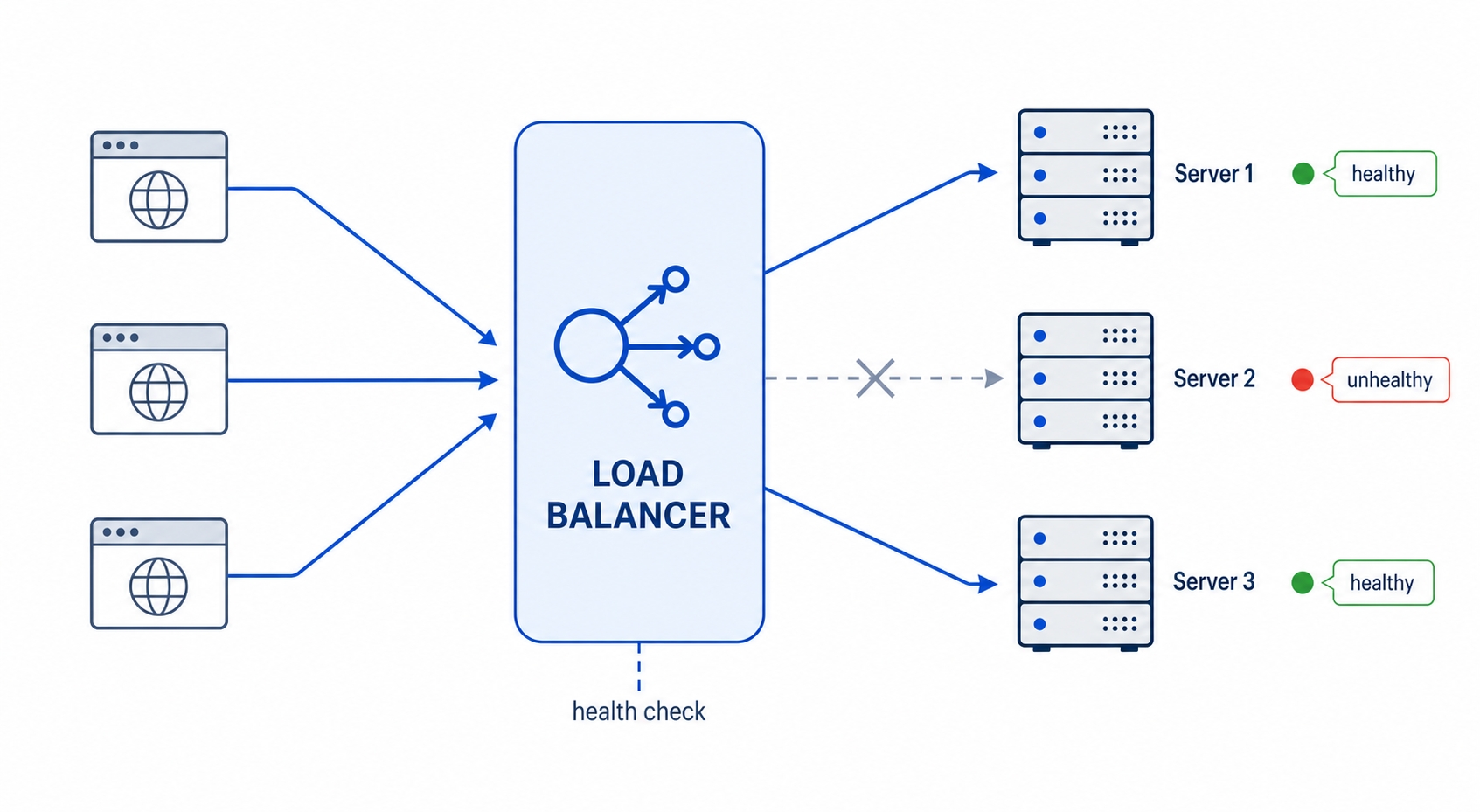
Often, this is the reverse proxy we discussed earlier, just wearing a second hat. Clients connect to one public IP address. Behind that address sit Server 1, Server 2, Server 3, and so on. The load balancer picks one server for each request. Clients never know how many servers actually exist, meaning you can add or remove them without anyone outside noticing.
A load balancer spreads requests across three backends and skips an unhealthy one
Spreading traffic this way gives you two major benefits:
Horizontal scale. If you need to handle more traffic, you just add more servers to the pool. The load balancer starts sending them work immediately. This approach is called "scaling out" (adding more machines) instead of "scaling up" (buying a bigger machine), and it has no hard ceiling.
Surviving a failure. If one server crashes, the load balancer notices and stops sending it requests. The remaining servers absorb the load. From the outside, the website stays online even though a machine just died.
That second benefit only works if the load balancer can tell a dead server from a live one. We will cover how it does that in a moment. First, how does it decide which server gets the next request?
Load Balancing and Rate Limiting in HTTP | dalabs.academy
How the load balancer picks a server
There are several routing strategies. You usually just pick one in your load balancer's configuration file. Three specific strategies cover the vast majority of use cases.
Round-robin is the simplest approach. It hands request 1 to Server A, request 2 to Server B, request 3 to Server C, then loops back to A. It is easy to understand and spreads requests evenly by count. The catch is that it treats every request as equal. If one request is a heavy database export that ties up a server for ten seconds, round-robin does not care. It just keeps dealing cards in strict order.
Least-connections is smarter about uneven work. Instead of going in order, the load balancer sends each new request to the server currently handling the fewest open connections. A server stuck processing slow requests naturally has more connections open, so it gets skipped until it catches up. This handles mixed workloads much better and is a very common default.
Hashing picks the server by computing a hash of something stable about the request. This is usually the client's IP address or a user ID. The same input always hashes to the same server, meaning a specific client keeps landing on the exact same backend. That consistency is the main goal. The trade-off is that traffic distribution can become uneven. If a few highly active clients send most of the traffic, they all stay pinned to the same server.
That last strategy connects directly to a problem we discussed in the sessions chapter.
Sticky sessions, and why a shared store frees you
Remember the trouble with in-memory sessions. A user logs in, and Server A creates a session in its own memory. The user's next request lands on Server B, which has never heard of that session. The user suddenly looks logged out. Load balancing is exactly what causes this issue because consecutive requests can easily go to different servers.
There are two ways to fix this.
The first is sticky sessions, sometimes called session affinity. You tell the load balancer to pin each user to one server. This is usually done with IP hashing or a special cookie. All of that user's requests will then go to the backend holding their session. It works, but it has real downsides. If that specific server dies, every user pinned to it loses their session and gets logged out. Also, because traffic is tied to specific machines, the load balancer can no longer rebalance freely. A busy server might stay overwhelmed while others sit idle.
The second option is a shared session store. Instead of keeping session data in a single server's memory, you keep it in an external database all servers can reach, like Redis. Now it does not matter which backend answers a request. Server B can look up the session just as easily as Server A. The servers become interchangeable. The load balancer is free to use round-robin or least-connections without worrying about keeping users pinned. This is why a shared store is the standard production choice. It removes the constraint entirely instead of working around it.
The general lesson here is that load balancing works best when your servers are stateless. This means any server can handle any request. If you keep state out of the individual servers, the load balancer's job gets much simpler.
Health checks: pulling a dead server out of rotation
Surviving a failure depends on actually noticing one. The load balancer does this with a health check. It periodically sends a small request to each backend, often a GET request to a path like /health, and watches the response. A healthy server answers quickly with a 200 OK status. A server that returns an error, or fails to answer within a timeout, is marked unhealthy and pulled out of rotation. No new requests go to it until it starts passing checks again.
This is why a single crashed server does not take a website down. Within a few seconds, the load balancer notices the failed checks. It stops routing traffic to that server and spreads the load over the remaining healthy ones. When the broken server recovers and starts answering /health with a 200 again, it gets added back to the pool automatically.
A good health endpoint is fast and honest. It should not do heavy processing, or the frequent checks will become a load problem themselves. However, it should reflect real readiness. If your application cannot reach its database, a health check that only confirms the process is running will keep a broken server in rotation. Many systems split this into a liveness check (is the process running?) and a readiness check (can it actually serve traffic right now?). The core idea remains the same: give the load balancer a reliable signal so it can route around trouble.
Rate limiting: capping what any one caller can demand
Load balancing helps you handle more traffic. Rate limiting is about handling it fairly and saying no when you have to. A rate limit is a cap on how many requests a specific caller can make in a given amount of time. For example, a limit might be "60 requests per hour per IP address." If a client goes over the cap, the server rejects the extra requests instead of serving them.
There are three main reasons to use rate limiting, and most systems care about all of them at once:
Fairness. One client hammering your API can starve everyone else. A per-client limit keeps a single heavy user from slowing down the service for the rest of your users.
Cost control. Every request costs something. It might use CPU time, trigger a database query, or make a paid third-party API call. A runaway client stuck in a buggy loop can cost you real money. A rate limit puts a firm ceiling on that bill.
Abuse and overload protection. Rate limiting is a front-line defense against web scrapers, brute-force login attempts, and accidental denial-of-service from misbehaving scripts. It will not stop a massive distributed attack on its own, but it cheaply absorbs a lot of everyday abuse.
The interesting question is how you actually count the traffic. "60 requests per hour" sounds simple until you ask: per hour starting exactly when? Three common algorithms answer that question differently.
Counting algorithms, and the trade-off each makes
Fixed window is the simplest method. It divides time into fixed buckets, like each clock hour, and counts requests in the current bucket. At the top of the hour, the count resets to zero. It is easy to build and cheap to run, but it has a well-known edge problem. A client can send their full limit in the last second of one window, and the full limit again in the first second of the next window. This lets them push double their allowance across that boundary.
Sliding window smooths that out by counting requests over the last N minutes from right now, rather than within a fixed bucket. There is no boundary to game because the window is always moving forward with the clock. The trade-off is that it costs a bit more memory to track. The server has to account for individual requests as they age out of the window rather than just resetting a single counter.
Token bucket is the algorithm you will see most in practice because it handles bursts gracefully. Picture a bucket that holds a fixed number of tokens and refills at a steady rate. For example, it might add one token per second up to a maximum of 60. Each request spends one token. If the bucket has tokens, the request goes through. If it is empty, the request is rejected until more tokens drip in. A client that has been quiet builds up a full bucket and can burst through 60 requests at once. After that, they are limited to the steady refill rate. This mix of allowing short bursts while capping the sustained rate matches how real clients behave.
You rarely implement these algorithms yourself. Your reverse proxy, API gateway, or a web framework library usually handles it. But knowing which one is running explains the behavior you see from the outside, like whether bursts are allowed and exactly when your budget refills.
How a server tells you it's rate limited
When you hit the cap, the server needs to tell you. HTTP has standard signals for this. The status code is 429 Too Many Requests. Because it is in the 4xx family, it is a client error. The server is fine; you are simply asking too often. If you slow down, the exact same request will work.
A 429 status on its own leaves you guessing how long to wait, so servers usually add headers. The most important is Retry-After, which tells the client exactly how long to hold off. It comes in two forms: a number of seconds (Retry-After: 30) or an absolute date. You might also see this header on a 503 Service Unavailable response when a server is temporarily overloaded. When this header is present, honor it. It is the server telling you precisely when it is safe to come back.
Servers also expose your remaining budget before you hit the limit, allowing a well-behaved client to pace itself. You will see two common header families that carry this information:
The widely used X- convention: X-RateLimit-Limit (your total budget for the window), X-RateLimit-Remaining (how many requests you have left), and X-RateLimit-Reset (when the window refills, usually as a Unix timestamp).
A newer standardized form that drops the X- prefix: RateLimit-Limit, RateLimit-Remaining, and RateLimit-Reset. Both families mean the exact same thing, and you will run into both in the wild.
If you read those headers, you never have to be surprised by a 429. When your Remaining count gets low, simply ease off until the Reset time passes.
Try it now
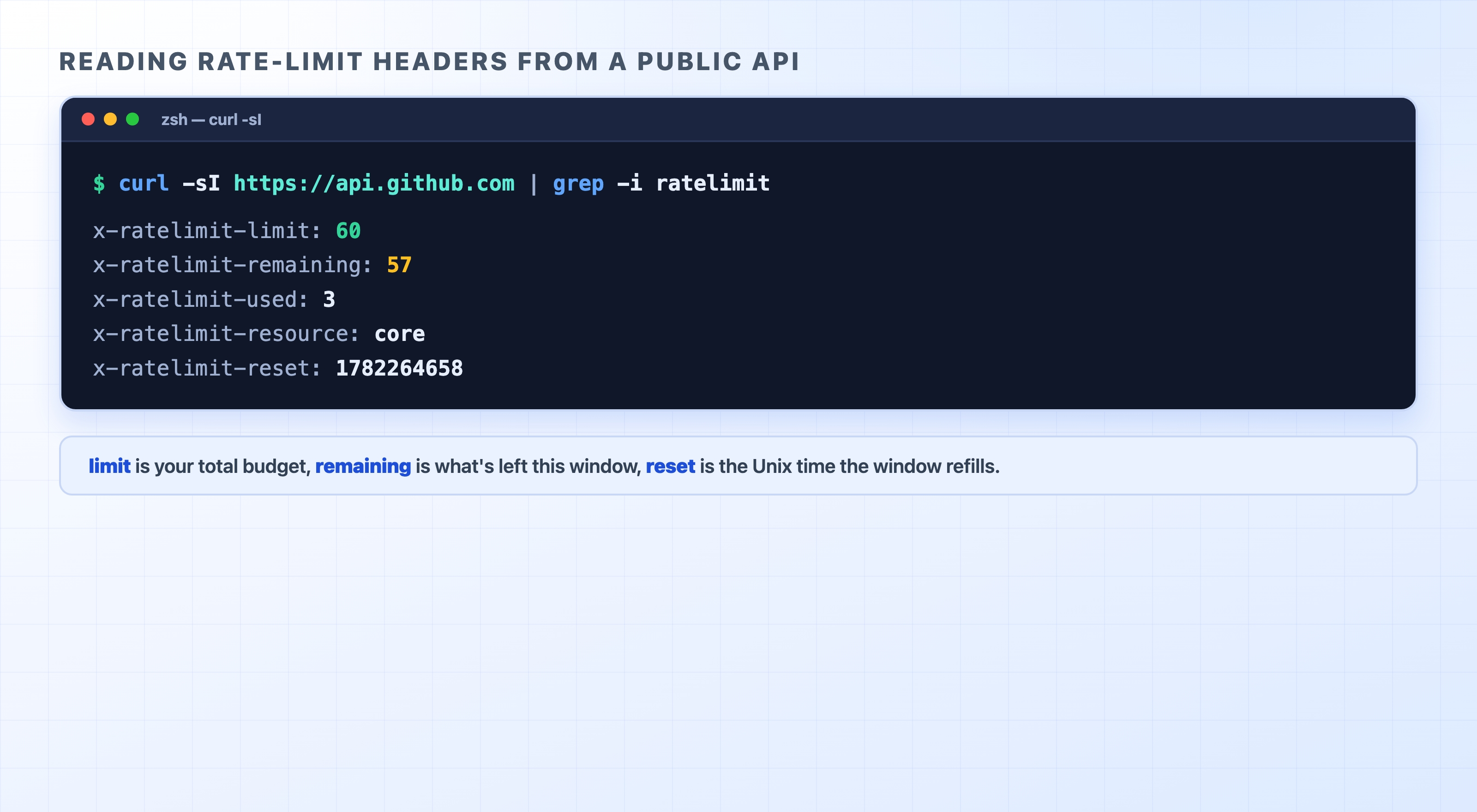
GitHub's public API returns these headers on every response, even without authentication. This means you can read a real rate limit right now. The -sI flags tell curl to fetch only the headers quietly (-s for silent, -I for a HEAD-style request). We then use grep to filter down to the lines we care about:
There it is, live. Unauthenticated callers get a budget of 60 requests. This response shows 57 left, with 3 already used. The x-ratelimit-reset value is a Unix timestamp representing the exact moment the window refills back to 60. You can decode it to a human-readable time:
date -r 1782264658
bash
Wed Jun 24 11:30:58 AEST 2026
text
curl reads GitHub's live rate-limit headers
Run the curl command a few times and watch x-ratelimit-remaining tick down while x-ratelimit-used ticks up. That is the rate limiter counting your requests in real time. If you drove the remaining count to zero, the next request would come back as a 403 or 429 with a Retry-After header, and you would have to wait for the reset.
A note on the header prefix. GitHub uses the older X-RateLimit-* names here, but newer APIs increasingly use the prefix-free RateLimit-* form. If running grep -i ratelimit turns up nothing on some other API, try grep -i 'rate'. The limit might be expressed under a slightly different name, or it might only be sent once you are actually authenticated.
Being a polite client
If you write code that calls an API, you are on the other side of this exchange, and how your code behaves matters. The rule of thumb is simple: do not hammer the server.
When you get a 429, the worst thing you can do is immediately retry. That just adds load to a service that is already telling you to slow down, and your retries will just get rejected again. Instead, you should back off. Wait, try again, and wait longer each time it keeps failing. This technique is called exponential backoff. You wait 1 second, then 2, then 4, then 8. By doubling the delay on each failed attempt, you give a struggling server room to recover.
There is one refinement worth knowing. If many clients all back off on the exact same schedule, they will retry at the same instants and slam the server in synchronized waves. The fix for this is jitter. You add a small random amount of time to each wait so the retries spread out instead of clumping together. Exponential backoff with jitter is the standard, well-tested pattern for handling retries, and most HTTP client libraries can handle it for you automatically.
Above all, if the response carries a Retry-After header, honor it. The server told you exactly when to come back. Waiting that long is both the polite move and the one most likely to succeed.
What's Next
You now know how to spread traffic across multiple servers and keep any single caller from overwhelming them. The next chapter looks at how you actually monitor what your HTTP traffic is doing in production using logs, metrics, and traces.