HTTP Redirects: 301 vs 302 vs 307 vs 308 | dalabs.academy
Redirects
Tung Nguyen
··
11 min read
A request arrives, the server reads the Host header, and it picks the right site to answer. But picking the right site is only half the job. One of the most common things a production server does immediately after that is tell the browser the page is somewhere else. The bare-IP visitor gets bounced to a real domain. The http:// visitor gets pushed to https://. The www. visitor gets sent to the canonical name. Every one of those is a redirect. They are so routine that the first response your browser gets from a typical site is usually not the page at all.
What a redirect actually is
A redirect is a response that says, "I am not giving you the page. Go ask for it at this other URL instead." The server does not return the actual content. It returns two things:
A status code in the 3xx range (the redirect family).
A Location header holding the URL the client should visit next.
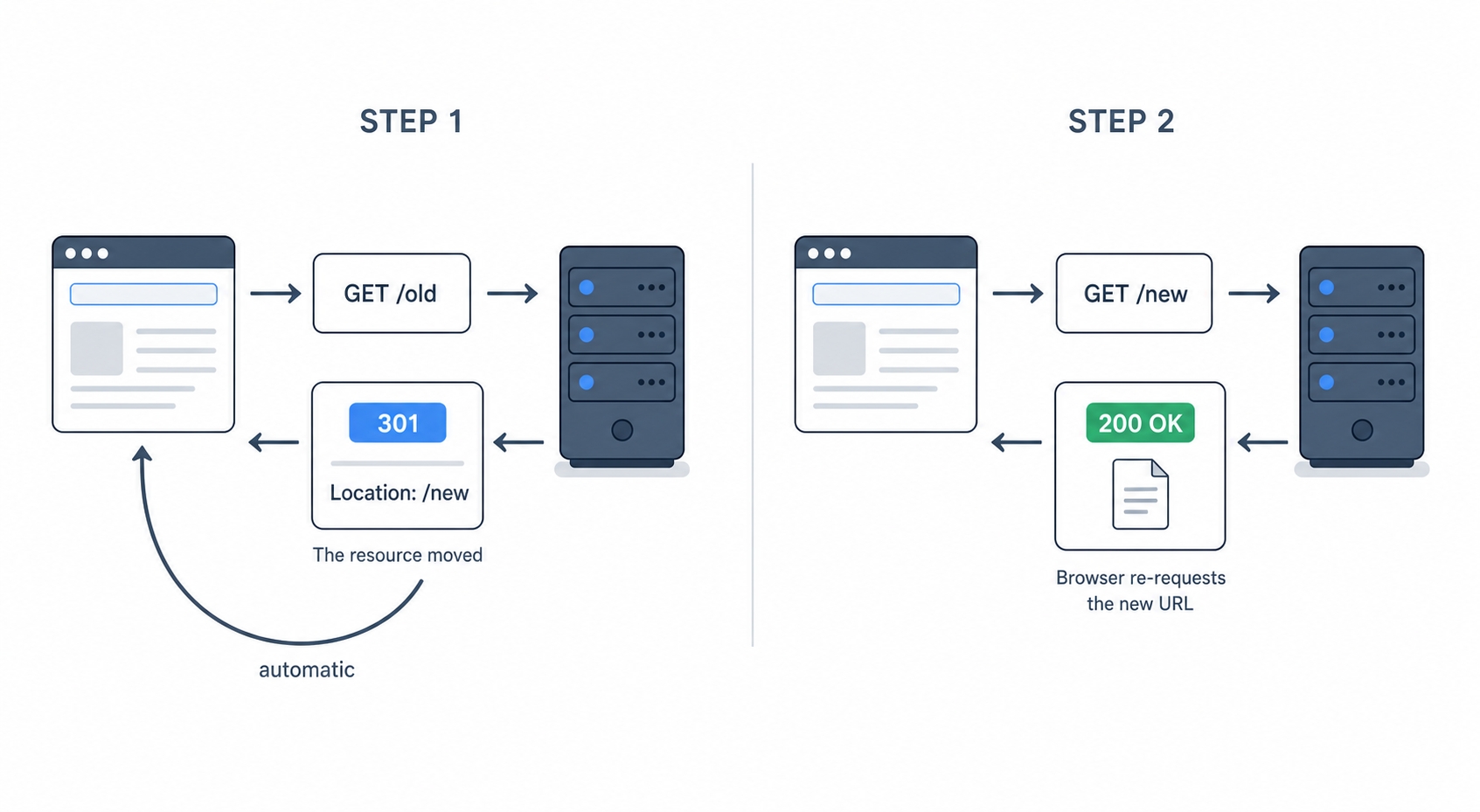
That is the entire mechanism. The client reads the 3xx code, sees the Location, and automatically sends a brand-new request to that new URL. You type one address, the browser quietly makes two requests, and you only see the final page.
A 301 plus a Location header sends the client to a new URL
Here is what that looks like as raw HTTP. The browser asks for the old address:
GET / HTTP/1.1
Host: github.com
http
The server does not send a page. It sends a redirect:
HTTP/1.1 301 Moved Permanently
Location: https://github.com/
http
There is no HTML body to render here. The status line says 301 and the header names the new URL. The browser reads both, then fires off a second request to . That second response is the actual page with a . The redirect is invisible to you because the browser follows it automatically.
A common point of confusion. The Location header only matters on a 3xx response. The same header name shows up on a 201 Created to point at the newly created resource, but that is not a redirect and the browser will not jump to it. A redirect is the combination of a 3xx status and a Location together.
Try it now
You can watch this happen against a real site. github.com over plain HTTP redirects you to HTTPS, making it a clean example. The -I flag tells curl to fetch only the headers. This is a HEAD-style request, which is perfect here because the interesting part of a redirect is the headers, not the body:
curl -I http://github.com
bash
HTTP/1.1 301 Moved Permanently
Content-Length: 0
Location: https://github.com/
text
There it is live: a 301 and a Location pointing at the https:// version. Notice the Content-Length: 0. The server is explicitly telling you there is no body. By default, curl stops here and shows you just the redirect. To make it follow the Location, add the -L flag:
curl -IL http://www.github.com
bash
HTTP/1.1 301 Moved Permanently
Location: https://www.github.com/
HTTP/2 301
location: https://github.com/
HTTP/2 200
text
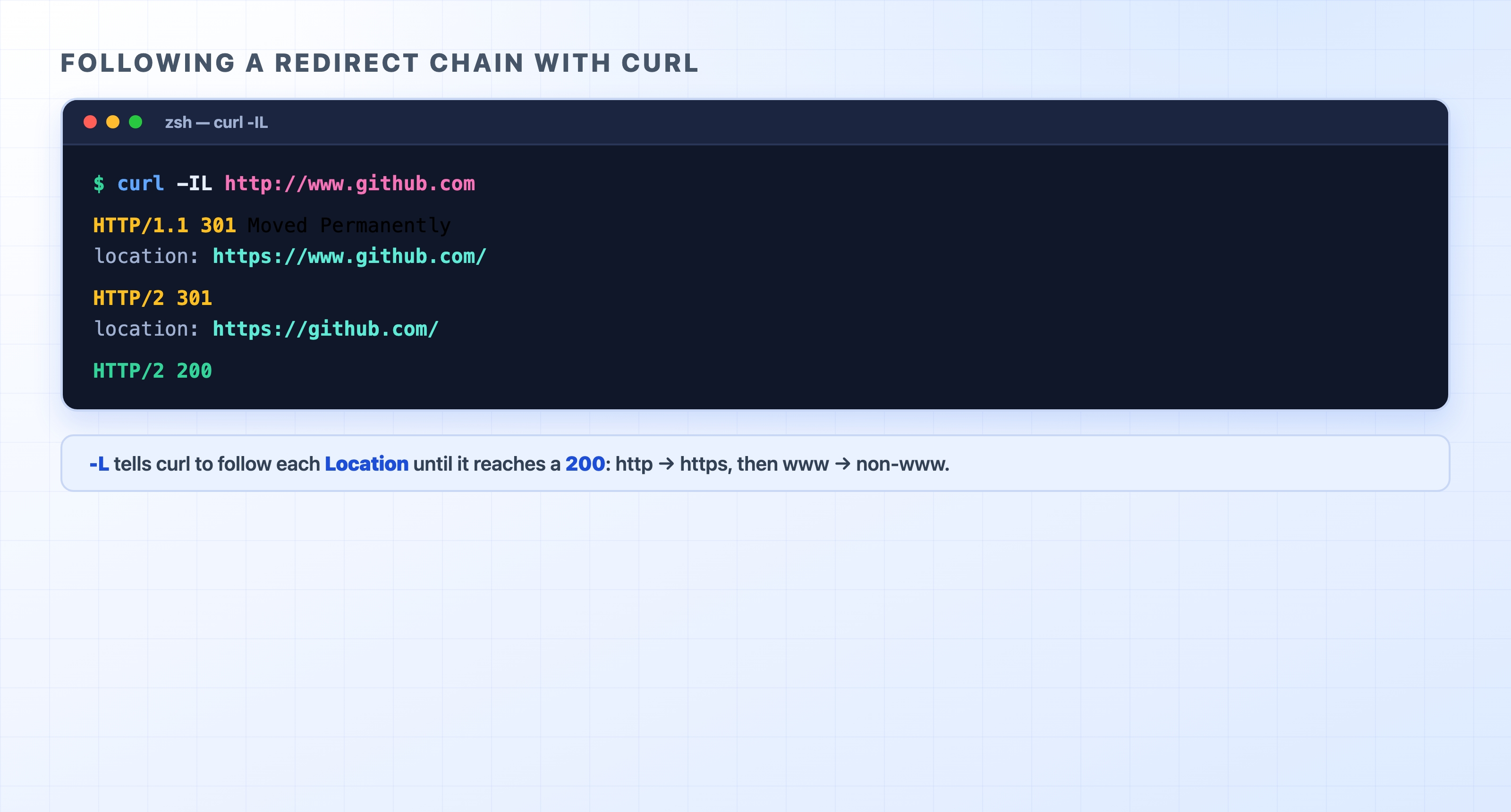
This command chains two redirects. Start at http://www.github.com and read the hops from top to bottom:
https://www.github.com/ → 301 → Location: https://github.com/ (the www. name gets sent to the bare name)
https://github.com/ → 200 (the real page, at last)
curl follows http to https then www to non-www to a 200
You typed one address, which resulted in three requests, two redirects, and a final 200. The -L flag turns "show me the redirect" into "walk the whole chain and show me where it ends up." Keep this flag in mind. It is exactly how you debug a redirect that has gone wrong.
The four redirects you'll meet
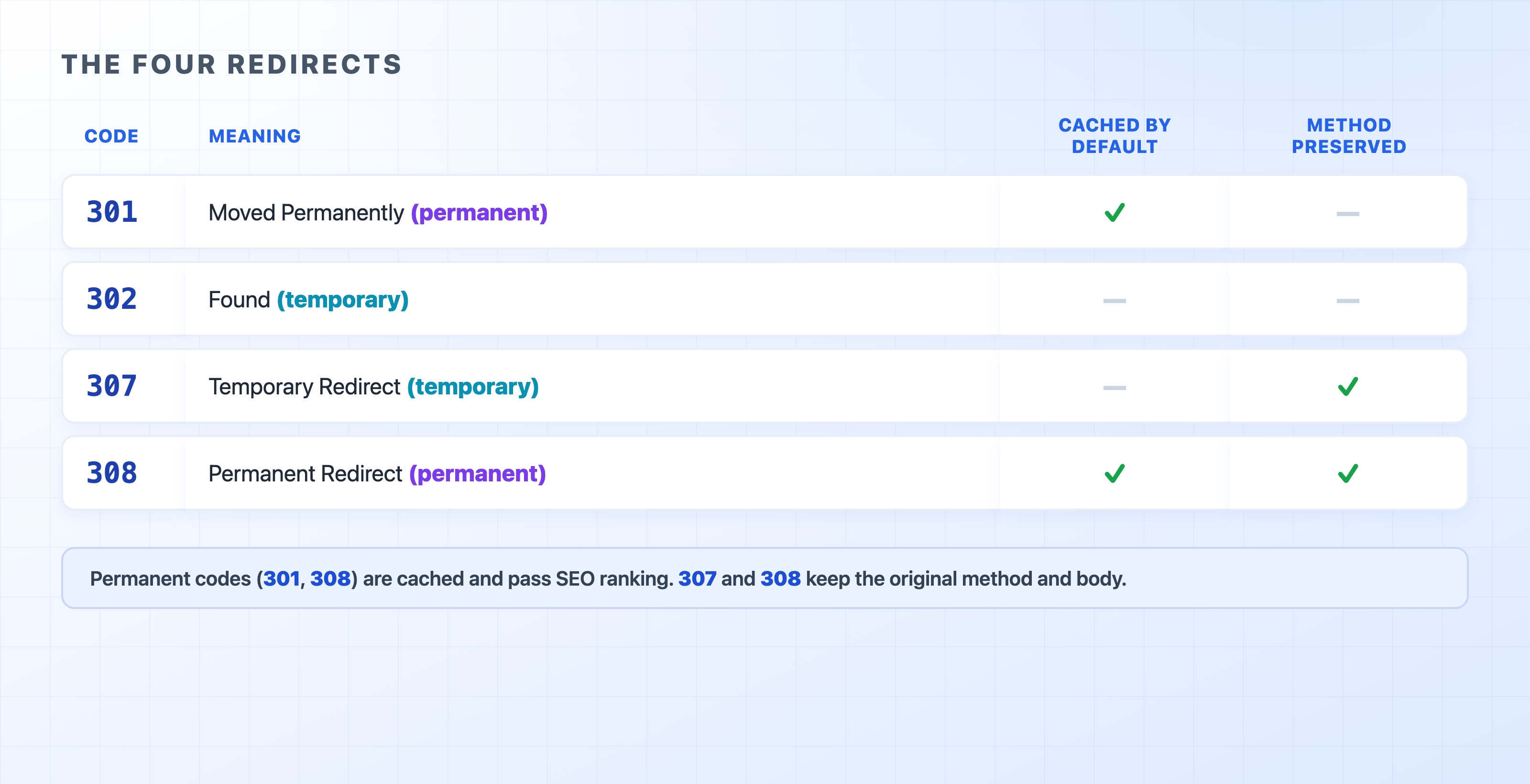
So far, every example has been a 301. But there are four redirect codes you actually need to know. The difference between them is not academic. Picking the wrong one causes real bugs. They split along two questions: is the move permanent or temporary, and does the client keep the original method when it re-requests?
301 302 307 and 308 compared by permanence and method
Code
Meaning
Cached by default
Method preserved
301
Moved Permanently
Yes
No
302
Found (temporary)
No
No
307
Temporary Redirect
No
Yes
308
Permanent Redirect
Yes
Yes
Read the table as two pairs. The left axis is permanence. The 301 and 308 codes mean the move is forever and the client should remember it. The 302 and 307 codes mean the move is just for now. The right axis is method preservation, which is the part that usually trips people up.
The method-switching gotcha
When a client follows a 301 or a 302, it is allowed to change the request method. In practice, if the original request was a POST, browsers and many HTTP clients turn the follow-up request into a GET and drop the body. That behavior is so old and widespread that it became expected. It is usually fine for the common case, like when a form submits a POST and then redirects you to a confirmation page that you fetch with a GET.
It is a problem when you did not want the method to change. Imagine a POST /api/orders request that the server answers with a 302 pointing to a new endpoint. A client that switches to GET will re-request the new URL with no body and the wrong method. Your order quietly vanishes.
That is exactly what 307 and 308 fix. They are the strict versions. The client must repeat the original method and body. A POST that hits a 308 stays a POST all the way to the new URL.
The safe rule of thumb. For a permanent move, use 308. For a temporary one, use 307. Both preserve the method, so they behave predictably no matter what request hits them. Reach for 301 and 302 only for the classic case of redirecting a GET to another GET, where a possible method switch does no harm. You will see 301 and 302 far more often in the wild for historical reasons. But for anything other than a plain page GET, the method-preserving codes are the ones that will not surprise you.
Why permanent vs temporary actually matters
The permanent versus temporary split is not just a label. It changes what clients actually do with the redirect. Getting this wrong can cost you real traffic or money in two ways.
Caching. A permanent redirect (301 or 308) is cacheable by default. A browser that sees a 301 from /old to /new can remember it. The next time you ask for /old, the browser jumps straight to /new without even contacting the server. That is great when the move really is permanent. It is painful when it is not, because the cached redirect can stick around for a long time and is hard to undo. A temporary redirect (302 or 307) is not cached by default. The client checks with the server every time, which is exactly what you want while a destination might still change.
SEO. Search engines treat the two differently. This is where a wrong code becomes a bad business decision. A 301 or 308 tells a search engine that the page moved for good, and it should transfer its ranking and accumulated authority to the new URL. A 302 or 307 says the original is still the real page, the detour is temporary, and it should keep crediting the old URL. If you use a temporary redirect for a move that was actually permanent, you can lose the search ranking you spent years building because the engine keeps pointing at an abandoned URL. This is the single most common redirect mistake. The fix is simply choosing the code that matches reality.
The mental shortcut is that a permanent redirect is a promise. Only make it when you mean it, because caches and search engines will hold you to it.
The two redirects almost every site runs
In production, you will set up the same two redirects over and over. They are how a site presents one canonical address to the world.
http → https. A visitor who types http://example.com should not be served over an insecure connection. The standard pattern is a tiny server block whose only job is to listen on port 80 and redirect everything to the https:// version. On Nginx, that looks like this:
server {
listen 80;
server_name example.com www.example.com;
return 301 https://example.com$request_uri;
}
nginx
The $request_uri variable carries the original path and query along. A request to http://example.com/blog?page=2 lands on https://example.com/blog?page=2, rather than just dropping the user at the homepage. This is the redirect that fired on the very first line of our curl chain earlier.
www → non-www (or the reverse). A site usually wants one canonical hostname, rather than two that serve identical content. Duplicate URLs split your SEO signals and confuse caches. You pick one, like example.com or www.example.com, and permanently redirect the other to it:
server {
listen 443 ssl;
server_name www.example.com;
return 301 https://example.com$request_uri;
}
nginx
Both of these are permanent moves, so they should be a 301 or 308. They are redirecting plain GET page requests. This is the one case where 301 is perfectly safe, which is why 301 is what you see most often in the wild. That is exactly the chain you watched against GitHub. The request to http://www.github.com walked through both of these redirects—http to https, and www to non-www—before reaching a real page.
The pitfall: redirect loops
The classic redirect bug is the redirect loop. Server A redirects to B, and B redirects right back to A (or forms a longer ring that eventually circles home). The browser follows the chain, never reaches a 200, and eventually gives up with an error like ERR_TOO_MANY_REDIRECTS. The page simply never loads.
Loops usually come from two redirect rules that disagree. A common scenario happens when a reverse proxy terminates TLS and forwards plain HTTP to your app, but your app has its own rule to redirect HTTP to HTTPS. The app only sees the plain HTTP it was handed. It decides the request is insecure and redirects to HTTPS. The proxy intercepts that, terminates the TLS, and hands plain HTTP back to the app, which redirects it again, forever. This is where the X-Forwarded-Proto header from the reverse proxy chapter earns its keep. It lets the app learn the request was originally HTTPS so it stops redirecting.
The way to see a loop is the same -IL flag from before. It prints every hop so you can read the whole chain:
curl -IL https://example.com
bash
The curl -IL command walks the entire chain and prints each status code and Location in order. A healthy chain ends in a 200. A loop shows the same URLs alternating, and curl eventually stops with a Maximum (50) redirects followed error. The moment you see the same Location come back around, you have found your loop. The fix is to make the two rules agree on when a request is already at its final destination.
What's Next
A server can answer a request, route it to the right site, or send the client elsewhere. The next chapter looks at what happens when one server isn't enough. We will cover load balancing across many servers, and rate limiting to keep any single caller from overwhelming them.