Last chapter we saw that a connection is a TCP pipe pinned down by a four-part address, and that a busy server keeps thousands of them open at once. Two chapters back we measured the catch: opening each new connection costs a round trip of pure waiting before a single byte of HTTP can flow. This chapter is about how HTTP spends those connections wisely, reusing them instead of reopening them, and how the protocol grew across HTTP/1.1, HTTP/2, and HTTP/3 to use them better.
Overview
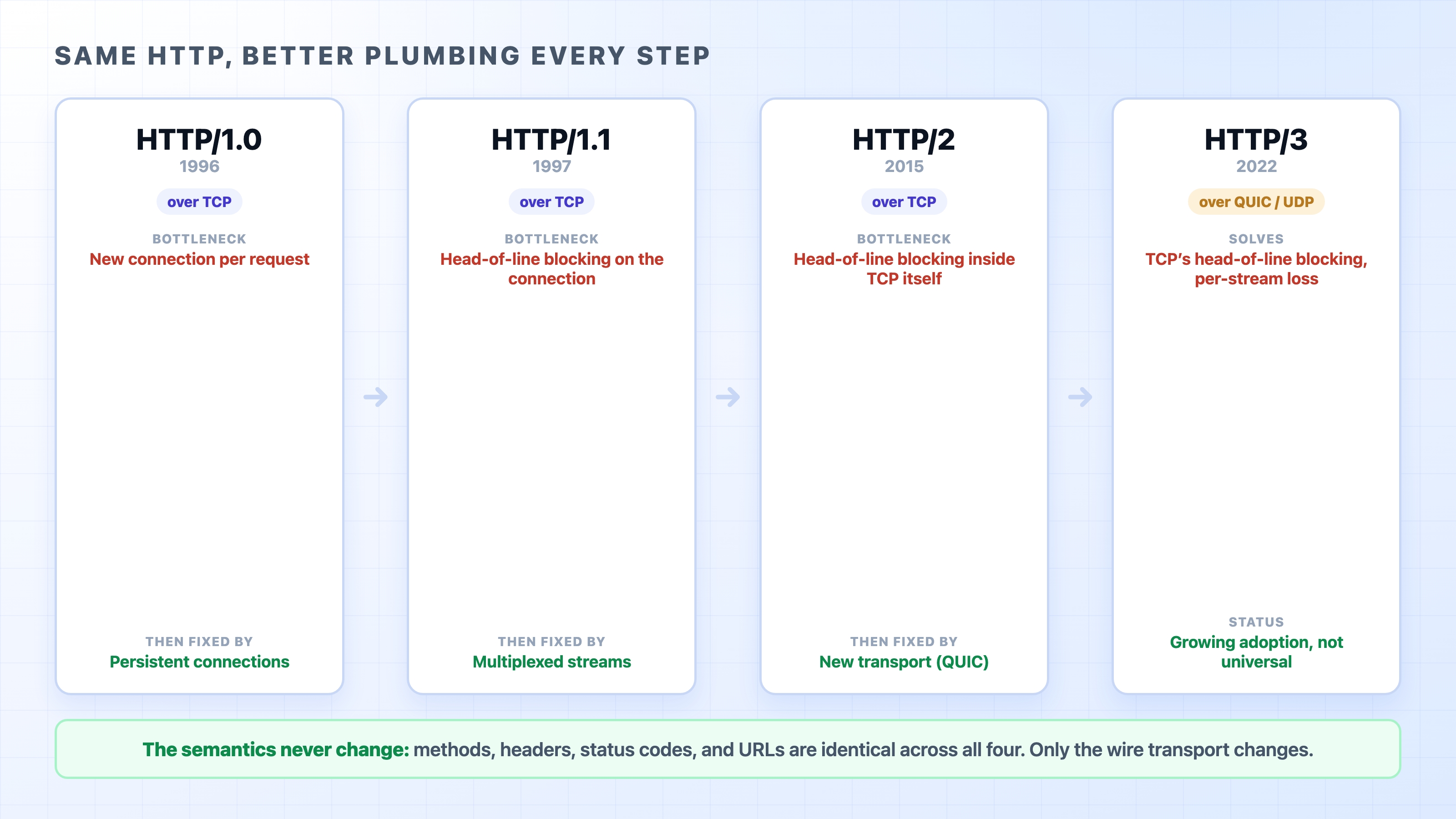
A TCP connection is expensive to open and cheap to keep. The whole story of HTTP's performance is the story of opening fewer connections and squeezing more requests through each one. Each version of HTTP attacked the bottleneck the version before it left behind.
HTTP versions 1.0 to 3 and the one bottleneck each fixed
Here is what we will cover:
Why reusing a connection beats opening a fresh one for every request
The problem-and-fix arc from HTTP/1.1 to HTTP/2 to HTTP/3
Why the meaning of HTTP, its methods, headers, and status codes, stays the same no matter which version moves the bytes
The expensive part is opening the connection
Start with the cost we already measured. Before HTTP can send one byte, TCP runs its three-way handshake, and that handshake is a full round trip: a message out to the server and a reply back. Across the city that might be a few milliseconds. Across an ocean it can be 100 to 200 milliseconds of nothing but waiting.
Now think about a real web page. It is not one file. Open almost any site and the browser fetches the HTML, then a stylesheet, a few scripts, some fonts, and a dozen images. That is easily twenty or thirty separate requests for one page.
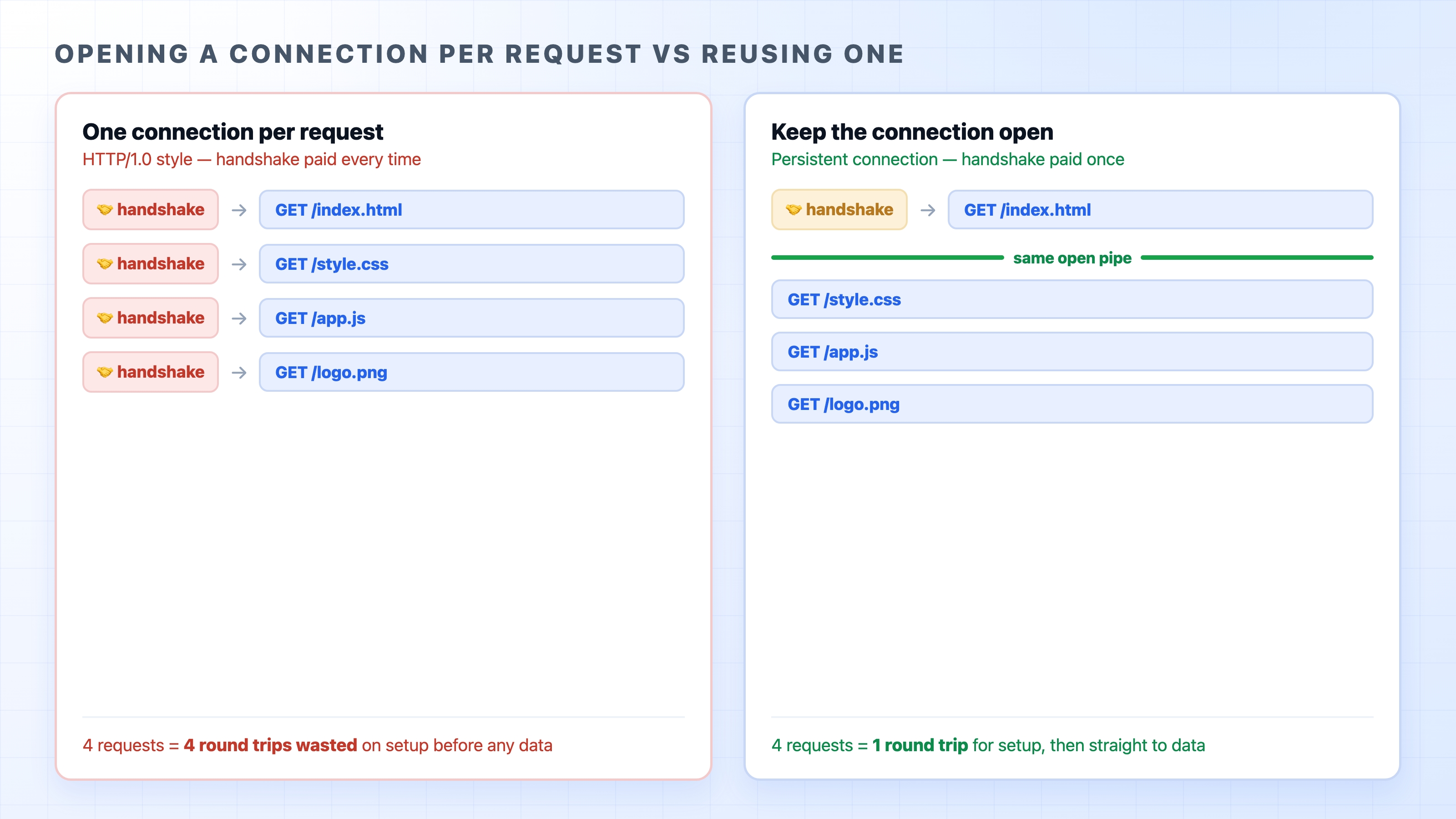
The earliest version of HTTP in wide use, HTTP/1.0, handled this in the most literal way possible: one TCP connection per request. Open a connection, send a request, read the response, close the connection. Need another file? Open another connection. Pay the handshake again. The left side of this picture is what that looks like:
HTTP Versions Explained: 1.1, 2, and 3 | dalabs.academy
Opening a connection per request versus reusing one open connection
Every request on the left pays for its own handshake. Thirty requests, thirty round trips spent before any of them even starts downloading. On a slow link, that setup cost alone can dwarf the time spent actually moving data. The connection is the expensive thing, and HTTP/1.0 threw a fresh one away after every single request.
Fix one: keep the connection open
The fix is on the right side of the same picture, and it is the obvious one once you see the waste. Instead of closing the connection after each response, keep it open and send the next request down the same pipe.
This is a persistent connection, often called keep-alive. You pay the handshake once, then reuse that open connection for request after request. The thirty round trips collapse toward one. HTTP/1.1 made persistent connections the default, so unless someone explicitly closes the connection, it stays open and ready for the next request.
There is a related move worth a name. A browser does not just keep one connection open; it opens a handful to the same server (commonly around six in HTTP/1.1) and reuses each of them across many requests. Holding a set of open connections ready to reuse is called connection pooling, and it is the same idea your backend uses when it keeps a pool of open database connections instead of dialing the database fresh on every query. The expensive setup is paid up front, then amortized over many requests.
A small clarification: keep-alive does not mean the connection stays open forever. Both the client and server set idle timeouts, and a connection that sits unused for a while gets closed to free resources. The win is reusing it for the burst of requests a page needs, not holding it open all day.
The problem HTTP/1.1 left behind: head-of-line blocking
Persistent connections solved the per-request handshake. But they left a subtler problem, and it is the one that shaped everything after.
On a single HTTP/1.1 connection, requests are answered in order, one fully finished before the next begins. You send request A, and you have to wait for response A to come all the way back before response B can start on that connection. The responses cannot overlap; they queue.
HTTP/1.1 did add an attempt to overlap them, called pipelining: send several requests back to back without waiting for each response in between. On paper it helps. In practice it was barely usable, because the server still had to return the responses in the order the requests came in. So if the first response was slow, every response behind it was stuck waiting, even if those were ready to go. This stall has a name: head-of-line blocking. One slow item at the front of the line holds up everyone behind it, like a single slow shopper freezing a whole checkout queue.
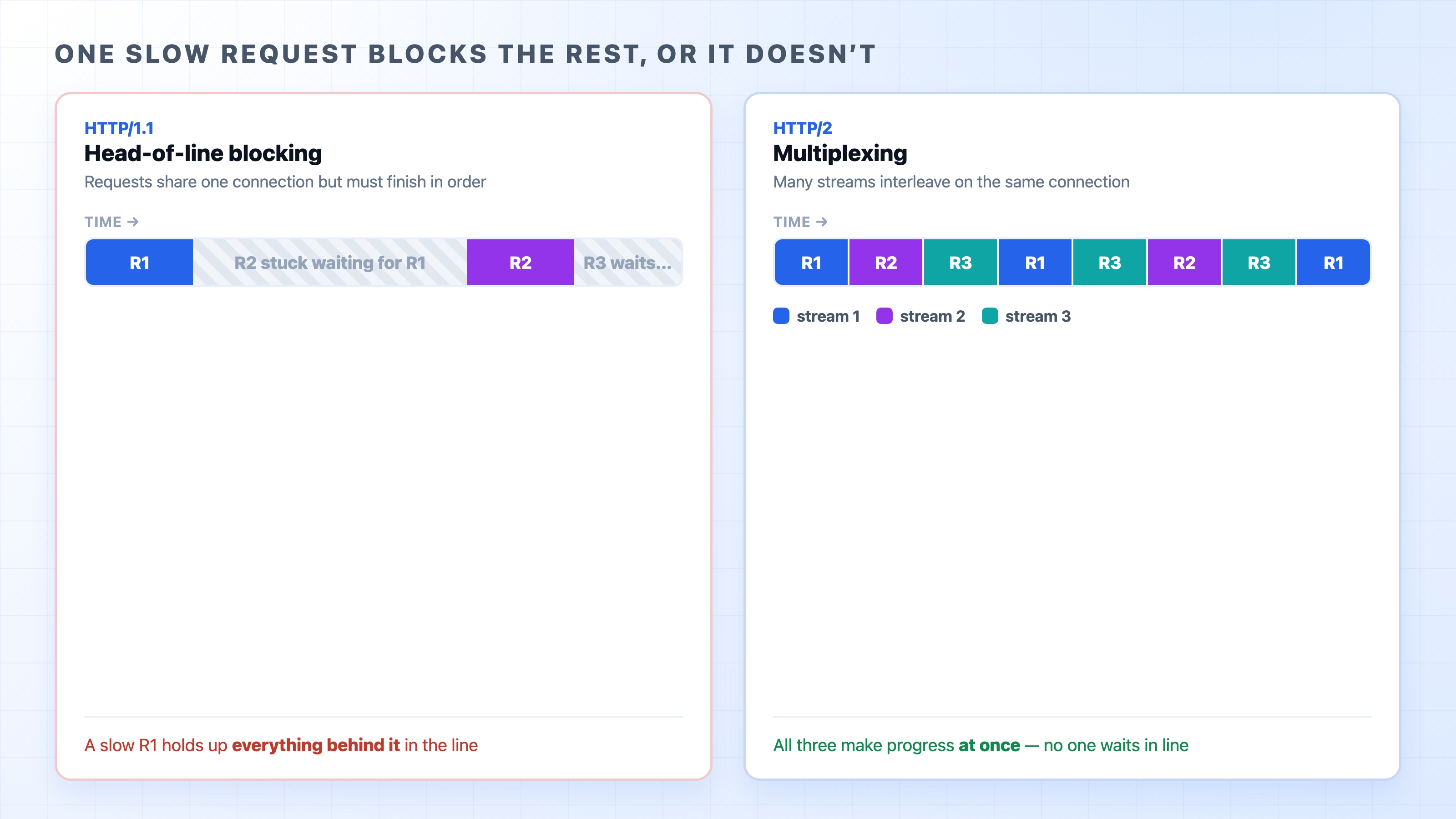
HTTP/1.1 head-of-line blocking versus HTTP/2 multiplexing
The left side shows the stall. R2 and R3 are ready, but R1 is slow, so they sit and wait their turn. Pipelining was so unreliable that browsers turned it off, which left the workaround we mentioned: open several connections per server and spread the requests across them. That helps, but each extra connection is another handshake, and there is a limit to how many you can sensibly open.
Web developers spent years inventing tricks to dodge this. They glued many small icons into one big image (a sprite sheet) to turn many requests into one. They concatenated all their JavaScript into a single bundle. They split assets across multiple domains, called domain sharding, to trick the browser into opening even more parallel connections. These hacks all existed for one reason: HTTP/1.1 made requests expensive, so you fought to make fewer of them.
Fix two: HTTP/2 multiplexes one connection
HTTP/2, standardized in 2015, attacked head-of-line blocking head on. Its central idea is multiplexing: send many requests and responses over a single connection at the same time, interleaved, instead of one strictly after another.
The unit that makes this work is the stream. HTTP/2 splits each request and its response into a stream of small labeled chunks called frames, and many streams share one connection at once. Because every chunk is tagged with which stream it belongs to, the server can send a piece of response A, then a piece of response B, then more of A, all mixed together on the wire, and the browser sorts them back out by their labels. The right side of the picture above is exactly this: R1, R2, and R3 all make progress together on one connection, no one waiting in line behind a slow neighbor.
That one change erased the reason for most of the old hacks. With multiplexing, many small requests are cheap again, so sprite sheets, aggressive bundling, and domain sharding stopped paying off and in some cases started to hurt. HTTP/2 also added header compression and lets the connection carry many requests without the six-connection ceiling. One well-used connection now does the work that used to need six plus a bag of tricks.
This is the part beginners often mix up: HTTP/2 is not a new language to learn. You still send GET and POST, still read 200 and 404, still set the same headers. What changed is purely how those requests and responses are packaged onto the connection. Multiplexing is plumbing underneath HTTP, not a rewrite of HTTP.
The problem HTTP/2 left behind: TCP's own blocking
Here is where it gets interesting, and where the same villain shows up one level down.
HTTP/2 fixed head-of-line blocking in HTTP. Its streams no longer block each other. But all of those streams still ride inside one TCP connection, and TCP has its own head-of-line rule: it hands bytes to the application strictly in order. If one TCP segment is lost, TCP holds back every byte that arrived after it until the missing piece is retransmitted, because TCP refuses to deliver data out of order.
So picture three HTTP/2 streams multiplexed on one TCP connection. One packet drops. That lost packet belonged to stream A, but TCP does not know or care about streams; it just sees a gap in its byte sequence. It freezes delivery of everything until the gap is filled, stalling streams B and C even though their data already arrived safely. HTTP/2 removed head-of-line blocking at the HTTP layer, and TCP quietly reintroduced it at the transport layer.
Head-of-line blocking exists at two levels, and this is the key point of the whole chapter. HTTP/1.1 blocked at the HTTP request level. HTTP/2 fixed that but still blocks at the TCP packet level, because every stream shares one ordered TCP byte stream. You cannot fix the second problem by changing HTTP, because the blocking lives in TCP itself.
Fix three: HTTP/3 changes the transport
If the remaining problem lives in TCP, the only real fix is to stop using TCP. That is what HTTP/3 does.
HTTP/3 runs over QUIC, a transport protocol built on top of UDP. Recall from the TCP chapter that UDP is the bare-bones transport: no handshake, no ordering, no retransmission. By itself it is no good for HTTP. QUIC rebuilds the reliability and ordering that HTTP needs, but with a crucial difference: it understands streams natively. In QUIC, each stream is independent, so a lost packet only stalls the one stream it belonged to. The other streams keep flowing. The TCP-level head-of-line blocking simply cannot happen, because there is no single ordered byte stream holding everyone hostage.
QUIC folds in other wins too. Because it was designed alongside encryption, it merges the connection setup and the TLS security handshake (which we cover in the next section) into fewer round trips, so connections open faster. And a QUIC connection can survive your network changing underneath it, for example when your phone moves from Wi-Fi to cellular, without starting over.
A necessary hedge: HTTP/3 is real and widely deployed by major sites and CDNs, but adoption is still growing, not universal. Not every server speaks it, some networks interfere with UDP traffic, and clients fall back to HTTP/2 or HTTP/1.1 when HTTP/3 is not available. So "the web runs on HTTP/3 now" overstates it. The honest version is that HTTP/3 is increasingly common and the browser picks it when both ends support it.
How a version actually gets chosen
You might wonder who decides which version a request uses. You do not, and neither does the website directly. It is negotiated.
When a browser opens a secure connection, it and the server agree on the highest HTTP version they both support, as part of the TLS handshake. If both speak HTTP/2, they use HTTP/2; if not, they drop to HTTP/1.1. HTTP/3 is usually advertised by a server and then tried by the browser on a later visit. The point is that all three versions coexist on today's web, and the negotiation is invisible. The same site might serve you over HTTP/2 today and HTTP/3 tomorrow, and your code never notices, because the requests and responses mean exactly the same thing either way.
That is the through-line of this whole chapter, and it is worth saying once more plainly. The semantics of HTTP, what the methods mean, what the headers do, what each status code says, have not changed across 1.1, 2, and 3. Every version moves the same conversation; they just moved it more efficiently each time. When you learn HTTP, you learn it once, and it applies no matter which version is on the wire.
Try it now
You can see which version a site is using in about ten seconds, and it is worth doing because it makes all of this concrete.
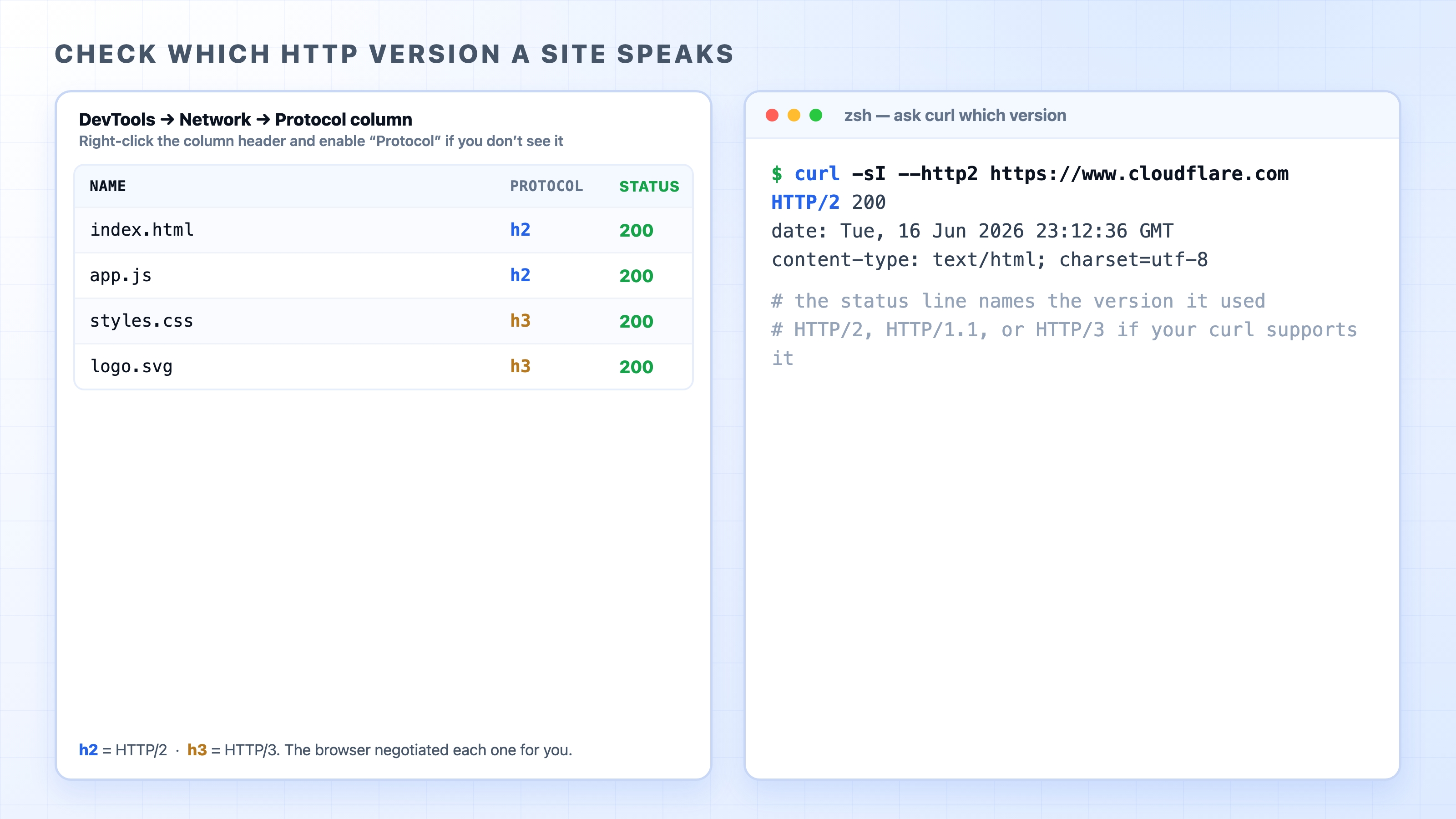
In the browser, open DevTools, go to the Network panel, and reload the page. Look for the Protocol column. If you do not see it, right-click the column headers and enable it. The values you will read there are short codes: http/1.1 for HTTP/1.1, h2 for HTTP/2, and h3 for HTTP/3. On a major site you will likely see h2 or h3 on most rows.
Checking a site's HTTP version in DevTools and with curl
From the terminal, ask curl directly. The -I flag fetches just the headers, and the response's first line names the version that was used:
curl -sI --http2 https://www.cloudflare.com
bash
The first line comes back as HTTP/2 200, which tells you the request went over HTTP/2. Change the site and you might see HTTP/1.1 200 instead. If your build of curl includes HTTP/3 support, curl -sI --http3 https://www.cloudflare.com will report HTTP/3 200. Not every curl is built with it, so do not worry if that one is unavailable; the DevTools Protocol column is the check you can always reach for.
Whichever version you see, notice the part that did not change: it is still a GET, still returns 200, still carries the same headers. The version is just how those bytes traveled.
What's Next
That closes our tour of the network under HTTP, from IP and TCP up through ports, connections, and versions. Next we climb back toward the things you actually type, starting with DNS: how a name like example.com becomes the IP address all of this machinery needs.