Last chapter, TCP gave us one reliable, ordered pipe between two machines. But a real server is never holding just one. A busy web server keeps thousands of TCP connections open at the same time, from thousands of clients, and even your own browser opens several at once across its open tabs. So a new question appears: when bytes arrive at a machine that is running a web server, a database, and an SSH login all at once, how does it know which program the bytes are for? The answer is ports and sockets.
Overview
A single IP address gets data to the right machine, but a machine runs many programs. Ports are the numbers that pick which program on that machine the data is for, and a socket is the endpoint of one specific connection. Together they let one server hold thousands of conversations without ever mixing them up.
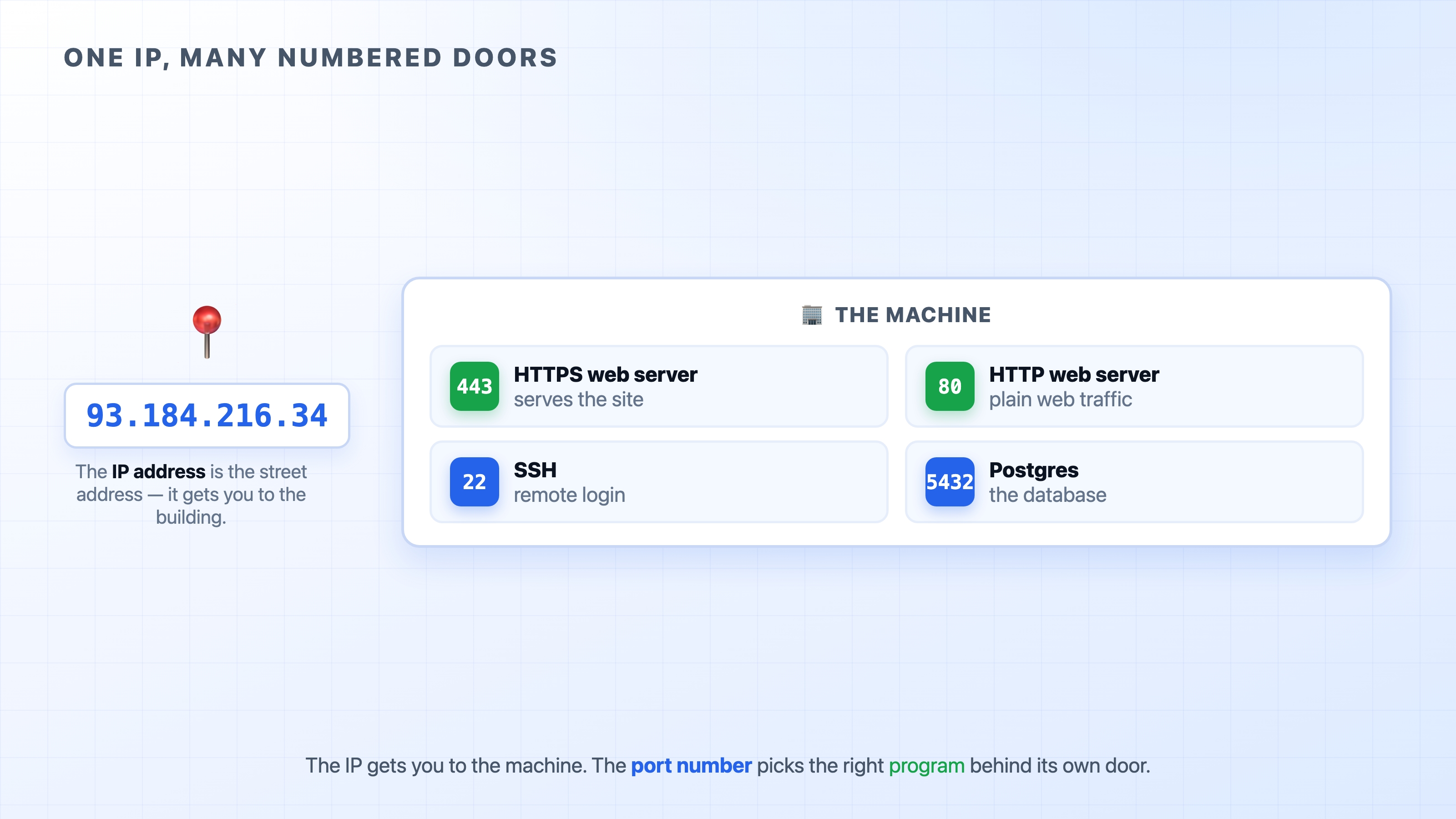
One IP address with many numbered ports as doors
Here is what we will cover:
How a port number routes data to the right program on a machine
The handful of ports a web developer should recognize on sight
How a four-part address makes every connection unique, even thousands to the same port
The apartment building
The picture above is the whole idea in one frame, and the analogy worth keeping is an apartment building.
The IP address is the building's street address. It gets a delivery to the right building, but a building has many apartments, and "deliver this to 93 Main Street" is not enough on its own. You also need the apartment number.
A port is that apartment number. It is a number from 0 to 65535 that picks which program on the machine the data belongs to. The web server lives behind one door, the database behind another, SSH behind a third. Bytes arriving at the machine carry a port number, and the machine uses it to slide the bytes under the right door.
So a full destination is really two parts: an IP address to find the machine, and a port to find the program on it. You have seen them written together with a colon between them:
Ports and Sockets Explained for Web Developers | dalabs.academy
That reads as "port 443 on the machine at 93.184.216.34." The IP gets you to the building; the :443 gets you to the apartment where the HTTPS web server is waiting.
You usually do not type the port for a website, and that is because the browser fills in a default for you. When you visit https://example.com, the browser quietly connects to port 443, because 443 is the agreed port for HTTPS. Plain http:// defaults to port 80. The port was always there; it was just implied.
The ports worth knowing by heart
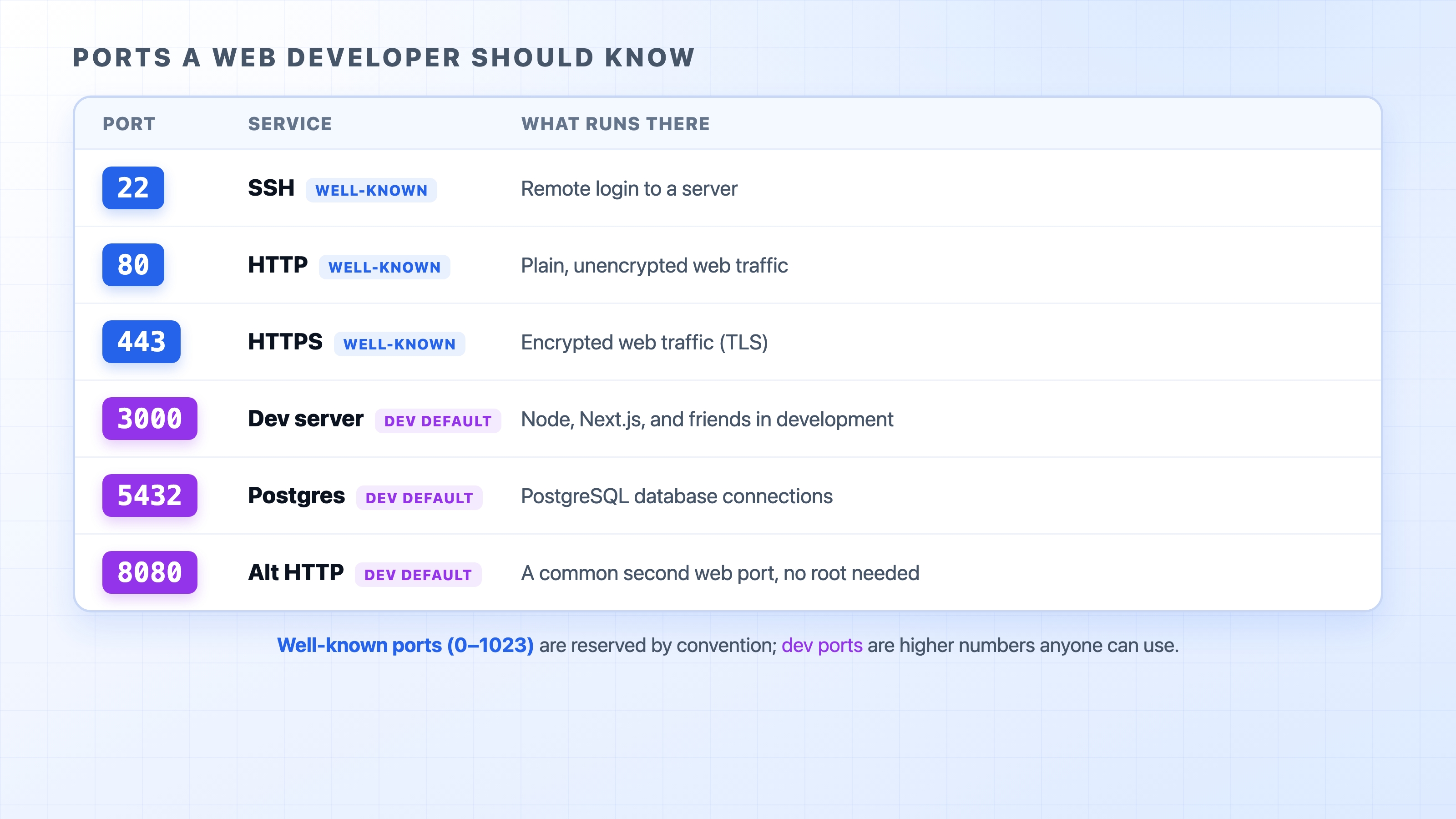
Ports run from 0 to 65535, but you will only ever recognize a small set of them by sight. These are the ones worth committing to memory, because you will type them, debug them, and read them in config files constantly.
A table of ports a web developer should know
The first three are the classics. Port 80 is plain HTTP, port 443 is HTTPS (HTTP wrapped in TLS, which we cover in a later section), and port 22 is SSH, the protocol you use to log in to a remote server. When you ssh into a box or your browser loads a secure site, these are the ports doing the work, whether or not you ever see the number.
The other three show up the moment you start a project locally. Port 3000 is the unofficial home of Node and frontend dev servers; run a fresh Next.js or Express app and it almost certainly greets you on localhost:3000. Port 5432 is where PostgreSQL listens by default, so your app's database connection string points there. Port 8080 is a common alternative web port, often used when you want a second HTTP server or you cannot use 80.
There is a reason the low numbers and the high numbers feel different, and it is worth one paragraph.
Ports below 1024 are called well-known ports. They are reserved by convention for standard services: 80 for HTTP, 443 for HTTPS, 22 for SSH, 25 for email, and so on. On most operating systems, a program needs administrator privileges to listen on one of these low ports, which is part of why your dev server picks something higher like 3000 instead of 80. The higher numbers are open territory that any program can grab without special permission, which is exactly why dev tools live up there.
Worth being clear about: these port assignments are conventions, not laws of physics. Nothing stops you from running a web server on port 9999 or a database on port 3000. The numbers are agreements so that everyone's software can find each other by default. When you visit a website, the agreement that HTTPS means 443 is what lets your browser connect without you specifying a port. Break the convention and things still work, but you will have to tell every client the unusual port yourself.
A socket is one end of a connection
So a port tells the machine which program the data is for. But "the web server" might be handling thousands of connections at once, all aimed at port 443. The port alone cannot tell those thousands of conversations apart. That is where the socket comes in.
A socket is the endpoint of a single connection: one combination of an IP address and a port that marks one end of one conversation. There is a socket on the client side and a socket on the server side, and the connection is the link between them.
Here is the key idea, and it is the one that makes everything click. A TCP connection is not identified by a single number. It is identified by four things together, often called the 4-tuple:
That is the client's IP and port, plus the server's IP and port. A connection is unique as long as that whole four-part combination is unique. Change any one of the four and it is a different connection.
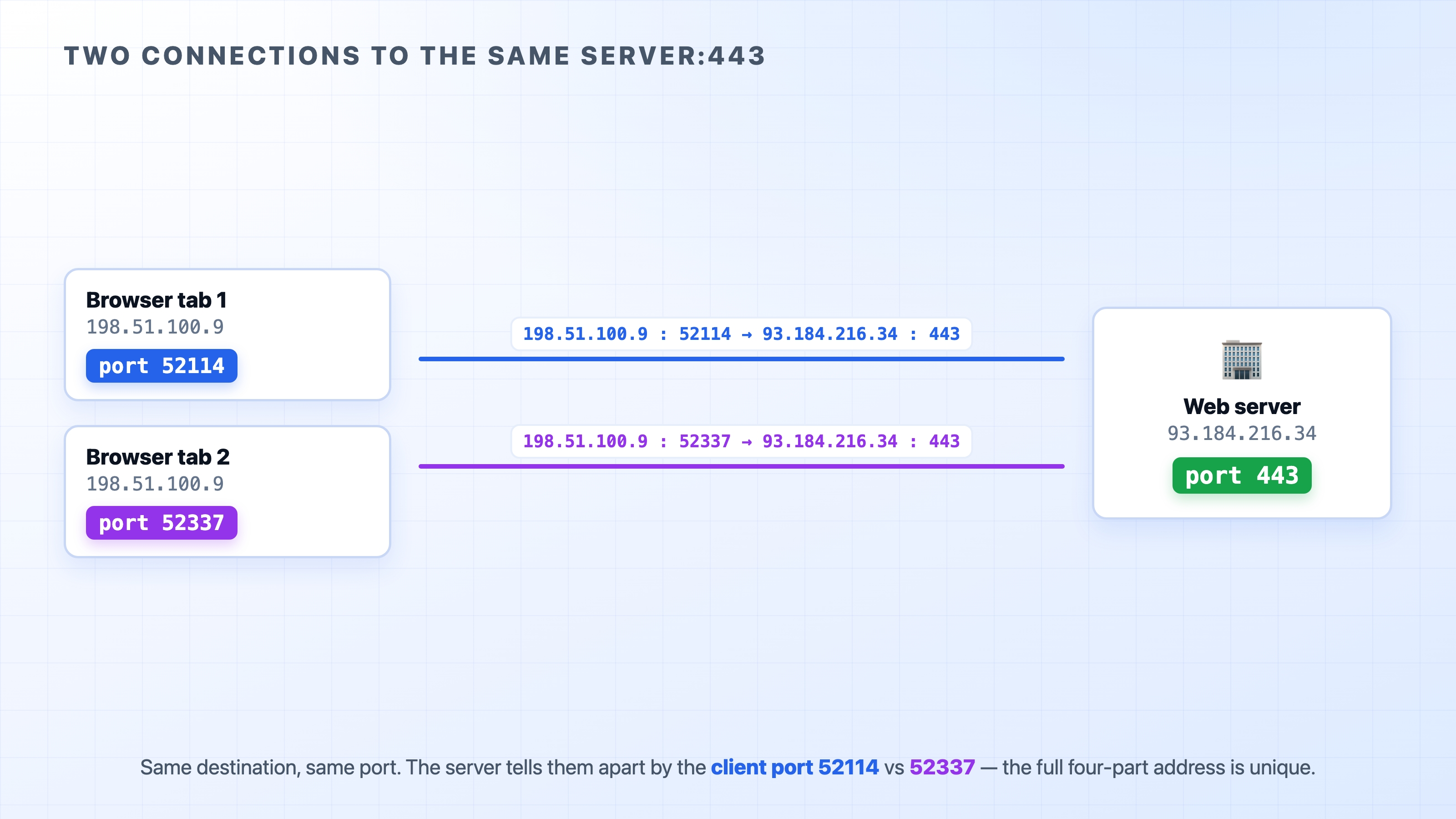
This is the answer to the question that opened the chapter. How can one server hold thousands of simultaneous connections, all to port 443? Because the server's IP and port are the same for all of them, but each client connection arrives from a different source. Look at two browser tabs talking to the same server:
Two connections to the same server told apart by client port
Both connections go to 93.184.216.34:443. The destination IP and destination port are identical. But each tab's connection leaves the client from a different source port: one from 52114, the other from 52337. So the two 4-tuples are different, and the server treats them as two separate conversations. Replies for tab 1 go back to source port 52114; replies for tab 2 go to 52337. They never get crossed.
Where do those source port numbers come from? When your machine opens an outgoing connection, it does not pick the source port itself. The operating system hands it a free, temporary port from a high range, used just for that one connection and released when it closes. These are called ephemeral ports ("ephemeral" meaning short-lived). You never choose them or notice them, but they are the reason your laptop can hold dozens of connections to the same server without confusion: each one gets its own source port, so each 4-tuple is unique.
A point beginners often mix up: the well-known port (like 443) is the one the server listens on, the door everyone knocks on. The ephemeral port is the temporary one the client connects from. You connect to a fixed, known port and you connect from a random, throwaway one. The exact range of ephemeral ports varies by operating system, so do not memorize specific numbers; the idea is what matters.
This four-part identity is the quiet reason TCP scales. One server, listening on one port, can keep tens of thousands of connections straight at once, because the full address of each connection, not just the port, is what makes it unique.
Listening: how a program claims a port
One more term ties this together. When a server program starts up, it tells the operating system "I want to handle anything that arrives on port 443." This is called listening on a port. From then on, the OS routes incoming connections for port 443 to that program, and only that program.
A port can only be claimed by one listener at a time. That rule is sensible: if two programs both listened on port 443, the OS would have no way to decide which one gets an incoming connection. So the first program to grab a port owns it until it lets go, and the next program that tries to listen on the same port is turned away. That refusal is the source of an error you will absolutely run into, which we will meet at the end of the chapter.
Try it now
You can see all of this on your own machine. Open a terminal and look at what is listening where.
To see which program is using a specific port, point lsof at it. This works on macOS and Linux:
lsof -i :3000
bash
If something is running on port 3000, you will see the command name and its PID (process ID). If the port is free, you get nothing back.
On Linux, the modern tool for a full list of listening ports is ss:
ss -tlnp
bash
The flags read as: t for TCP, l for listening sockets only, n to show numeric ports instead of service names, and p to show which process owns each one. (Older systems use netstat -tlnp for the same view.)
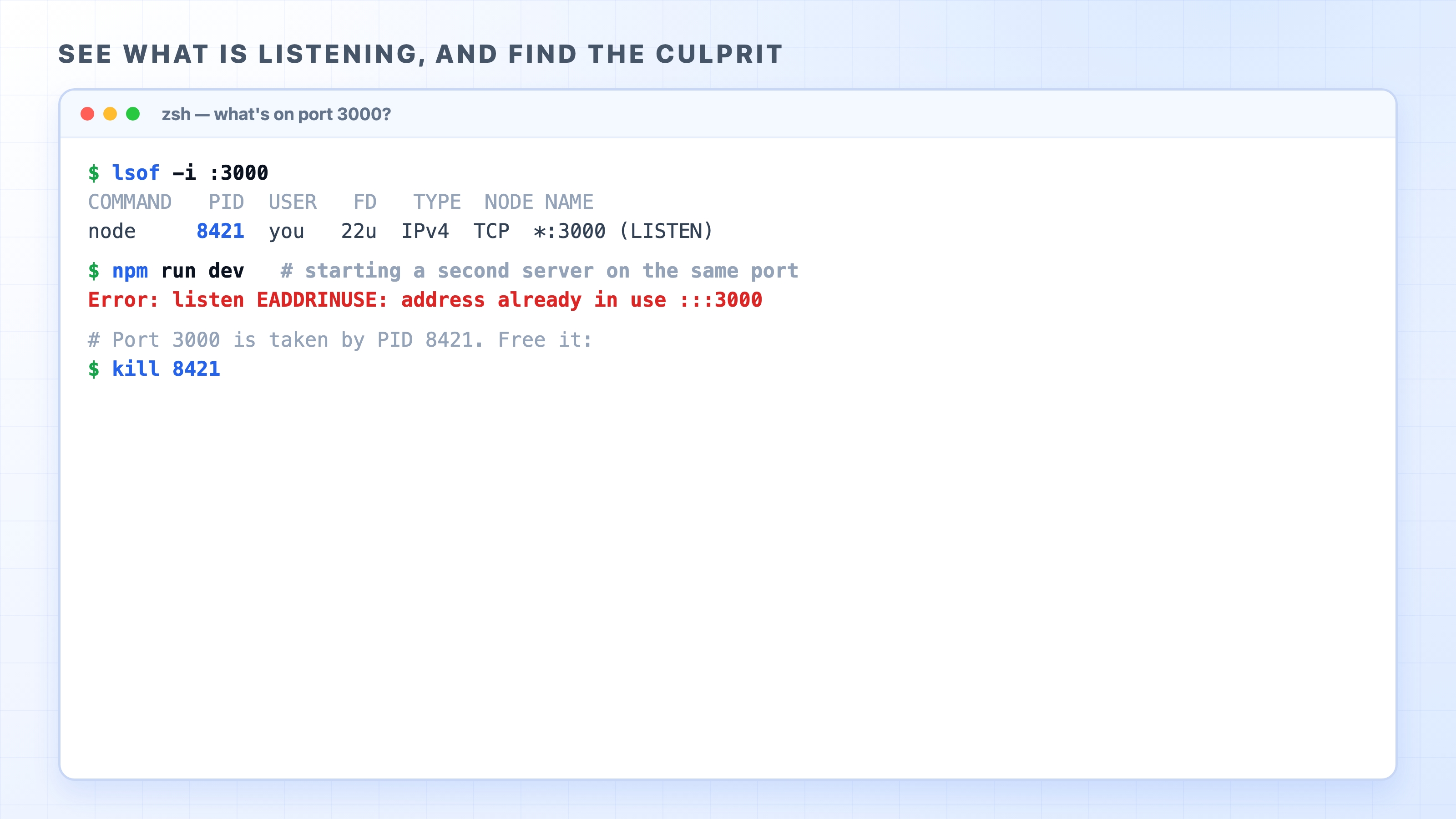
Now the error you came here for. Start a dev server on port 3000, then try to start a second one on the same port without stopping the first:
Finding what listens on a port and freeing a busy one
The second one fails with EADDRINUSE, short for "address already in use." It means exactly what this chapter just explained: another program is already listening on that port, and a port can have only one listener. This is one of the most common errors in local development, and now it is not mysterious. A previous server did not shut down cleanly, or you simply have two things fighting for the same port.
The fix is to find the program holding the port and stop it. lsof -i :3000 gives you the PID, and you stop that process by its PID:
kill 8421
bash
Replace 8421 with the PID lsof actually reported. Once the port is free, your server starts. Either free the port, or start your second server on a different one (PORT=3001 npm run dev, for instance). Both are valid; you are just resolving who gets the door.
What's Next
We now know how one machine routes many connections to the right program and keeps each conversation distinct. The next chapter looks at how reusing these connections, and the differences between HTTP/1.1, HTTP/2, and HTTP/3, turn that capability into real performance.