You have already seen that HTTP is a request and a response, and that both are really just lines of text. Now we will slow down and read every line. The good news is that there is very little to memorize. A request and a response share almost the exact same structure. Once you can name the parts of one, you can read the other. If you understand this basic shape, you can read any HTTP message you ever encounter.
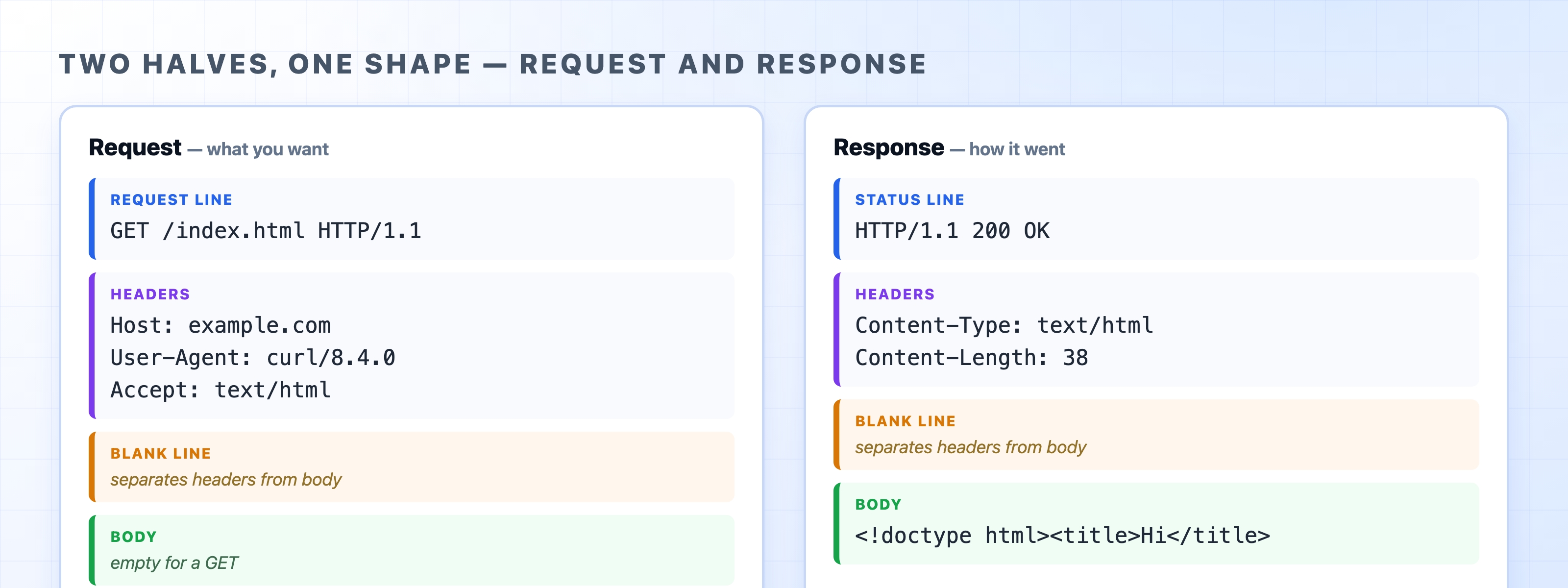
Every request is built from four parts, appearing in a specific order. Here is a complete example:
httpGET /index.html HTTP/1.1Host: example.comUser-Agent: curl/8.4.0Accept: text/html
Reading top to bottom:
GET /index.html HTTP/1.1 translates to "fetch the resource at /index.html using HTTP 1.1." This is the line that states exactly what you want the server to do.Key: Value lines that follow. They carry extra information about the request, such as which host you are trying to reach, what kind of browser you are using, and what data formats you accept. Each header sits on its own line.GET request has no body, which is why the example above ends with the blank line and nothing after it. A request that sends data to the server, like a POST, puts that data here.The response the server sends back has the same four parts. Only the first line is different:
httpHTTP/1.1 200 OKContent-Type: text/html; charset=UTF-8Content-Length: 38<!doctype html><title>Hi</title>OK
HTTP/1.1 200 OK means "I am using HTTP 1.1, and your request succeeded." We will cover status codes in detail shortly.Content-Type says the body is HTML, and Content-Length says it is 38 bytes long.This mirror image is a helpful concept to remember. The request and the response use the same basic envelope. The first line simply changes from "here is what I want" to "here is how it went."
A single empty line is easy to overlook, but it is a vital part of the message. It acts as a marker that tells the receiver, "the headers are finished; everything after this is the body."
The receiver reads headers one line at a time until it hits an empty line. At that point, it stops looking for headers and treats the rest of the message as the body. Without this separator, there would be no way to tell where the metadata ends and the content begins. It is a small rule that the entire format relies on.
Reaching the body raises a fair question. How does the receiver know when the body stops? The network connection might stay open for the next request, so the client cannot just read until the connection closes. There are two common ways to handle this.
The first is the Content-Length header. This header states the exact size of the body in bytes, just like in the response example above. The receiver reads precisely that many bytes and knows it is finished.
The second is chunked transfer. Sometimes the server does not know the total size up front, perhaps because it is generating the response on the fly. In this case, it sends Transfer-Encoding: chunked and streams the body in labeled pieces. Each piece is prefixed with its own length. The transmission ends with a zero-length chunk that signals the end of the message. You do not need to memorize the details right now. Just know that a body without a Content-Length is usually arriving in chunks.
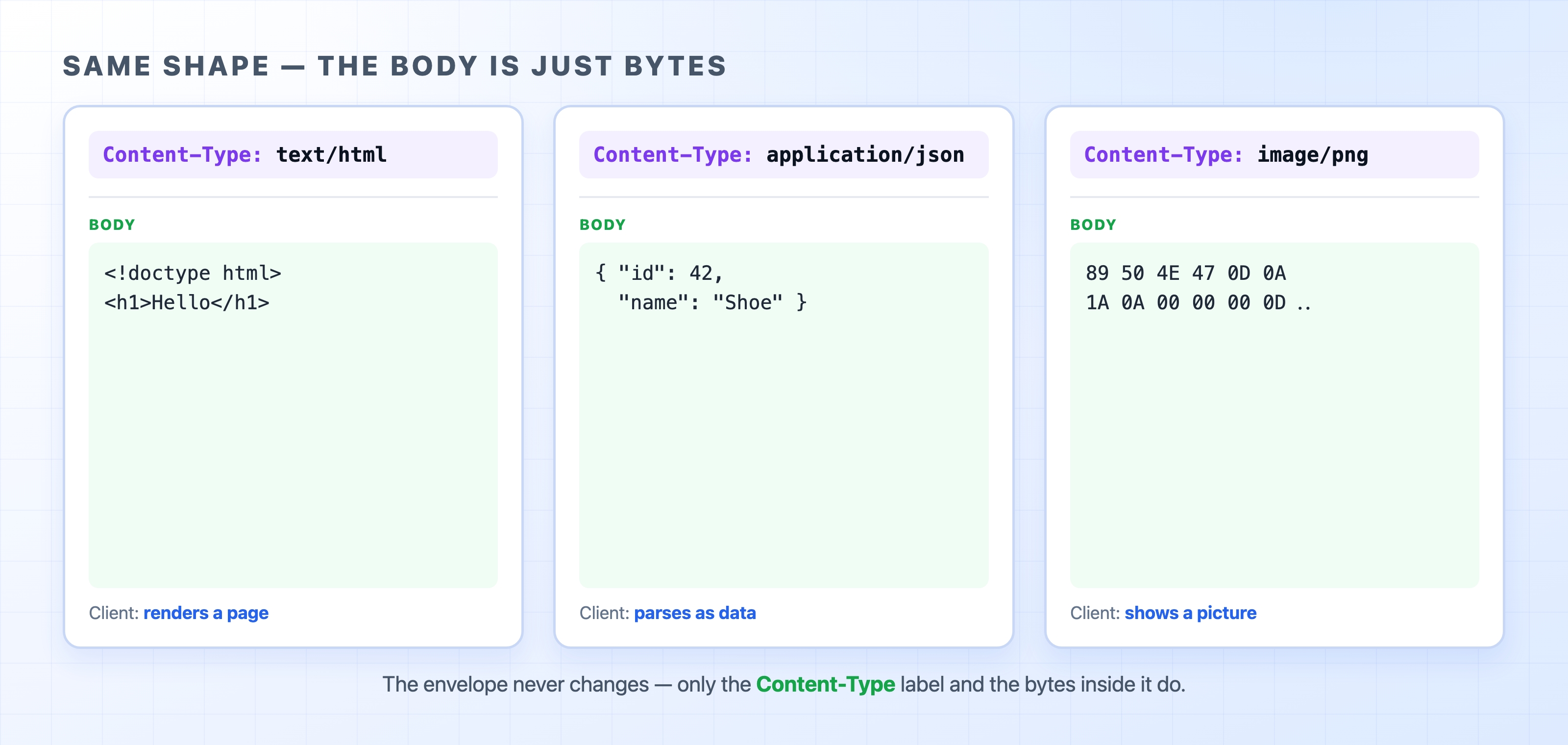
There is one last idea that makes HTTP easy to understand. The body has no fixed type. It is simply a sequence of bytes. The Content-Type header is what tells the client how to interpret those bytes. Change that header, and the exact same response shape carries something completely different.

If the Content-Type is text/html, the browser renders a web page. Change it to application/json, and the body becomes data for your code to parse. Change it to image/png, and the bytes become a picture. The envelope never changes. Only the label and the bytes inside change. This flexibility is why one protocol can carry the entire web.
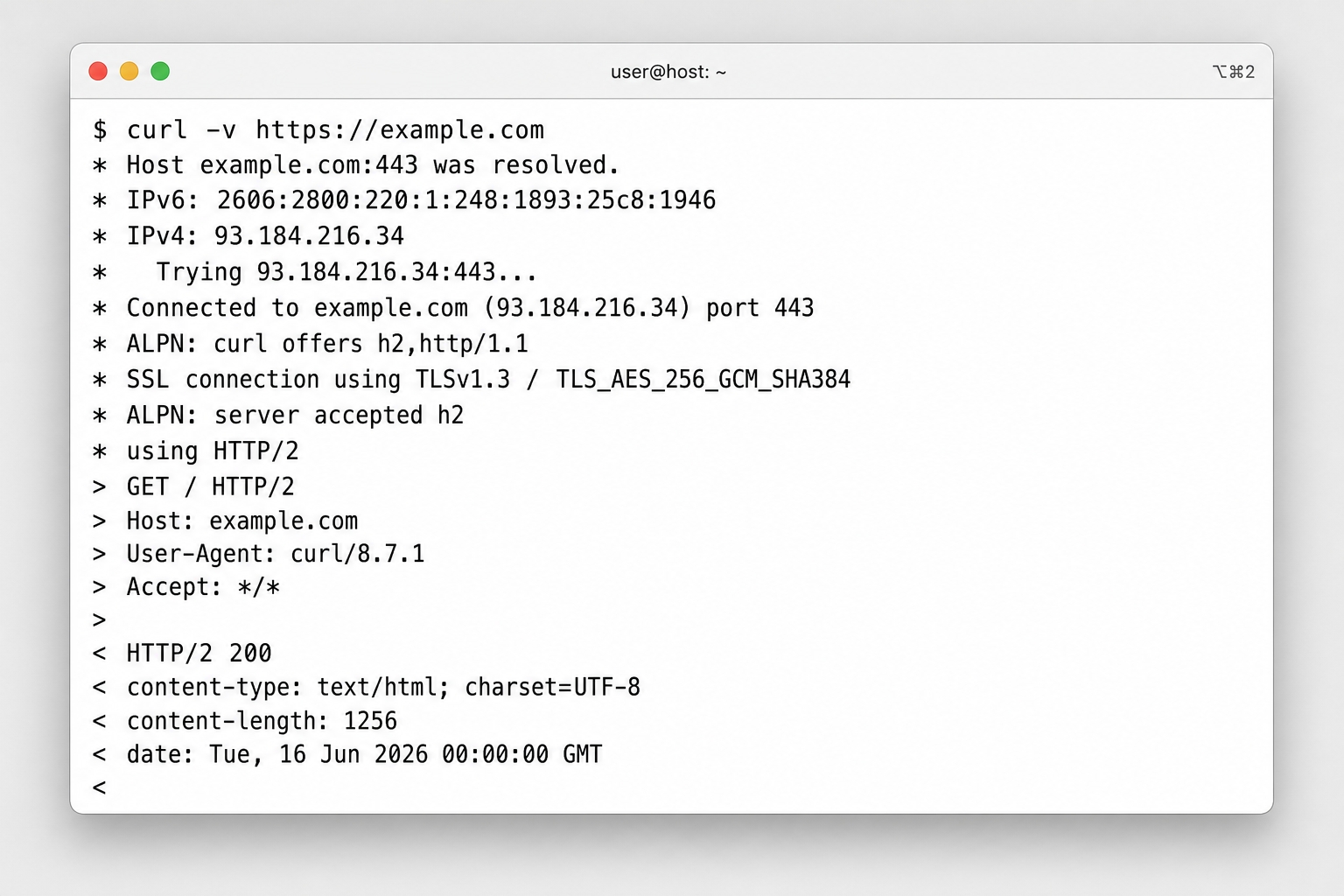
You can use curl with the verbose flag to see both halves of a real exchange:
bashcurl -v https://example.com
Lines that start with > represent the request that curl sent. Lines that start with < represent the response that came back. You will spot the request line, the headers, and the status line right away.

If you want to see just the response, running curl -i prints the status line, the headers, the blank line, and the body together. This lets you see the four parts stacked exactly as described above.
The request line opens with a single word called the method. This method decides what the server should do. The next chapter works through GET, POST, and the other common methods, along with the rules that keep them predictable.