Every request in this course starts with a URL. You type them, click them, and paste them all day, so they feel obvious. However, a URL is actually several distinct parts stitched into a single string. Each piece answers a different question. Learning to see those parts helps you read a URL instead of just guessing at how it works.
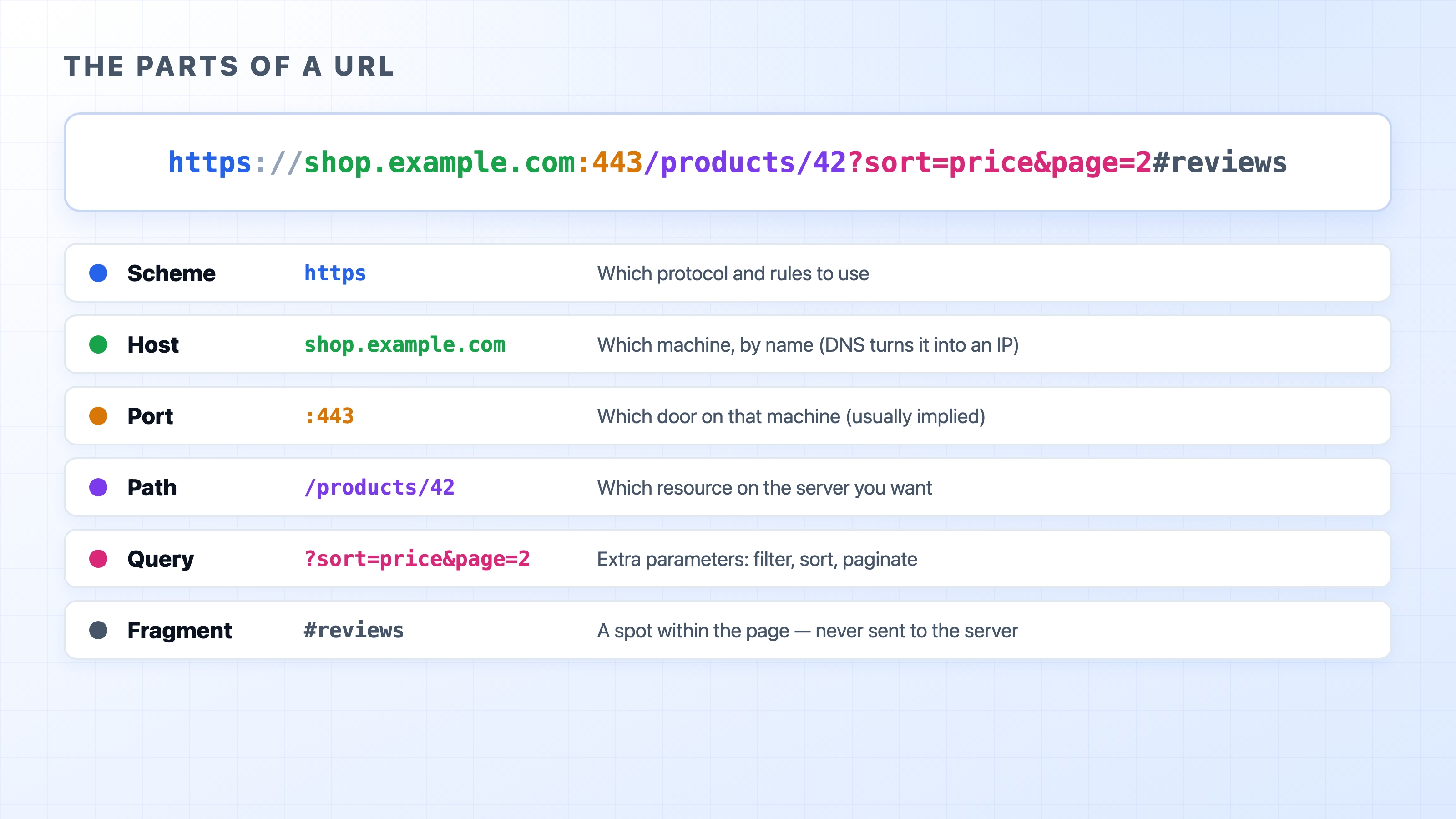
The parts of a URL labelled one by one
Taking a URL apart
Here is a fully loaded example. It has more parts than most URLs you see day to day:
Reading from left to right, each piece has a specific job:
Scheme:https. This tells the client which protocol to use, and therefore which rules apply. The https scheme means HTTP with encryption. You will also see http and others like ftp or mailto.
Host:shop.example.com. This is the name of the machine you want to talk to. DNS turns this name into an IP address before anything can connect.
Port::443. This is the specific "door" on the machine to knock on. You almost never type it because each scheme has a default value (80 for http, 443 for https), and the browser fills it in for you. We give ports a full chapter later.
Path:/products/42. This identifies the specific thing you want on that server. It often looks like a folder path, but it does not have to map to a file on a hard drive. It is just a name the server understands.
Query string:?sort=price&page=2. These are extra parameters, written as key=value pairs joined by an & symbol. They are usually used to filter, sort, or paginate results. Everything after the ? is the query.
Fragment:#reviews. This points to a specific spot within the page, such as a section to scroll to.
Most everyday URLs use only a few of these parts. A bare https://example.com is just a scheme and a host. The browser fills in the rest using defaults.
The fragment never leaves the browser
The fragment deserves a special note because it surprises almost everyone the first time they learn about it. The part of the URL after the # is handled entirely by your browser. It is used to scroll to a matching spot on the page, and it is never sent to the server.
If you load https://example.com/article#section-3, the server only ever sees a request for /article. The #section-3 portion stays in the browser. You can confirm this yourself later in DevTools. No network request ever shows the fragment. For now, just remember that anything after the # symbol is a browser-side instruction.
Path versus query: which goes where
Both the path and the query carry information to the server. When you design a URL, it is not always obvious which one to use. A reliable rule of thumb is:
Use the path to identify which thing you want: /users/42, /products/42, /articles/http-basics.
Use the query to refine or modify the request for that thing: ?page=2, ?sort=price, ?q=shoes.
If changing the value points you at a genuinely different item, it belongs in the path. If it filters, sorts, or tweaks the same underlying item, it belongs in the query. These are conventions rather than hard rules. Following them makes URLs predictable for people and for the caching layers we will meet later.
A URL names a resource
This brings us to a term you will see throughout the course: resource. A resource is whatever a URL points at. It could be a product, a user, an article, or a search result. The main idea is that a URL names the underlying item, not a particular file or format.
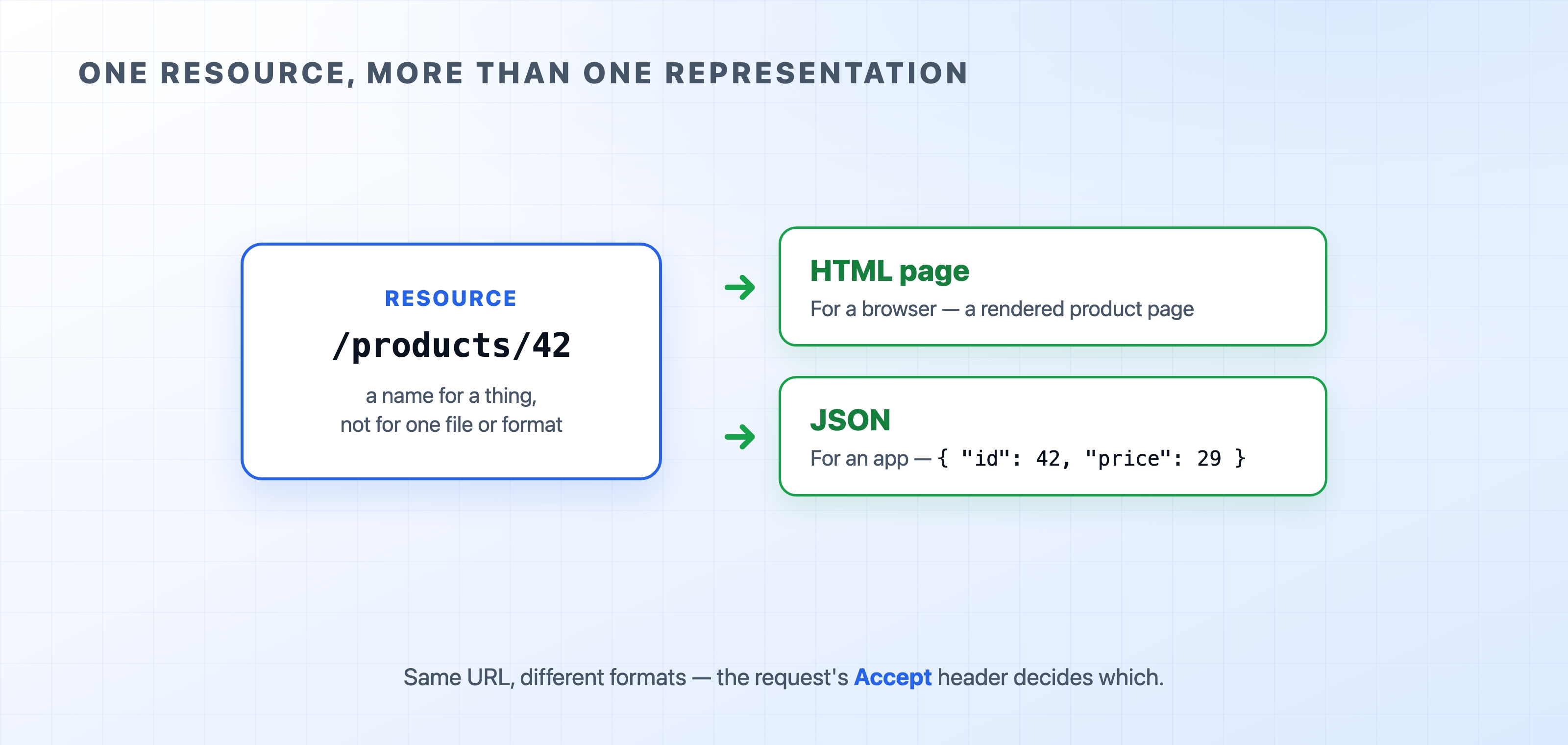
This matters because the same resource can come back in more than one representation. The product at /products/42 might arrive as a rendered HTML page when your browser asks for it. That exact same URL might return a compact JSON object when a mobile app asks for it. It is the same URL and the same resource, just in a different format.
One resource can come back as HTML or JSON from the same URL
How does the server know which format to send? The request carries a header saying what the client prefers, and the server picks a representation to match. We cover that negotiation properly in the content section. For now, just know that a URL is a stable name for a resource, and the format is a separate choice layered on top.
Why spaces turn into %20
URLs are only allowed to contain a limited set of characters. A handful of those characters, like ?, &, #, /, and the space, already have special meaning. When a value needs to contain one of them literally, it gets percent-encoded. A space becomes %20, so q=hello world is sent as q=hello%20world.
Browsers do this for you automatically. This detail usually trips people up when they build URLs in code and forget to encode them. A stray space or an unencoded & silently splits your URL into the wrong pieces, and the server reads something you never meant to send. When you construct URLs yourself, always encode the values that go into them.
Try it now
Watch encoding and the disappearing fragment in your own browser:
Open DevTools and select the Network tab.
In the address bar, type a URL with a space and a fragment, such as https://example.com/hello world#top, and press Enter.
Look at the address bar. The space has become %20.
Look at the request in the Network tab. The path shows the encoded space, and the #top fragment appears nowhere in the request. The server never saw it.
What's Next
You can now read a URL and name the resource a request is asking for. The next section opens up the request and response themselves, reading every line of a real HTTP message.