What Really Happens When You Open a Website?
Tung Nguyen
9 min read
When you type a web address and press Enter, a complete page appears on your screen almost instantly. Between those two moments, your computer does an incredible amount of invisible work. This chapter walks through that entire journey step by step, using plain language.
The goal right now isn't to dive deep. It’s to give you a map. Every step gets its own detailed chapter later, so don't worry if a term flies past. We just want to see the whole route at once. When we finally slow down and zoom into each part, you will already know exactly where it fits.
The trip, step by step
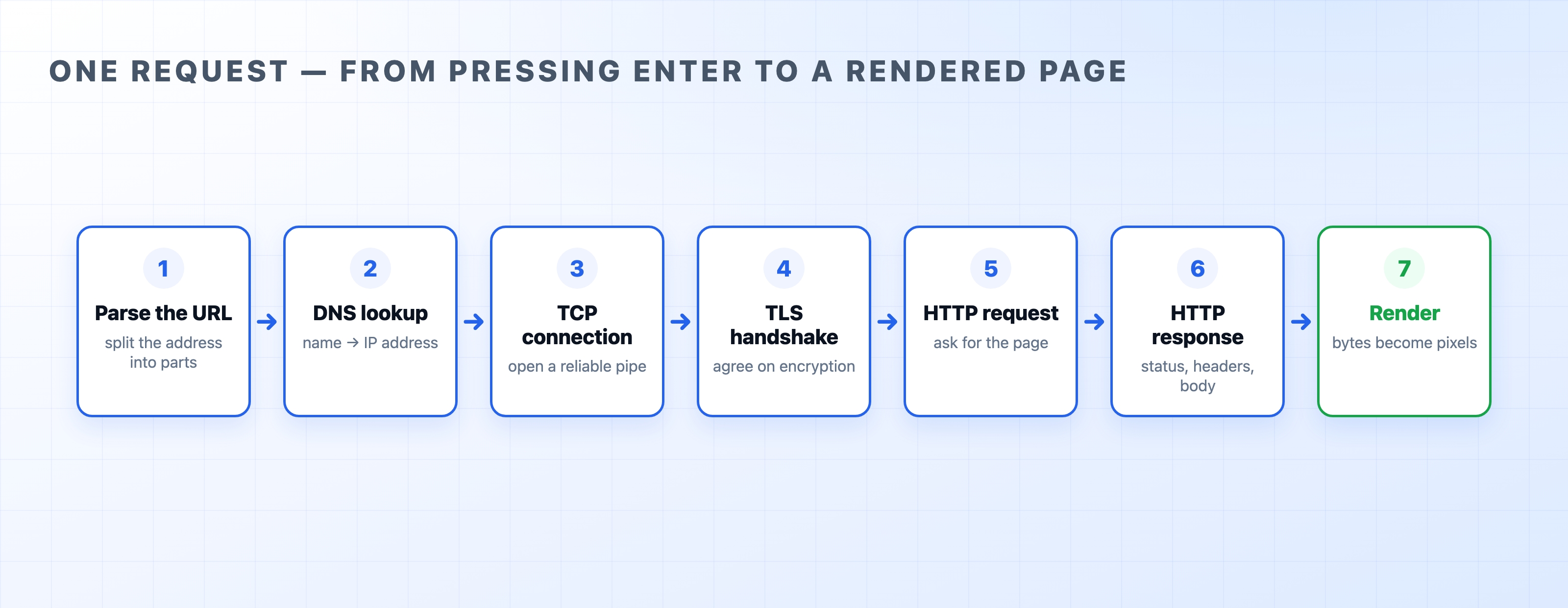
Imagine you open https://example.com. Here is exactly what happens, in order.
- Parse the URL. Your browser first breaks the address into pieces: the protocol (
https), the site name (example.com), and the specific path of the file you want. It needs these pieces before it can do anything else. - DNS lookup. Computers do not talk to names like
example.com; they talk to numbers. So the browser asks the Domain Name System, "what is the IP address for this name?" and gets back a number like93.184.216.34. - Open a TCP connection. Now that it has an IP address, the browser opens a direct connection to that machine. This is a quick back-and-forth conversation that sets up a reliable pipe for the data to flow through.
- TLS handshake. Because the address was
https, the two computers now agree on encryption keys. This ensures that nobody sitting between them can read the traffic. This step turns plain HTTP into secure HTTPS. - Only now does the browser send the actual request: "GET me the page at this path." It is just a small block of text.