The last three chapters built up the middle of the connection one machine at a time: the web server at the front door, the forward proxy working for the client, and the reverse proxy working for the server. The reverse proxy was an HTTP-in, HTTP-out machine. It speaks HTTP to the client and HTTP to the backend, forwarding requests without changing the protocol. This chapter covers three more middle machines that break that mold. A gateway translates between protocols. A tunnel passes traffic straight through without touching it. And an API gateway is a reverse proxy with a pile of extra jobs bolted on, acting as one feature-rich front door for an entire API.
Overview
Three machines, three different relationships with the traffic flowing through them. A reverse proxy keeps the protocol the same on both sides. A gateway changes it. A tunnel refuses to look at it at all. The API gateway is the practical one you will meet most: a single door in front of many services that handles the work they all share.
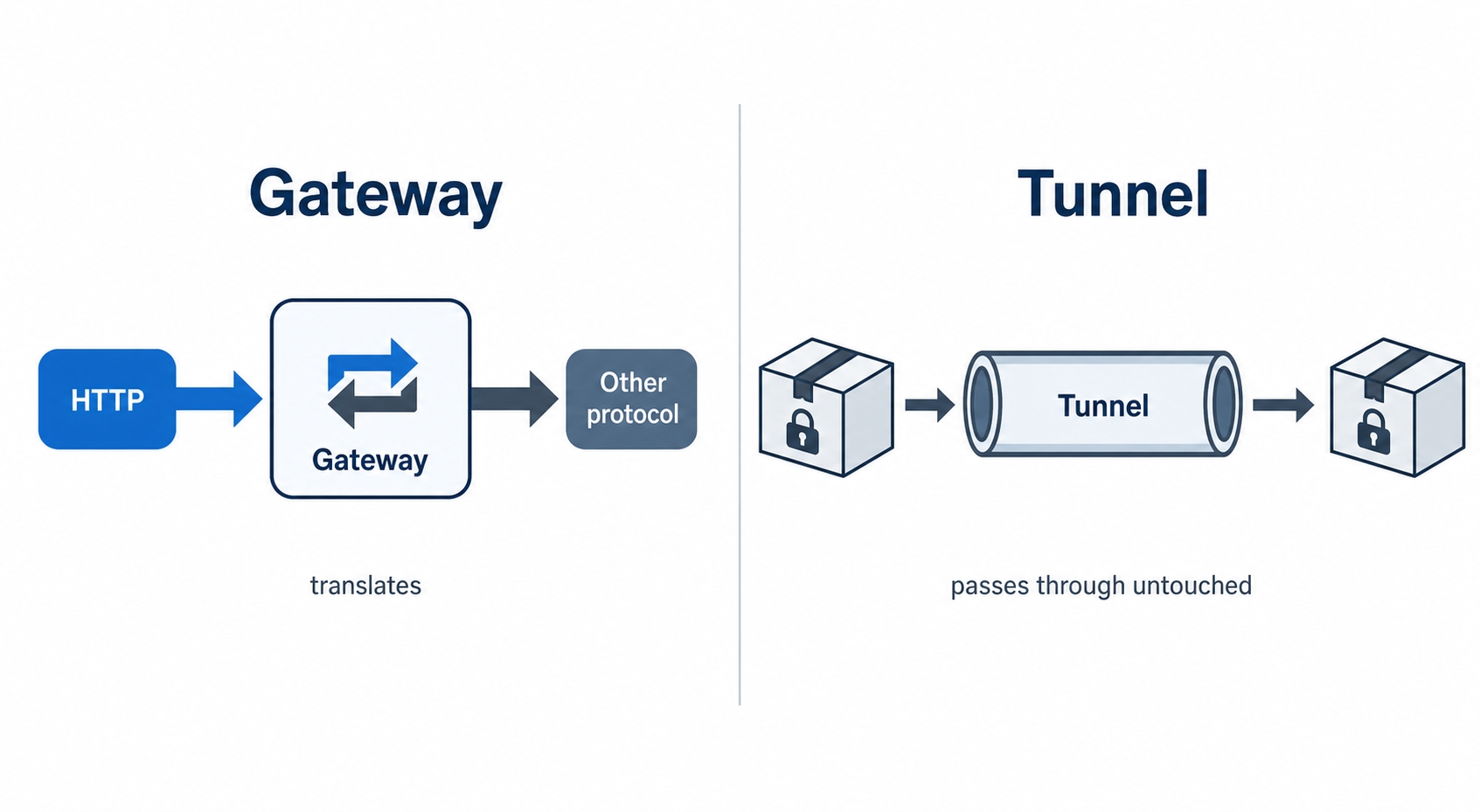
A gateway translates protocols while a tunnel passes traffic through untouched
Here is what we will cover:
A gateway as a translator: HTTP on one side, something that isn't HTTP on the other.
A tunnel as an opaque pass-through, with HTTP CONNECT (how HTTPS flows through a proxy) as the example.
The API gateway: one front door that centralizes the cross-cutting jobs every service would otherwise repeat, plus the trade-off that comes with it.
A gateway translates
Start with the gateway, because it is the one that does something a plain proxy never does.
A reverse proxy is a same-protocol machine. HTTP comes in, HTTP goes out. It might change the path, add a header, or pick a different backend, but both conversations are HTTP. A gateway is the machine for when the two sides don't speak the same protocol. It takes HTTP on the front and speaks something else out the back, translating between the two as it goes. That translation is the whole point of a gateway, and it is exactly what a plain proxy doesn't do.
Gateways, Tunnels, and API Gateways Explained | dalabs.academy
The classic reason you need one is a backend that doesn't speak HTTP at all. Picture an old system that was built long before the web, talking some database protocol or a binary message format of its own. You want a clean HTTP API in front of it so modern clients can use it. You put a gateway in the middle: it accepts an HTTP request, translates that request into whatever the legacy system understands, gets the answer back in the legacy format, and translates that into an HTTP response. The client sends ordinary HTTP and has no idea there is anything unusual behind the door.
Common confusion: gateway vs reverse proxy. They look identical in a diagram, one box in the middle with an arrow in and an arrow out. The difference is what comes out the back. If both sides are HTTP, it's a reverse proxy forwarding. If one side is HTTP and the other is a different protocol, it's a gateway translating. Same shape, different job: forwarding keeps the protocol, a gateway converts it.
The word "gateway" shows up in a few related ways, and they all share this translator idea. You will see it in error names later in the course: a 502 Bad Gateway means a server acting as a gateway or proxy got a broken response from the machine behind it, and a 504 Gateway Timeout means that machine never answered in time. The "gateway" in those names is this same middle box, the one standing between your request and whatever actually fulfills it.
A tunnel passes traffic through untouched
A tunnel is the opposite extreme. A gateway reads your traffic carefully and rewrites it. A tunnel refuses to look at it at all. It takes bytes in one side and pushes the identical bytes out the other, with no idea what they mean. It is a dumb pipe, and that dumbness is exactly what makes it useful.
The reason tunnels exist is encryption. Think back to the forward proxy: a client sends its requests to the proxy, and the proxy fetches them on its behalf. That works fine for plain HTTP, where the proxy can read the request and act on it. But what about HTTPS? The whole point of HTTPS is that the traffic is encrypted end to end, so the client and the destination server can talk privately. If the proxy in the middle could read and rewrite that traffic, the encryption would be pointless. So the proxy needs a way to relay the encrypted bytes back and forth without being able to understand them. That way is a tunnel.
The mechanism HTTP defines for this is the CONNECT method. When your browser is configured to use a forward proxy and you request an HTTPS site, it doesn't send a normal GET to the proxy. It sends this:
CONNECT example.com:443 HTTP/1.1
Host: example.com:443
http
This is the browser asking the proxy: "open a raw connection to example.com on port 443, and from now on just pass bytes between us." The proxy opens that connection to the destination, replies 200 Connection established, and then steps out of the way. From that point on, it is a tunnel. The encrypted TLS handshake and every encrypted HTTP request after it flow straight through the proxy, in both directions, as bytes the proxy can copy but cannot read.
This is the part worth slowing down on, because it surprises people: the forward proxy can see which host you asked for, because the CONNECT line names it in plaintext. But it cannot see the path you requested, the headers you sent, or the response that came back. All of that is inside the encrypted tunnel. The proxy is a relay, not a reader. It knows you talked to example.com:443; it has no idea what you said.
Try it now. You can watch the CONNECT exchange with curl. Point a request at an HTTPS site through a proxy in verbose mode:
In the output, before any of the normal request lines, you will see curl send CONNECT example.com:443 HTTP/1.1 and the proxy answer HTTP/1.1 200 Connection established. Everything after that line is the TLS handshake and the real request, flowing through the tunnel the proxy just opened. (Swap in a real proxy address you have access to.)
So a gateway and a tunnel sit at the two ends of one spectrum. A gateway understands the traffic so well it can rewrite it into another protocol. A tunnel understands nothing and simply carries it. Most middle machines, including the proxies from the last two chapters, live somewhere in between: they read enough to do their job and forward the rest.
The API gateway: one front door for many services
Now to the machine you are most likely to build or configure yourself. To see why the API gateway exists, we first need the problem it solves, and that problem comes from how modern backends are often built.
Instead of one big application that does everything, a system is frequently split into many small services, each owning one job. A microservice is one of these small, independently deployed services: a users service, an orders service, a payments service, each running on its own, each with its own HTTP API. The client's single app now talks to a whole collection of them.
Here is where the pain shows up. Every one of those services needs to do the same handful of boring jobs on every request. It has to check that the caller is authenticated. It has to enforce rate limits so no one hammers it. It has to log the request for debugging and metrics. It has to reject malformed requests. None of that is the service's actual purpose, but every service has to do it anyway. Build it into each one, and you have copied the same authentication and logging code into ten different places, where it can drift out of sync and has to be fixed ten times.
These repeated, service-agnostic jobs have a name: cross-cutting concerns. They cut across every service rather than belonging to any one of them. Auth, rate limiting, logging, request validation, all of it is the same regardless of which service ultimately answers.
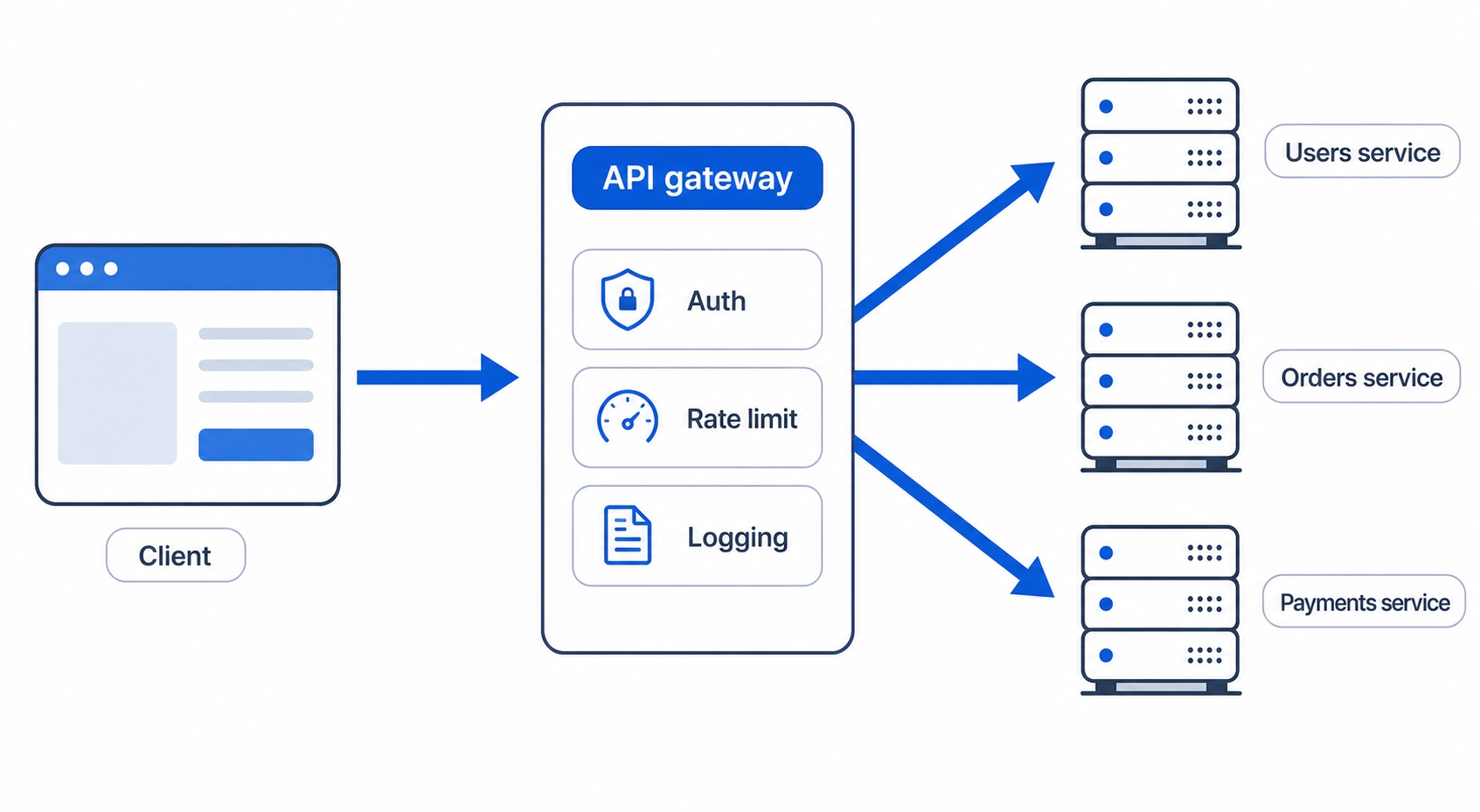
The API gateway is the fix. It is one machine that sits in front of all the services, every client request goes through it first, and it does the cross-cutting work once, in one place, before routing each request on to the service that actually handles it.
An API gateway is one front door that routes to several backend services
Follow a single request through it. A client sends GET /orders/42 to the gateway. The gateway:
Authenticates the caller, checking the token or key, and rejects it if it's invalid, so no service behind it ever sees an unauthenticated request.
Rate-limits the caller, counting their requests and turning them away with a 429 if they've gone over budget.
Logs the request, recording the method, path, and timing in one consistent place for every service.
Routes the request to the right backend, reading the /orders/ prefix and forwarding to the orders service.
The orders service receives a clean, already-authenticated, already-rate-limited request and gets to do nothing but look up order 42. Every other service sits behind the same door and inherits the same protections for free. Write the auth logic once, at the gateway, and every service is covered.
If that routing-plus-forwarding description sounds familiar, it should. An API gateway is a specialized reverse proxy. It does everything a reverse proxy does, taking requests in and forwarding them to backends, and adds the cross-cutting jobs on top. The reverse proxy is the foundation; the API gateway is what you get when you load it up with auth, rate limiting, logging, and validation and point it at a fleet of services.
The trade-off: one front door is also one choke point
A single front door is powerful, but the power cuts both ways, and it would be dishonest to sell it without the catch.
Everything funnels through the API gateway. That is what lets it enforce policy everywhere at once. It is also what makes it a single point of failure: if the gateway goes down, it doesn't matter that all your services are healthy, because no request can reach them. The one door is shut, and the whole API is unreachable. The same concentration that makes the gateway useful makes it a single thing that can take everything down.
It can also become a bottleneck. Every request in the system passes through this one machine and waits for it to do its auth, rate-limiting, and logging work. If the gateway is slow or overloaded, every service behind it feels it, even the ones that are sitting idle. You have moved the cross-cutting work into one place, which also means you have moved a potential traffic jam into one place.
This isn't a reason to avoid API gateways. They are standard in production for good reason, and the centralization is usually worth it. But the gateway becomes a piece of infrastructure you have to take seriously: run more than one copy so a single failure can't sink the whole API, watch its latency closely, and give it the resources it needs. We will pick up one of its central jobs, rate limiting, in detail in the production section later in the course, where it gets the full treatment it deserves.
What's Next
That closes Section 7: you now have the full map of machines a request passes through, from web servers and proxies to gateways and tunnels. Next we start Section 8 on caching, beginning with why caching exists and the cache nearest the user, the one built right into your browser.