The previous chapter looked at the web server, the program that sits at the server's end of the connection and decides what to do with a request the moment it lands. Now we move into the space between the two ends. A proxy is a machine that sits in the middle of a connection and relays requests from one side to the other instead of letting them go straight across. This chapter is about one kind of proxy, the forward proxy: a proxy that sits in front of the client and makes requests on the client's behalf.
Overview
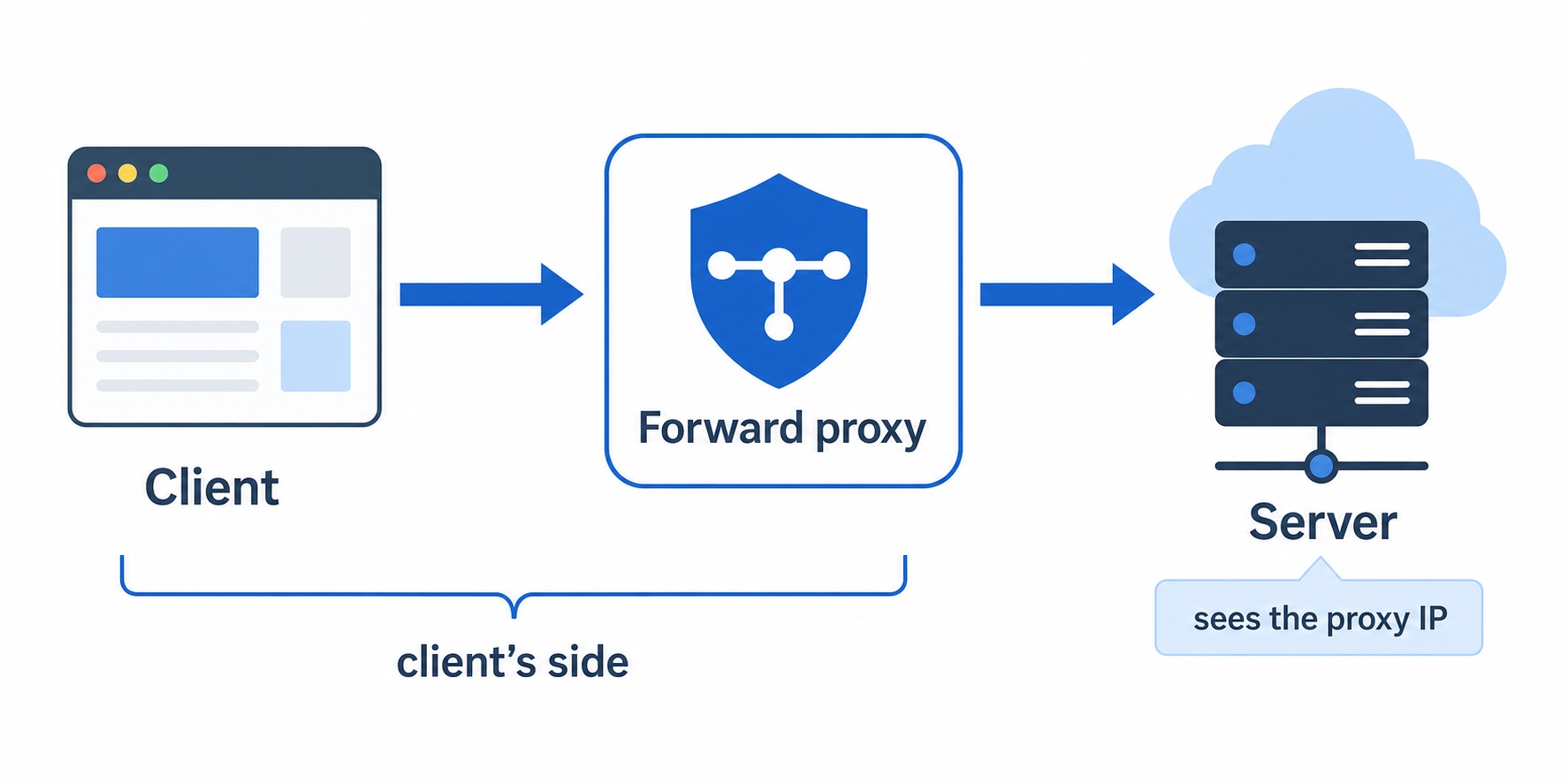
Here is the whole idea in one line: a forward proxy is a middleman that works for the client. Instead of talking to the destination server directly, the client hands its request to the proxy, and the proxy goes and fetches the response.
A forward proxy sits on the client's side and relays requests to the server
That small shift in who actually contacts the server is what makes forward proxies useful. In this chapter we will cover:
What "on the client's side" means, and why it is the one fact that defines a forward proxy.
The three reasons people run one: filtering traffic, hiding the client's identity, and sharing a cache across many users.
Why the destination server sees the proxy as the visitor, not the real client, which you will confirm yourself with curl.
Whose side is it on?
Without a proxy, the path is short. Your browser opens a connection straight to the destination server, sends an HTTP request, and reads the response. Two parties, one connection.
A forward proxy slips a third party into the middle. Now your browser does not connect to the destination at all. It connects to the proxy and says, in effect, "please go get https://example.com for me." The proxy opens its own connection to the destination, makes the request, receives the response, and passes it back to you.
Forward Proxies: A Proxy on the Client's Side | dalabs.academy
The key question with any proxy is whose side it is on, because that single fact tells you everything else about how it behaves. A forward proxy is on the client's side. It is configured by the client (or by whoever controls the client's machine), it acts for the client, and from the destination server's point of view, the proxy is the client. The server has no idea you exist behind it.
That is worth slowing down on, because it is the part beginners most often get backwards. The forward proxy is not something the website you are visiting set up. It is something on your end of the connection, standing in front of you and your colleagues, relaying your traffic outward. Picture it as the doorway your requests pass through on the way out to the internet.
Why run one?
If a forward proxy just relays requests, why bother putting one in the path at all? Because once every request from a group of clients flows through a single point, that point becomes a convenient place to do three useful things.
The first is filtering and logging. A company or school can route every machine's traffic through one forward proxy and then decide what passes. It can block certain sites, allow others, and keep a log of who requested what. This is why the network on a corporate laptop or a campus often refuses to load some sites: a forward proxy in the middle is checking each request against a policy before it goes out.
The second is anonymity. Because the destination server sees the request coming from the proxy, the client's own address is hidden behind it. The server learns the proxy's identity, not yours. Routing your traffic through a proxy in another location is a basic way to keep your real address off the destination's logs.
The third is a shared cache. A cache is a stored copy of a response that can be reused instead of fetching it again. If a hundred people behind one proxy all request the same popular file, the proxy can fetch it once, keep a copy, and serve the other ninety-nine from that copy, without going out to the internet again. That saves bandwidth and makes the second request faster. We will go deep on caching in its own section later; for now, just notice that a forward proxy is a natural place for many users to share one cache.
These three uses are really the same trick seen from three angles. Funnel many clients through one point, and that point can inspect traffic, stand in for the clients, or remember responses on their behalf.
The server sees the proxy, not you
The most important mechanical detail to lock in is who the destination server thinks it is talking to.
When the proxy makes the request to the destination, it does so over its own connection, from its own address. So the source of the request, as far as the server can tell, is the proxy. The server sends its response back to the proxy, and the proxy relays it to you. Your address never appears in that conversation. This is the same fact that makes anonymity work, and it is the cleanest way to see a forward proxy in action, which is exactly what we will do at the end of the chapter.
A fair question here: if the server only ever sees the proxy, how does the response find its way back to the right client? The proxy keeps track. It knows which of its clients asked for what, so when the response arrives, it hands it to the one that requested it. The client and the server never speak directly, and neither needs to know the other's address. The proxy is the only party that knows both.
Forward proxy vs reverse proxy
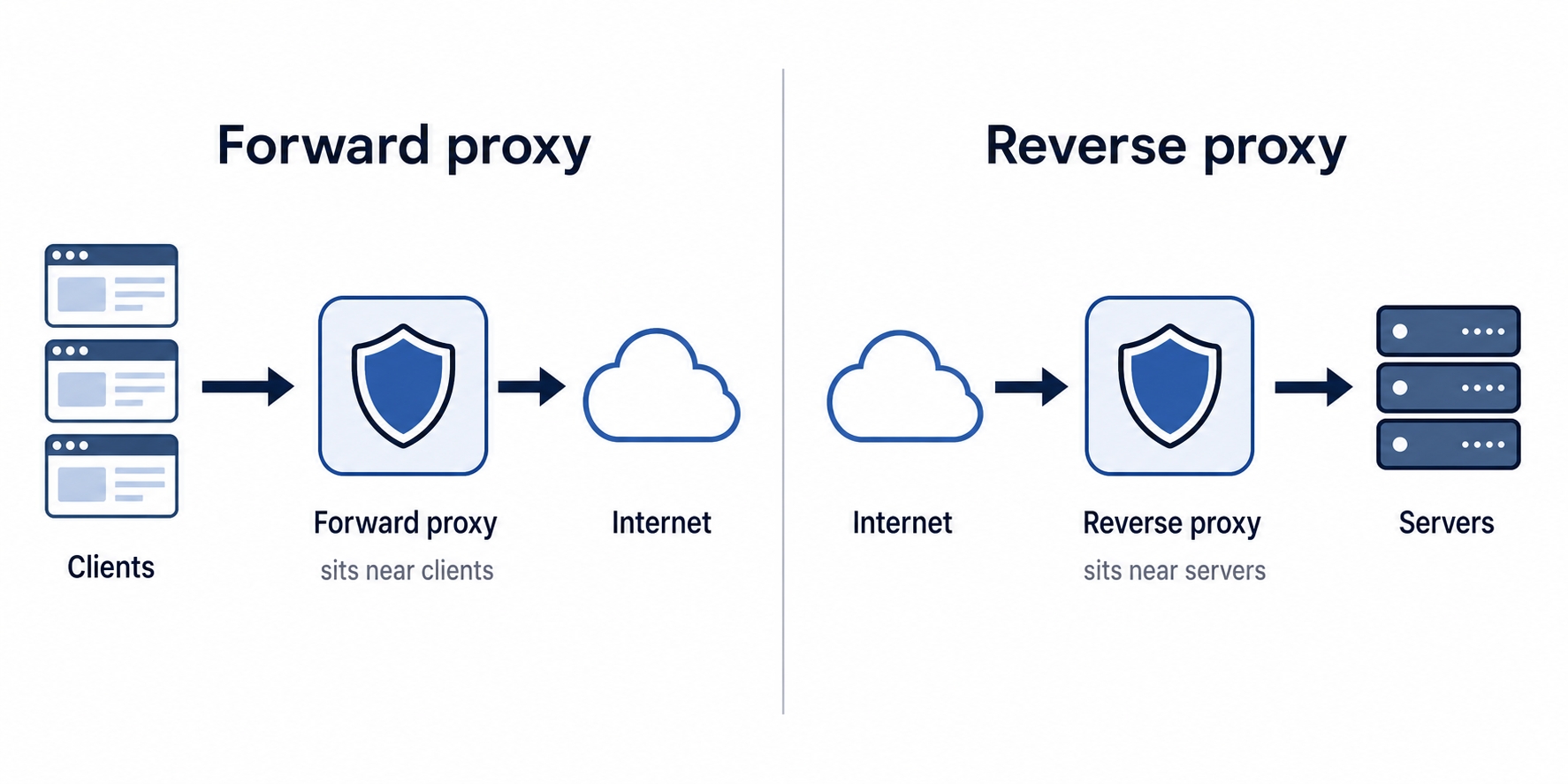
There is one mix-up worth heading off now, because it trips up almost everyone, and the next chapter is the other half of it. A proxy in front of clients is a forward proxy. A proxy in front of servers is a reverse proxy. Same kind of machine, opposite position.
A forward proxy sits near clients while a reverse proxy sits near servers
Read the figure by whose side each one is on. The forward proxy on the left lives next to a group of clients and works for them, relaying their requests out to the internet. The reverse proxy on the right lives next to a group of servers and works for them, taking requests in from the internet and passing them to the right backend. A forward proxy hides the clients from the server; a reverse proxy hides the servers from the clients.
A simple way to remember it: name the proxy after whoever set it up and whoever it serves. Your IT department puts a forward proxy in front of you, the employees, so it is on the client's side. A website operator puts a reverse proxy in front of their servers, so it is on the server's side. The reverse proxy gets its own chapter next, so we will leave it there.
Try it now
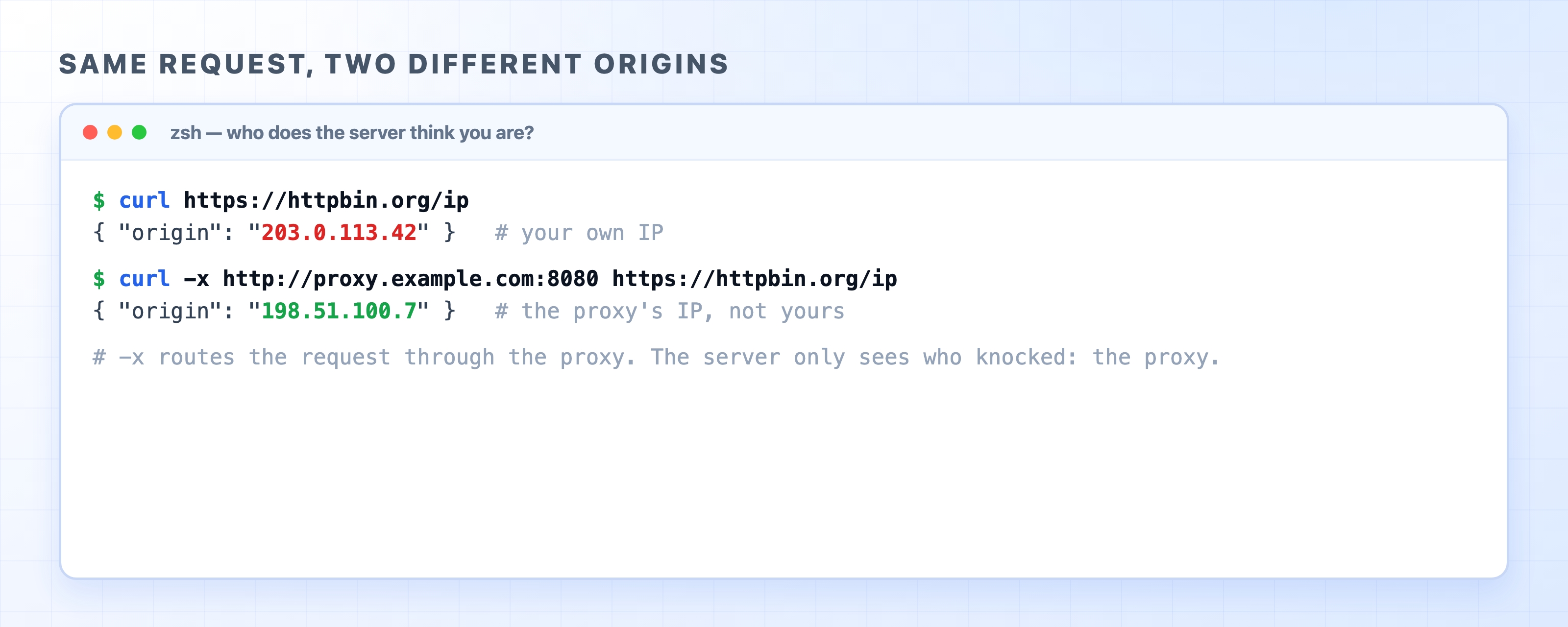
You can watch a forward proxy change who the server thinks you are with a single tool you already have: curl. The site https://httpbin.org/ip answers any request with the address it saw the request come from, in a tiny JSON body. Ask it directly first:
curl https://httpbin.org/ip
bash
You will get back your own public address, something like { "origin": "203.0.113.42" }. That is the server seeing you.
Now send the same request through a proxy with the -x flag, which tells curl to route the request through the proxy you name instead of connecting directly:
Routing a curl request through a proxy changes the origin IP the server sees
The body comes back with a differentorigin: the proxy's address, not yours. Same request, same destination, but the server now reports a different visitor, because the request reached it from the proxy. That swapped address is the whole idea of a forward proxy made visible in one line.
To run this against a real proxy, replace proxy.example.com:8080 with the address of a forward proxy you have access to (your company may give you one, or you can run a local proxy for testing). The address will change to that proxy's; the origin field is your live confirmation that the request went out through it.
What's Next
Now that you know the forward proxy that works for the client, the next chapter turns it around to the reverse proxy, the one that works for the server and quietly powers most production web architecture.