The previous chapter looked at the forward proxy: a middleman that works for the client, relaying its requests out to the internet. This chapter turns that exact picture around. A reverse proxy is a proxy that works for the server side. It sits in front of your servers, takes requests in from the internet, and passes each one to the right backend. It is the workhorse of modern web architecture, and when a backend engineer says "the proxy," this is almost always the one they mean.
Overview
Same kind of machine, opposite position. A forward proxy stands in front of clients and points outward; a reverse proxy stands in front of servers and points inward. That one flip changes what the proxy is for: instead of serving a group of users, it serves a group of servers, and it takes on a pile of jobs so those servers can stay simple.
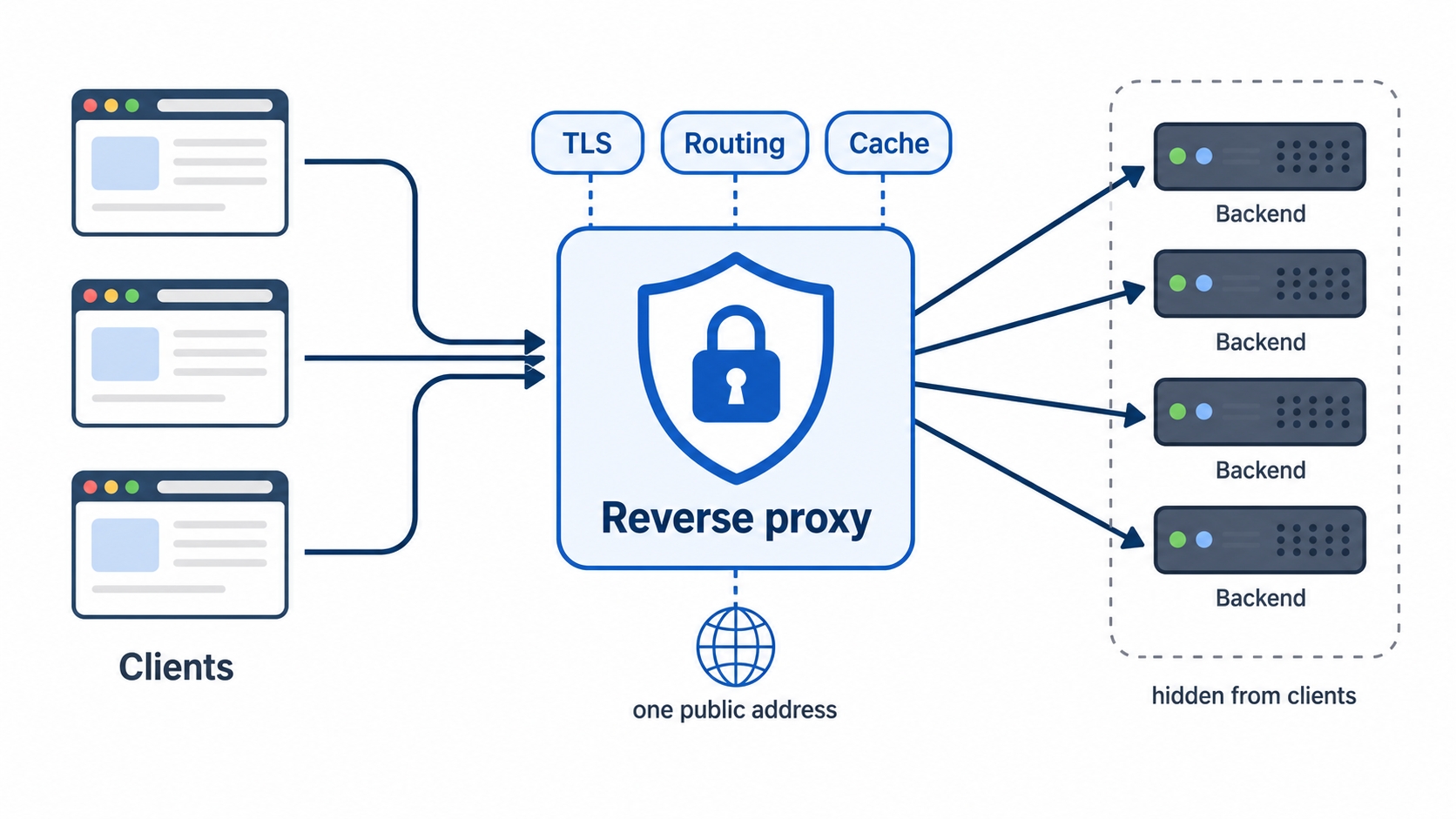
A reverse proxy hides a fleet of backend servers behind one public address
Here is what we will cover:
The jobs a reverse proxy absorbs so your backends don't have to: TLS termination, routing, caching, and compression.
How it hides a whole fleet of backend servers behind a single public address.
Why the backend, which only ever sees the proxy, depends on the X-Forwarded-For and X-Forwarded-Proto headers to learn who the real visitor was. You will set up two apps behind one Nginx and watch this happen.
One public face for many servers
Start with the picture in the figure above, because everything else follows from it.
To the outside world, your site has one address. Clients connect to it, send their requests, and read the responses, exactly as if a single server were answering. They have no way to tell, and no reason to care, what is behind that address. It could be one server. It could be fifty.
Behind that one public address sits the reverse proxy, and behind sit the real servers that do the work, the (you will also hear them called , because they are upstream of the proxy in the flow). When a request arrives, the proxy picks one of those backends, forwards the request to it, takes the backend's response, and hands it back to the client as if it were its own. The client talks only to the proxy. The proxy talks to the backends. The two ends never meet.
Reverse Proxies: A Proxy on the Server's Side | dalabs.academy
it
backends
upstreams
This is the mirror image of the forward proxy from last chapter, and it is worth saying out loud because the symmetry makes both click. A forward proxy hides the clients from the server. A reverse proxy hides the servers from the clients. Name each one by whose side it sits on and works for, and you will never mix them up again.
Hiding a fleet behind one face buys you room to grow. You can add backends, remove a broken one, or deploy a new version, all without the client noticing, because the address it connects to never changes. Spreading incoming requests across those backends so no single one is overwhelmed is its own big topic, load balancing, which gets a full treatment later in the course. For now, just hold the shape: many servers, one public door.
The jobs it absorbs
A reverse proxy could just forward requests and nothing more. The reason it is everywhere is that the single point every request flows through is the perfect place to handle the cross-cutting work that every backend would otherwise have to do for itself. Push that work out to the proxy once, and the backends get to stay small and focused on their actual logic.
Four jobs come up again and again.
TLS termination. Back in the HTTPS section, the encrypted connection ran from the client all the way to the server. In practice, the reverse proxy is usually where that encryption ends. The client makes its HTTPS connection to the proxy, the proxy decrypts the request, and it talks to the backends over plain HTTP on the private network behind it. This is called TLS termination: the proxy "terminates" the encrypted connection and handles all the certificate and key work in one place. Without it, every backend would need its own copy of the certificate and its own TLS setup. With it, you configure HTTPS once, at the edge, and your backends speak simple HTTP.
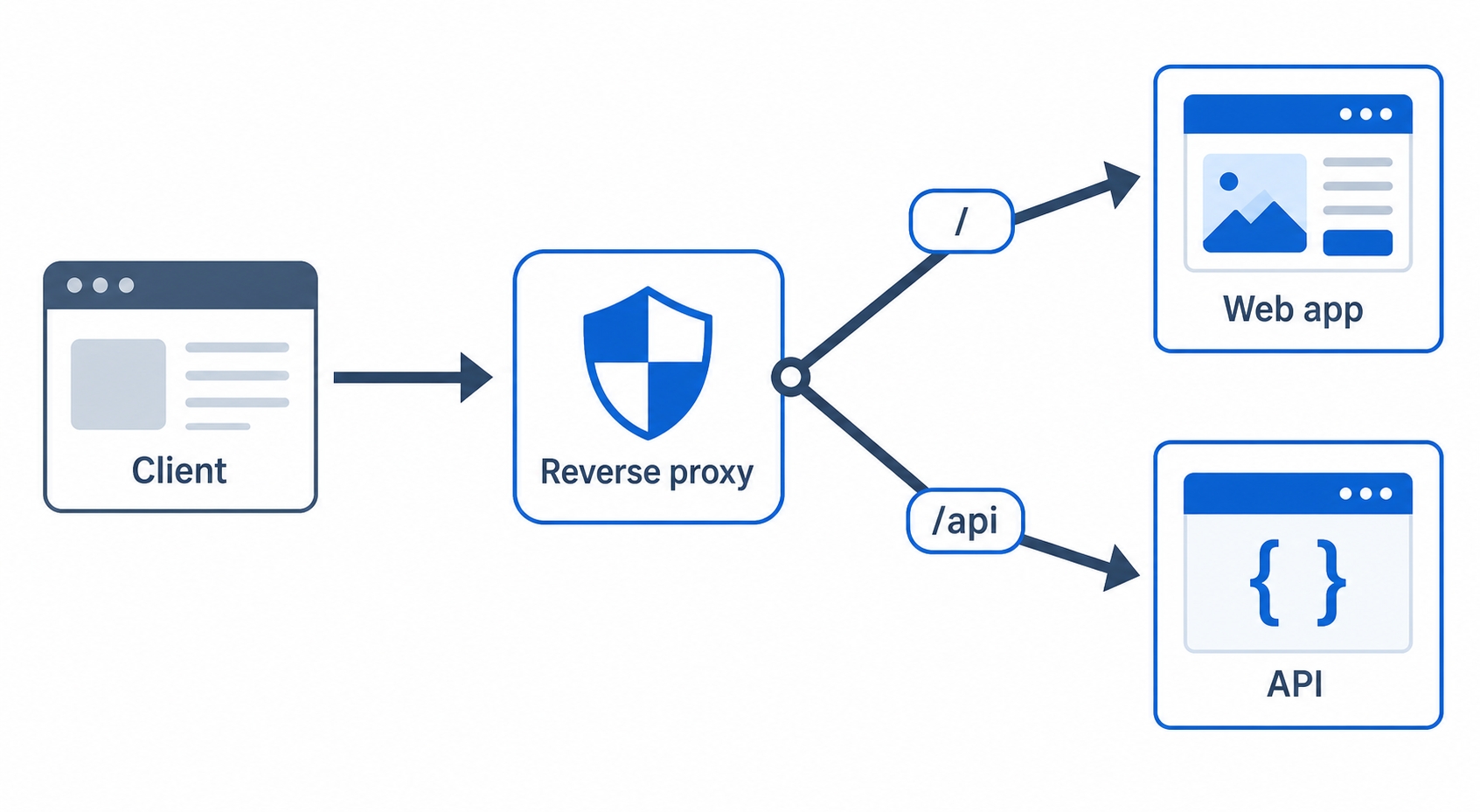
Routing. Not every request should go to the same backend. The proxy can look at the request and send it to the right place, usually by the URL path or by the hostname. Send /api to the API service and / to the web app. Send shop.example.com to one set of servers and blog.example.com to another. The proxy reads the front of the request and forwards accordingly, which is how a single address can sit in front of many different services.
A reverse proxy routes the root path to a web app and /api to an API
Caching. Just like the forward proxy from last chapter, a reverse proxy is a natural spot to keep copies of responses. If a thousand clients ask for the same page or image, the proxy can serve a saved copy instead of bothering the backend every time. That takes load off the servers and speeds up the response. Caching has a whole section coming up, so we will leave the details there.
Compression. Text responses (HTML, CSS, JSON) shrink a lot when compressed before they go over the wire. The proxy can compress responses on the way out so the backend doesn't have to spend CPU doing it on every request. The backend sends plain text; the proxy compresses it once at the edge.
Notice the through-line: in each case, the messy, repetitive, edge-of-the-network work moves out of the backends and into the one box in front of them. That is the whole point of a reverse proxy. Your application code gets to assume someone else already handled HTTPS, routing, caching, and compression, and just answer the request it was given.
A note on what a reverse proxy actually is
Here is the part that confuses beginners, so let's clear it up directly: a reverse proxy is often the same software as a web server. Nginx is the classic example. In the web servers chapter, we used Nginx to serve files from disk. In this chapter, we use Nginx to forward requests to backends. Same program, different job, decided entirely by its config.
So "web server" and "reverse proxy" are not two different products you choose between. They are two roles one piece of software can play, often at the same time. One Nginx can serve your static files straight from disk and reverse-proxy your /api requests to an application, in the same config file. When you read that someone "put Nginx in front of their app," they mean they configured Nginx to act as a reverse proxy. The box in the diagrams is a role, not necessarily a separate machine or a separate program.
The backend sees the proxy, not the client
Now we hit the exact problem we met with forward proxies, mirrored. With a forward proxy, the destination server saw the proxy's address instead of the client's. With a reverse proxy, it is the backend that gets fooled the same way.
Think it through. The client connects to the proxy. The proxy opens its own, separate connection to a backend and forwards the request over it. So from the backend's point of view, the request arrived from the proxy, over the proxy's connection, from the proxy's address on the internal network. The backend has no idea who the real visitor was. As far as it can tell, every request in the world comes from one machine: the reverse proxy sitting right in front of it.
That is usually fine, until the backend needs to know the real client. And it often does:
Logging. An access log that records the proxy's address for every single request is useless. You want to know which actual visitor made the request.
Rate limiting. If you cap requests per client but every request looks like it came from the proxy, you would throttle everyone at once the moment traffic rises.
Redirects and links. The client connected over HTTPS, but the backend received plain HTTP from the proxy. If the app builds an absolute URL, it might wrongly produce an http:// link, because that is the scheme it saw.
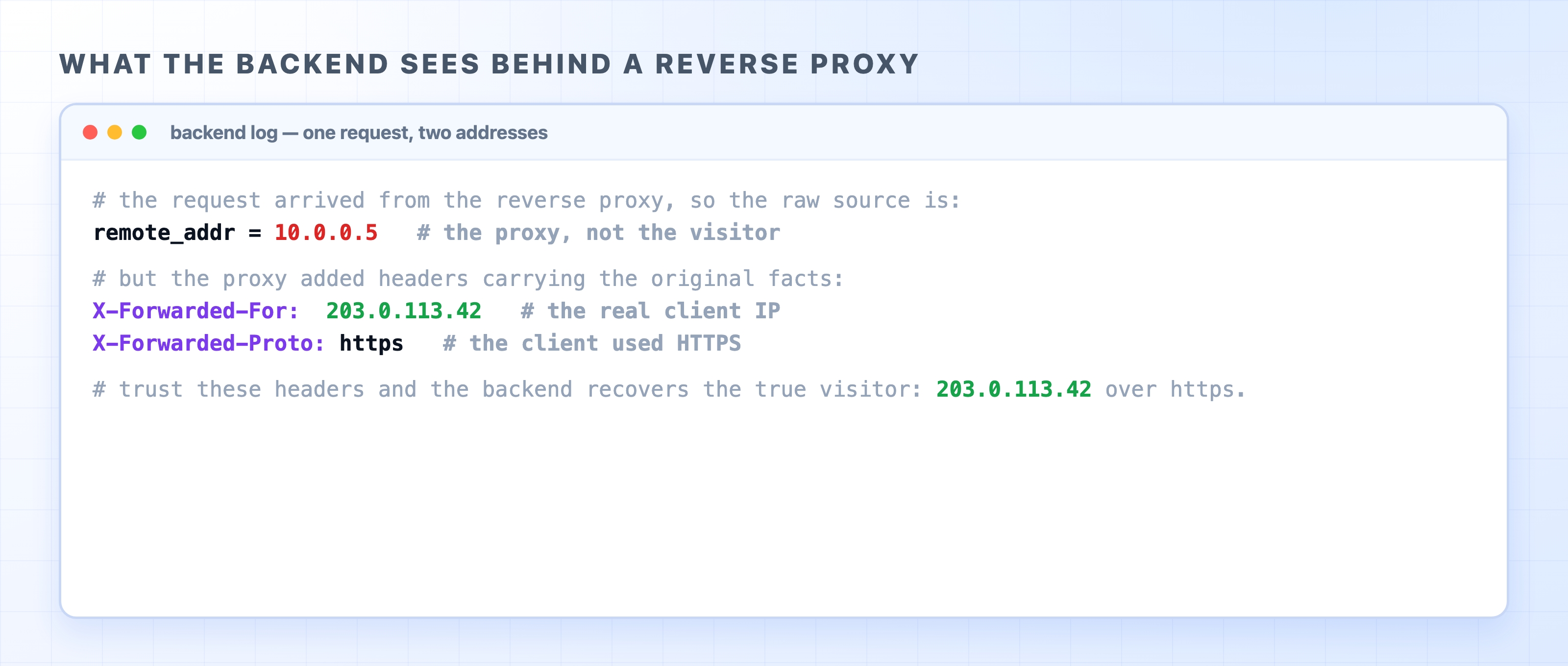
The fix is a pair of headers the proxy adds as it forwards the request. X-Forwarded-For carries the real client's IP address. X-Forwarded-Proto carries the scheme the client originally used, https or http. The proxy knows both facts, because it is the one that spoke to the client directly, so it writes them into the forwarded request. The backend then reads those headers instead of trusting the connection it sees, and recovers the truth: this request really came from 203.0.113.42, over HTTPS, even though it arrived here as plain HTTP from the proxy next door.
One safety note worth carrying with you: a backend should only trust these headers when the request genuinely came through a proxy it controls. Any client can set an X-Forwarded-For header itself, so an app that is directly reachable from the internet must not blindly believe it. Behind a properly configured reverse proxy, though, these headers are how the backend gets the real client back.
Try it now
Let's put a reverse proxy in front of two apps and route between them by path. Imagine two tiny backends already running on your machine: a web app on port 3000 and an API on port 4000. We will point one Nginx at both, sending / to the web app and /api/ to the API.
Here is the whole config:
server {
listen 80;
server_name localhost;
location /api/ {
proxy_pass http://localhost:4000;
proxy_set_header X-Forwarded-For $remote_addr;
proxy_set_header X-Forwarded-Proto $scheme;
}
location / {
proxy_pass http://localhost:3000;
proxy_set_header X-Forwarded-For $remote_addr;
proxy_set_header X-Forwarded-Proto $scheme;
}
}
nginx
Read it the way we read the config in the web servers chapter. listen 80; accepts HTTP on the public port. The two location blocks are the routing decision: /api/ matches anything starting with that path and proxy_pass forwards it to the API on port 4000; / is the catch-all and forwards everything else to the web app on port 3000. Nginx checks the more specific /api/ block first, so a request for /api/users reaches the API, while a request for /about falls through to the web app.
The difference from the web servers chapter is that neither block serves a file from disk. Both forward to a backend. That is what makes this Nginx a reverse proxy: it is standing in front of two servers and presenting them to the world as one.
The two proxy_set_header lines are the headers from the last section, written out. As Nginx forwards each request, it sets X-Forwarded-For to $remote_addr (the address Nginx saw the client connect from) and X-Forwarded-Proto to $scheme (the scheme the client used). Those are the variables Nginx fills in for you. They ride along to the backend so it can recover the real client.
Now send a request to the proxy on port 80 and let it route by path:
curl http://localhost/
curl http://localhost/api/status
bash
The first lands in the / block and comes back from the web app on 3000. The second matches /api/ and comes back from the API on 4000. Same address, same port, two different backends, chosen entirely by the path. From curl's side it looks like one server answering everything.
And if you log the incoming request inside the API backend, here is what it sees:
The backend recovers the real client from X-Forwarded-For behind a reverse proxy
The raw connection came from the proxy (remote_addr is an internal address like 10.0.0.5), but the forwarded headers carry the original facts: the real client IP and the original scheme. Trust those, and the backend logs the true visitor instead of the proxy. That recovered address is the reverse proxy's version of the same lesson the forward proxy taught: the machine in the middle changes who the other end thinks it is talking to, and a header is how the truth gets passed along.
What's Next
You now know the two everyday proxies, one for each side of the connection. The next chapter widens the lens to gateways and tunnels, including the API gateway, a feature-rich front door that builds on the reverse proxy idea.