Across this section you collected the pieces one at a time. DNS turns a name into an IP. The TCP handshake opens a reliable connection. The TLS handshake encrypts it and verifies the server's certificate. And under all of that sits the round-trip cost we measured back in the TCP chapter. This chapter does the assembly: it follows one HTTPS request from the moment you press Enter to the moment the encrypted bytes come back, with every layer you have learned now filled in.
Overview
You already know each step. What you have not seen is all of them lined up in order, on one clock, so you can see how they stack and where the time actually goes. That is what this chapter is: a single request told as one continuous story, from https://example.com to a rendered page.
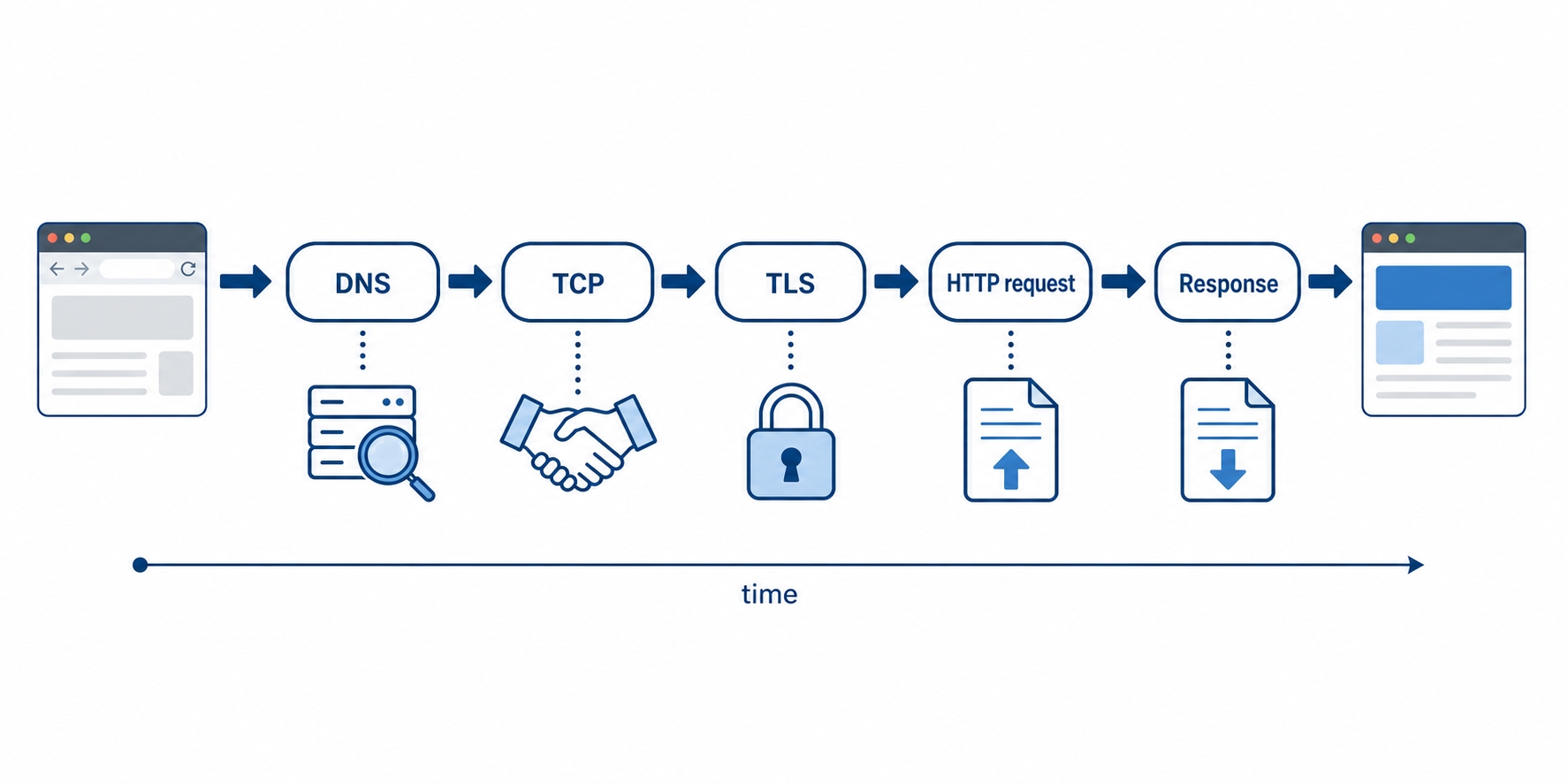
One HTTPS request as a left to right timeline of phases
Here is the shape of it:
The four phases of a cold request in order: DNS finds the server, TCP connects, TLS secures, then HTTP asks and answers
Roughly how many round trips each phase costs, and why a brand-new connection feels slow before any HTML arrives
How caching and connection reuse make the second request to the same site dramatically cheaper than the first
The timeline, phase by phase
Picture the slowest honest version of this: a cold request, where your machine has never talked to this site, holds nothing in any cache, and has no open connection to reuse. Every phase runs in full. We will walk it in order, and the one number to keep in your head is the round trip: one message out to the server and one reply back. On a connection across a continent or an ocean, a single round trip can be 50 to 150 milliseconds of pure waiting, and most of these phases cost at least one. That waiting, not the size of the files, is what makes a cold connection feel slow.
You type https://example.com and press Enter. Here is everything that happens before the page shows up.
The Full HTTPS Request Flow, Start to Finish | dalabs.academy
Phase 1 — DNS: name to IP
The browser cannot connect to example.com, because the network routes to numbers, not names. So the very first thing it does is the lookup from the DNS chapter: ask for the IP address behind the name. It checks its own cache, then the operating system's, and on a cold lookup the question goes out to a recursive resolver, which walks the chain (root, then the .com servers, then example.com's authoritative server) and returns an address like 93.184.216.34.
On a fully cold lookup that resolver may make several queries of its own, but to your machine it is one question and one answer: roughly one round trip of waiting from where you sit. When it finishes, the browser finally has an IP to connect to. Nothing has been sent to the actual web server yet.
Phase 2 — TCP: open a reliable connection
Now the browser opens a TCP connection to that IP on port 443, the standard HTTPS port. This is the three-way handshake from the TCP chapter: SYN out, SYN-ACK back, ACK out. It establishes the ordered, reliable byte stream that everything above relies on, and it costs about one round trip before the connection is usable.
At the end of this phase you have an open pipe to the right machine. You still have not sent a single byte of HTTP, and on a plain http:// site you would start sending it now. On HTTPS there is one more layer to build first.
Phase 3 — TLS: secure the connection
The open TCP pipe is readable by anyone in the middle, so the browser will not send your request down it yet. First it runs the TLS handshake from the last two chapters: agree on a session key without ever sending it in the open, and check the server's certificate up the chain of trust to a root the browser already holds. Only when both the encryption and the identity check pass does the secure channel exist.
This is the phase whose cost varies most, so here is the honest version. With TLS 1.3, today's common case, the handshake usually completes in about one round trip. Older TLS 1.2 typically needed two. Either way it stacks on top of the TCP handshake, which is why a cold HTTPS connection waits through DNS, then TCP, then TLS before the first byte of your actual request goes out.
This is the part worth pausing on. Everything so far, all three phases, happened before the browser sent one byte of HTTP. No GET, no headers, no HTML. On a cold connection you can easily spend three round trips just getting ready to ask the question. When a brand-new HTTPS connection feels slow before anything appears, this setup, not the download, is usually where the time went.
Phase 4 — HTTP: the request and response
Now, at last, the part the whole course has been about. Inside the secure channel, the browser sends the HTTP request you would recognize from Section 4: a request line like GET / HTTP/2, a Host header, an Accept header, and the rest. It travels encrypted, so anyone watching the wire sees only scrambled bytes.
The server receives it, does its work (reads a file, runs your application code, queries a database), and sends back an HTTP response: a status line like 200 OK, response headers, and the body. That body is the HTML for the page. This phase is at least one more round trip, the request out and the response starting to come back, plus however long the server itself takes to produce the answer. The browser reads the HTML, discovers it needs a stylesheet, some scripts, and images, and fires off more requests, most of which now reuse the connection it just paid so much to set up.
So the cold request, end to end, is roughly: DNS (~1 round trip) plus TCP (~1) plus TLS (~1 to 2) plus the HTTP request itself (~1), and only then does the first byte of HTML arrive. Treat those counts as a guide, not a law; real numbers shift with TLS version, caching, and how far away the server is. The order, though, is dependable, and the order is the point.
Where the time actually goes
Phases are easier to believe when you can put numbers on them, so here is a realistic cold request, with each phase's cost pulled out:
Phase
Roughly
Why
DNS lookup
~1 round trip
Find the IP behind the name
TCP handshake
~1 round trip
Open the reliable connection
TLS handshake
~1–2 round trips
Encrypt it and verify the certificate
HTTP request/response
~1 round trip + server time
Ask, then wait for the answer
Notice what dominates: setup. Three of the four phases finish before the request is even sent, and on a distant server each is mostly waiting for a message to cross the network and come back. This is exactly why the round-trip cost we kept returning to all section matters so much, and why the next part of the story, reuse, changes the picture completely.
Why the second request is so much cheaper
Here is the good news the cold timeline hides. Almost nothing on a real site is actually cold, because the moment you finish that first request, your machine starts skipping steps.
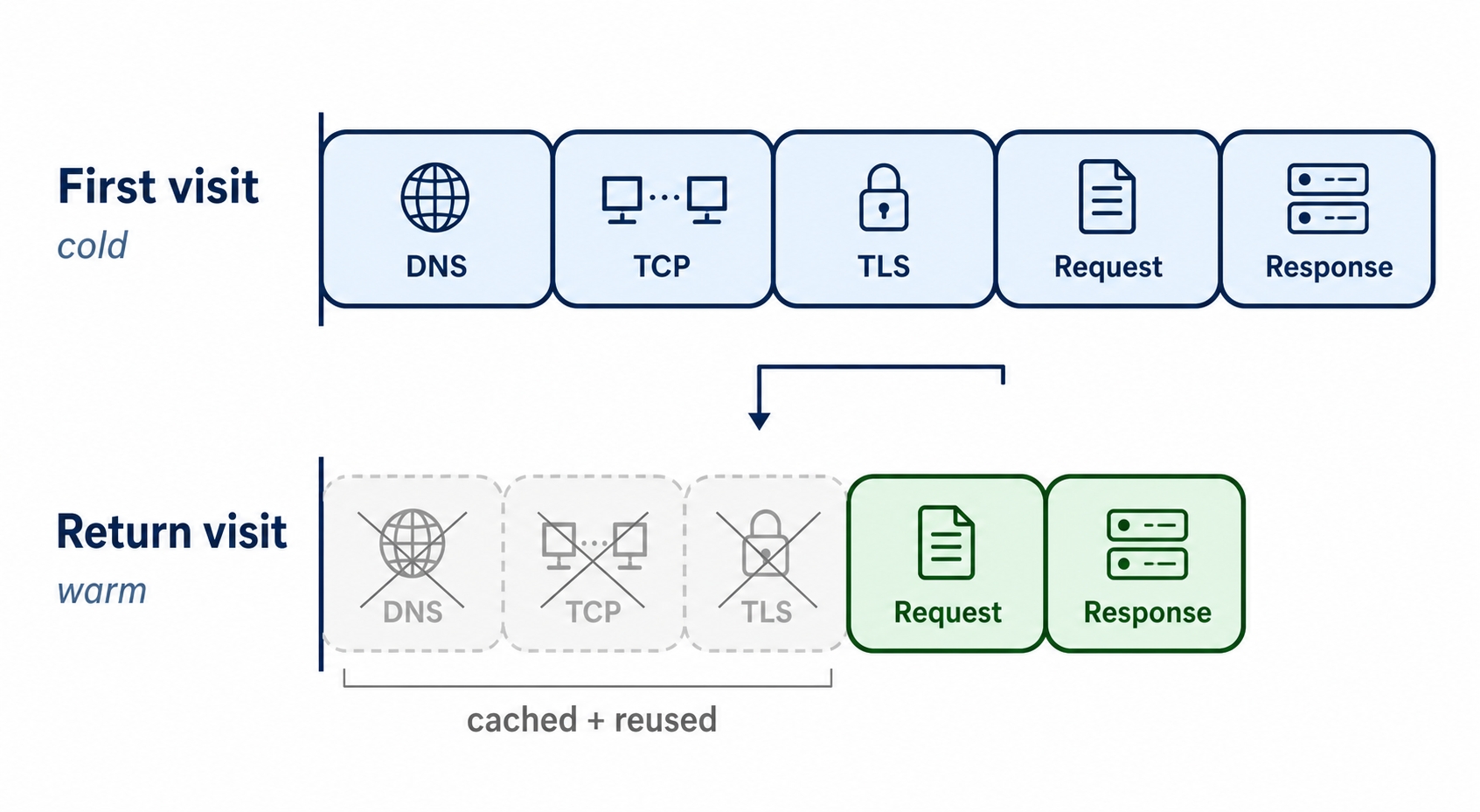
A first cold visit runs every phase, a return visit skips most of them
Look at the second timeline. The return visit is short because each of the first three phases has a way to disappear:
DNS is cached. The resolver, your OS, and your browser all remember the answer for the record's TTL, so the next lookup for example.com skips the whole walk and returns instantly.
The connection is reused. Thanks to the keep-alive and connection pooling from the connections chapter, the browser holds that open, already-secured connection and sends the next request straight down it. No second TCP handshake, no second TLS handshake.
TLS can resume. Even when a fresh connection is needed, TLS supports session resumption: the two sides remember enough from last time to skip most of the handshake, often saving a round trip.
So the first request to a site pays the full DNS plus TCP plus TLS plus HTTP bill, and every request after it on the same connection is close to pure HTTP: ask, get the answer, done. This is the whole reason a page's first asset feels slow and the next thirty feel instant, and it is why the performance work in this course kept circling back to one idea, pay the setup cost once and amortize it over many requests.
A useful way to hold it: the cold path is the one you read about; the warm path is the one you actually live in. Both are real, and knowing which one you are on tells you immediately whether a slow request is a setup problem (cold, fix it with reuse and caching) or something else (warm, look at the server or the network).
Try it now
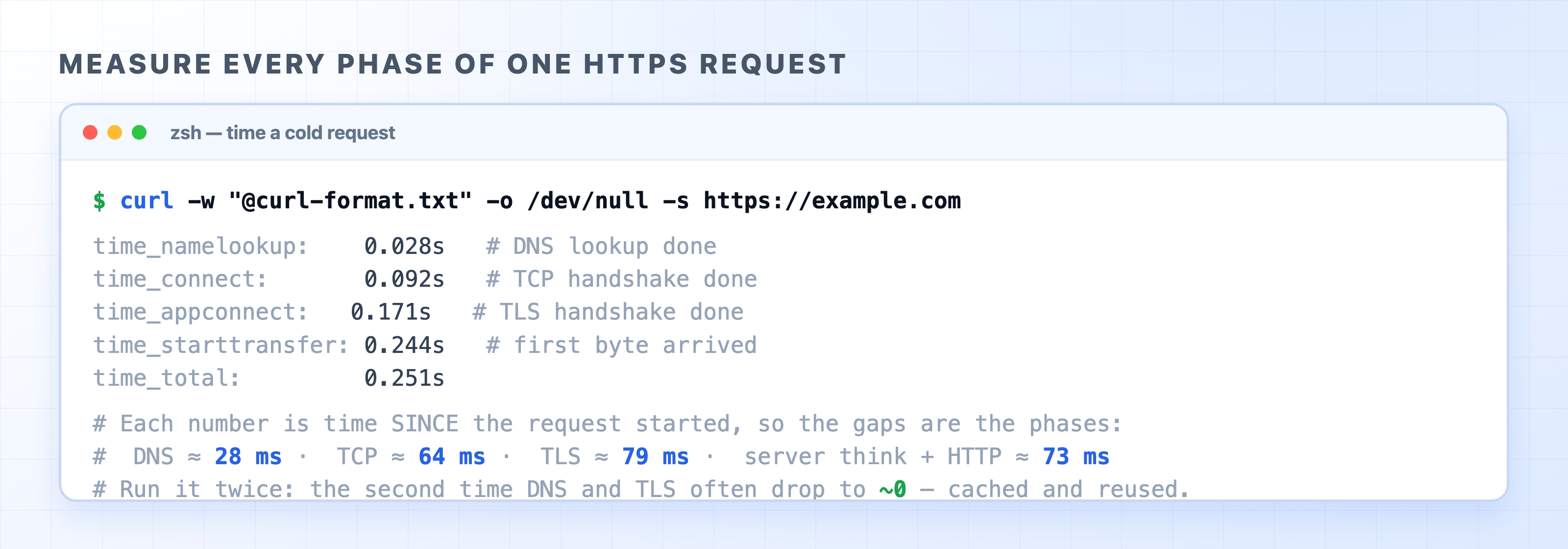
You can watch this exact timeline on a real request. The -w flag on curl prints timing checkpoints, and the five that matter map one-to-one onto the phases above. Put this format string in a file:
Measuring every phase of one HTTPS request with curl
Each number is the time since the request started, so the phases are the gaps between them. time_namelookup is the end of DNS. The jump to time_connect is the TCP handshake. The jump from there to time_appconnect is the TLS handshake, the slice we set aside back in the TCP chapter and have now fully explained. time_starttransfer is the first byte of the response arriving, so the gap after appconnect is the HTTP request plus the server's thinking time. time_total is the end. Read top to bottom and you are reading the timeline of this chapter in milliseconds.
Now run the exact same command a second time. On most sites time_namelookup and time_appconnect shrink toward the numbers before them, because DNS is cached and TLS resumes. You just measured the cold-versus-warm difference on your own machine, which is the whole story of this chapter, made concrete.
What's Next
You can now follow a request the whole way down: from the URL you type, through DNS, TCP, and TLS, to the encrypted HTTP exchange and back. The next section climbs to the other end of that journey, the machines the request actually arrives at, starting with what a web server does with your request once it lands.