The last chapter ended on an uncomfortable gap. TLS proves the server on the other end holds a private key, and that everything you send is encrypted on the way there. But anyone can generate a key pair and write example.com on it. So how does your browser know that the key it just received belongs to the real example.com, and not an impostor who set up TLS just as carefully? Encryption was the easy part. This chapter is about the hard part: trust.
Overview
When a server presents its certificate during the handshake, your browser does not just take its word for it. It checks who vouched for that certificate, then who vouched for them, following a short chain upward until it reaches an authority it already trusts. That chain is what turns "here is a key with example.com written on it" into "this really is example.com."
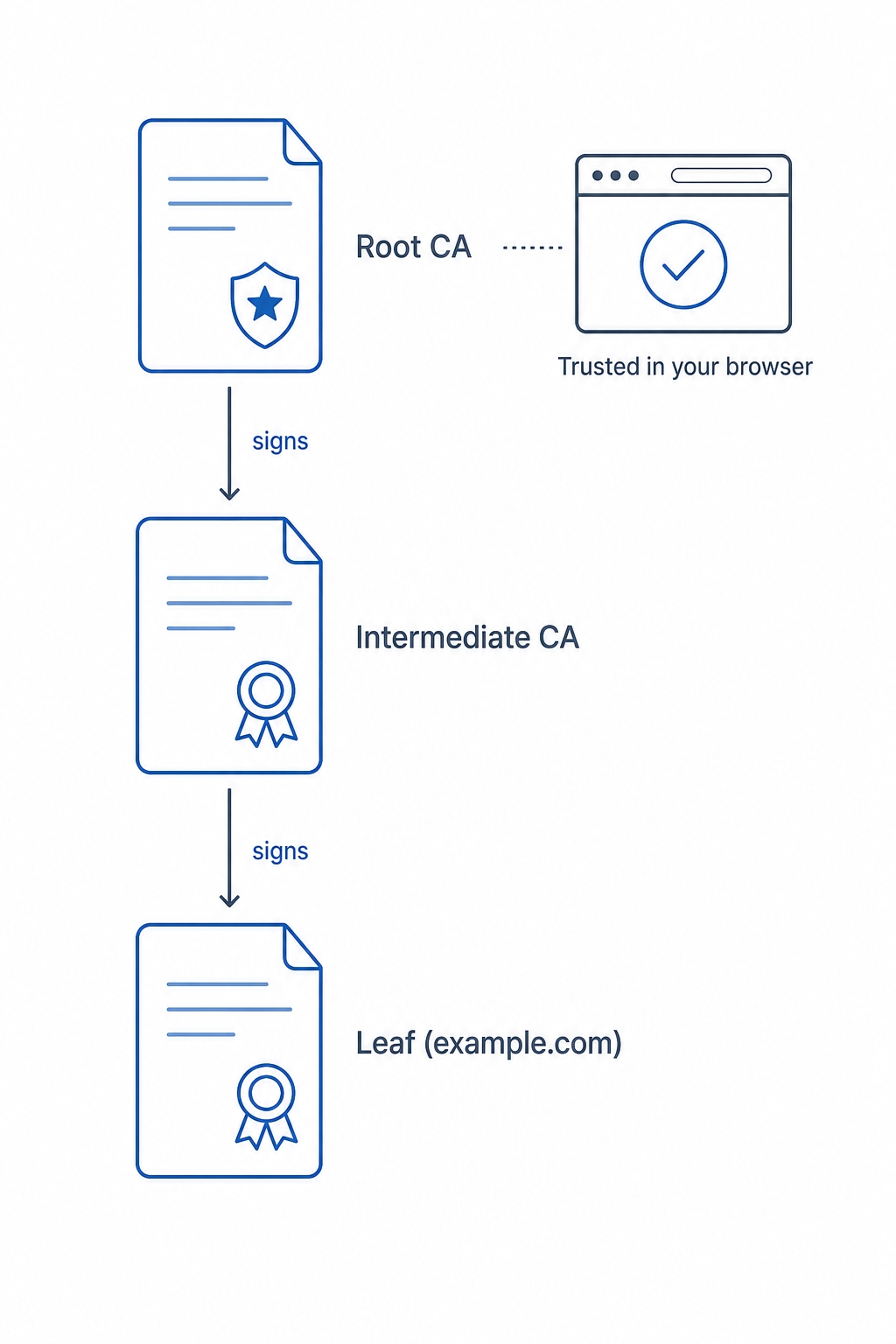
The certificate chain of trust from leaf to intermediate to root
Here is what we will work through:
How the chain of trust links a site's certificate up to a root your browser already trusts
What a certificate authority actually checks before it issues a certificate (and what it does not)
How to read the warnings browsers show when that chain breaks, and how Let's Encrypt makes valid certificates routine
What a certificate actually is
A certificate is a small file that makes a claim and attaches a signature to it. The claim is roughly: "the public key inside this file belongs to example.com." On its own that claim is worthless, because anyone could write it. The value comes from the signature, which is added by someone else who is willing to vouch that the claim is true.
That "someone else" is a certificate authority, or CA: an organization in the business of verifying domain ownership and signing certificates that say so. When a CA signs example.com's certificate, it is staking its reputation on a single fact, that whoever requested this certificate proved they control example.com.
Certificates and Certificate Authorities Explained | dalabs.academy
So a certificate carries, at minimum, three things you care about:
The subject: the domain the certificate is for, like example.com.
The public key: the same public key the server uses in the TLS handshake from the last chapter.
The issuer and its signature: who vouched for this, and cryptographic proof they really did.
The signature is the clever bit. The CA signs the certificate with its own private key. Anyone can then verify that signature using the CA's public key, and a valid signature proves two things at once: the certificate was signed by that specific CA, and not a single byte of it has been changed since. If an attacker edits the domain or swaps the public key, the signature no longer matches and the certificate is rejected.
Why one signature is not enough: the chain
There is an obvious next question, and beginners are right to ask it. To check example.com's certificate, your browser needs the CA's public key. So how does it get that one safely? Doesn't this just push the same trust problem up a level?
It does, and the answer is to push it up a level deliberately, a small fixed number of times, until it reaches something your browser was simply told to trust from the start. That structure is the chain of trust, and it has three kinds of certificate in it.
A root certificate sits at the top. Roots belong to a handful of certificate authorities, and their certificates ship pre-installed in your operating system and browser. This pre-installed collection is called the trust store (or root store). When your computer was set up, it already contained the public keys of these roots. That is the anchor: a root is trusted not because something signed it, but because it is already on your machine. A root signs itself, and your browser believes it only because it is in the trust store.
A leaf certificate sits at the bottom. This is the certificate for the actual site, example.com. It is the one the server presents during the handshake. It is called the leaf (or end-entity certificate) because it is the end of the chain, the specific site you are visiting.
An intermediate certificate sits in the middle. CAs almost never sign leaf certificates directly with their root. Instead the root signs one or more intermediates, and the intermediates do the day-to-day work of signing leaf certificates. So the chain for example.com usually reads: the leaf is signed by an intermediate, and the intermediate is signed by a root in your trust store.
Look back at the figure above. The leaf points up to the intermediate, the intermediate points up to the root anchor, and the browser trusts the whole thing because it recognizes that root. Your browser verifies each link in turn: it checks the leaf's signature using the intermediate's key, checks the intermediate's signature using the root's key, and checks that the root is one it already has. If every link holds and the chain ends at a trusted root, the certificate is accepted. If any link fails, you get a warning.
Why bother with intermediates at all? Roots are extremely valuable and extremely dangerous to expose, so CAs keep their root private keys offline, locked away and rarely used. The intermediate is the working key that does the constant signing. If an intermediate's key is ever compromised, the CA can retire just that intermediate without having to replace the root that lives in millions of trust stores. The intermediate is a firewall around the part you can never safely change.
This is also why the server sends more than one certificate during the handshake. It typically sends the leaf and the intermediate, so the browser can build the chain up to a root it holds. The root itself is never sent, because the browser already has it.
What the CA checks, and what it does not
Before any of this matters, the CA has to decide whether to sign in the first place. The most common check is called domain validation, and it is exactly what it sounds like: proving you control the domain you are asking for a certificate for.
In practice the CA gives you a challenge that only the real owner of the domain could satisfy. A typical one: "put this specific random value in a file at http://example.com/.well-known/..., and we will fetch it." If the value the CA fetches matches the value it gave you, you have demonstrated control of that domain, because only someone who controls example.com's server could place that file there. There are DNS-based variants too, where you prove control by adding a special DNS record. Either way, the logic is the same, you do something only the domain's controller could do.
This is the part that is easy to over-read, so here is the common confusion spelled out.
A valid certificate proves domain control, not honesty. Domain validation confirms one narrow fact: the certificate holder controls the domain. It says nothing about whether they are trustworthy, whether the site is a scam, or whether your data is safe with them. A phishing site that registers examp1e.com can pass domain validation for that domain and get a perfectly valid certificate, padlock and all. This is the same point the last chapter made about the padlock: a secure connection is not a safe website. The CA vouches that you are talking to the domain you typed, nothing more.
There are higher levels of validation, where the CA also verifies the legal organization behind the domain (you may have seen these called OV or EV certificates). They involve more paperwork and were once shown with a green company name in the address bar. Browsers have largely stopped giving them special visual treatment, and for the vast majority of the web, plain domain validation is what is in use. The chain of trust works identically regardless of which level signed the leaf.
When the chain breaks: reading certificate warnings
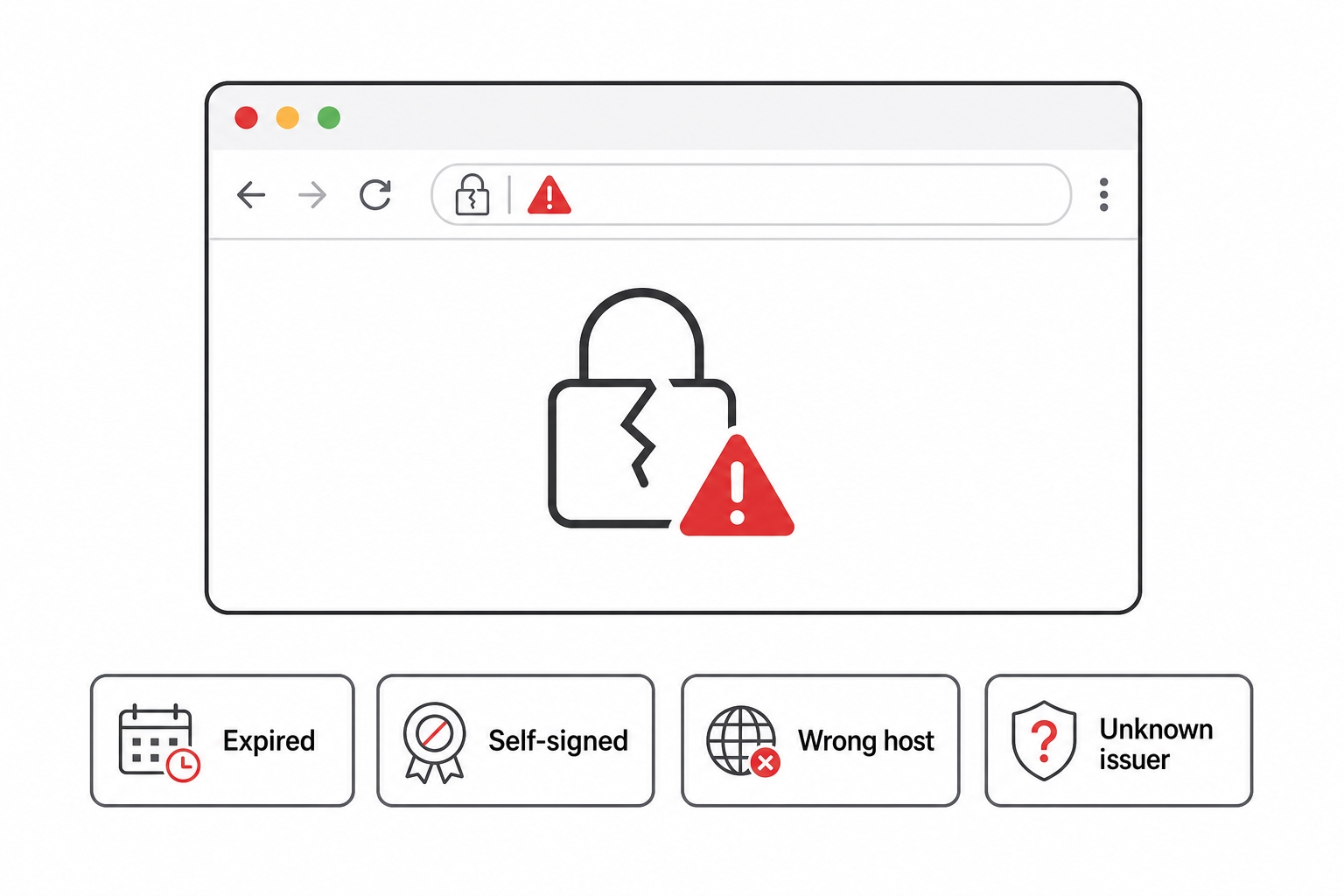
Most of the time the chain just works and you never think about it. When it breaks, the browser stops you with a full-page warning rather than a quiet padlock change, because a broken chain can mean an attack. The wording differs between browsers, but every warning maps to one of a few underlying failures. Knowing which is which tells you whether you are looking at a real problem or a harmless misconfiguration.
A browser certificate warning and what each kind means
Expired certificate. Every certificate has a validity window with a start and an end date, and the browser checks today's date against it. Once a certificate is past its notAfter date, it is rejected, even if everything else about it is perfect. This is the single most common cause of a site suddenly throwing warnings, and the fix is almost always "someone forgot to renew." It is also the problem that automated renewal, below, exists to eliminate.
Self-signed certificate. A self-signed certificate is one that is its own issuer: no CA signed it, the certificate vouches for itself. The chain has nowhere to go, it never reaches a trusted root, so the browser cannot verify the claim. This is not inherently evil. It is exactly what you get when you generate a certificate locally for development, and it is completely fine on your own machine. It just means unverified: there is no third party attesting that this key belongs to this domain. On the public internet a self-signed certificate where you expected a real one is a red flag.
Wrong host (name mismatch). The certificate is valid and properly signed, but the domain in its subject does not match the domain you are actually visiting. A certificate issued for example.com does not cover shop.example.com unless it explicitly lists that name. The browser refuses because a certificate for one domain says nothing about another, and accepting it would let any site with a valid certificate impersonate any other.
Untrusted or unknown issuer. The chain is complete, but it ends at a root that is not in your trust store. The browser followed the links upward and arrived at an authority it has no reason to trust. This shows up when a site uses an internal company CA your machine was never told about, or, more worryingly, when something is intercepting the connection with a certificate from an issuer your browser does not recognize.
Notice the shared logic underneath all four. The browser is asking one question, "can I build an unbroken chain from this certificate up to a root I already trust, for the exact domain I asked for, that is valid right now?" Each warning is a different way of answering no.
Let's Encrypt and automated renewal
For a long time, getting a certificate meant paying a CA and going through a manual process every year, which is precisely why so many sites historically threw expired-certificate warnings. Let's Encrypt changed the default. It is a free, automated certificate authority whose roots ship in every major trust store, and it issues domain-validated certificates with no manual steps and no cost.
Two design choices make it work. First, issuance is automated through a protocol called ACME: a small program on your server, often certbot, talks to Let's Encrypt, completes the domain-validation challenge automatically, and installs the signed certificate, all without a human. Second, the certificates are short-lived, valid for only 90 days. A short lifetime sounds like a burden, but it is the opposite: because renewal must be automated to be practical at 90 days, you set it up once and a scheduled job quietly renews each certificate well before it expires. The certificate that throws an expired warning is usually the one a human was supposed to renew by hand. Automation removes the human, and the warning with it.
The result is that valid HTTPS went from a paid annual chore to something most platforms turn on by default. When you deploy to a typical host today and your site is served over HTTPS without you configuring anything, there is a good chance Let's Encrypt and an ACME client did all of this in the background.
Try it now
You have already seen the chain in one place: the padlock. Click the padlock (or site-information icon) in your browser's address bar, open the connection or certificate details, and you can walk the chain yourself, from the leaf for the site you are on, up through any intermediate, to the root. The validity dates and the issuer are right there too.
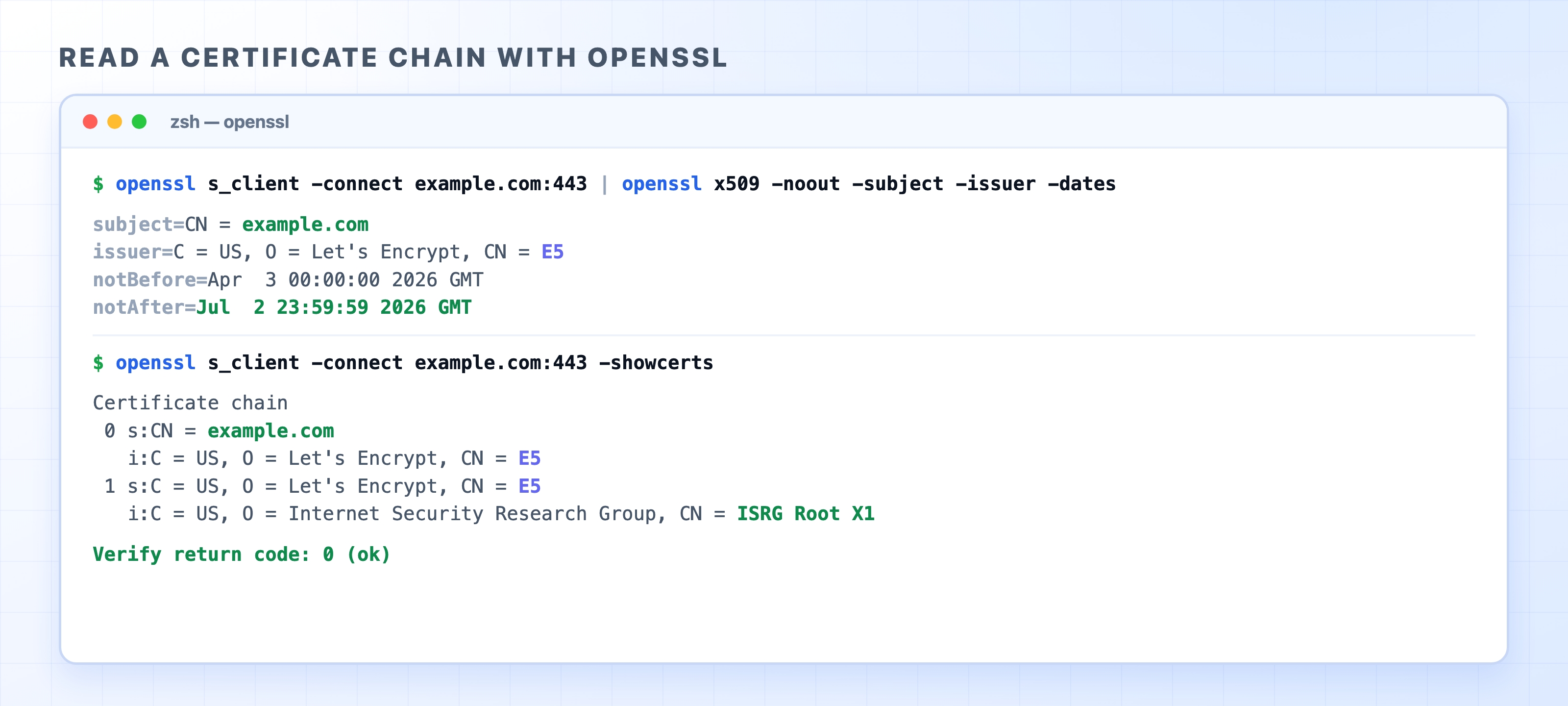
To see the same thing from the terminal, openssl can connect and print the certificate directly. Run this to read the leaf's subject, issuer, and validity dates:
Read the output top to bottom. The subject line is the leaf, the domain the certificate is for. The issuer line is who signed it, the intermediate CA. In the chain view, each entry shows s: (subject, who it is for) and i: (issuer, who signed it), and you can watch the links stack up: the leaf is issued by the intermediate, the intermediate is issued by the root. The final Verify return code: 0 (ok) is your machine confirming it built that chain all the way to a root in its trust store. Try it against a few sites and compare issuers, you are reading the exact proof your browser checks on every HTTPS request.
What's Next
You now have every piece of an HTTPS request: DNS finds the server, TCP connects, TLS encrypts, and certificates prove identity. The next chapter is the capstone of this section, stitching all four into one continuous, narrated request from the moment you press Enter.