At the end of the last chapter your browser had an IP address and could open a TCP connection. But a plain HTTP connection sends everything across that wire as readable text: the page you asked for, the form you submitted, the password you typed. Anyone sitting between you and the server can read it, or quietly change it. TLS is the layer that wraps that connection in encryption, and HTTP running over TLS is what we call HTTPS.
Overview
TLS, the Transport Layer Security protocol, sits between TCP and HTTP. Once TCP has opened the raw connection, TLS performs its own short negotiation to turn that open pipe into a secure one. From then on, HTTP runs inside it exactly as before, only now nobody in the middle can read or tamper with the bytes. The s in HTTPS is that TLS layer, and the padlock your browser shows is its visible sign.
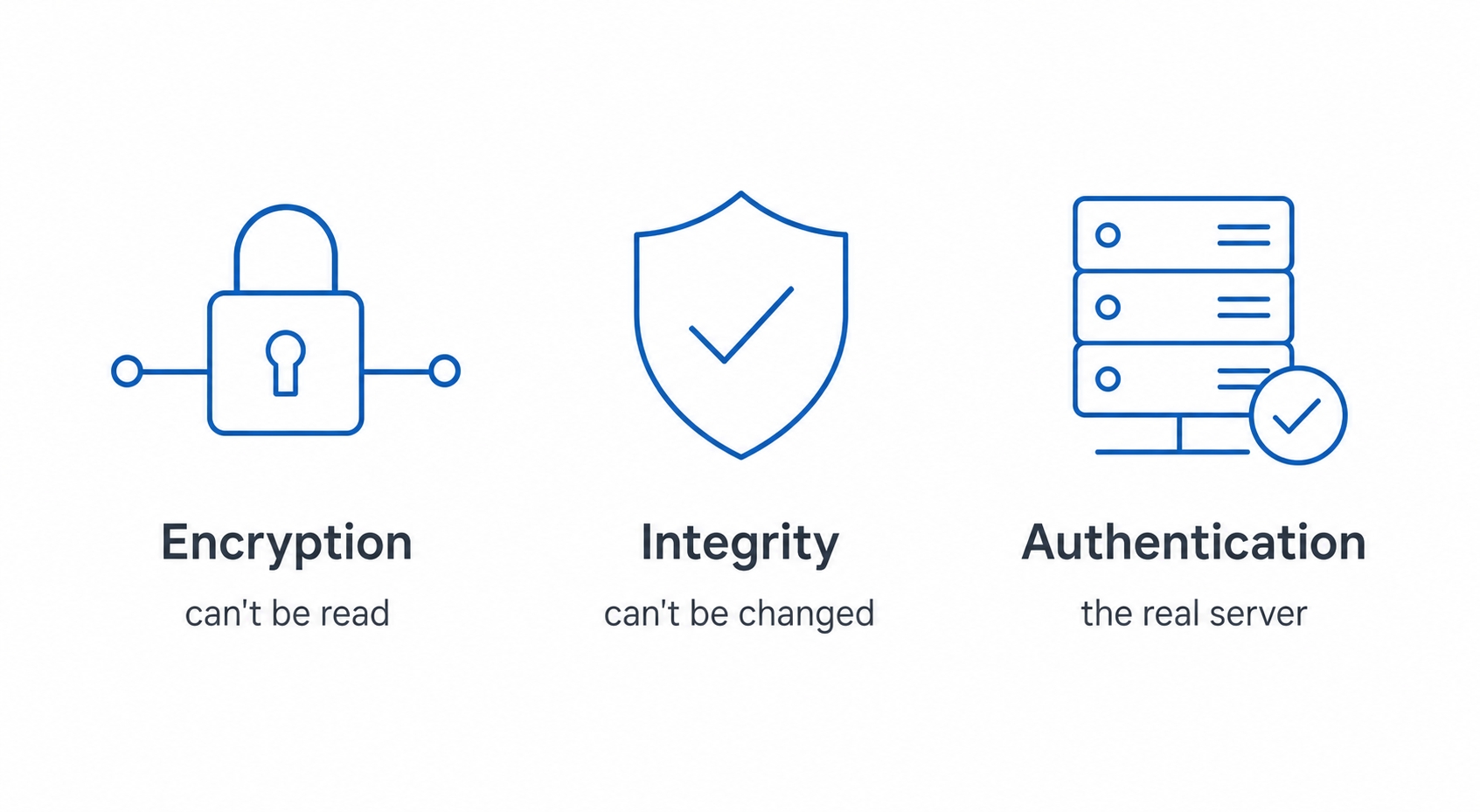
The three guarantees of HTTPS encryption integrity and authentication
Here is what we will cover:
The three things HTTPS actually guarantees, and the two things it does not
How the TLS handshake agrees on a secret key without ever sending it in the open
Why one server with one IP address can serve many different HTTPS sites
A quick note on the name. You will still see SSL used as a synonym for TLS, on certificate pages, in tool output, in everyday speech. SSL was the original protocol; TLS is its successor and what every browser actually uses today. The old name simply stuck around. When someone says "SSL certificate," they mean the certificate TLS uses.
The three guarantees
The clearest way into TLS is to ask what problem it solves, and the answer is three problems at once. Picture your request travelling across coffee-shop wifi, then your internet provider, then a dozen routers you will never see. Without protection, every one of those hops can do three bad things, and TLS exists to stop each of them. The figure above lays them out; here they are in plain terms.
Encryption means nobody can read your data. Everything between your browser and the server is scrambled, so anyone listening on the wire, the person snooping on shared wifi, your ISP, a compromised router, sees only meaningless bytes. They know you are talking to server, but not what you are saying.
TLS and HTTPS Explained for Beginners | dalabs.academy
some
Integrity means nobody can change your data without being noticed. Encryption alone would stop reading, but a clever attacker might still try to flip bits in transit, turning a transfer of $10 into $1000. TLS attaches a check to every message so that if even a single byte is altered along the way, the other side detects it and rejects the message rather than trusting it.
Authentication means you are talking to the real server, not an impostor. This is the one people forget, and it is arguably the most important. Encryption is worthless if you are encrypting your password and handing it straight to an attacker who pretended to be your bank. TLS lets the server prove it really owns the domain you asked for, so you know your encrypted data is going to the right place.
Hold those three words: read, change, real. Encryption stops reading, integrity stops changing, authentication confirms it is real. The rest of the chapter is mostly about how TLS pulls off the first two, and the next chapter is entirely about how it pulls off the third.
The handshake: agreeing on a secret
Here is the puzzle at the heart of TLS. To encrypt your conversation, both sides need to share a secret key, the same key one side uses to scramble and the other uses to unscramble. But they are strangers who have never met, talking over a wire that an attacker may be watching the entire time. How do you agree on a shared secret in front of someone who can hear every word you say?
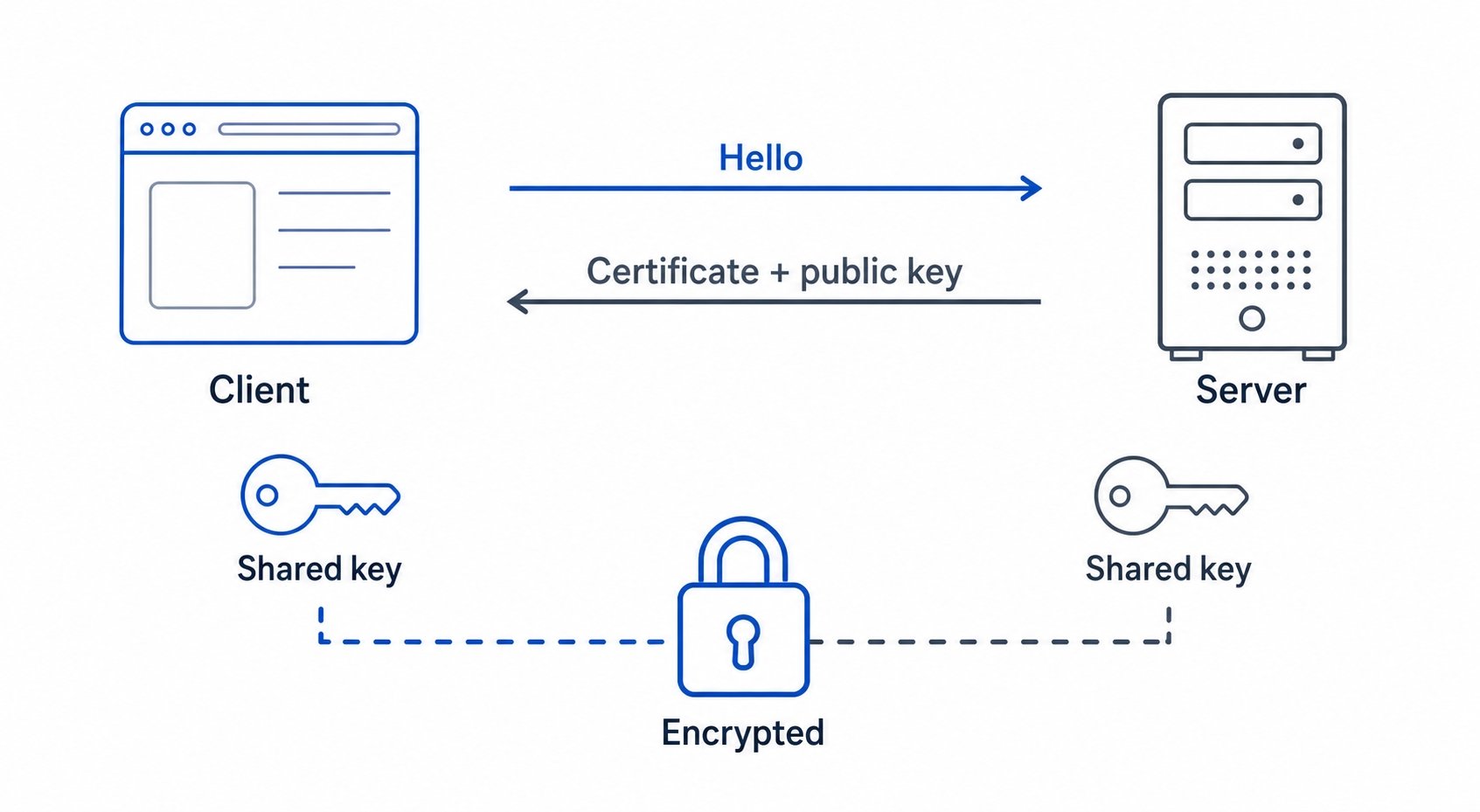
That is exactly what the TLS handshake does. It runs right after the TCP connection opens and before any HTTP is sent. Conceptually, it goes like this.
The TLS handshake and its asymmetric to symmetric key handoff
The browser speaks first with a client hello. It says, in effect, "I want to talk securely to example.com, and here are the encryption methods I understand." The server replies with a server hello and, crucially, its certificate. The certificate carries the server's public key, which is half of a special pair of keys, and we are about to see why that pairing is the whole trick.
Two kinds of keys
There are two styles of encryption at play here, and the handshake uses both deliberately.
Symmetric encryption uses one shared key for both locking and unlocking. It is fast, which is why it is great for encrypting the actual data of your session, but it has the chicken-and-egg problem we just described: both sides need the same key first, and you cannot send a key across a wire an attacker is watching.
Asymmetric encryption uses a pair of keys, a public key and a private key, that are mathematically linked. Anything locked with the public key can only be unlocked with the matching private key. The server publishes its public key to the world (it is right there in the certificate) but keeps its private key secret. So anyone can lock a message that only the server can open. Asymmetric crypto is slower, but it solves the introduction problem: you can safely send a secret to someone using only their public key.
The key handoff
Now the trick is visible. The two sides use the slow but safe asymmetric keys for one job only, agreeing on a fresh shared secret, and then switch to the fast symmetric key for everything else.
Conceptually: the browser uses the server's public key to safely establish a brand-new session key that only these two parties end up knowing. An eavesdropper watching the whole exchange cannot reconstruct it, because doing so would require the server's private key, which never leaves the server. Once both sides hold the same session key, they each send a Finished message and switch over to symmetric encryption using that key. The introduction is done. From this point on, the real HTTP request goes out, encrypted with the fast session key, and the whole conversation is private.
A note on accuracy. The exact steps vary by TLS version, and the modern handshake is cleverer than "the browser encrypts a secret with the public key." TLS 1.3, today's standard, uses a key-agreement method where both sides contribute to the session key, and it is faster, often finishing in a single round trip where the older TLS 1.2 needed two. The asymmetric-to-symmetric handoff is the durable idea, and it holds across versions. The cipher-suite details underneath it are something you will almost never need to touch by hand.
This is also where the cost from earlier in the course shows up again. Recall that opening the TCP connection already cost one round trip of pure waiting. The TLS handshake adds more messages on top of that, so a brand-new HTTPS connection waits through the TCP handshake and the TLS handshake before the first byte of HTTP goes out. That is exactly the time_appconnect number we saw in the curl timing breakdown back in the TCP chapter and set aside, the slice between the connection opening and the secure channel being ready. It is one more reason the connection reuse from the last chapter matters so much: pay this setup cost once, then send many requests over the already-secured connection.
What the padlock does not promise
The padlock icon is useful, but it is also widely misread, and two misunderstandings are worth clearing up because they cause real mistakes.
The padlock does not mean the site is safe or trustworthy. It means the connection to that site is encrypted and authenticated, nothing more. A phishing site at paypa1-login.com can get a perfectly valid certificate and show a padlock just as proudly as your real bank. The padlock confirms you have a private, tamper-proof line to that server, and that the server really owns that domain. It says nothing about whether the people running the domain are honest. "Secure connection" is not the same as "safe website," and attackers count on people conflating the two.
The second misconception is about how far the protection reaches.
HTTPS protects data in transit, not after it arrives. The encryption covers the journey between your browser and the server. Once your data reaches the server, TLS has done its job and stepped aside, what the server then does with your data, whether it stores it safely, logs it, sells it, or leaks it, is entirely outside HTTPS. People sometimes imagine the padlock means their data is encrypted "end to end" all the way into safe hands. It is not. It means the wire is secure. The server is a separate trust decision.
Both of these come down to the same point: HTTPS secures the pipe, not the parties at the ends of it. That is an enormous and necessary thing, but it is a precise thing, and knowing its edges is part of understanding it.
One server, many sites: SNI
Here is a practical puzzle the handshake has to solve. A single physical server, behind a single IP address, often hosts dozens or hundreds of different websites, your small site and a thousand others might share one machine at a hosting company. Each site is a different domain with its own certificate. So when a TLS handshake arrives at that shared IP, the server faces a problem: which site's certificate should it present? The browser has not sent its HTTP request yet, because the request only goes out after the secure connection is built. At handshake time the server only has the IP address, and the IP is the same for every site it hosts.
The fix is a small but essential field in that very first client hello, called SNI, for Server Name Indication. Right at the start of the handshake, in the clear, the browser names the hostname it wants to reach: "I'm here for example.com." Look back at the handshake figure and you will see it in step one. That single hint is enough for the server to pick the right certificate for example.com and continue the handshake correctly, even though a hundred other sites live behind the same address.
Without SNI, every HTTPS site would essentially need its own dedicated IP address, and the modern web, where shared hosting and CDNs routinely serve thousands of domains per IP, would not work the way it does. The same naming idea reappears once we are inside HTTP, where the Host header tells the server which site a request is for; SNI is the encrypted-handshake version of that question, asked early enough for the server to choose a certificate. We will return to that pairing when we reach virtual hosting later in the course.
The hard part is trust
Step back and notice which of the three guarantees this chapter actually explained. Encryption and integrity fall out of the handshake fairly cleanly: agree on a session key, then scramble and checksum everything with it. The mechanics are involved, but the idea is tidy.
Authentication is the one we have been leaning on without justifying. The whole scheme rests on the server proving it owns the domain, and on the browser believing that proof. The server hands over a certificate containing a public key and says "this is me." But anybody can generate a key pair and write example.com on it. What stops an attacker from presenting their own certificate that claims to be your bank?
Encrypting the connection turns out to be the easy part. Trusting that the public key on the other end really belongs to the real server is the hard part, and it is the problem that certificates and certificate authorities exist to solve. That is the whole of the next chapter.
Try it now
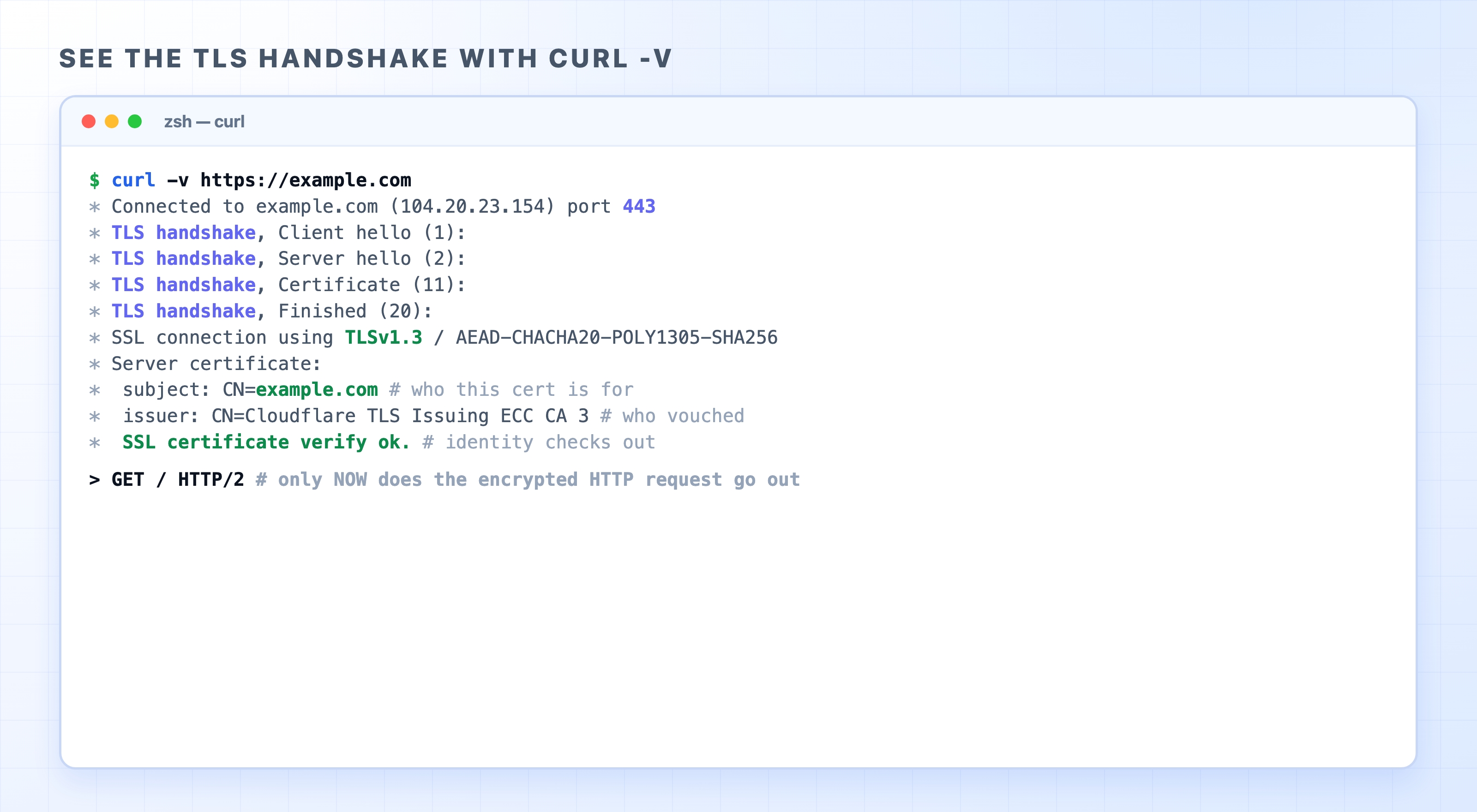
You can watch a real TLS handshake happen. The -v (verbose) flag on curl prints the connection setup line by line, including every step of TLS, before any HTTP is exchanged. Open a terminal and run:
curl -v https://example.com
bash
Seeing the TLS handshake with curl verbose output
Read the lines marked with * from the top. After Connected to example.com ... port 443 (port 443 is the standard HTTPS port), you will see a run of TLS handshake lines, Client hello, Server hello, Certificate, Finished, which are exactly the handshake steps we walked through. Then a line like SSL connection using TLSv1.3 tells you which TLS version was negotiated. Below it, the Server certificate block shows the certificate's subject (the domain it is for) and its issuer (who vouched for it), and finally SSL certificate verify ok confirms your machine accepted the proof of identity.
Notice the ordering. Every one of those lines happens before the > GET / HTTP/2 request line near the bottom. That is the whole point of this chapter made visible: the secure channel is built first, and only then does the encrypted HTTP request travel through it. Try the same command against a few sites you use and compare the issuers, you are reading the start of the certificate story.
What's Next
We just leaned hard on one unproven claim: that the certificate really proves who the server is. The next chapter, on certificates and certificate authorities, explains the chain of trust that makes that proof believable.