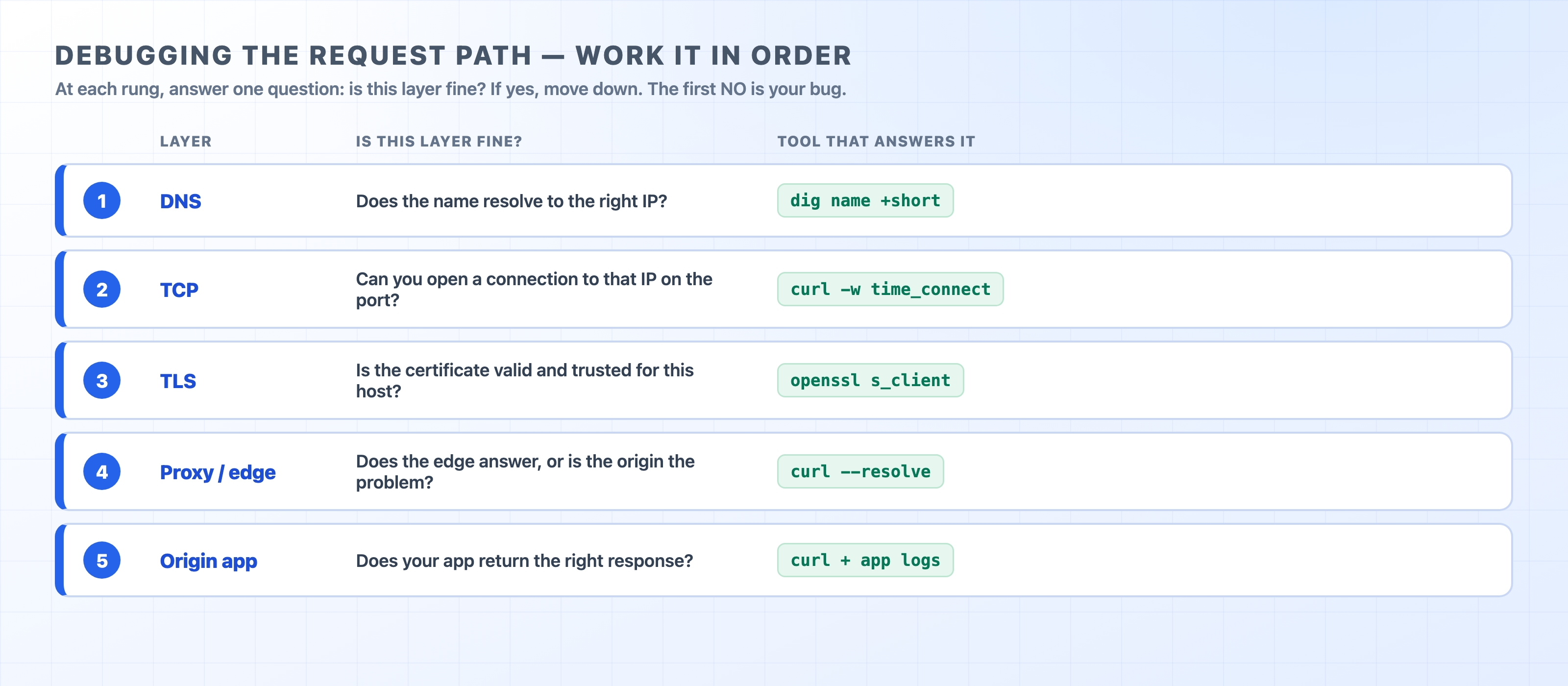
You have the tools to inspect a request and a field guide to the errors they surface. Now it is time to tackle the hardest kind of problem: a broken site with no error code to point you in the right direction. Fixing this doesn't rely on knowing a secret command. It relies on a habit. When something breaks, you walk the request path in order instead of guessing.
Most debugging time is lost guessing at the wrong layer
A web request is a chain of layers. The domain name has to resolve to an IP address. A TCP connection has to open to that IP. TLS has to negotiate a trusted certificate. The proxy at the edge has to accept the request and reach your origin server. Finally, the origin app has to run your code and answer. Any one of those steps can fail. When one does, the page simply won't load.
The trap is that the symptom usually looks exactly the same no matter which layer broke. A spinning browser tab tells you nothing about whether you are dealing with a DNS issue, a dead server, or an expired certificate. Because of this, people guess. They restart the app server when the real problem is stale DNS. They redeploy code when a certificate quietly expired at midnight. They blame the network when their app is throwing 500s. Hours disappear into the wrong layer.
HTTP sits on top of a stack of layers, and each layer has a clear job. Keeping this mental model in mind turns a vague "it's broken" complaint into a short, ordered checklist. You don't have to be clever to fix it. You just have to be systematic.
The request path checked one layer at a time with a tool for each
Work the path in order
The order matters. Each layer depends on the one before it, so you check from the bottom of the stack up toward your code. The first layer that fails is your bug. Any errors happening above it are usually just noise.
DNS — does the name turn into the right IP address?
TCP — can you open a connection to that IP on that port?
TLS — is the certificate valid and trusted for this host?
Debugging the Full HTTP Request Path | dalabs.academy
Proxy / edge — does the thing in front of your servers answer, and is it the proxy or the origin that's wrong?
Origin app — does your application return the right response?
At each rung you ask one yes/no question: is this layer healthy? If yes, you eliminate it and move to the next. If no, you stop. You found where the request dies. A failure low in the stack makes everything above it look broken. If DNS gives you the wrong IP, the connection, the certificate, and the app will all fail even if they are configured perfectly. Fix the bottom first and the noise above it disappears.
Here is how to check each rung using a single command, followed by a walkthrough of the whole sequence against a real bug.
Layer 1 — DNS: does the name resolve, and to the right IP?
DNS turns example.com into an IP address. If it returns nothing, the wrong address, or a stale address, nothing else can work. This is a very common cause of mystery bugs. DNS changes are cached at multiple levels and take time to propagate. A record you updated an hour ago might still serve the old value to certain users.
The tool for this is dig (or nslookup on Windows). Ask it what the domain name resolves to:
dig example.com +short
bash
104.20.23.154
172.66.147.243
text
You get back the IP addresses the name points to right now. Ask yourself two questions: did you get an answer at all, and is it the address you expect? If dig returns nothing, the name doesn't resolve. The bug is DNS, and you stop here. If it returns an IP but it is the old one from before a recent change, you have stale DNS. That is still a DNS problem, not an app problem. If the IP looks right, DNS is fine and you move to the next layer.
A common confusion: It is easy to see a working site on your own machine and assume DNS is fine for everyone. However, your machine might be answering from a local cache. When a change works for you but not for your users, a stale cached record is a prime suspect. We will chase down this exact bug later in the chapter.
Layer 2 — TCP: can you reach that IP on the port?
Now you have the right IP. Can you actually open a connection to it? This relies on the TCP three-way handshake. If the server is down, the port is closed, or a firewall is dropping packets, the connection never completes. The request can't even begin.
The curl -w timing breakdown answers this without requiring a packet sniffer. It prints how long each phase took:
Read these as cumulative milestones rather than separate durations. time_namelookup is when DNS finished. time_connect is when the TCP handshake finished. time_appconnect is when TLS finished. Finally, time_starttransfer (Time to First Byte, or TTFB) is when the first byte of the response arrived. The gap between any two milestones tells you where the time went.
For TCP specifically, look at connect. If connect never completes, the handshake failed. The bug is at the network or port layer, and you stop here. If connect finishes but then everything stalls, TCP is fine and the problem is higher up. This breakdown also doubles as a performance tool. If you have a slow page where most of the time sits between connect and ttfb, you usually have a slow server, not a slow network.
Layer 3 — TLS: is the certificate valid and trusted?
The connection opened, but the page still won't load and the browser shows a security warning. Now you are at the TLS layer. A certificate can be expired, issued for the wrong hostname, self-signed, or missing an intermediate certificate in its chain. Any of those issues will break HTTPS even if DNS and TCP are working perfectly.
The openssl s_client command opens a raw TLS connection and shows you exactly what the server presented:
i:C=US, O=SSL Corporation, CN=Cloudflare TLS Issuing ECC CA 3
v:NotBefore: May 31 21:39:12 2026 GMT; NotAfter: Aug 29 21:41:26 2026 GMT
1 s:C=US, O=SSL Corporation, CN=Cloudflare TLS Issuing ECC CA 3
i:C=US, O=SSL Corporation, CN=SSL.com TLS Transit ECC CA R2
text
The -servername flag sends SNI (Server Name Indication). This tells a server hosting multiple sites which certificate you want, so you should always include it. You want to check three things here. The subject (s:) should match the host you asked for. The NotAfter date should be in the future. And the chain should climb to a trusted root. The clearest signal is the verify line at the very end of the full output:
A result of 0 (ok) means your machine trusts the chain. Anything else, like an expired cert, a hostname mismatch, or an untrusted issuer, names the TLS problem precisely. If it says OK, TLS is fine and you keep going.
Layer 4 — Proxy or edge: is it the front door or the origin?
In production, your request rarely hits your app directly. It usually goes through a reverse proxy or a CDN edge first, and that machine can return errors of its own. As covered in the errors chapter, a 502 means the proxy got a broken reply from the origin. A 504 means the origin never answered in time. Both are emitted by the proxy, but they are about the origin behind it. The key question at this layer is: is the edge broken, or is it faithfully reporting that the origin is broken?
The best way to find out is to take the proxy out of the loop and talk to the origin directly. The curl --resolve command lets you keep the real hostname (so TLS and the Host header still work) while pointing the connection at a specific IP you choose. You usually point this at the origin's address instead of the edge's address:
This command says, "For example.com on port 443, connect to 104.20.23.154 instead of whatever DNS says." Run it once against the edge IP and once against the origin IP, then compare the results:
If the edge fails but the origin answers cleanly, the problem is the proxy or its configuration, not your app.
If the origin also fails the same way, the proxy was telling the truth. The bug is in your origin app, which is the next and final layer.
Bypassing the proxy to test the origin alone is a powerful trick. It turns a vague "the proxy returned a 502" dead end into a clear next step.
Layer 5 — Origin app: does your code return the right answer?
If you have eliminated DNS, TCP, TLS, and the proxy, the request successfully reached your application. The bug is in your code or its dependencies. Now you can use curl to talk straight to the origin and read the real status and body:
A 500 here means your app is throwing an unhandled exception. You will need to go read its logs. A 504 confirmed at the origin usually points to a slow database query or a hung external call. This is where combining two logs tells the whole story. Match the timestamp on the proxy log (what the proxy decided to return to the client) against the backend log (what your app was actually doing at that exact second). A crash in the backend log at the exact same moment as a 502 in the proxy log is an open-and-shut case.
Walking one real bug: "it works for me, not for them"
Checklists are easier to trust once you watch them catch a real bug. Here is a classic scenario. You ship a change that moves your site to a new server. You test it, the site loads, and you call it done. An hour later, support is flooded with tickets. Half your users can't reach the site, while the other half are fine. It works for you. Where do you even start?
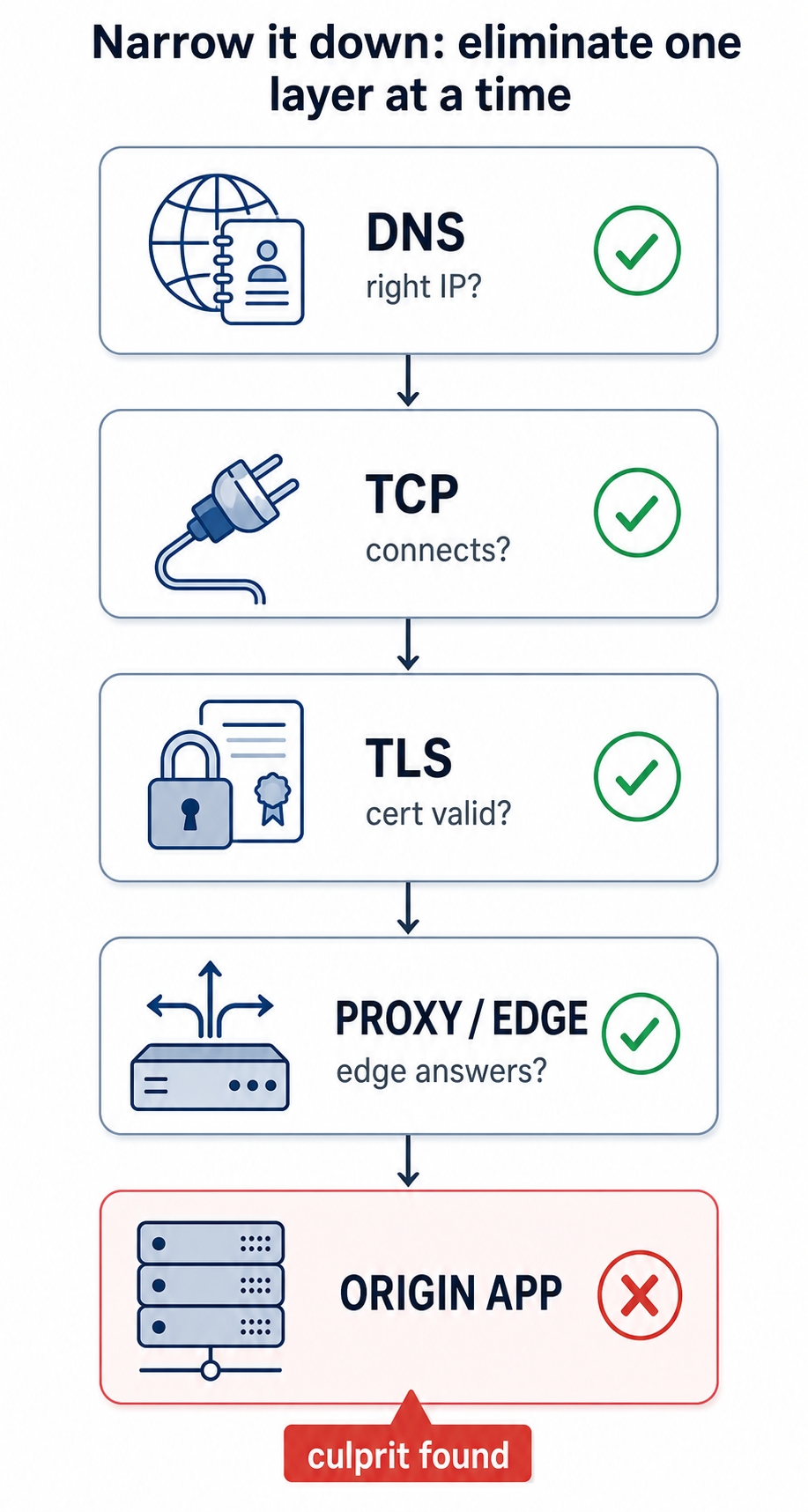
You start at the bottom and work your way up. The figure below shows the shape of what you are doing. You confirm each layer is healthy and cross it off until one layer fails. That failure is your answer.
Eliminate each layer in order until the failing one is found
DNS. First question: are you and the broken users even getting the same IP address? You run dig example.com +short and get the new server's address. That looks good. However, that is just your resolver's answer, possibly served from your own local cache. The tell-tale sign of this bug is that the answer changes depending on who is asking. You can query a public resolver to get a second opinion:
dig @1.1.1.1 example.com +short
bash
It returns the old server's IP. There is the problem. Your DNS change hasn't propagated everywhere yet. Users whose resolvers cached the old record are being sent to the old server. That old server might be turned off or serving stale content. Your machine had the new record, which is why the site worked for you. The bug is DNS propagation. You found it at the very first rung without touching the app, the certificate, or the proxy.
Notice what you avoided doing. You didn't redeploy code. You didn't restart any servers. You didn't waste time staring at application logs that would have shown nothing wrong. Because you worked the layers in order, the first failure stopped you exactly where the problem lived. If DNS had checked out clean on both resolvers, you would have moved to the next step. You would use curl -w to confirm the connection opens, openssl s_client to check the certificate, curl --resolve to test the origin past the proxy, and finally check the origin's own response. You use the exact same method every time, no matter what the bug turns out to be.
Your request-path debugging runbook
Keep this list handy. It compresses the whole chapter into a sequence you can run on autopilot the next time something breaks.
Resist the urge to guess. Don't change anything yet. Reproduce the failure first.
DNS — does the name resolve to the right IP?dig name +short. Compare against a second resolver (dig @1.1.1.1 name +short) when dealing with a "works for me, not for them" issue. Wrong or stale IP → DNS is the bug.
TCP — does the connection open?curl -w and read time_connect. Never completes → server down, closed port, or firewall.
TLS — is the certificate valid and trusted?openssl s_client -connect host:443 -servername host. Check the subject, the NotAfter date, and Verify return code: 0 (ok).
Proxy / edge — is it the front door or the origin?curl --resolve host:443:ORIGIN_IP to bypass the proxy and hit the origin directly. Edge fails but origin is clean → proxy problem. Both fail → keep going.
Origin app — does your code answer correctly?curl -i straight to the origin, read the status and body, then match the proxy log against the backend log by timestamp.
Confirm the fix the same way you found it. Re-run the command at the layer that failed and watch it go green before you call it done.
The order is the most important part. Each step eliminates one layer. By the time you reach the bottom, you are no longer guessing. You are looking exactly where the request died.
Try it now
Run the full sequence against a real site from top to bottom, even though nothing is broken. The goal is to get these four commands into your muscle memory so they are automatic when something actually breaks. Open a terminal:
Read the output of each command against its layer. Check the IP from dig, the cumulative milestones from curl -w, and the certificate chain and verify code from openssl. For the last command, watch what happens when you point the connection somewhere else. That final --resolve aims example.com at an address that isn't its real server, so notice how the request behaves when the layers stop lining up. Once running this ladder feels routine on a healthy site, you will reach for it without thinking the next time a page just spins.
What's Next
This debugging method is the last piece of your toolkit. The final chapter recaps the whole journey—from a single wire to production HTTP—and points you to where to go next.