In the last two chapters, you learned how to see a request using the Network panel and curl. When things break, both tools hand you a status code in the 400s or 500s. The whole game is knowing what that number is trying to tell you. This chapter is your field guide to those errors. The most useful skill you can develop is reading the first digit, because it tells you exactly which side of the wire to start looking on.
The first digit tells you whose problem it is
Earlier, we learned that status codes are grouped into categories. Two of those ranges are the ones you will actually debug, and they point in opposite directions:
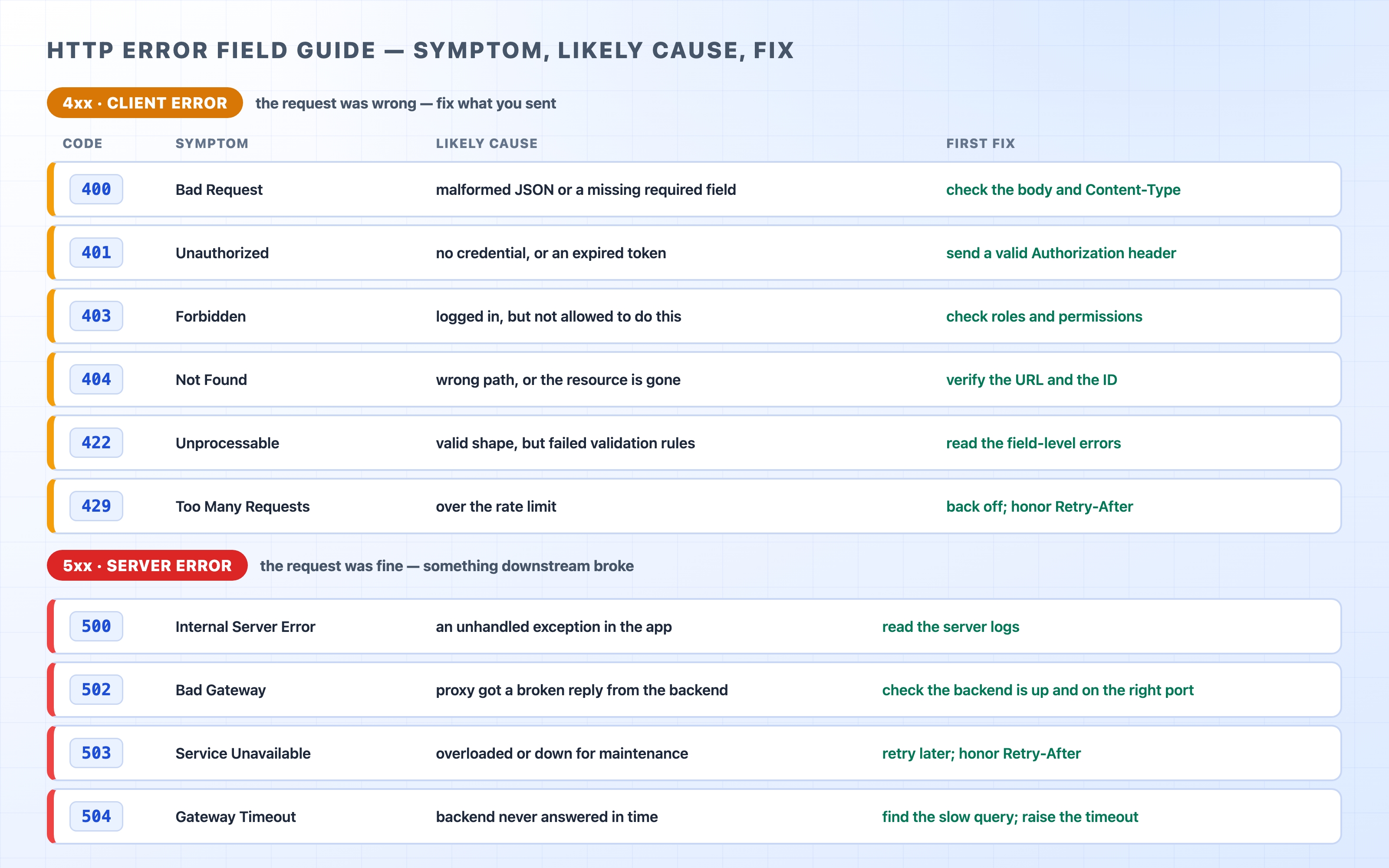
A 4xx is a client error. The server is saying it understood you, but your request was wrong. The fix is usually something you sent: a bad URL, a missing token, or a malformed body.
A 5xx is a server error. The server is saying your request was fine, but it failed to fulfill it. The fix is on the server side: a crash, a slow database query, or a backend that is down.
This single distinction saves hours of wasted effort. When you see a 403, you stop staring at your server logs and look at the credentials you sent. When you see a 502, you stop tweaking your request and go read the backend logs. Get the digit right, and you are looking in the right place from the first minute.
A field guide of common HTTP errors sorted by client or server
Keep that table handy. The rest of this chapter walks through the errors that come up the most. Then, we will zoom in on the two server errors that confuse almost everyone: 502 versus 504.
The everyday 4xx codes
These are the errors you cause yourself, usually while building or calling an API. Each has a typical trigger and a straightforward fix.
Common HTTP Errors: 502 vs 504 Explained | dalabs.academy
400 Bad Request means the server failed to parse what you sent. The classic trigger is broken JSON, like a trailing comma or a missing quote. It also happens if you forget to mark a JSON body with the Content-Type: application/json header. When you hit a 400, look at the shape of your request before checking anything else.
401 Unauthorized and 403 Forbidden are the pair people mix up the most. A 401 means not authenticated: the server does not know who you are. You sent no credential, or an expired one. A 403 means not allowed: the server knows exactly who you are and has decided you lack permission. The official names are slightly misleading, so here is a trick to remember them:
A helpful distinction: The word "Unauthorized" on a 401 actually means unauthenticated. Think of it as "who are you?" A 403 means "I know who you are, and the answer is no." A fresh login fixes a 401. Only a permission change on the server fixes a 403. Sending a new token at a 403 will just get you another 403.
404 Not Found is the most familiar error. It means the path does not map to anything. Sometimes the resource never existed. Sometimes you have a typo in the URL. Other times, the ID in the path points to a record that was deleted. The first move is to read the URL out loud and check it character by character.
422 Unprocessable Content means the request was well-formed and the JSON parsed successfully, but the values failed validation. Think of an email field that lacks an @ symbol, a negative age, or a date in the past. A 400 says "I could not read this." A 422 says "I read it, but the data is invalid." Good APIs return a 422 with a list of which fields failed and why, so the fix is usually right there in the response body.
429 Too Many Requests means you tripped a rate limit. The server is asking you to slow down. A well-behaved client does not just retry immediately. Instead, it reads the Retry-After header and waits the specified number of seconds.
CORS errors look like network failures, but they're not
This is a trap that can send you down the wrong rabbit hole for an entire afternoon. You make a request from your front-end JavaScript, and the browser console lights up red with a message like this:
Access to fetch at 'https://api.example.com/orders' from origin
'https://app.example.com' has been blocked by CORS policy.
text
It looks like the request failed, but it probably did not. CORS (Cross-Origin Resource Sharing) is a browser policy, not an HTTP status code. The request very often reached the server, and the server very often answered with a perfectly normal 200. The browser simply refused to hand that response to your JavaScript. It does this because the server did not include the specific headers required to say, "code from this other origin is allowed to read my response."
The only thing that ever produces a CORS error is a web browser making a request from one origin to another. This is why the exact same call works perfectly fine from curl or Postman. Neither of those tools enforces CORS. When your browser console shows a CORS error but curl returns a 200, you have learned something precise. The server and the request are fine. The fix requires updating the server's CORS configuration (usually by adding an Access-Control-Allow-Origin header). The problem is not your front-end code, and it is not the network.
A helpful mental model: A CORS error is the browser protecting the user, not the server rejecting the request. There is no "CORS status code" to look up because CORS is not an HTTP error. It is a rule the browser applies after the response comes back.
The headline pair: 502 vs 504
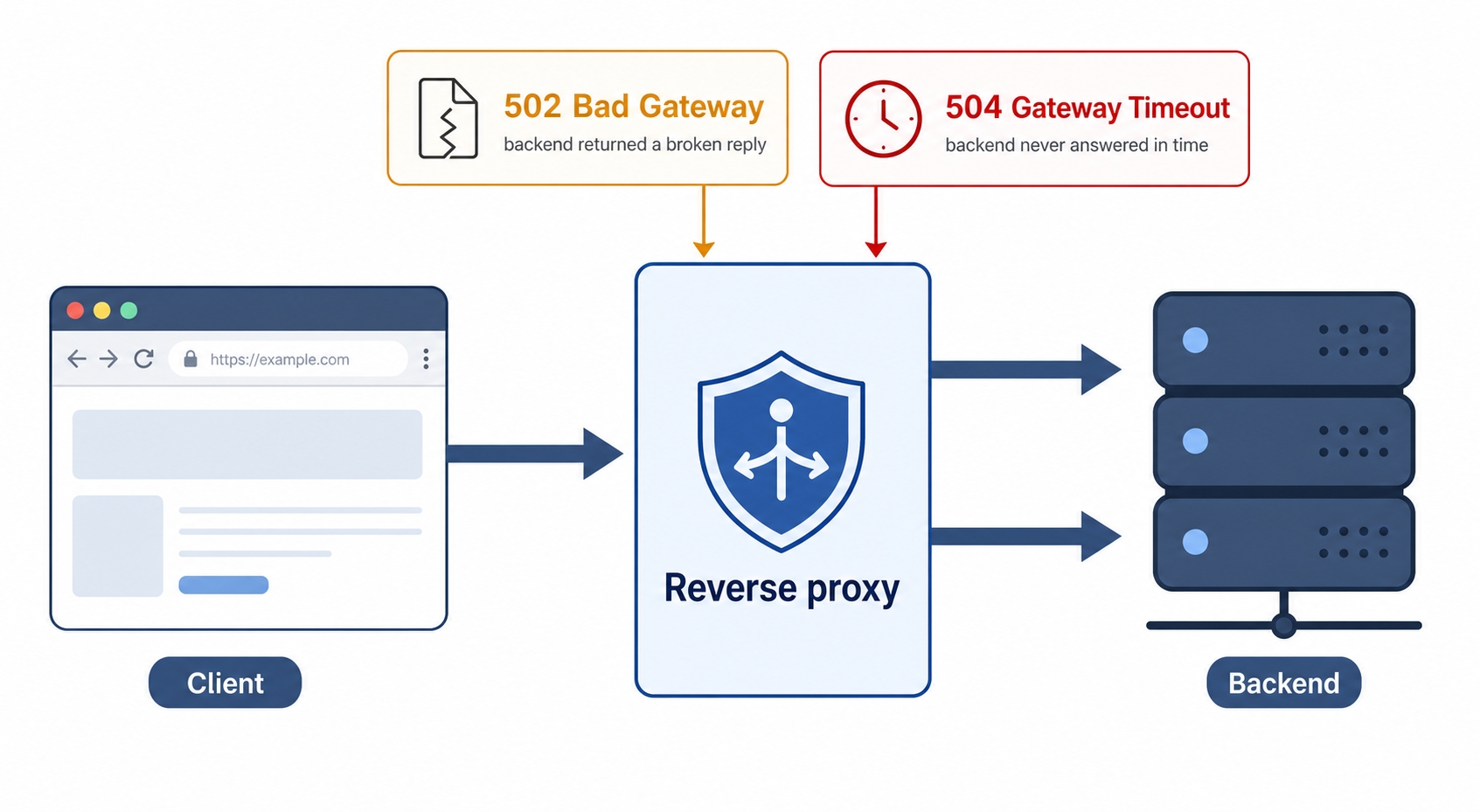
Now for the two errors that send the most engineers in circles. Both are 5xx, meaning both are server-side. Both also contain the word "Gateway." That word is your clue. In production, your request rarely hits your application directly. It usually goes through a reverse proxy first. That proxy is the machine emitting these two codes. The difference between them comes down to what went wrong between the proxy and your backend.
502 means the backend returned garbage while 504 means it never answered
502 Bad Gateway means the proxy talked to the backend and received a broken or invalid reply. The backend answered, but the answer was something the proxy could not make sense of as an HTTP response, or the connection died mid-reply. Think of it as: "I asked the backend, and it handed me nonsense." Common causes include:
The backend crashed, and the proxy got a connection reset instead of a real response.
The proxy is pointed at the wrong port, so nothing valid is listening where it expects an HTTP server.
The backend returned a malformed response, often after running out of memory or hitting an unhandled error mid-write.
504 Gateway Timeout means the proxy talked to the backend and got nothing back in time. The backend never finished answering before the proxy's patience ran out. Think of it as: "I asked the backend, and it just never replied." Common causes include:
The backend is slow, usually due to a database query or an external call that hangs.
The backend is overloaded, and the request sat in a queue past the deadline.
The proxy's timeout is set too low for a legitimately long-running endpoint.
The short version worth memorizing: 502 means the backend answered incorrectly; 504 means the backend did not answer at all. One is a broken reply, and the other is silence.
A common point of confusion: People often assume a 502 or 504 means the proxy itself is broken. Usually, it is not. The proxy is just the messenger reporting honestly about the backend behind it. The bug is almost always on the backend. This is exactly why the next step matters: knowing which machine's logs to open.
Which logs reveal the culprit
The reason 502 and 504 errors feel mysterious is that two machines are involved, and you are usually only looking at one. Walk the path conceptually: client → reverse proxy → backend. When the proxy returns a 502 or 504, it does so because of something it saw from the backend. Both sides usually write a log line about the event. They tell you the story from two different angles, and you want to read both.
The proxy log tells you what the proxy decided. For a 502, it will say something like "upstream sent an invalid response" or "connection refused." For a 504, it will say "upstream timed out." This confirms which situation you are in and which backend the proxy was trying to reach. The proxy access log shows the status it returned to the client, and its error log shows the reason why.
The backend log tells you what actually happened on the other end. For a 502, you will often find a crash, a stack trace, or an out-of-memory kill right at that timestamp. The backend died, and the proxy saw the connection drop. For a 504, you will often find a request that started but never logged a completion. This is the slow query or hung external call that blew past the proxy's deadline.
To put the pieces together, match the timestamps. The proxy logs the exact moment it gave up. The backend logs what it was doing at that same moment. A 502 with a crash in the backend log at the same second is an open-and-shut case. A 504 with a request that started but never finished is your slow endpoint caught red-handed. If the backend log shows the request actually succeeded quickly but the proxy still returned a 504, the problem is between them. It might be a network hiccup or a misconfigured timeout, and now you know exactly where to look.
A repeatable triage checklist
When an error lands, resist the urge to start changing things at random. Work through the problem in order. This is a reliable sequence you can use every time.
Read the first digit. If it is a 4xx, look at your request. If it is a 5xx, look at the server. If the browser console says CORS, it is neither—it is the server's CORS configuration.
Reproduce it with curl. Run the exact request from the terminal. If it fails the same way, the browser and the front-end code are off the hook. The problem is the request itself or the server. If curl succeeds where the browser failed, the difference is something the browser added (like a cookie or a header) or a browser policy like CORS.
For a 4xx, fix what you sent. Check for a wrong path (404), a missing or stale token (401), a lack of permission (403), a bad JSON body (400), invalid values (422), or requesting too fast (429). The response body usually names the specific problem.
For a 5xx, find the failing hop. A plain 500 is usually your application, so read its logs. A 502 or 504 is the proxy reporting on the backend. Open the proxy log to confirm which case it is, then open the backend log at the same timestamp to see what broke.
Confirm the fix the same way you found the bug. Re-run the curl command and watch the status flip to a 2xx. If it does, you have actually fixed the issue, not just moved it.
Try it now
You do not need a broken server to practice reading these codes. The site httpbin.org has an endpoint that returns any status code you ask for. This is perfect for getting the codes into your fingers. Open a terminal and run these commands, reading only the first line of the output each time:
curl -i https://httpbin.org/status/404
curl -i https://httpbin.org/status/401
curl -i https://httpbin.org/status/500
curl -i https://httpbin.org/status/503
bash
Each prints a status line that looks like this:
HTTP/2 404
text
Notice the shape of the response: the protocol version, then the number, and sometimes a short reason phrase. That first line is the whole diagnosis in one glance. A 4 means look at your request, and a 5 means look at the server. You can swap in any code you want, like curl -i https://httpbin.org/status/403 or .../status/429, and you will get that exact status back. Once reading that first line becomes automatic, half the work of debugging an HTTP error is done before you open a single log.
What's Next
You can now identify an error and aim at the right side of the wire from the very first glance. The final chapter puts everything together. We will trace one real request end-to-end across DNS, the proxy, and the application to find a bug hiding in the request path.