In the last chapter, you ran Go by hand with go run ., with only the compiler checking your code. This chapter sets up two tools you will use from here on: a Makefile to give your commands short names, and golangci-lint to catch mistakes the compiler misses.
This chapter adds no application code. Instead, we wrap the existing Hello, Go! program in tooling so the habit is in place before there is much code to get wrong.
Why bother this early?
You will type the same handful of commands hundreds of times in this course: run the program, build it, format it, and check it. Two problems usually show up fast. First, the exact commands are easy to forget and slightly different on every project. Second, the Go compiler is strict but not thorough. It refuses to build code with an unused variable, yet it happily compiles a program that ignores an error returned from a function. That ignored error is one of the most common bugs in Go, and nothing in the standard go build will warn you about it.
A Makefile fixes the first problem by putting your commands in one standard place with short names. A linter fixes the second by reading your code and flagging mistakes that compile fine but are probably wrong. Setting both up now helps you learn good Go habits early.
What a Makefile is
make is a command-line tool that reads a file named Makefile and runs the commands defined inside it. Each named command is called a target. You run one by typing make <target>.
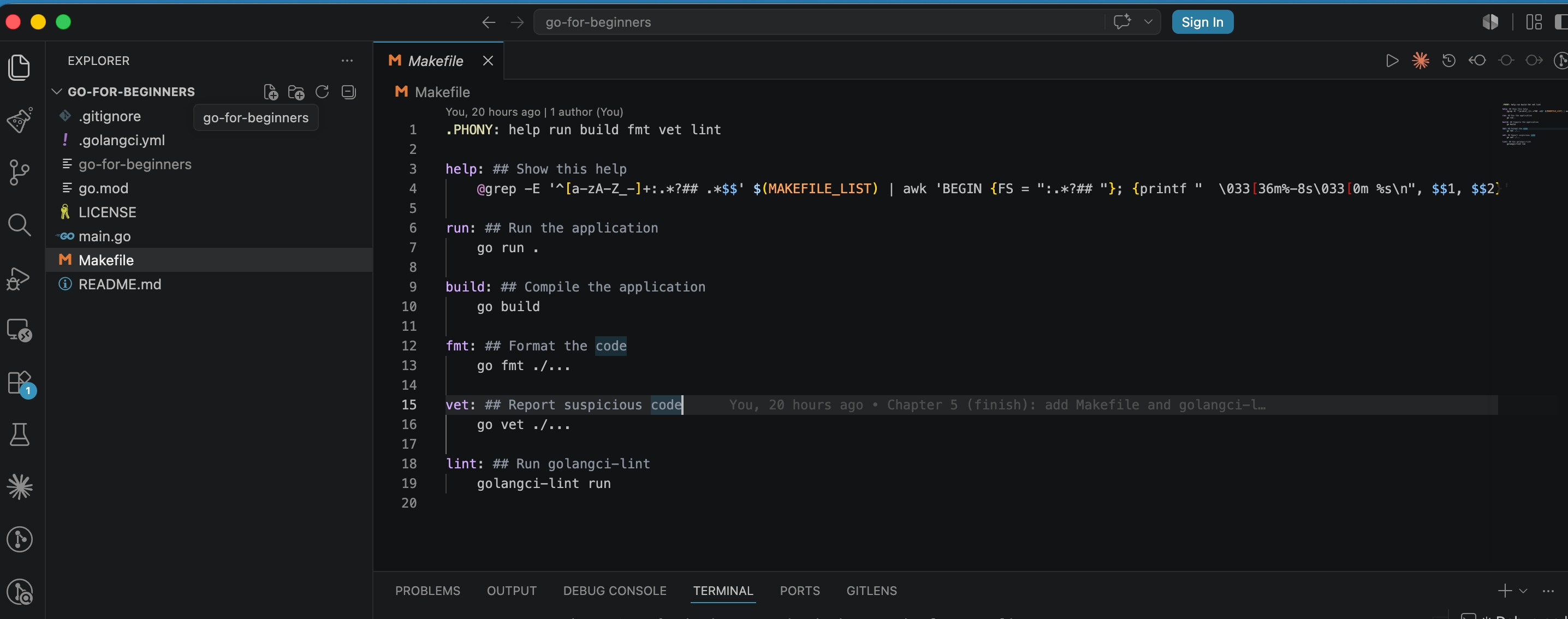
This is what that Makefile looks like open in VS Code:
Go Developer Tooling: Makefile & golangci-lint | dalabs.academy
The Makefile open in VS Code showing its targets
Think of these as named shortcuts. Instead of remembering go run ., you type make run. Instead of golangci-lint run, you type make lint. The names are short and stay consistent across machines. A new contributor can open the Makefile and see every command the project supports at a glance. make ships with macOS and Linux out of the box, so there is nothing to install.
Here is the full Makefile we add on the 05-developer-tooling branch:
The shape of each target is the same: a name, a colon, and then the command to run on the next line. Typing make run runs go run ., make build runs go build, and so on. These map directly to the toolchain commands from the previous chapter. The ./... you see on fmt and vet is Go's way of saying "every package in this module." This becomes useful once the project grows past a single file.
The help target is the one exception. It is a small script that reads the Makefile and prints every target next to the comment after ##. You do not need to understand the grep/awk line. It is just a convenience so make help lists what is available without you needing to open the file.
Two gotchas to know
Makefiles have two rules that trip up almost everyone the first time.
The first is tabs, not spaces. The command under each target must be indented with a real tab character, not spaces. This is the single most common Makefile error. If you indent with spaces, make stops with a confusing message like missing separator. Most editors insert spaces by default. If you write a Makefile from scratch, make sure your editor uses a real tab inside the recipe. In the companion repo, this is already correct, so checking out the branch sidesteps the problem.
The second is .PHONY. By default, make assumes a target's name is a file it should build. It skips the target if a file with that name already exists and looks up to date. Our targets are commands, not files. We list them under .PHONY to tell make these are not files and should run anyway. Without it, the day you create a folder called build, make build would silently do nothing. The line at the top of the file handles this for every target.
Adding golangci-lint
A linter is a tool that reads your source code and reports likely mistakes and bad style without running the program. The compiler answers "will this build?" while a linter answers "is this a good idea?"
Go has several linters, and running each one separately would be tedious. The tool golangci-lint solves that. It is a single fast runner that bundles many linters together and runs them in one pass. You configure which ones you want, run it once, and get all their findings together.
Install it with Homebrew on macOS:
brew install golangci-lint
bash
Confirm it is on your path:
golangci-lint version
bash
This course was built with golangci-lint 2.12.2. The version matters because the tool changed its configuration format in version 2, and the config below uses the newer v2 format. If you install a much older version, the config file will not load.
The configuration file
golangci-lint reads its settings from a file named .golangci.yml in the project root. Here is ours:
# .golangci.yml
version:"2"
linters:
enable:
- errcheck
- govet
- ineffassign
- staticcheck
- unused
yaml
The version: "2" line tells golangci-lint to use the v2 config format, which is required by version 2 of the tool. Everything else lists the linters we want turned on. We keep the set small and beginner-friendly on purpose:
errcheck flags error return values you forgot to check. This is a common stumbling block for beginners.
govet runs the same suspicious-code checks as go vet, like a Printf format string that does not match its arguments.
ineffassign flags an assignment whose value is never used. This usually means you made a typo or forgot a line.
staticcheck is a large bundle of correctness and simplification checks. It is the most valuable single linter in the set.
unused flags functions, variables, constants, and types that are never used anywhere.
Now we wire it into the Makefile. We already did this earlier: make lint runs golangci-lint run, which reads .golangci.yml automatically.
Running it
With both files in place, run the linter on our Hello, Go! program:
make lint
bash
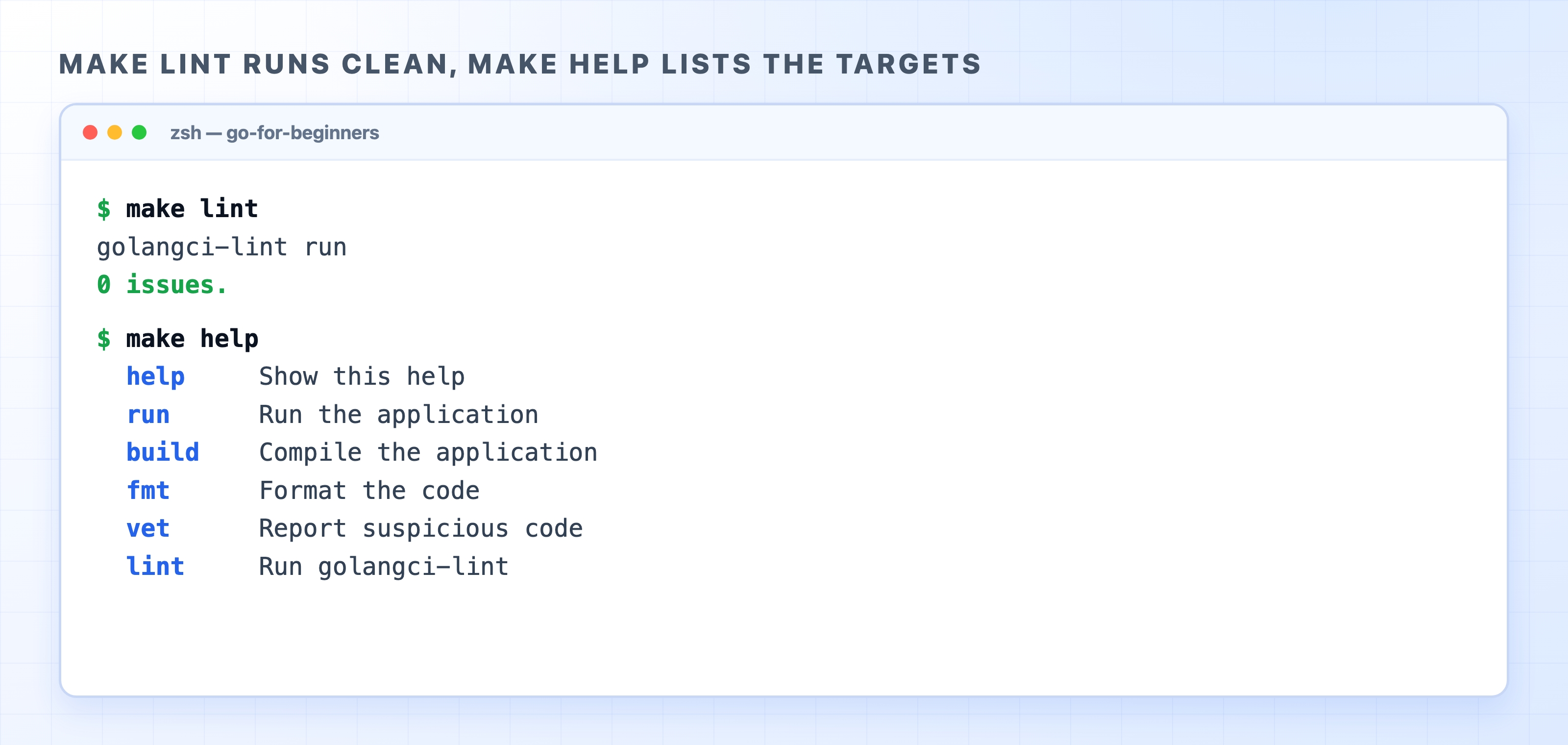
Because the program is tiny and correct, there is nothing to complain about. You can also run make help to see the targets you have available:
make lint runs clean and make help lists targets
Seeing 0 issues. is the result you want, and make help confirms the six targets are wired up. The other targets are just as quiet on a clean project. Running make run prints Hello, Go!, while make fmt and make vet print nothing at all because there is nothing to reformat and nothing suspicious to report. No output is the good outcome for those.
Here is make run in action: the short command runs go run . and prints the greeting.
make run executes go run and prints Hello Go
What a real finding looks like
A clean 0 issues. is reassuring, but it does not show you the point of the tool. We can look at a finding from a broken-on-purpose program instead. The code below is not in our repo. It is a throwaway file written just to trigger the linter so you can see what a finding reads like.
package main
import"os"
funcmain(){
os.Remove("missing.txt")
}
go
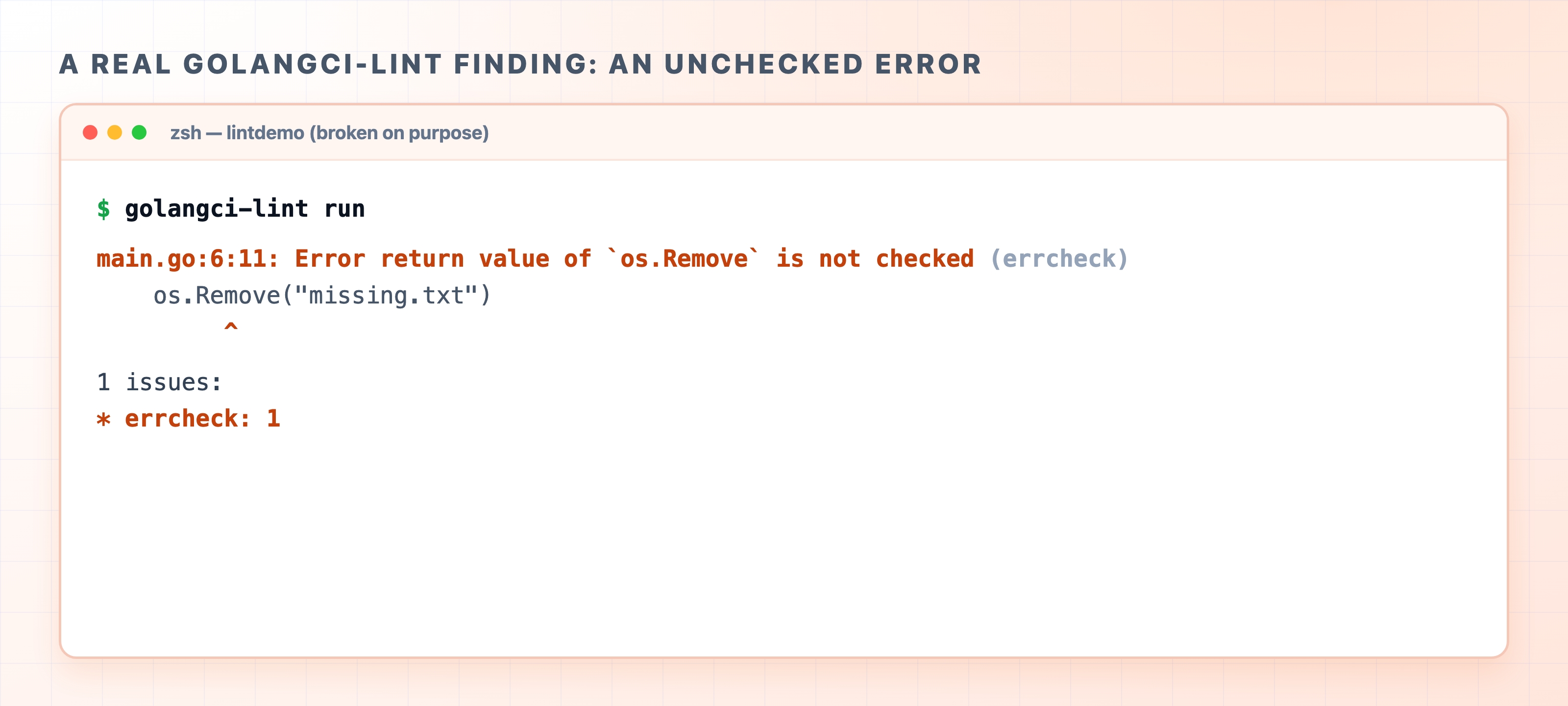
This program compiles and runs without complaint. os.Remove returns an error if the file cannot be deleted. We never look at that error, so any failure is silently swallowed. The compiler does not care, but errcheck does:
A real golangci-lint finding for an unchecked error
The finding points at the exact line and column, names the function whose error you dropped, and tags which linter caught it (errcheck). This shows the value of the tool in one screen. Code that builds and runs but quietly ignores a failure gets caught before it ever reaches a real system.
There is a second kind of mistake worth knowing because Go treats it differently. An unused local variable is not a lint warning at all. It is a hard compile error. If you write x := 1 and never use x, go build refuses to compile and reports declared and not used: x. Go is deliberately strict about unused locals, so that class of mistake never even reaches the linter.
The linter and format-on-save are different jobs
In the previous chapter, you turned on format-on-save in VS Code, which runs go fmt for you. It is fair to wonder whether the linter is now redundant. It is not, and the two tools complement each other.
Format-on-save handles layout, like indentation, spacing, and import order. It makes your code look the same as every other Go file and never changes what the code does. The linter handles correctness and intent, like an ignored error, an unused function, or a value you assigned and never read. One keeps your code tidy, while the other keeps it from being subtly wrong. You want both, and they do not overlap.
The Makefile will grow
Right now, the Makefile has six targets. This is intentional. It grows alongside the course as new tools earn their place:
A test target arrives in the testing section once we start writing tests.
A migrate target arrives when we add database migrations for PostgreSQL.
This same make lint gets wired into continuous integration at the end of the course. The linter will run automatically on every change, not just when you remember to run it.
If those targets feel missing now, they are simply not needed yet.
What's Next
With your tooling in place, the next section introduces the Go language itself, beginning with variables, types, and constants. From here on, you can run and lint everything you write with a single short command.