In the last chapter, we defined the Task struct; now we need a way to store many tasks at once. This chapter covers slices and maps, the two collections you reach for constantly in Go.
Overview
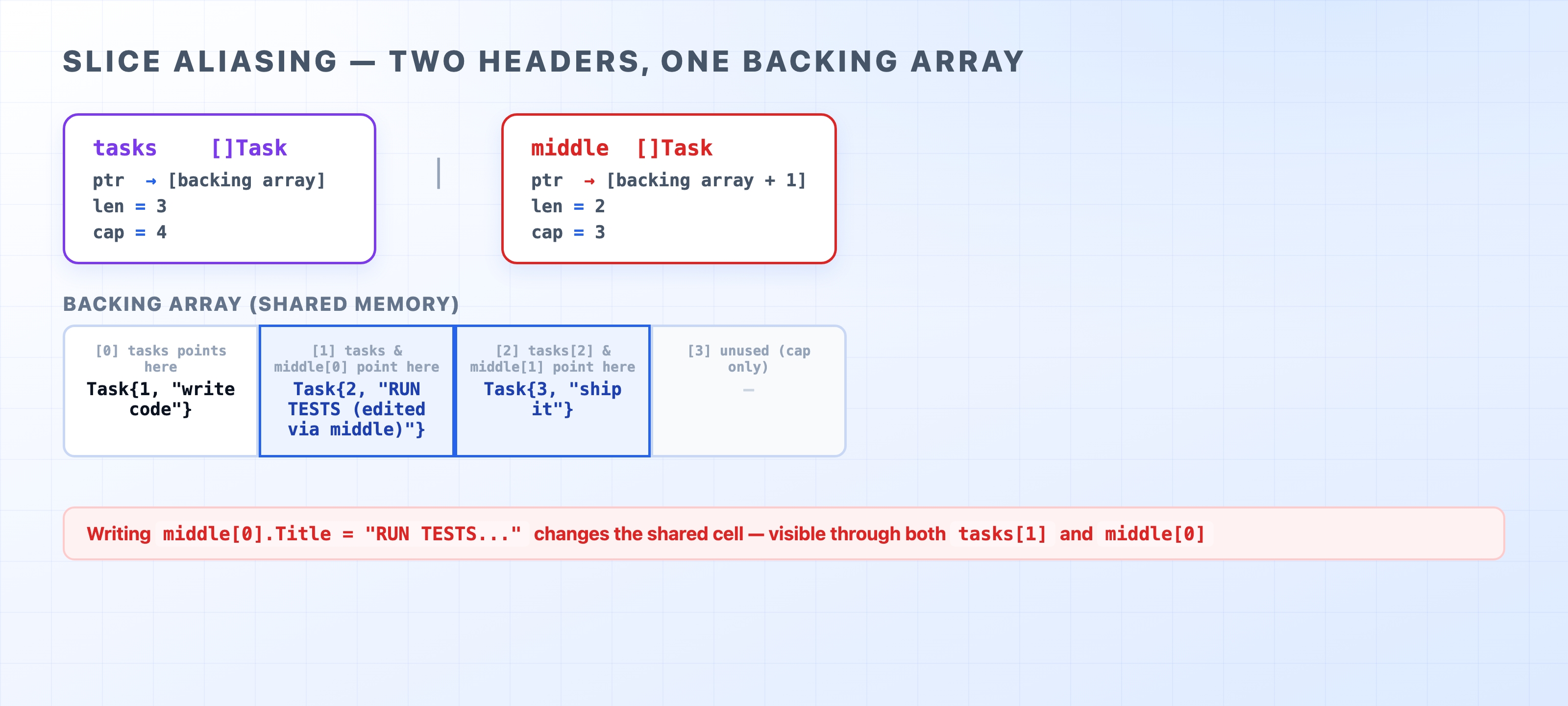
Inside collections.go, we have three demo functions: slicesDemo, mapsDemo, and nilMapDemo. We call each of them from main right after the struct demos from Chapter 9. Pay special attention to the aliasing trap. It happens when two slices share the same underlying array, meaning a change to one slice secretly changes the other.
Two slice headers sharing the same backing array
By the end of this chapter, you will know how to:
Build a slice with make and append, and read its len and cap
Recognize and avoid the aliasing trap caused by slice expressions
Look up, insert, and delete map entries
Use the comma-ok idiom to tell a missing map key apart from a zero value
Avoid the runtime panic caused by writing to a nil map
Backing array. A slice does not store data itself. It is just a small header—a pointer, a length, and a capacity—sitting on top of a standard, fixed-size array. That array holds the actual data. Multiple slices can point to different parts of the exact same backing array.
len vs cap. Length (len) is the number of elements currently in the slice. Capacity (cap) is how much total space the backing array has before Go needs to allocate a larger one. You rarely manage capacity manually; Go handles it behind the scenes.
Aliasing. Two variables alias each other when they point to the same memory. If you create a sub-slice with an expression like tasks[1:3], the new slice shares the original backing array. Writing to one slice changes the data for both.
Comma-ok idiom. When you read from a map using v, ok := m[k], Go returns two values. If the key exists, ok is true and v holds the data. If the key is missing, ok is false and v is empty (the zero value). Without that ok variable, you cannot tell if a key is truly missing or just storing a zero.
Nil map. If you declare a map variable but never initialize it, its value is nil. Reading from a nil map is perfectly safe and returns a zero value. Writing to a nil map crashes your program.
Slices
An array in Go has a fixed length baked right into its type. A [3]Task is a completely different type from a [4]Task, and neither can be resized. A slice ([]Task) is a flexible, resizable window into an array. In Go, you will use slices almost exclusively.
fmt.Printf("len=%d cap=%d after three appends\n",len(tasks),cap(tasks))
go
The command make([]Task, 0, 2) creates a slice with a length of 0 and a capacity of 2. This tells Go to reserve enough memory for two elements up front. After we append three tasks, the output looks like this:
len=3 cap=4 after three appends
The length is 3, which makes sense. But the capacity jumped to 4. When we tried to append the third task, Go saw that the backing array was full. It automatically allocated a new, larger array and copied the existing data over. The exact math Go uses to grow the array changes depending on the version, but append handles all of it for you. Just remember to assign the result back to your variable: tasks = append(tasks, ...).
Ranging over a slice
// collections.go
for i, t :=range tasks {
fmt.Printf(" tasks[%d] = %s\n", i, t.Summary())
}
go
Using range gives you the index and a copy of the element for every item in the slice. If you only need the element, use an underscore to ignore the index: for _, t := range tasks. If you only need the index, you can leave the second variable off entirely: for i := range tasks.
The expression tasks[1:3] creates a new slice. But it does not copy the data. Instead, it points to the exact same backing array as tasks, just starting at index 1. Because middle and tasks share memory, writing to middle[0] actually overwrites element [1] in the shared array. Both slices see the change:
tasks[1]  = #2 "RUN TESTS (edited via middle)" [open]
middle[0] = #2 "RUN TESTS (edited via middle)" [open]
This behavior catches many beginners off guard. You might take a sub-slice expecting a safe, independent copy, but you get an alias instead. If you genuinely need a separate copy of the data, use the built-in copy function:
independent :=make([]Task,len(tasks))
copy(independent, tasks)
go
Now, modifying independent will not affect tasks.
Maps
A map is Go's built-in hash table. It is an unordered collection of key-value pairs that provides fast lookups, inserts, and deletes.
Creating and using a map
// collections.go
byID :=map[int]Task{
1:{ID:1, Title:"write code"},
2:{ID:2, Title:"run tests"},
3:{ID:3, Title:"ship it", Done:true},
}
byID[4]= Task{ID:4, Title:"deploy"}
go
The type map[int]Task means the keys are integers and the values are Task structs. The map literal above sets up three initial entries. Adding a fourth is as simple as assigning a value to byID[4].
Comma-ok: distinguishing missing from zero
A basic lookup like t := byID[99] will never crash. If the key is missing, Go simply hands you a zero-value Task. But an empty task is not the same thing as knowing the ID actually exists in the map. To tell the difference, use the comma-ok idiom:
// collections.go
if t, ok := byID[2]; ok {
fmt.Println("found id 2:", t.Summary())
}
if_, ok := byID[99];!ok {
fmt.Println("id 99 is not in the map (comma-ok said so)")
}
go
The ok variable is a boolean. If it returns false, the key was not in the map.
The delete function removes an entry from the map. If you try to delete a key that does not exist, Go does nothing. It will not throw an error.
Map iteration order is unspecified
// collections.go
keys :=make([]int,0,len(byID))
for id :=range byID {
keys =append(keys, id)
}
sort.Ints(keys)
fmt.Println("tasks in sorted-key order:")
for_, id :=range keys {
fmt.Printf(" %d -> %s\n", id, byID[id].Summary())
}
go
Go does not promise any particular iteration order for a map, and it intentionally varies the starting point so you cannot rely on one. If you write code that assumes a map will loop in a specific order, it will eventually break. When you need a predictable order, you have to collect the keys into a slice, sort that slice, and then loop over the sorted keys. That is exactly what the demo above does, ensuring make run produces the same output every single time.
The nil map trap
// collections.go
var tasks map[int]Task
t, ok := tasks[1]
fmt.Printf("read from nil map: ok=%t, value=%+v\n", ok, t)
// writing would panic, so we do not run it:
// tasks[1] = Task{ID: 1} // panic: assignment to entry in nil map
fmt.Println("writing to a nil map would panic; make() the map first")
go
Declaring var tasks map[int]Task creates a nil map. Reading from it is perfectly safe—you just get ok=false and a zero value. But writing to it will trigger a panic and crash your program. We left the write operation commented out in the code so that make run still succeeds.
To avoid this, always initialize your maps with make or a map literal before you add data to them:
tasks :=make(map[int]Task)// ready to use
go
Running the demos
make run
bash
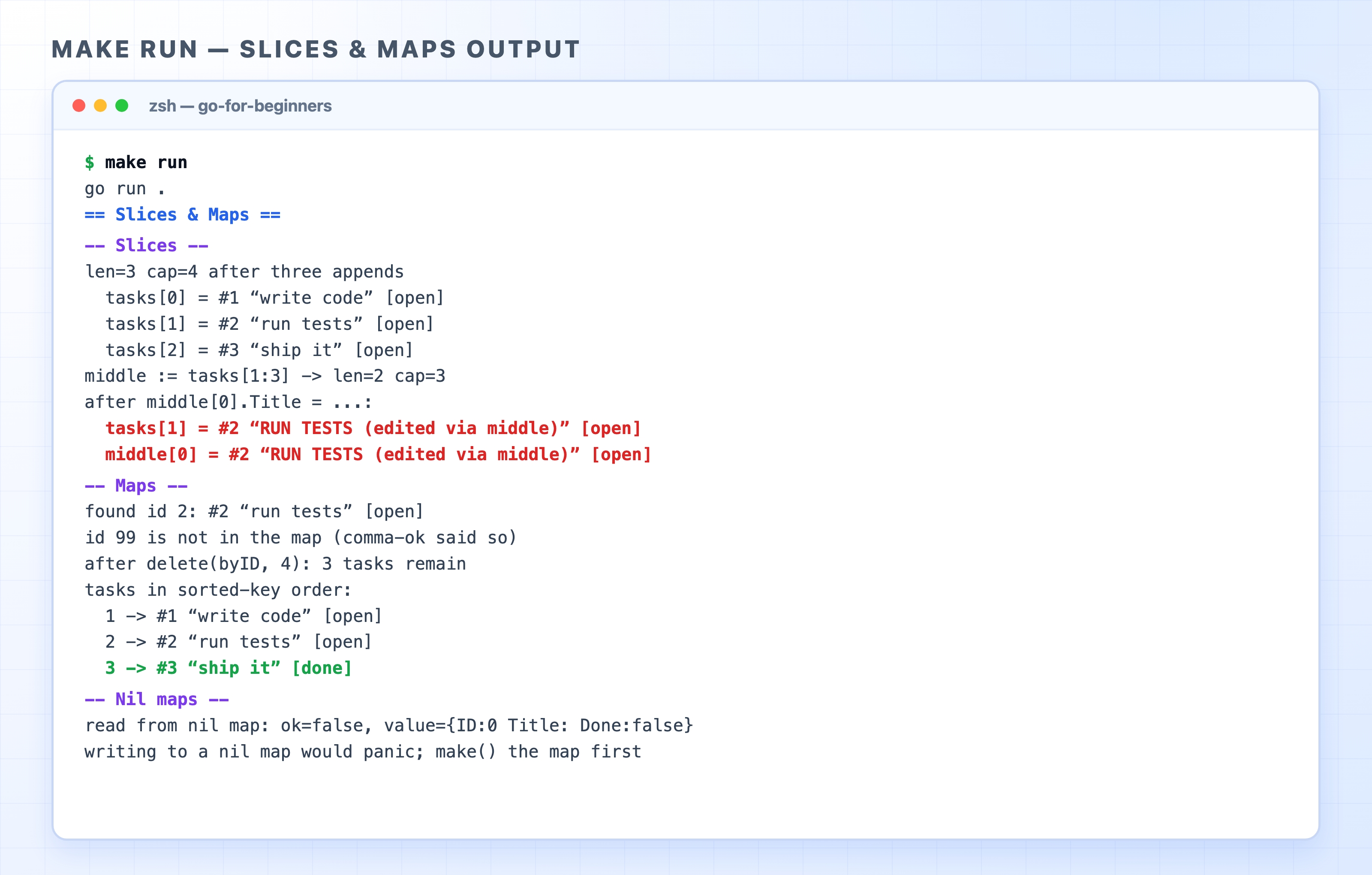
make run output for the slices and maps demos
Notice the two red lines for tasks[1] and middle[0] under the Slices section. This proves the aliasing trap. Both lines show the exact same edited title, even though we only modified middle.
Slice of structs vs map keyed by ID
You will use both of these data structures in the Task API we build later in the course.
A slice ([]Task) is the right choice when order matters or when you need to loop through every item. Appending to the end is fast. However, finding a specific task by its ID requires scanning the entire slice until you find a match.
A map (map[int]Task) is the right choice when you need to quickly look up, update, or delete an item by its ID. The in-memory task store we build in Chapter 20 uses exactly this pattern. Just remember that maps have no inherent order.
What's Next
Chapter 11 introduces interfaces. This is Go's way of describing behavior that any type can satisfy. We will define a TaskStore interface, which becomes the central foundation for our entire Task API.