In Chapter 13, we launched goroutines and waited for them with a fragile time.Sleep. This chapter replaces that guesswork with sync.WaitGroup, then introduces channels for passing values safely between goroutines.
Overview
We have two loose ends to tie up. First, we need a reliable way to wait for background tasks to complete. Second, we need a way to move data between them.
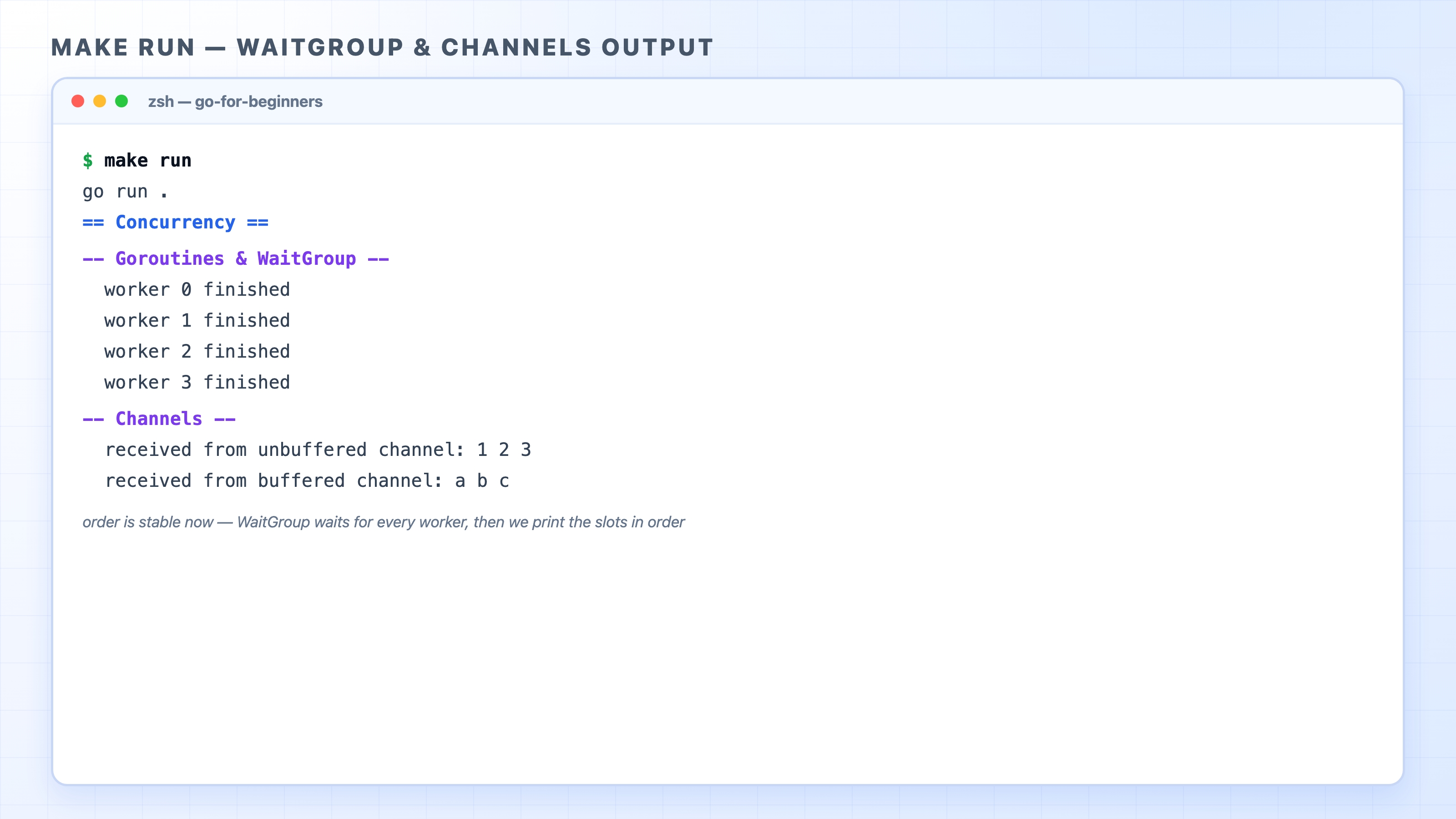
Stable make run output for the WaitGroup and channels demo
This chapter covers two tools:
sync.WaitGroup: A counter that blocks your program from exiting until every goroutine you launched has finished.
Channels: Typed pipes for passing values between goroutines. We will look at both unbuffered and buffered channels.
Check out the finish branch to follow along:
git checkout 14-channels-and-waitgroup-finish
bash
Waiting properly with sync.WaitGroup
A WaitGroup is a counter that tracks the exact number of goroutines you started. You add to the counter before launching a goroutine. Each goroutine subtracts one when it finishes. Finally, a Wait command pauses the program until the counter reaches zero.
Here is the refactored goroutinesDemo in concurrency.go:
Go Channels & sync.WaitGroup for Beginners | dalabs.academy
Three calls do the heavy lifting here. wg.Add(1) runs before each go statement, bumping the counter up by one. Inside the goroutine, defer wg.Done() lowers the counter when the function returns. Using defer guarantees the counter goes down even if the goroutine crashes or exits early. After the loop, wg.Wait() pauses the main goroutine until the counter hits zero. This only happens when all four workers have called Done. We wait exactly as long as the work takes, no more and no less.
The order of Add, Done, and Wait matters. Always call Add(1) before you launch the goroutine. If you call it inside the goroutine, Wait might run before the goroutine has a chance to add itself. The counter would read zero, and the program would exit too early.
Common confusion: Forgetting wg.Wait() brings back the exact bug from Chapter 13. The main function will return while goroutines are still running, and their work will be lost. A WaitGroup only helps if you actually tell your program to wait on it.
Why the output is stable now
Notice how the output behaves now. In Chapter 13, the four lines printed in a random order because each goroutine printed to the screen on its own. In this refactored version, every goroutine writes into its own specific slot in an array, like results[i]. No two goroutines ever touch the same slot. After Wait finishes, the main goroutine loops over results and prints the slots in order.
This makes the output completely predictable. You will see worker 0 through worker 3 on every single run. The goroutines still finish in whatever random order the Go scheduler picks, but we no longer print from inside them. We collect the results safely and print them sequentially.
Giving each goroutine its own slot sidesteps a major headache. Because no two goroutines write to the same piece of memory, there are no conflicts. When goroutines actually do need to update the exact same variable, you need extra protection. We will cover that in Chapter 15.
Channels: a typed pipe between goroutines
A channel is a pipe used to send values from one goroutine and receive them in another. You create a channel with make. You send data into it using an arrow <- pointing at the channel, and you receive data with an arrow pointing out of it:
ch :=make(chanint)
ch <-42
v :=<-ch
go
The type in make(chan int) dictates what the channel can carry. A chan int moves integers and nothing else. The Go compiler will reject anything of the wrong type. This is the primary way goroutines share data safely. Instead of multiple goroutines fighting over a single variable, one goroutine sends a value and another receives it.
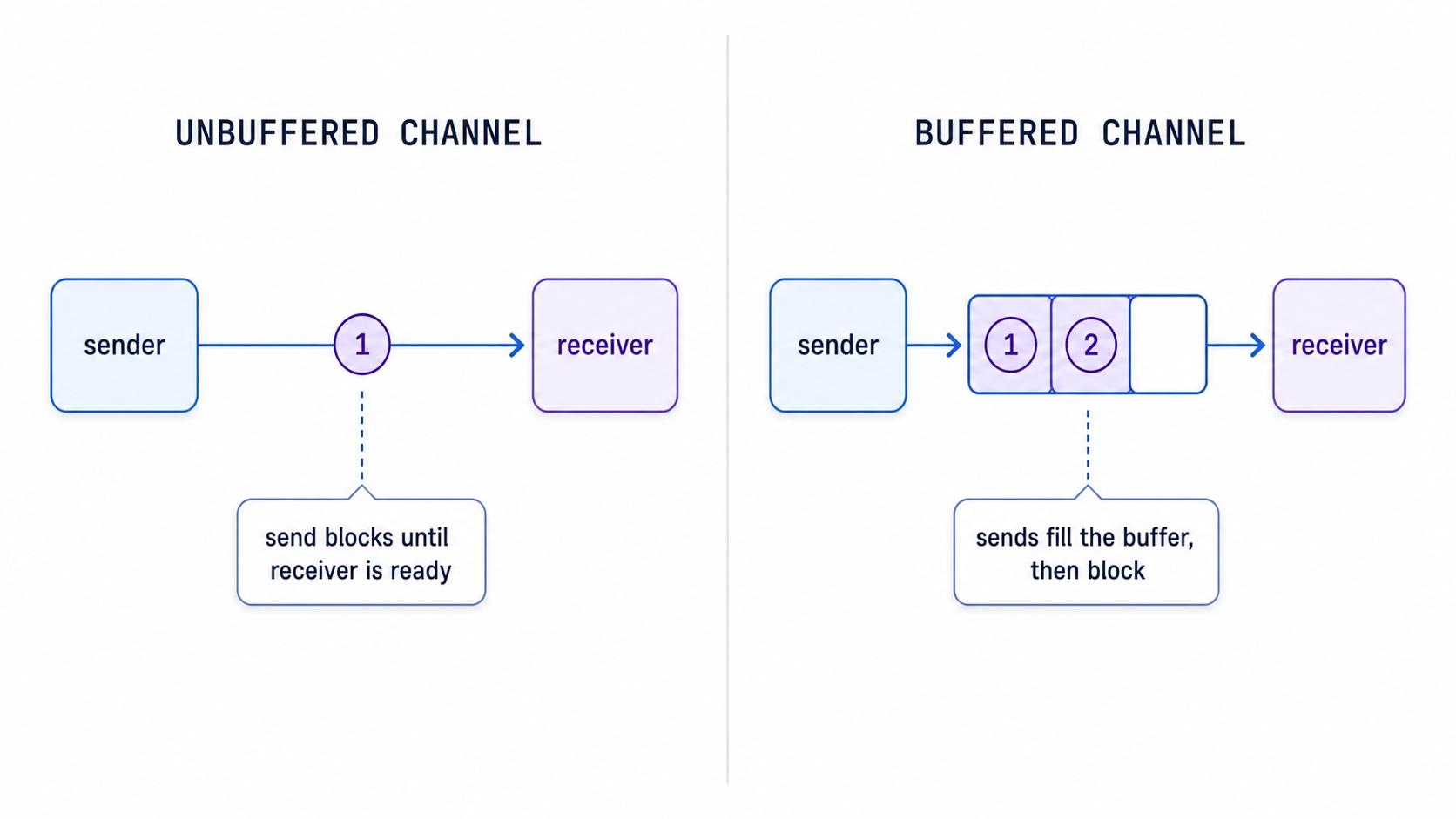
Unbuffered channel hand-off compared with a buffered channel queue
Channels come in two forms: unbuffered and buffered. The channelsDemo function shows how both work.
Unbuffered channels block until both sides meet
A channel created with make(chan int) and no specified size is unbuffered. It has no internal storage to hold a value. Because of this, a send operation cannot complete until another goroutine is ready to receive. The sender waits for the receiver, or the receiver waits for the sender, whichever arrives first. The two goroutines meet at the exact moment of the hand-off, pass the value, and move on. This meeting is often called a rendezvous.
nums :=make(chanint)
gofunc(){
for i :=1; i <=3; i++{
nums <- i
}
close(nums)
}()
fmt.Print(" received from unbuffered channel:")
for n :=range nums {
fmt.Printf(" %d", n)
}
fmt.Println()
go
The background goroutine sends 1, 2, and 3 into nums. Each nums <- i pauses until the for n := range nums loop in the main goroutine receives that specific value. Ranging over a channel is the cleanest way to receive data. The loop pulls values one at a time until the channel is closed.
The close(nums) command is not optional here. When you range over a channel, the loop waits for the next value forever unless the channel is explicitly closed. Once the sender closes nums, the range loop drains any remaining values and then ends. If you forget to close the channel, the loop waits for a value that never arrives. The program gets stuck, and Go will eventually report a deadlock and crash.
Common confusion: Only the sender should close a channel, and it should only do so once. Closing a channel is a signal that says, "no more values are coming." Sending data on a closed channel will cause a panic. Closing a channel that is already closed will also cause a panic. Always leave the closing to the goroutine doing the sending.
Buffered channels hold a few values
A buffered channel is created with a specific size, like make(chan string, 3). That number represents the size of an internal queue. A send operation succeeds immediately as long as the buffer has room, even if no receiver is standing by. The sender only pauses once the buffer is completely full.
letters :=make(chanstring,3)
letters <-"a"
letters <-"b"
letters <-"c"
close(letters)
fmt.Print(" received from buffered channel:")
for s :=range letters {
fmt.Printf(" %s", s)
}
fmt.Println()
go
This buffer holds three strings. The three sends complete right away, even though nothing is receiving them yet. A fourth send, like letters <- "d", would block because the buffer is full and no one has received anything to free up space. We close the channel and then range over it to drain "a", "b", and "c" in the exact order they went in.
As a general rule, use an unbuffered channel when you want the sender and receiver to move in lockstep. Use a buffered channel when the sender needs to run ahead by a fixed amount before waiting.
Where goroutines get stuck
The failures in this chapter all come down to a goroutine waiting on a channel that never unblocks. A send on an unbuffered channel with no receiver will wait forever. A range loop over a channel that is never closed will wait forever. A blocked goroutine that never finishes is called a goroutine leak. It sits in memory doing nothing. If the main program is waiting on it too, Go detects that nothing can make progress and reports a deadlock.
The habits to avoid these traps are simple. Close a channel when you are done sending. Make sure every send has a receiver, whether that is a ranging loop or spare room in a buffer. When you launch a goroutine you expect to finish, wait for it with a WaitGroup. Follow these steps, and your goroutines will not get stuck.
What's Next
Chapter 15 tackles the exact scenario we avoided here: multiple goroutines writing to the same variable. You will learn about data races, how to protect shared state with a mutex, and how to use Go's race detector to catch bugs automatically.