Chapter 12 handled failures that return as error values. This chapter starts the concurrency story: how Go runs multiple things at once.
Go builds concurrency directly into the language. You do not need to import a threading library or manage a thread pool. You simply put the keyword go in front of a function call, and that call runs concurrently with the rest of your program. Behind the scenes, the Go runtime spreads these tasks across a small number of operating-system threads for you.
This chapter focuses on a few core concepts:
go func().We will cover channels and sync.WaitGroup in Chapter 14, and mutexes in Chapter 15. Here, we are only going to launch goroutines and watch them run.
Check out the finish branch to follow along:
bashgit checkout 13-goroutines-and-concurrency-finish
A goroutine is a function that runs concurrently with the rest of your program. It is distinct from a traditional operating-system thread.
In many programming languages, threads are expensive. Each one reserves a large chunk of memory for its stack, and the operating system does heavy work to switch between them. Because of this, developers usually create a small number of threads and reuse them through a pool.
Go takes a different approach. A goroutine starts with a tiny stack—often just a couple of kilobytes—that grows and shrinks as needed. The Go runtime schedules many goroutines onto a small pool of OS threads. Switching between goroutines happens inside your program rather than in the OS kernel. Because each goroutine is so cheap, running thousands of them at once is normal in Go.
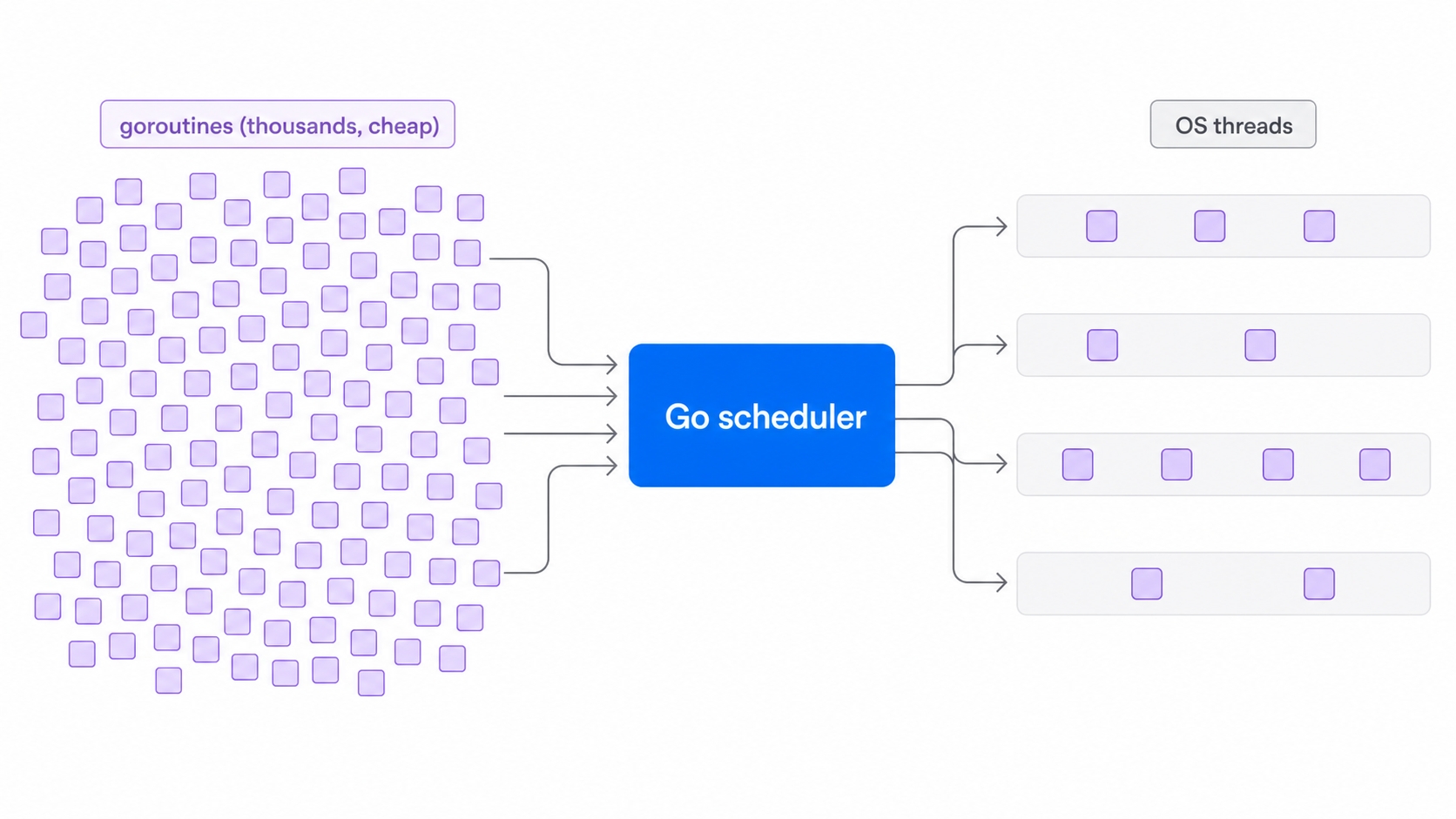
Picture a large group of cheap goroutines on the left. In the middle is the Go scheduler, which decides which goroutine runs next. On the right are a handful of OS threads mapped to your CPU cores. The scheduler multiplexes the many goroutines onto the few threads. You write the goroutines, and the runtime handles the threads.
The goroutinesDemo function in concurrency.go launches four goroutines, one per worker:
gofunc goroutinesDemo() {fmt.Println("\n-- Goroutines --")const workers = 4for i := 0; i < workers; i++ {go func() {fmt.Printf(" worker %d finished\n", i)}()}time.Sleep(100 * time.Millisecond)}
The go keyword does all the work here. go func() { ... }() takes the anonymous function call and runs it as a new goroutine. The for loop does not wait for the function to finish. It fires off the goroutine and immediately moves to the next iteration. Four goroutines launch almost instantly, running concurrently with the loop that created them.
The concurrencyDemo wrapper is what main.go calls under the == Concurrency == header:
gofunc concurrencyDemo() {goroutinesDemo()}
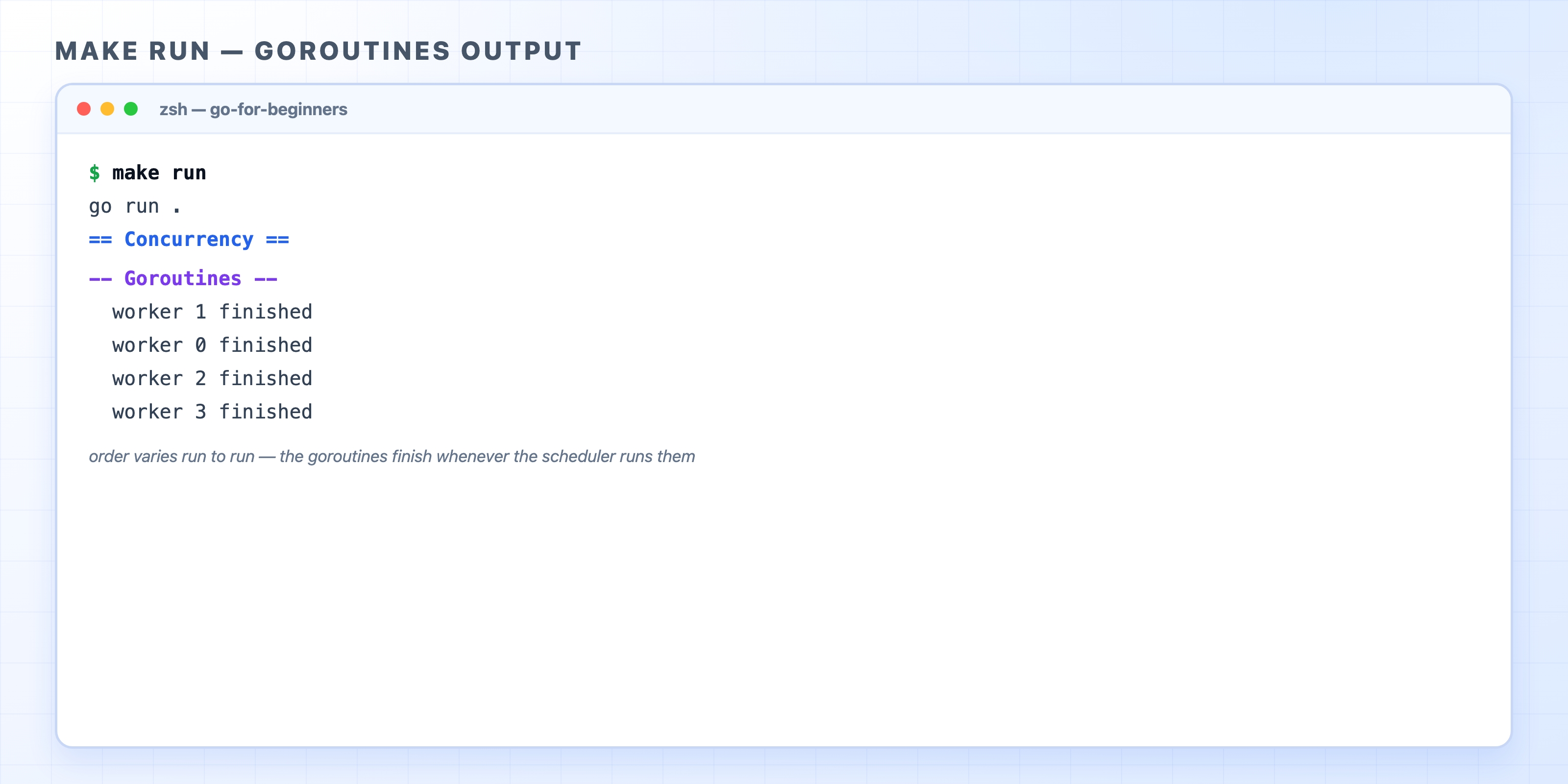
The terminal image above shows the four workers finishing in the order 1, 0, 2, 3. Run the program again, and you might see 0, 2, 1, 3, or any other arrangement. Nothing is broken. The scheduler is free to run the four goroutines in whatever order it likes, making no promises about which one prints first. When you write concurrent code, you give up strict top-to-bottom execution. If your program needs a specific order, you have to coordinate it yourself.
Common confusion. Beginners often expect the four lines to appear in the order the loop launched them. They usually will not. Concurrent goroutines have no ordering guarantee, so treat any run of the output as one possibility out of many.
Notice that each line prints a different worker number, 0 through 3. This works because Go 1.22 gives every loop iteration its own copy of i, allowing each goroutine to capture its own value. In older versions of Go, all four goroutines shared a single i and often printed worker 4 four times. Because this course targets modern Go, the loop behaves exactly as you would expect.
Look at the last line of goroutinesDemo:
gotime.Sleep(100 * time.Millisecond)
That Sleep call is a temporary crutch. When the for loop finishes, the four goroutines may not have run yet. If goroutinesDemo returned right away, the function would be done. In a real program, main could exit before any worker printed anything. The goroutines would be killed mid-flight, and their work would be lost.
We pause for 100 milliseconds to give the scheduler time to run them. This highlights a common trap when starting with goroutines: a function can return before the goroutines it launched have finished. Launching work is not the same as waiting for it.
time.Sleep only papers over the problem by guessing that 100 milliseconds is long enough. A guess is not a guarantee. If the work took longer, the sleep would end too early. If the work finished instantly, we waited for nothing. Chapter 14 replaces this guess with sync.WaitGroup, a counter that lets us wait for exactly the goroutines we launched. For now, the sleep keeps the demo simple.
Goroutines are the reason a Go web server can handle many users at once.
When you build an HTTP server with Go's standard library later in this course, you will write a handler function for each route. You will rarely need to spawn a goroutine yourself because the server does it for you. For every incoming request, the server launches your handler in a fresh goroutine. Two requests that arrive at the exact same moment run in two goroutines at the same time. A thousand concurrent requests become a thousand cheap goroutines that the scheduler juggles across a few threads.
You write one plain handler as if it serves a single request, and the language scales it to serve many. This is also why the next two chapters exist. Once multiple goroutines run your handler at once and reach for the same in-memory task store, you need a way to coordinate them safely. Channels, WaitGroup, and mutexes provide that coordination.
Chapter 14 swaps the fragile time.Sleep for sync.WaitGroup so we can wait for goroutines properly. It then introduces channels for passing values between them.