In the last chapter, we made the integration suite fast and safe on your laptop: four Jest workers, each with a private database, all passing in half the normal time. But a passing test on your machine does nothing for a teammate who forgets to run it. Your local safety net only protects you if you actually use it.
This chapter wires the project to GitHub Actions. Now, the same type-check, unit, and integration suite will run automatically on every push and every pull request. We will also start PostgreSQL as a service container so the continuous integration (CI) environment sees the exact same database your local setup does.
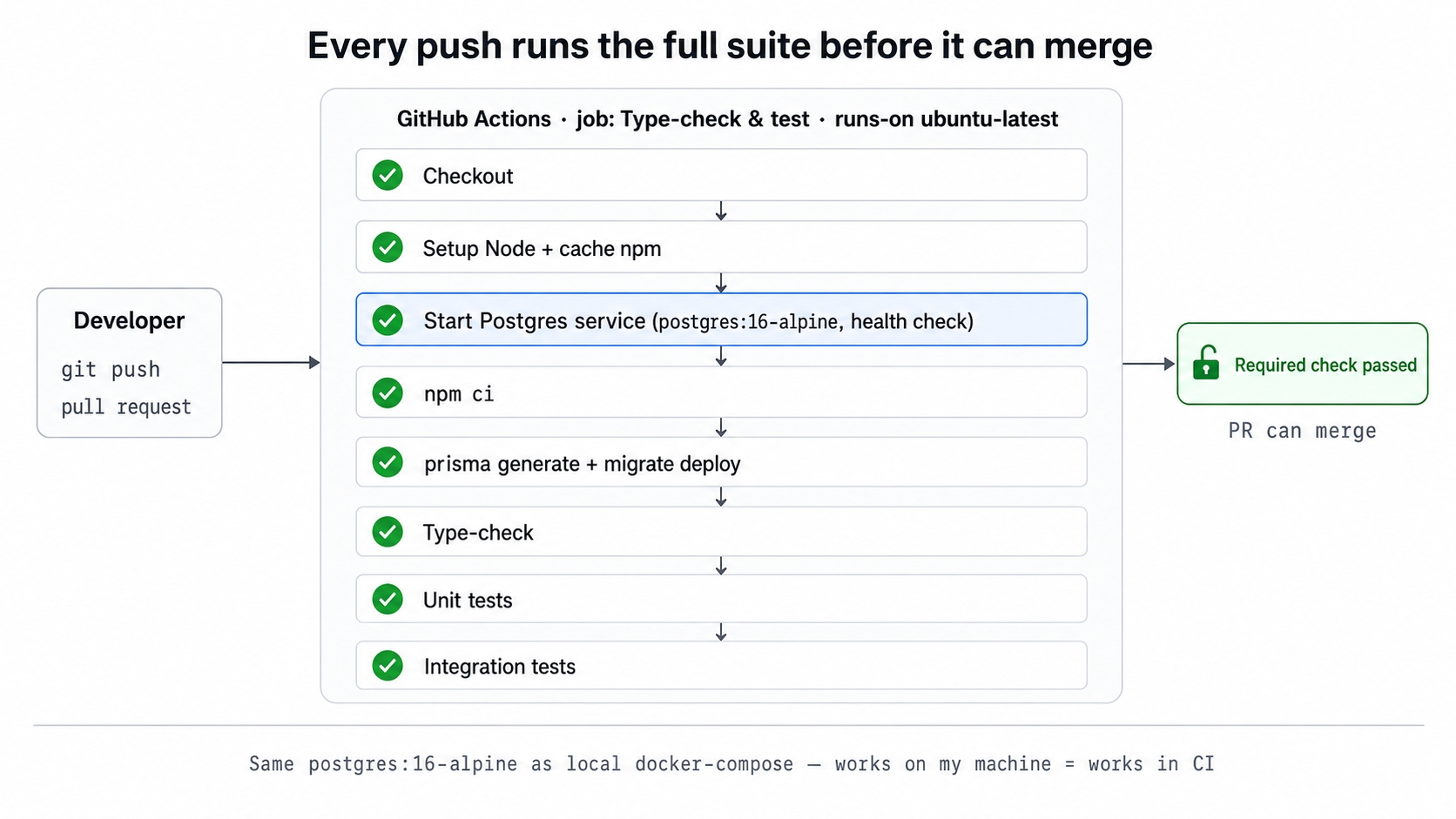
A push triggers a GitHub Actions job that runs every check before merge.
A single workflow file under .github/workflows/ runs the full suite of checks.
A postgres:16-alpine service container gives the integration tests a real database inside CI, matching your local Docker image exactly.
A branch-protection rule turns a passing run into a strict requirement. Nothing merges into main until CI passes.
What These Terms Mean
This chapter revolves around a single YAML file and a few core GitHub concepts. Here is a quick guide to the vocabulary before we look at the code.
CI (continuous integration). A server automatically builds and tests every push to the repository. Broken code surfaces within minutes instead of weeks later. You no longer have to ask if everyone remembered to run the tests.
GitHub Actions. GitHub's built-in CI platform. It reads a YAML workflow file from .github/workflows/, spins up a fresh ubuntu-latest machine, and runs your listed steps against the new code. You do not need a separate CI service to host this.
Service container. A temporary container that GitHub Actions starts alongside your job. In this case, it is postgres:16-alpine. The integration tests get a real database to connect to, and GitHub tears it down when the job finishes. It is the CI equivalent of running docker compose up and then docker compose down.
The workflow also relies on two smaller concepts. Dependency caching allows actions/setup-node to save the npm download cache based on your package-lock.json file. This means npm ci can reuse packages instead of downloading them from scratch every time. A required check (or branch protection) is a GitHub repository rule. It blocks anyone from merging a pull request until a specific check reports a passing status.
Why "Works on My Machine" Is Not Enough
Your test suite might be fast and accurate, but it only catches errors if someone actually runs it. Without CI, a developer can accidentally commit broken code, open a pull request, and merge it. If nobody runs the tests by hand during the review, that broken code lands in main. The next person to pull the code pays the price. CI removes human error from the equation by running the tests the exact same way every time.
Automating the database is the tricky part. The unit tests run anywhere, but the integration tests need a real PostgreSQL database. If CI ran those tests against a database that behaved differently from your local one, a passing CI run would lose its meaning. The service container closes that gap. It uses the same postgres:16-alpine image, the same database names, and the same credentials as your local Docker setup. A green checkmark in CI becomes a real promise about the code, not just a quirk of the environment.
The final piece is the required check. Running the suite automatically is helpful, but making a passing run mandatory is what actually stops broken code from reaching main. That gate is a GitHub repository setting rather than something inside the workflow file. It turns the pipeline from a polite suggestion into a strict guarantee.
The Workflow File
The entire pipeline lives in one file. Here is the complete workflow from the finish branch.
The on: block lists push and pull_request without any branch filters. This tells GitHub to run the checks on every push to any branch, and on every pull request.
The Postgres service container
The services: block is the heart of this setup. GitHub starts a postgres:16-alpine container before any other step runs. It creates the postgres user and a urlshortener database using environment variables. It also publishes port 5432 to the runner machine using ports: ["5432:5432"]. Because the job runs directly on the ubuntu-latest machine rather than inside a container, that port is reachable at localhost:5432. This is why the job's DATABASE_URL and TEST_DATABASE_URL both point there.
The options: line defines a health check. The --health-cmd "pg_isready ..." command runs every five seconds. GitHub pauses the workflow and waits until Postgres reports that it is healthy. This is the CI equivalent of the --wait flag we used with docker compose up in earlier chapters. No step will ever try to connect to a database that is still starting up.
One detail differs from your local setup. Locally, the host port is 5433 because docker-compose maps 5433:5432 to avoid clashing with any Postgres instance already running on your machine. CI provides a completely clean runner, so the service maps 5432:5432 directly. The image, database names, and credentials stay exactly the same. Only the host port changes.
The credentials sit in plain text in the file, which is perfectly fine here. They are throwaway values for a temporary container that only exists for a few minutes. A real production deployment connecting to a real database would pull its connection string securely from ${{ secrets.* }} instead.
Dependency caching and install
The actions/setup-node@v4 step uses cache: npm to hash your package-lock.json file and restore the npm cache. This allows npm ci to reuse downloaded packages across different runs, saving time. The node-version: 22 setting matches the repository's Node 22 requirement, ensuring CI runs on the same major version you use for development. The install step uses npm ci, which performs a clean installation of exactly what the lock file pins.
Preparing the database
Three steps prepare the database. First, npx prisma generate builds the typed Prisma client. This also runs automatically on postinstall, but writing it out as an explicit step documents the dependency and keeps the workflow easy to read. Second, npx prisma migrate deploy applies your committed migrations to the urlshortener database. This catches any migration drift, even though the integration suite uses its own separate test databases.
The createdb step matters more than it looks. It creates the base urlshortener_test database manually. The service container does not run your local docker/init/01-create-test-db.sql script because that script is a volume mount in docker-compose, not part of the bare Postgres image. From there, the machinery from Chapter 22 takes over. Each Jest worker calls CREATE DATABASE "urlshortener_test_<id>" against the postgres maintenance database and migrates it. This works in CI because the service container's postgres superuser has permission to create databases, just like your local setup.
Running the checks
The final three steps run the suite itself. The npm run typecheck command runs tsc --noEmit. The npm test command runs the Docker-free unit suite. Finally, npm run test:integration runs the parallel integration suite against the Postgres service container. Both database-facing commands read DATABASE_URL and TEST_DATABASE_URL from the job-level env block, which points them at the service container.
There is no lint step because this project does not have a lint script. The workflow runs the type-check and the tests, matching the repository exactly as it is. If you added a tool like ESLint later, you would slot its step right next to the type-check step.
Gating merges with a required check
The workflow file makes the suite run. Making a passing run required before a merge is a separate GitHub setting, not something the YAML file controls. The repository owner enables this by going to Settings → Branches → Add rule for the main branch. They turn on Require status checks to pass before merging and select the Type-check & test check. Once that is saved, a pull request can only merge if CI is green. This is the rule that finally keeps broken commits out of main.
Step 1: The Integration Step Fails in CI (Red)
Check out the start branch.
git checkout 23-ci-pipeline-start
bash
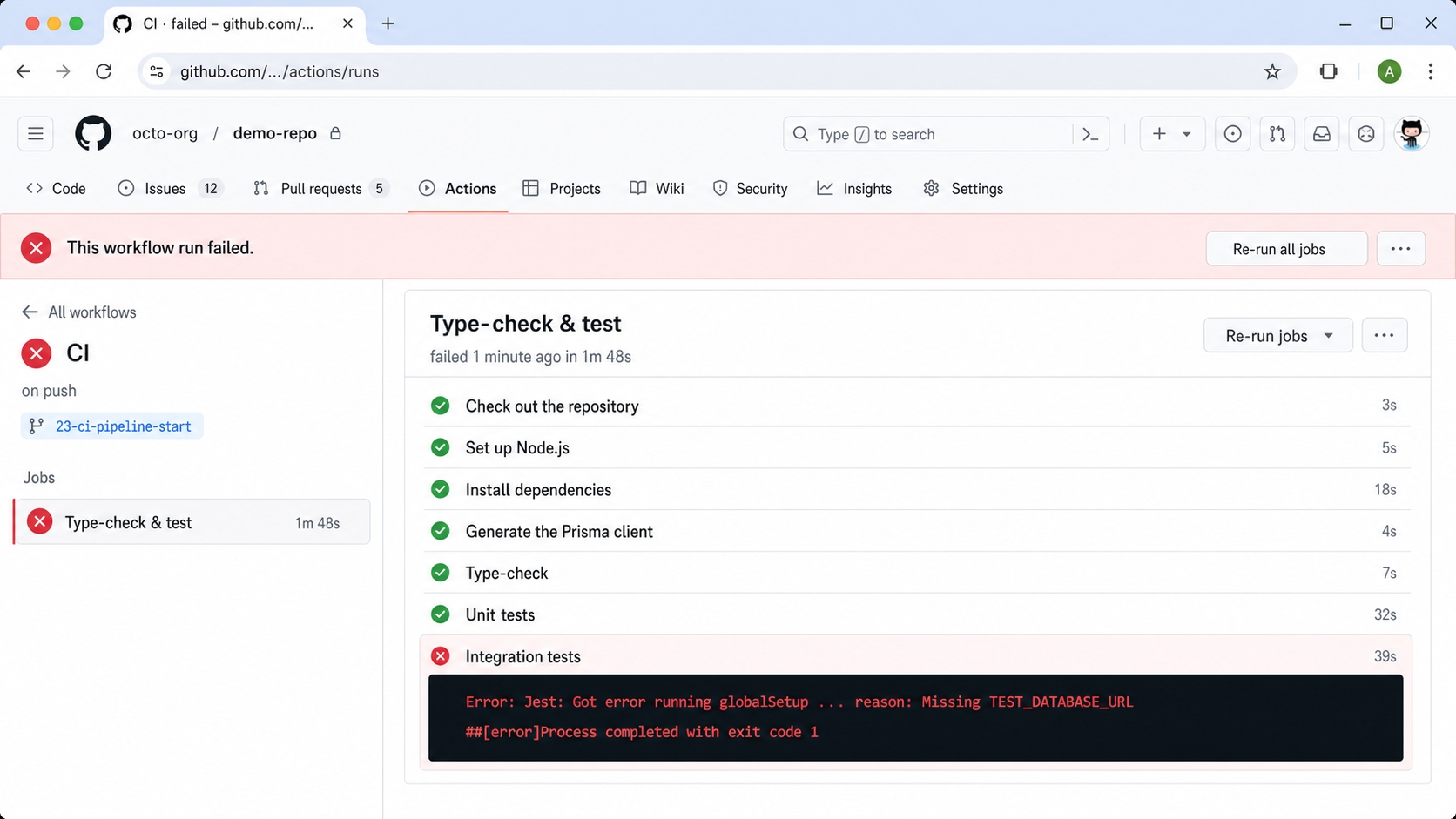
The start branch ships an incomplete ci.yml with no services: block and no DB env. The type-check and the Docker-free unit tests pass, but the integration step has no database to reach and fails. The real GitHub Actions run for this branch ended in failure on exactly that step.
The start workflow has no database so the integration step fails in CI.
Step 2: Add the Service Container and Migrations (Green)
Switch to the finish branch.
git checkout 23-ci-pipeline-finish
bash
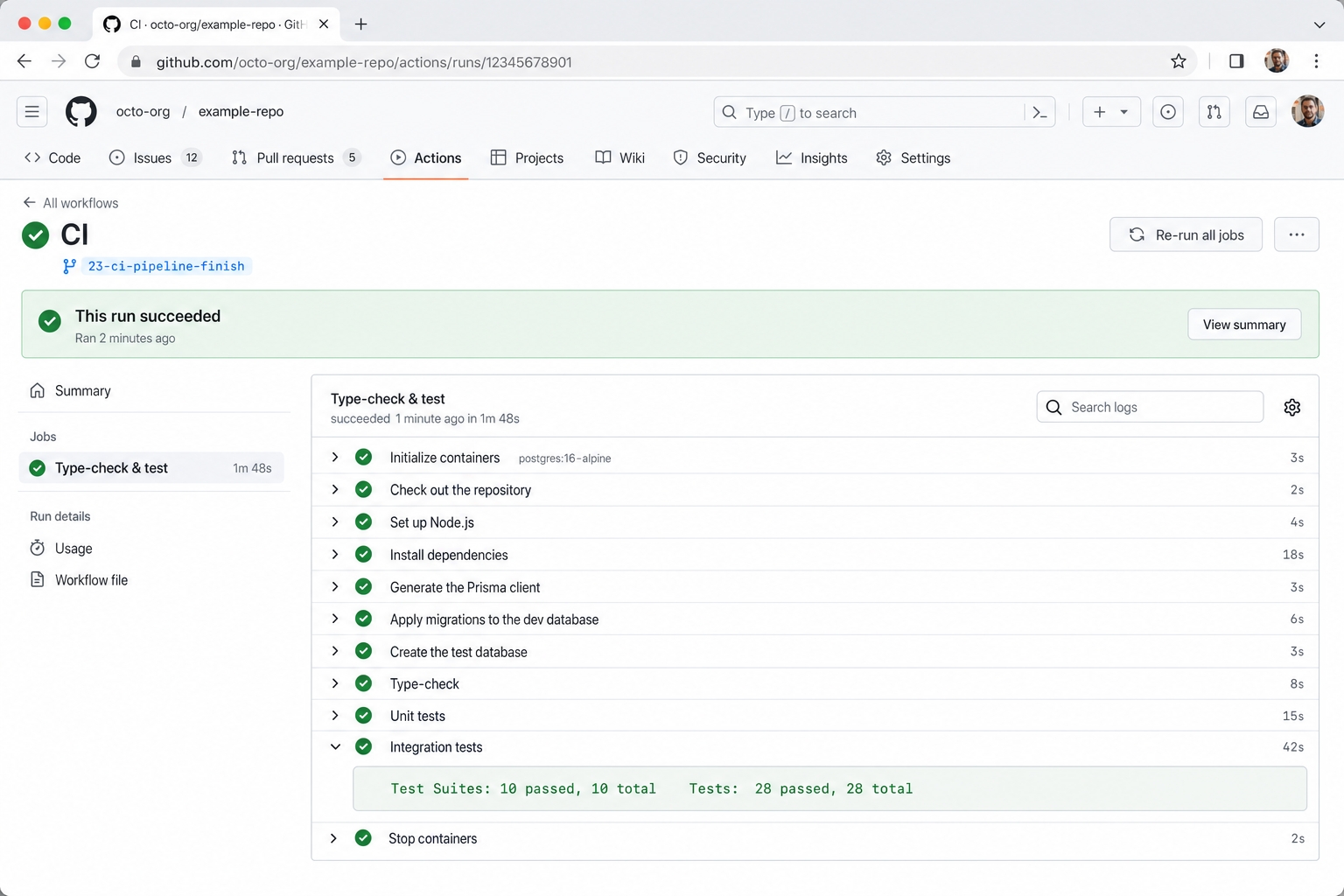
The finish branch adds the env URLs, the postgres:16-alpine service with its health check, and the migrate deploy plus createdb steps. Now every step runs green. The real GitHub Actions run for this branch succeeded, with the integration job reporting 10 suites and 28 tests passing.
The finish workflow starts Postgres and every step passes.
What's Next
The bonus chapter scales the schema using PostgreSQL table partitioning. It splits the URL table by range so lookups and statistics stay fast at high volume. As the final chapter, it proves that the exact same queries still pass against a partitioned schema.