Up to chapter 8, every test ran against an in-memory Map. In this chapter, we stand up a real PostgreSQL database using Docker Compose. We will prove the test suite can reach it using the smallest possible integration test: SELECT 1. The app's storage stays the in-memory Map for now. This chapter is purely about infrastructure.
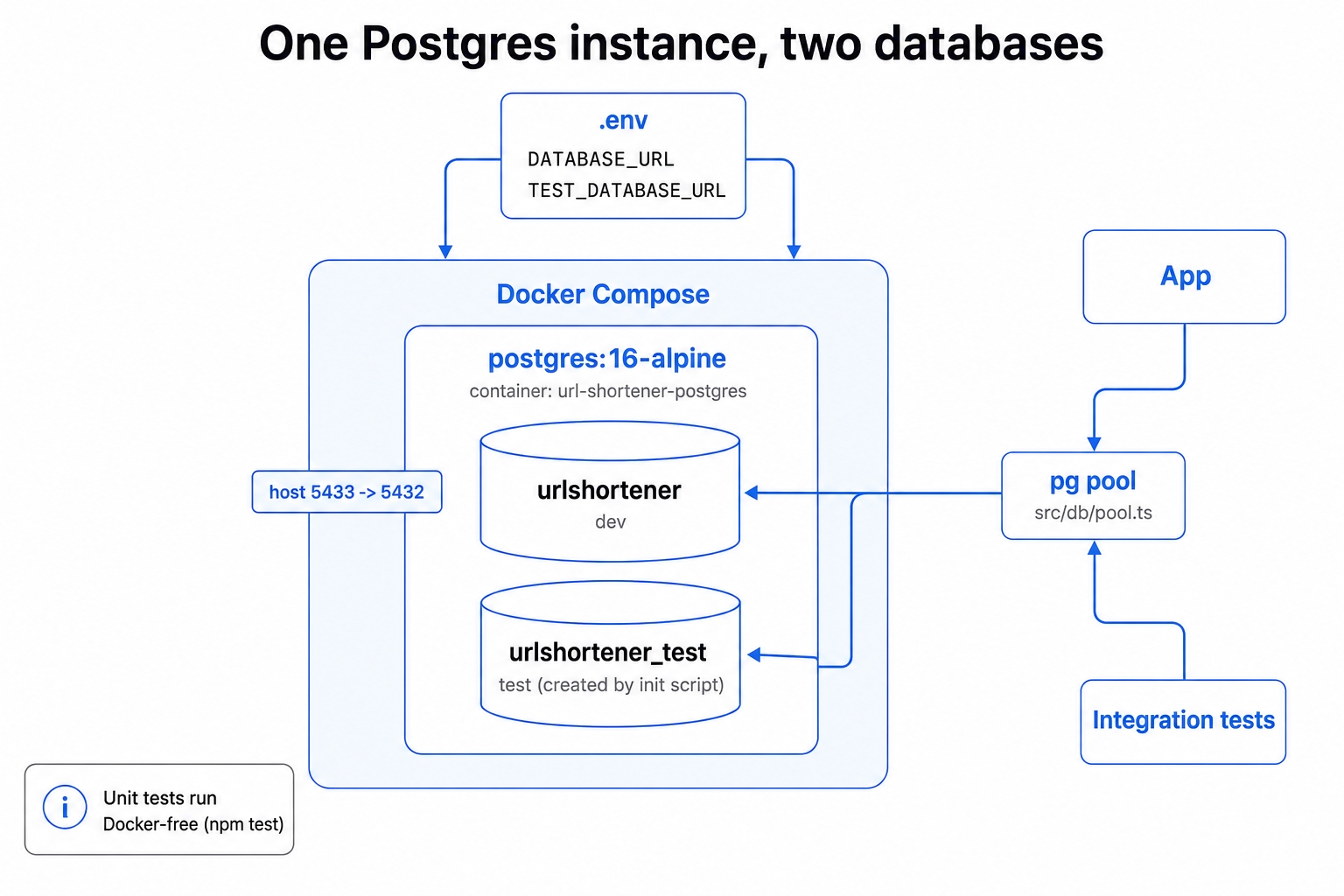
One Postgres container with dev and test databases.
We will run one version-pinned postgres:16-alpine container locally. It includes a healthcheck so the test run never races a database that is still booting up.
It will hold two databases: urlshortener for development and urlshortener_test for tests. This ensures destructive tests never touch your development data.
We will set up one pg connection pool that reads the correct database from the environment. A SELECT 1 integration test proves it works, kept separate from the fast, Docker-free unit suite.
What These Terms Mean
A few terms run through this chapter. The most important concepts are the distinction between test types and the healthcheck that makes this setup reliable.
Container. An isolated, disposable box running one piece of software with everything it needs bundled inside. A postgres:16-alpine container is a ready-to-run PostgreSQL server you can throw away and recreate for a clean slate. Docker Compose is how we describe it. A file declares the services a project needs, allowing to bring the container up identically for you, a teammate, or a continuous integration (CI) server.
PostgreSQL with Docker Compose for TDD - Node.js | dalabs.academy
docker-compose.yml
docker compose up -d
Unit test vs integration test. A unit test exercises one piece of code in isolation with nothing else running. An integration test exercises how your code talks to a real external system. In this case, that system is a real Postgres database, which means the test is slower and needs the database running.
Healthcheck. A command Postgres runs on a loop so Docker knows whether the container is merely started or actually ready to accept connections. We use pg_isready, and the command docker compose up -d --wait blocks until the database reports healthy.
Keep this straight as we go: the app's storage is still the in-memory Map. We are standing up a real Postgres database and proving the tests can reach it, but no application code reads or writes to it yet. The actual storage swap comes later.
A Real Database Catches What a Mock Can't
The instinct in a test-driven course is often to mock the database. A mock is fast, has no dependencies, and keeps the test pure. Why drag Docker into it?
A mock proves the wrong thing for this layer. A mocked database test asserts that your code calls the functions you think it calls. It verifies that pool.query was invoked with a specific string. However, it says nothing about whether that string is valid SQL. It cannot tell you if the driver is wired up correctly, if the connection string and credentials reach a live server, or if Postgres behaves the way your code assumes. A mock will happily return a green check for SQL that a real Postgres database would reject outright. That class of bug then only shows up in production.
A real database closes that gap. SELECT 1 returning 1 is a tiny query, but passing it validates the entire connection stack at once. It proves the environment variables resolved, the pg pool opened a socket, Docker mapped the port, the credentials authenticated, and Postgres answered. That is true integration confidence. A mock structurally cannot give you this.
This is not an anti-mock chapter. Mocks remain the right tool for pure logic and for the service layer, where you want speed and isolation. The point is narrower. A real database earns its keep on the one thing a mock cannot prove: that your code can actually talk to the database. The cost is honest and bounded. It is slower and requires Docker to be running, which is exactly why we split the two suites later in this chapter.
Why a Separate Test Database
Integration tests are destructive by nature. They insert rows, truncate tables, and rewrite state so each test starts clean. You do not want that running against the same database you use for local development. One stray TRUNCATE and your hand-seeded development data is gone.
Because of this, the tests get their own database: urlshortener_test. It is completely separate from the development database, urlshortener. Tests can wipe it freely, and your development data is never in the blast radius.
The interesting decision is how to provide that second database. We use one Postgres instance hosting two databases, rather than two separate Postgres services. Here is why:
It provides the simplest clean isolation. A separate database is the cleanest blast-radius boundary, while a single instance keeps the setup tiny. You only manage one container, one port, and one healthcheck.
It is cheaper and faster. One container uses roughly half the memory of two, and it starts and stops much faster.
It mirrors CI. When the GitHub Actions pipeline arrives later in the course, it will typically run a single Postgres service container. Using separate database names here keeps your local environment and CI shaped the same way.
Per-worker parallel databases (one database per Jest worker) are a real technique, but they belong in an advanced isolation chapter. For now, a single instance with two databases is plenty.
Pinning the Image Version
The docker-compose.yml file specifies postgres:16-alpine, not postgres:latest. That 16 is doing real work.
The latest tag is a moving target. Whoever runs docker compose up tomorrow, next month, or in CI might pull a different major version than the one you developed against. Postgres major versions change behavior, defaults, and occasionally the on-disk format. A test suite that passed on your machine can fail on a teammate's purely because the database underneath shifted. Pinning the version makes the database a reproducible part of the project, the same way a lockfile pins your npm dependencies. Everyone runs the exact same Postgres: you, your teammates, and CI. The -alpine variant simply keeps the image small.
Why Configure the Connection with Environment Variables
The connection details (host, port, user, password, database name) live in environment variables. They are not hardcoded in the source. There are two reasons for this.
The obvious reason is secrets. Credentials do not belong in version-controlled code. We commit a .env.example file documenting the shape of the configuration with safe local development defaults, and we gitignore the real .env file.
The subtler reason is the dev/test split. The exact same src/db/pool.ts file needs to point at the development database in normal runs and the test database under Jest. Environment variables make that a one-line decision. The code reads TEST_DATABASE_URL when NODE_ENV === "test" (which Jest sets automatically), and otherwise reads DATABASE_URL. There are no complex code branches per environment and no separate test builds. It is just a different value in the environment.
Step 1: The Failing Integration Test (Red)
Start from the red branch and install the dependencies:
git checkout 09-postgresql-docker-setup-start
npm install
bash
The start branch ships the integration test, but it lacks what it needs to run. The test imports a connection pool that does not exist yet:
// __tests__/integration/db.test.ts
import{ pool }from"../../src/db/pool";
describe("database connectivity",()=>{
afterAll(async()=>{
await pool.end();
});
it("connects to Postgres and runs a trivial query",async()=>{
const result =await pool.query<{ result:number}>(
"SELECT 1 as result"
);
expect(result.rows[0].result).toBe(1);
});
});
typescript
This is the specification. The test borrows a connection, runs SELECT 1 as result, expects the value back as 1, and closes the pool in afterAll. Closing the pool ensures Jest exits cleanly instead of hanging on an open socket.
The unit suite already ignores this folder. On the start branch, we add one line to jest.config.ts so npm test never looks at the integration tests:
The fast unit tests are untouched and stay green, since they never touch a database:
npm test
bash
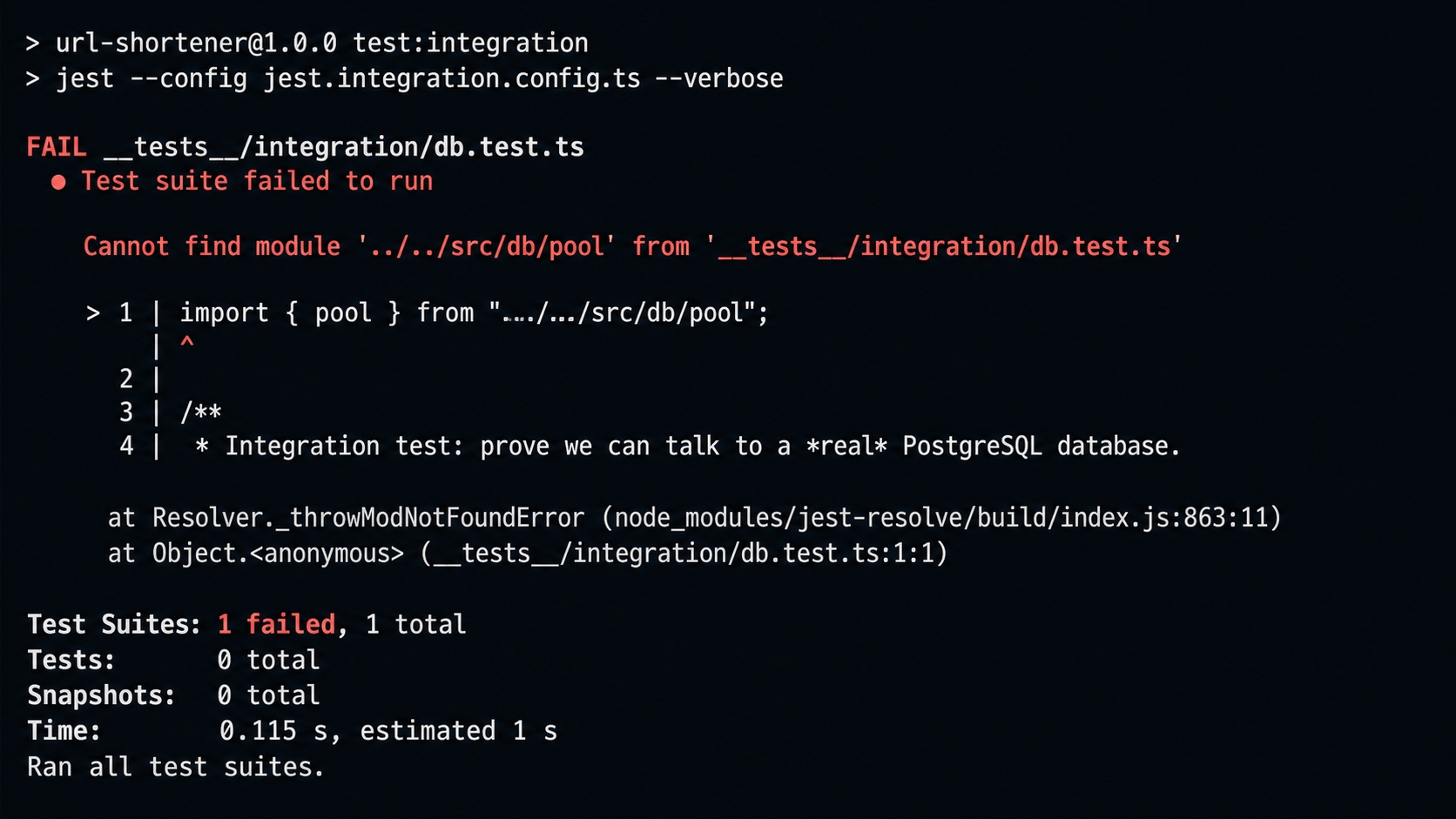
The integration suite is the one that fails. Run it with the Postgres container already up. This ensures the failure is unmistakably "the module doesn't exist," rather than "the database is unreachable":
npm run test:integration
bash
The integration test failing — pool module missing.
Red. The suite cannot even compile: Cannot find module '../../src/db/pool'. There is no connection module, pg is not installed, and there is no docker-compose.yml. Running npm run typecheck reports the same gap as a TS2307 type error. Fixing that missing module is the entire to-do list for this chapter.
Step 2: Define the Database (Green)
Switch to the finish branch:
git checkout 09-postgresql-docker-setup-finish
npm install
bash
The Docker Compose file
The heart of the chapter is the compose file. It defines one pinned Postgres service with a healthcheck, a persistent volume, and a non-default host port.
image: postgres:16-alpine is pinned, as discussed earlier. Everyone gets the exact same Postgres.
The port mapping "${POSTGRES_PORT:-5433}:5432" maps host port 5433 to the container's standard 5432. Postgres inside the container still listens on 5432. From your machine, you reach it on 5433. We use 5433 because the default 5432 is frequently taken by other local projects. It is overridable via POSTGRES_PORT, but the repository is consistent on 5433, so we will use 5433 throughout.
The ./docker/init mount is a small but important trick. Postgres runs every *.sql file in /docker-entrypoint-initdb.d exactly once on first boot, provided the data volume is empty. This is how we create the second database without any manual steps.
The healthcheck runs pg_isready on a loop. It exists so that docker compose up -d --wait can block until Postgres is ready to accept connections, rather than returning the moment the container starts. Without it, the test run can race a database that is still initializing and fail intermittently.
The init script is just one line:
-- docker/init/01-create-test-db.sql
CREATEDATABASE urlshortener_test;
sql
Postgres creates urlshortener automatically from the POSTGRES_DB variable. This script adds urlshortener_test alongside it. A single instance ends up hosting both databases.
The environment config
The .env.example file documents every variable, including the container settings and the two connection strings:
Both connection strings point at localhost:5433, the host side of the port mapping. They differ only in the database name at the end. The real .env file (which is gitignored) holds the same values. You create it by copying the example. The repository's .gitignore already ignores .env and .env.* while un-ignoring !.env.example, so nothing changes there.
The connection pool
The connection module is small on purpose. It opens one shared pg pool and decides which database to hit based on NODE_ENV:
`Missing ${expected}. Copy .env.example to .env and start Postgres with \`docker compose up -d\`.`
);
}
exportconst pool =newPool({ connectionString });
typescript
A connection pool is a set of reusable open connections that the driver hands out and reclaims. This matters because opening a fresh TCP connection and authentication handshake on every query is slow. The pg library manages that pool for you. We create exactly one pool, export it, and everything else borrows from it via pool.query(...).
The dev/test selection is the only logic in the file. It lives here so no other module ever has to think about it. When Jest runs, it sets NODE_ENV=test automatically. The pool reads TEST_DATABASE_URL, and every query lands in urlshortener_test. The guard that throws an error on a missing connection string is deliberate. A clear "copy .env.example to .env" message is much better than pg silently trying to reach a default localhost database and failing confusingly. A later chapter replaces this with proper, schema-validated configuration loaded at startup.
Splitting the test suites
The integration tests need a real Postgres database; the unit tests do not. Forcing every npm test run to require Docker would slow down the fast feedback loop that TDD depends on. Because of this, the integration suite gets its own Jest config and its own script.
Two additions over the start-branch config make this work. First, setupFiles runs setup-env.ts before any test module is imported. This is exactly the window where the connection strings must exist, because src/db/pool.ts reads them the moment it is imported. Second, testMatch restricts what counts as a test to files ending in .test.ts. This ensures Jest does not try to run the setup file or the helpers (which have no test cases) as if they were test suites.
The setup file is a one-liner that loads .env into process.env via dotenv:
Running npm test executes the fast unit suite with no Docker required, so you can run it any time, on any machine. Running npm run test:integration executes the database suite and requires the container to be up. The finish branch also adds three dependencies for this to work: pg and @types/pg for the driver, and dotenv for loading .env.
Step 3: Start Postgres and Go Green
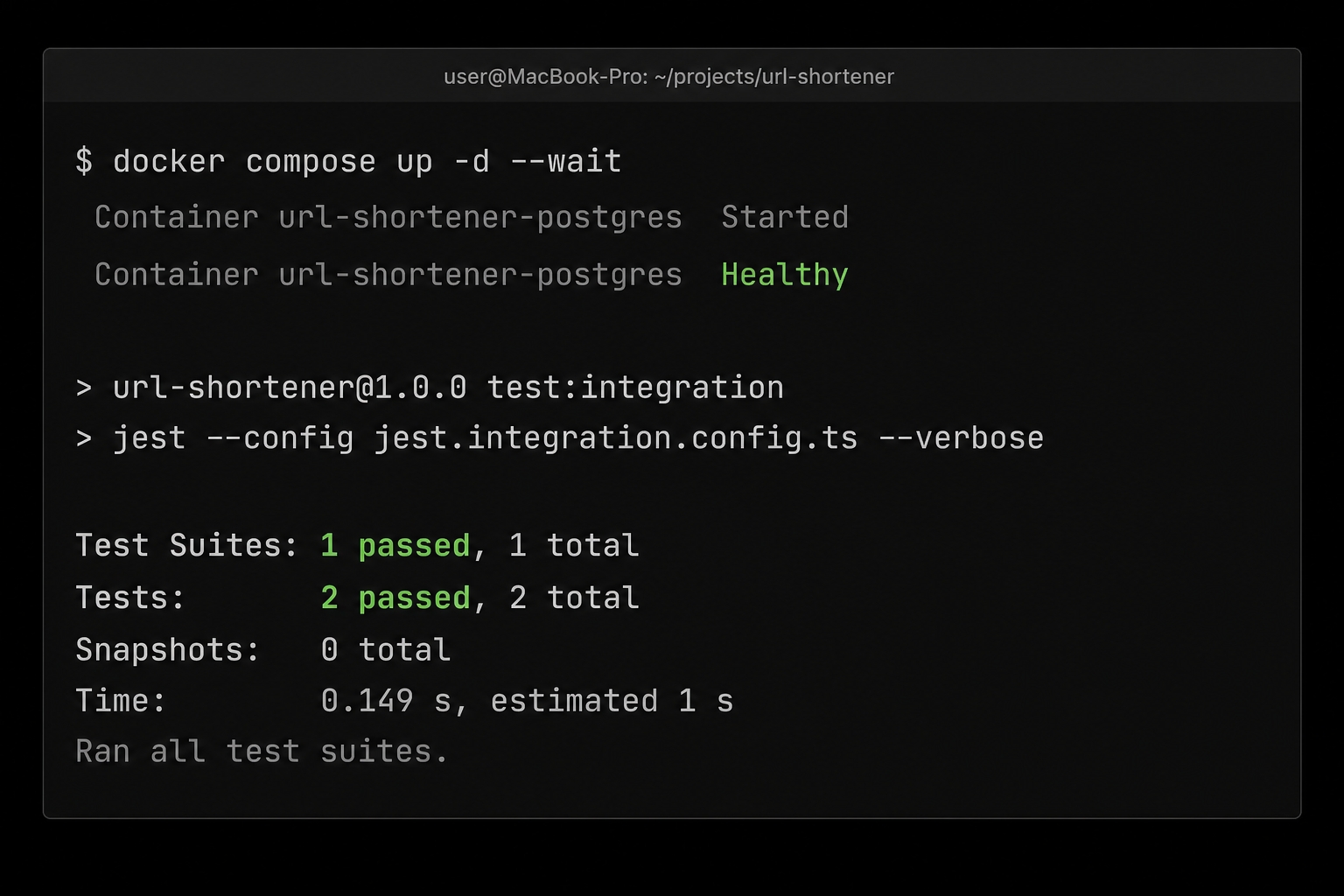
The integration test cannot pass against a database that is not running, so start the container first. The --wait flag blocks until the healthcheck reports healthy:
cp .env.example .env # first time only
docker compose up -d --wait # starts Postgres, blocks until healthy
bash
The --wait flag is the healthcheck paying off. The command only returns once Postgres is accepting connections. On this first boot, the init script has also created both databases (urlshortener and urlshortener_test). Now run the integration suite:
npm run test:integration
bash
All tests passing after the change.
Green. The pool connected to urlshortener_test, SELECT 1 came back as 1, and the second test (the cleanup seam, covered next) ran without error. The fast unit suite is unchanged and still green, and npm run typecheck now passes. The full connection stack is proven end to end.
The Cleanup Seam for Chapter 10
That second passing test exercises a helper that is about to become important. The moment tests share a real database, they also share its state. One test's rows are visible to the next, meaning order suddenly matters and the suite goes flaky. The fix is to reset the database between tests. The truncateAllTables function is the seam where that reset will live:
Right now, this is effectively a no-op. There are no application tables yet, since the Url table arrives with Prisma a couple of chapters later. Because of this, getPublicTableNames() returns an empty list and the function exits before running any destructive statement. The test only asserts that it runs against the real database without throwing an error.
The job here is to plant the seam and prove it works against a real Postgres database. The next chapter is where it gets rigorous. We will wire it into a beforeEach block, weigh truncation against transaction rollbacks, and centralize it so every database test starts from a clean slate.
Tearing Down
When you are done, stop the container. The plain down command removes the container and network but keeps the data volume. Using down -v also deletes the volume, which means the init script will re-run (and recreate urlshortener_test) on the next up:
docker compose down # stop + remove container & network
docker compose down -v # ...and delete the data volume
bash
What's Next
The cleanup seam is still inert, so the tests do not reset state between runs yet. Next, we will lay the foundations for test isolation. We will build per-test cleanup that keeps every database test deterministic and order-independent.