The service now reads a validated config at boot, but it still runs almost silently and dies the instant a SIGTERM arrives. This chapter, the second of Section 6: Production Readiness, sets up structured logging and adds a graceful shutdown so a rolling deploy stops dropping requests. Both pieces are driven by failing tests first, and neither needs a database to test.
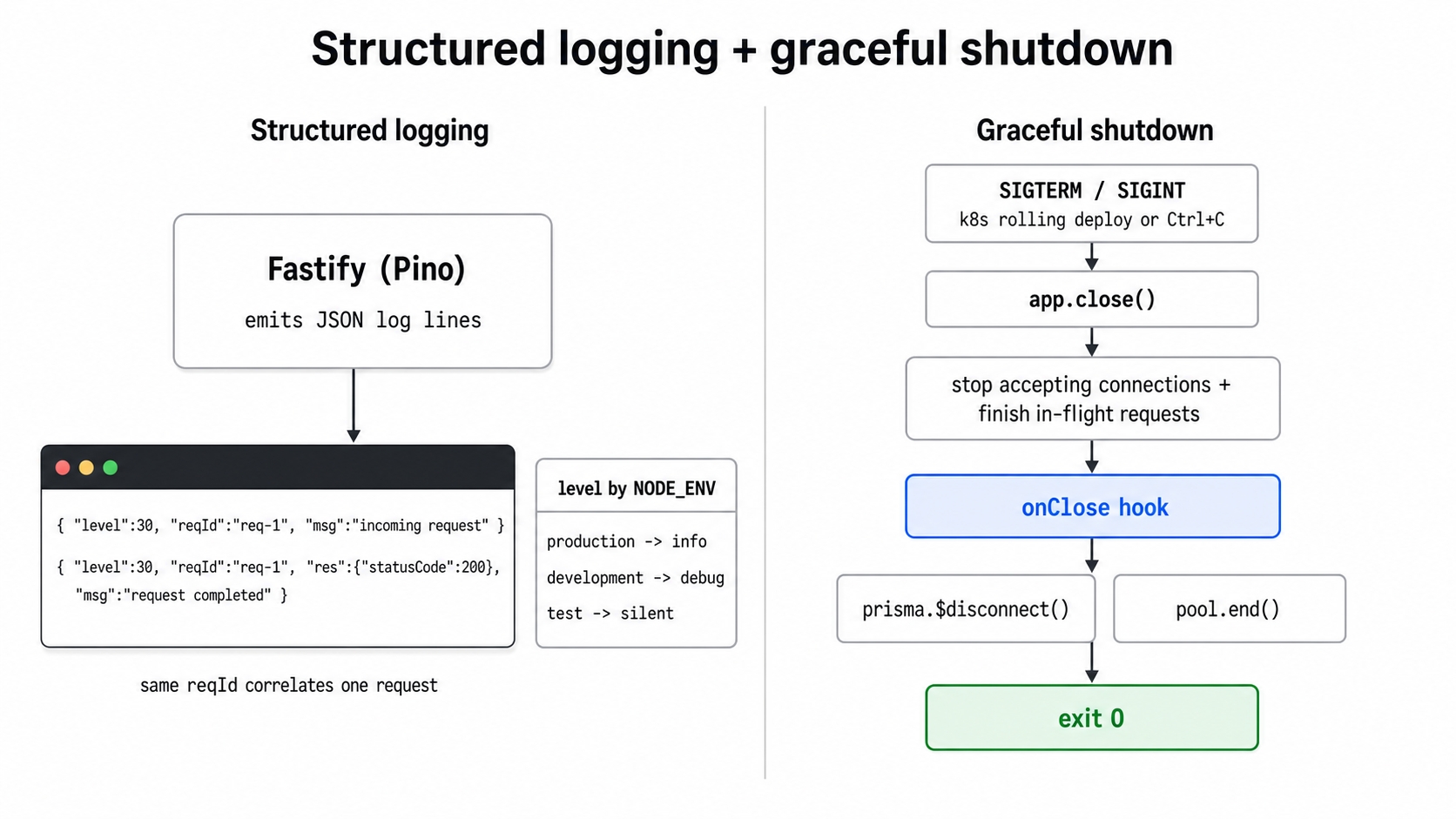
Structured JSON logs on the left and a clean SIGTERM drain on the right.
A config-driven logger that sets the log level from NODE_ENV. It stays quiet in production, verbose in development, and silent in tests. A request id also rides along on every request.
An onClose hook that releases injected resources, plus signal handlers in server.ts. These drain in-flight requests and close the database before the process exits.
What These Terms Mean
Three main ideas carry this chapter. Here is what they mean in plain English.
Structured logging. These are logs written as JSON objects that a machine can easily query, rather than plain text lines you have to read by eye. Instead of printing Server started on port 3000, the app emits {"level":30,"msg":"Server listening...","reqId":"req-1"}. This allows a log aggregator to filter by reqId or level directly. Fastify uses a built-in logger called Pino that already emits JSON. The work here is just configuring it.
Graceful shutdown. When the process is told to stop, it finishes any requests currently in flight and closes its resources before exiting. The opposite is an abrupt kill, which drops connections mid-request and leaves database sockets open.
SIGTERM. This is the signal a container runtime like Docker or Kubernetes sends to ask a process to stop. The default action is to terminate immediately. If a process wants to shut down cleanly, it has to catch this signal and do the cleanup itself. SIGINT is a similar signal sent when you press Ctrl+C in a terminal. We will handle both the same way.
Two smaller pieces also show up in the code. A request id (reqId) is a short token Fastify assigns to each incoming request. This ensures the incoming request and request completed log lines for a single request share the same ID and can be grouped together. The onClose hook is a Fastify lifecycle feature that runs when app.close() is called. We use this hook to release resources during shutdown.
Why This Matters in Production
A log line you cannot query is almost useless during an incident. When something breaks at 2 a.m. and you have a thousand mixed-up requests in the log, plain text leaves you guessing. Structured JSON with a reqId lets you pull every line for the exact failing request and read its story end to end. Pino provides this out of the box. We just need to keep the production log level at info so important errors are not buried under debug noise, and set it to silent in tests so the test output stays clean.
The shutdown problem is even more critical. When Kubernetes does a rolling deploy or scales a pod down, it sends the container a SIGTERM signal and waits a grace period before forcing a hard SIGKILL. Without a custom handler, the default action terminates the process right away. Any HTTP request still being served gets cut off, leaving the client with a connection reset or a 5xx error. Open Postgres connections in the pool are never closed, meaning those sockets leak until they eventually time out. If you repeat that across every deploy, you will slowly burn through the database's connection slots. Catching SIGTERM and calling app.close() first allows Fastify to finish active requests and run our cleanup code. This ensures a deploy drops zero requests and safely releases its database connections.
The Config-Driven Logger
Fastify already logs through Pino, so we do not need to add a new logging library. Instead, we add a small module that decides the log level based on the environment. The level controls how chatty the logger is. For example, debug shows everything while you build locally, info keeps production limited to operational lines, and silent mutes test runs entirely.
The resolveLogLevel function is a simple lookup with a safe default. An unknown environment like staging falls back to info rather than crashing or going completely silent. The buildLoggerOptions function wraps that level in the exact shape Fastify expects for its logger option. Splitting these two functions means the unit tests can check resolveLogLevel directly without needing to boot up an entire app.
In app.ts, the basic Fastify({ logger: opts.logger ?? true }) setup from earlier chapters becomes config-driven:
The logger === false branch is an escape hatch that fast unit tests use to silence output completely. Everything else builds the logger from nodeEnv, ensuring production gets info and the test suite gets silent. To support this, BuildAppOptions gains a nodeEnv?: string field to carry the environment value in.
The request id comes for free. Fastify assigns every incoming request a reqId, and Pino stamps it on the lifecycle lines. This means the incoming request and request completed entries for a single request share the same id. A production deploy usually swaps this generator to read an inbound X-Request-Id header instead of the default req-1, req-2 sequence. However, the basic correlation works out of the box without any extra code.
The onClose Hook
The shutdown logic splits into two parts. The hook lives in app.ts and knows how to run a list of cleanup functions. The actual resources to clean up are injected from the outside, so buildApp never has to import the database modules directly. That separation is what keeps the unit tests Docker-free. Importing src/db/pool throws an error at import time if there is no DATABASE_URL, so buildApp must stay loadable in a plain shell.
A Closer is simply a function that releases one resource:
// src/app.ts
exporttypeCloser=()=>Promise<void>|void;
typescript
BuildAppOptions gains a closers?: Closer[] field. We then register a hook that walks through this array when the app closes:
// src/app.ts
const closers: Closer[]= opts.closers ??[];
app.addHook("onClose",async(instance)=>{
for(const close of closers){
try{
awaitclose();
}catch(err){
instance.log.error(err,"error while closing a resource on shutdown");
}
}
});
typescript
Each closer is awaited in turn, and the try/catch block isolates them. If prisma.$disconnect() throws an error, the loop still reaches pool.end() instead of leaving the pool stranded open. The default is an empty array, so an app built with no closers shuts down cleanly and does nothing extra. The route registration order below the hook remains unchanged from the previous chapter.
Signal Handlers in server.ts
The composition root is the only place that knows about the real database. Because of this, it supplies the real closers and installs the signal handlers. The server.ts file injects prisma.$disconnect() and pool.end() as the closers, then listens for SIGTERM and SIGINT:
The order here is a strict contract. First, app.close() stops the listener from accepting new connections and lets the in-flight requests finish. Then, it runs the onClose hook, which is where the injected closers disconnect Prisma and end the pool. Only after all of that finishes does process.exit(0) run, signaling a clean stop. If anything throws an error along the way, we log it and exit with a non-zero status code so the orchestrator records a failed shutdown.
The shuttingDown guard handles a common real-world scenario where two signals arrive close together. For instance, Kubernetes might send a SIGTERM, and an impatient operator might hit Ctrl+C right after. The first call flips the flag and starts draining. The second call returns immediately so the app never tries to close twice.
Step 1: The Failing Tests (Red)
Check out the start branch and install the dependencies:
git checkout 21-logging-shutdown-start
npm install
bash
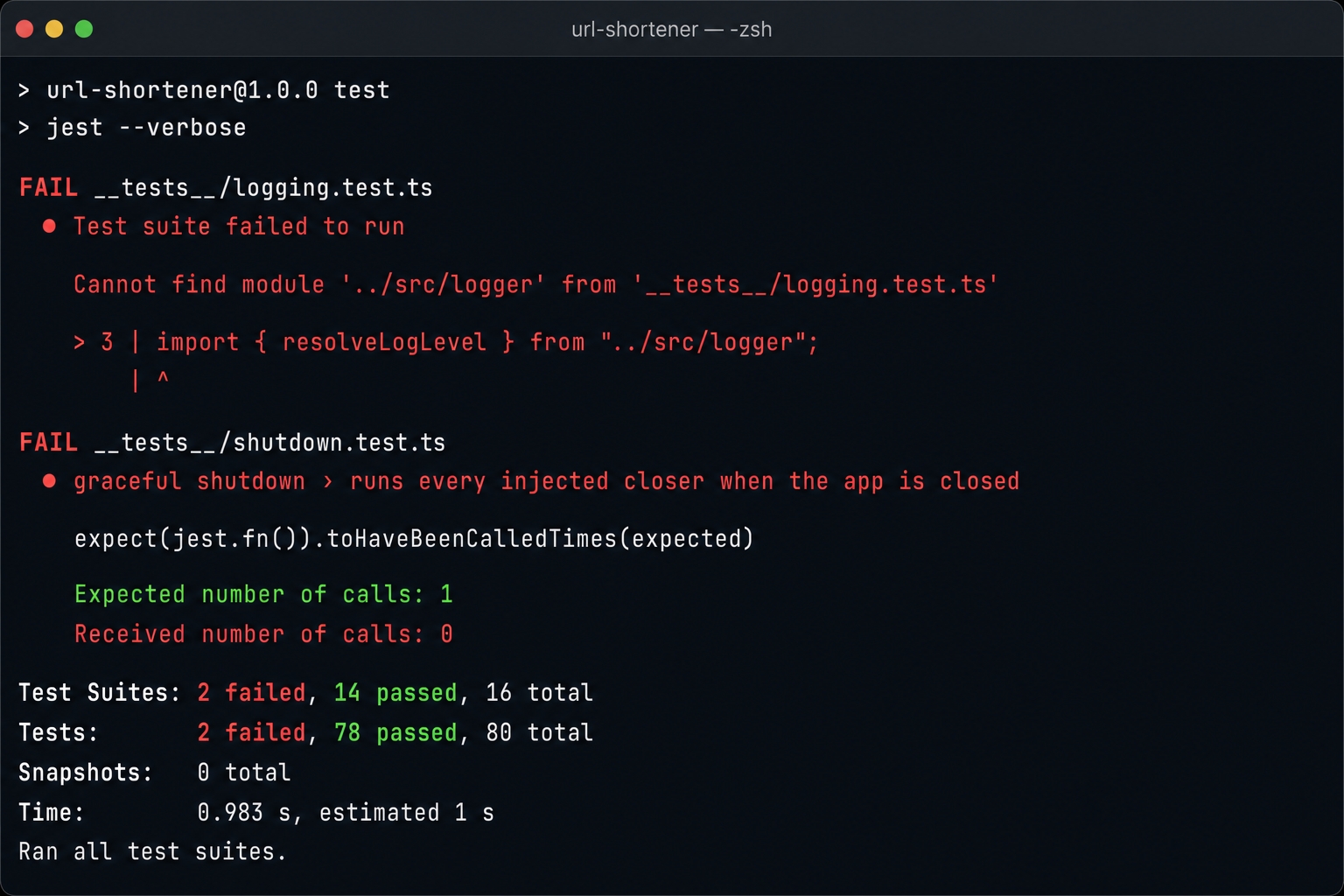
The start branch includes both new unit suites, but neither implementation. There is no src/logger.ts file yet, and buildApp lacks the onClose hook, nodeEnv, and closers options. The two suites fail in two different ways, which is helpful to see.
The logging suite imports the missing module, so it cannot even load. Its tests cover the level lookup directly and verify the level wired onto a built app:
// __tests__/logging.test.ts
it("sets the log level from NODE_ENV (production => info)",async()=>{
app =awaitbuildApp({ nodeEnv:"production"});
await app.ready();
expect(app.log.level).toBe("info");
});
it("assigns a request id to every request for log correlation",async()=>{
The onRequest hook captures request.id so the test can verify a real ID was assigned. This hook must be registered before app.ready(). Adding a hook to an instance that is already listening will throw an error.
The shutdown suite does compile because it does not touch the missing logger module. Instead, it fails on behavior. It injects two spy closers and checks that they fire exactly once when the app closes. It also verifies that if one closer throws an error, it does not strand the other.
// __tests__/shutdown.test.ts
it("runs every injected closer when the app is closed",async()=>{
On the start branch, the onClose hook does not exist. The closers are never called, and the toHaveBeenCalledTimes(1) assertions fail at zero calls.
Run the unit suite:
npm test
bash
The logger module is missing and the shutdown closers never run.
Two suites fail: 2 tests fail, 78 pass (80 total). The logging suite cannot find ../src/logger, and the shutdown suite's two cases fail because the hook is not firing. Every pre-existing suite stays green. Running npm run typecheck also fails here due to the missing module and the unknown nodeEnv and closers options. This proves the test failure is honest, not just a stale build.
Step 2: Wire the Logger and the Shutdown Hook (Green)
Switch to the finish branch:
git checkout 21-logging-shutdown-finish
npm install
bash
The finish branch adds src/logger.ts, wires the config-driven logger and the onClose hook into app.ts, and installs the signal handlers in server.ts. No integration tests were added since both new suites are Docker-free, so the integration count remains unchanged.
Run both test suites:
npm test
npm run test:integration
bash
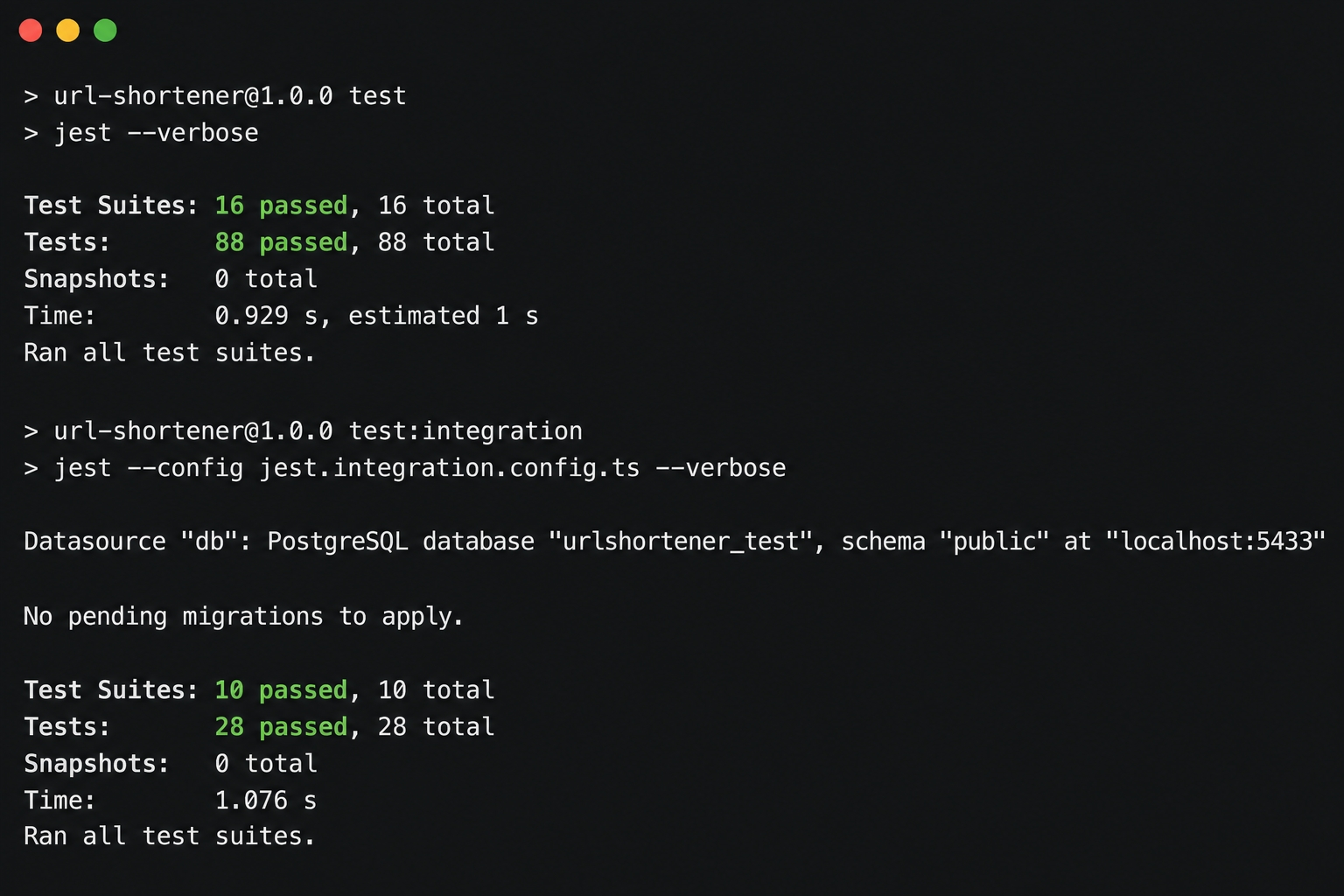
All unit and integration tests passing.
Both suites are now green. The unit suite grows to 16 suites / 88 tests. The new logging.test.ts and shutdown.test.ts files add two suites and ten cases between them. Integration holds steady at 10 suites / 28 tests, untouched by changes that needed no database. Running npm run typecheck passes with no output. The logger now emits JSON at the correct level per environment, a shared reqId correlates each request's lines, and a SIGTERM successfully drains in-flight work and closes Prisma and the pool before the process exits cleanly.
What's Next
The service is now observable and shuts down without dropping requests. The next chapter covers Advanced Test Isolation & Parallel Safety. This will allow the growing test suite to run in parallel against a shared database without tests stepping on each other's data.