We know from Chapter 13 that Go runs every HTTP request in its own goroutine. Now it is time to build the server that makes those requests happen.
Go's standard library includes the net/http package. It gives you everything you need to start a real HTTP server. You do not need a framework or a complex configuration file. You just need a handler function and a single line of code to start listening on a port.
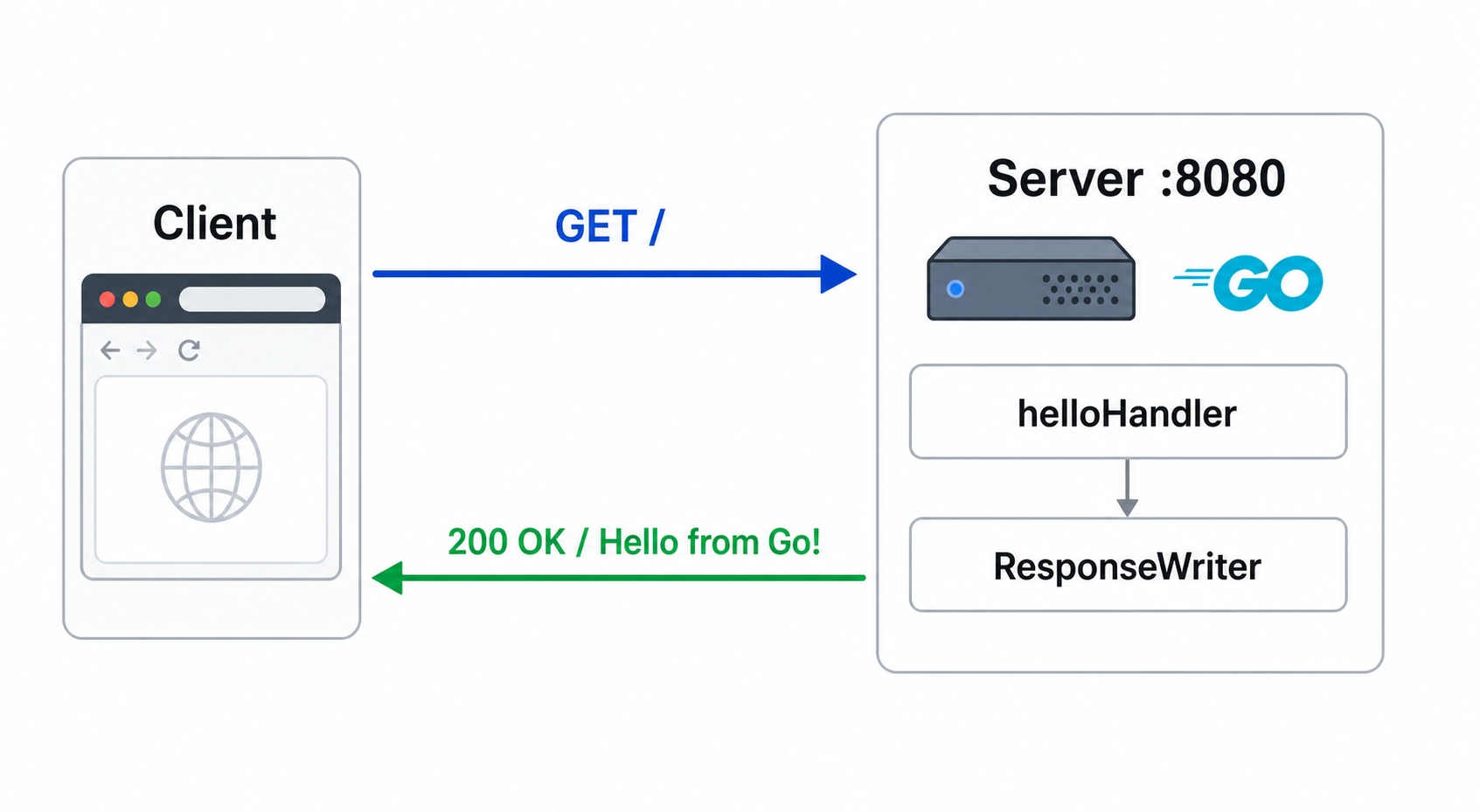
This chapter covers three main pieces:
http.HandleFunc to register that handler.http.ListenAndServe to bind a port and serve traffic.Check out the finish branch to follow along:
bashgit checkout 14-first-http-server-finish
A handler is a function that runs every time an HTTP request comes in. Its job is to write a response back to the client. In Go, every handler uses the exact same two-parameter signature:
go// main.gofunc helloHandler(w http.ResponseWriter, r *http.Request) {fmt.Fprintln(w, "Hello from Go!")}
The http.ResponseWriter is an interface used to build the response. Because it implements io.Writer, you can write the response body directly to w. When we call fmt.Fprintln(w, "Hello from Go!"), it sends that text followed by a newline. Go's HTTP machinery handles the rest.
The *http.Request holds all the details about the incoming request, like the HTTP method, URL path, headers, and body. We are ignoring it for now, but Chapter 15 will cover how to read from it.
Your main function has two jobs: register the handler and start the server.
go// main.gofunc main() {http.HandleFunc("/", helloHandler)log.Fatal(http.ListenAndServe(":8080", nil))}
The http.HandleFunc line registers helloHandler on the default mux. A mux (multiplexer) is built into net/http to match URL patterns to handlers. Any request with a path starting with / gets sent to helloHandler. By passing nil as the second argument to ListenAndServe, we tell Go to use this default mux. Chapter 16 will show you how to create a custom http.NewServeMux() for finer control.
The http.ListenAndServe(":8080", nil) command opens a TCP listener on port 8080 and starts handling requests. This function blocks forever. It only returns if something fails, like a port conflict or a permission error. If it does return, it always passes back an error.
This is why we wrap it in log.Fatal. If you run http.ListenAndServe(...) without checking for errors, a startup failure will cause the program to exit silently. Using log.Fatal ensures the error is logged and the program exits with a status code of 1, so you know exactly what went wrong.
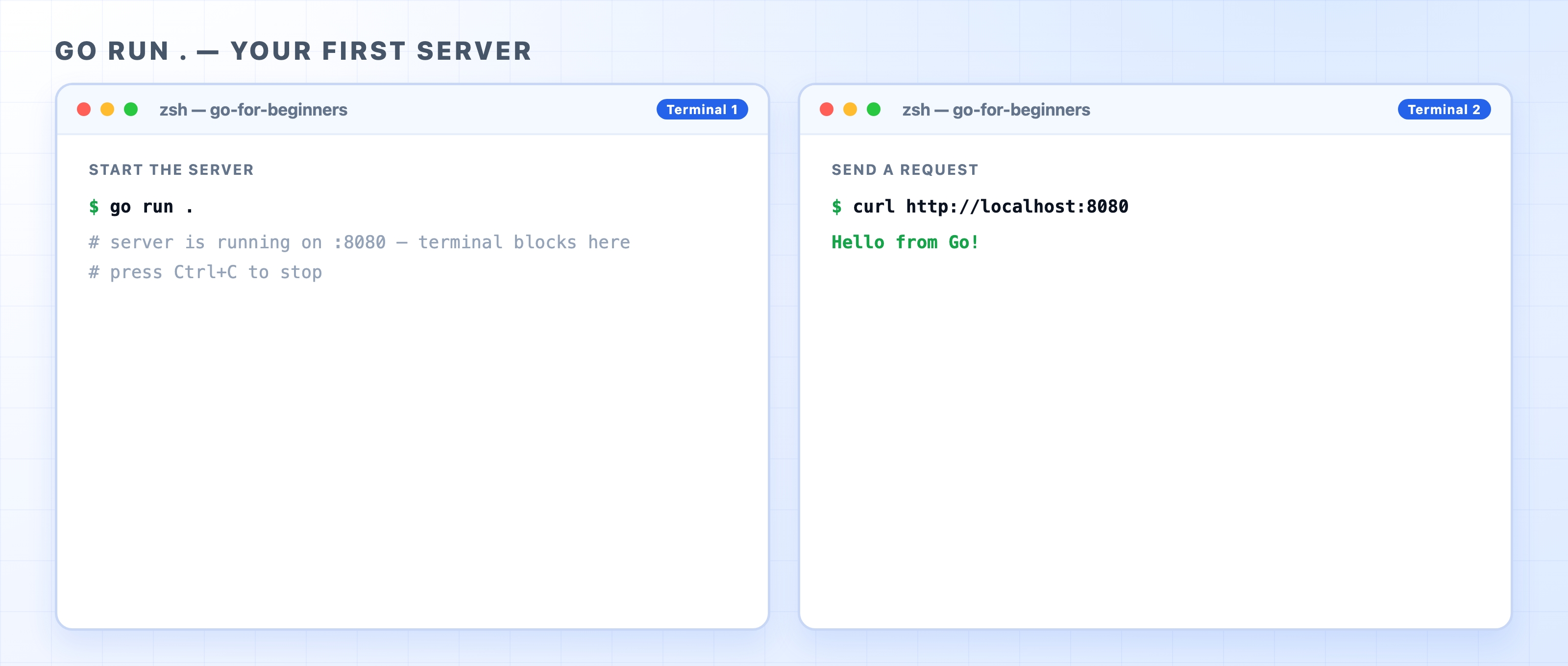
Now, start the server:
bashgo run .
Your terminal will appear to freeze. This is expected. ListenAndServe blocks on purpose because the process is waiting in a loop for incoming connections. Open a second terminal window and send a request:
bashcurl http://localhost:8080
The response comes back immediately: Hello from Go!

You can also open http://localhost:8080 in a web browser to see the same plain text. To stop the server, press Ctrl+C in the first terminal. The terminal will print ^Csignal: interrupt and the process will exit. This is the standard way to stop a blocking server while developing.
If you have looked into Go web development, you might have seen frameworks like chi, gin, and echo. They are popular, but for this course, we will stick to the standard library.
Go 1.22 added method-plus-path routing directly into http.NewServeMux. This means you can write a pattern like "GET /tasks/{id}" and read the {id} wildcard using r.PathValue("id") without needing a third-party router. We will cover this in Chapter 16.
Beyond routing, net/http is production-grade code. It has no external dependencies, which means no version conflicts and lower security risks. If you learn the standard library well, picking up a framework later will only take an afternoon. The reverse is much harder, as frameworks hide underlying details that you need to know when things break.
Address already in use: This means port 8080 is occupied. A previous server might still be running, or another program is using it. ListenAndServe returns this error immediately, and log.Fatal prints it to the screen. To fix it, stop the other process or change your code to use a different port like :9090.
The terminal seems stuck: It is actually running normally. ListenAndServe blocks the terminal by design while it listens for connections. A server started this way always holds the terminal until you stop it, so just press Ctrl+C.
Skipping the error check: Some tutorials write http.ListenAndServe(":8080", nil) without checking for errors. If the server fails to start, the program will exit with no output, leaving you guessing. Always wrap it with log.Fatal so you can see any startup failures.
Chapter 15 goes deeper into the handler: reading request data from the URL, query parameters, and body, then writing proper status codes and response bodies. That is where simple text output grows into a real API.